


Knowing exactly how to get GPS coordinates for an address is an essential skill for modern business operations. Whether you are plotting a delivery route, scraping business data for lead generation, or building a new real estate app, a standard street address is rarely enough. You need exact map data.
GPS coordinates provide precise global positioning using latitude and longitude numbers. Converting a standard street address into these exact coordinates is a process known as geocoding.
This guide breaks down exactly how to find a GPS coordinates location from an address in the USA. We will cover simple manual methods for beginners, advanced API workflows for developers, and automated batch geocoding tools designed for marketers and logistics professionals.
The Quick Answer: Finding Coordinates Fast
Need to convert an address to coordinates right now? Here is the absolute fastest way to do it:
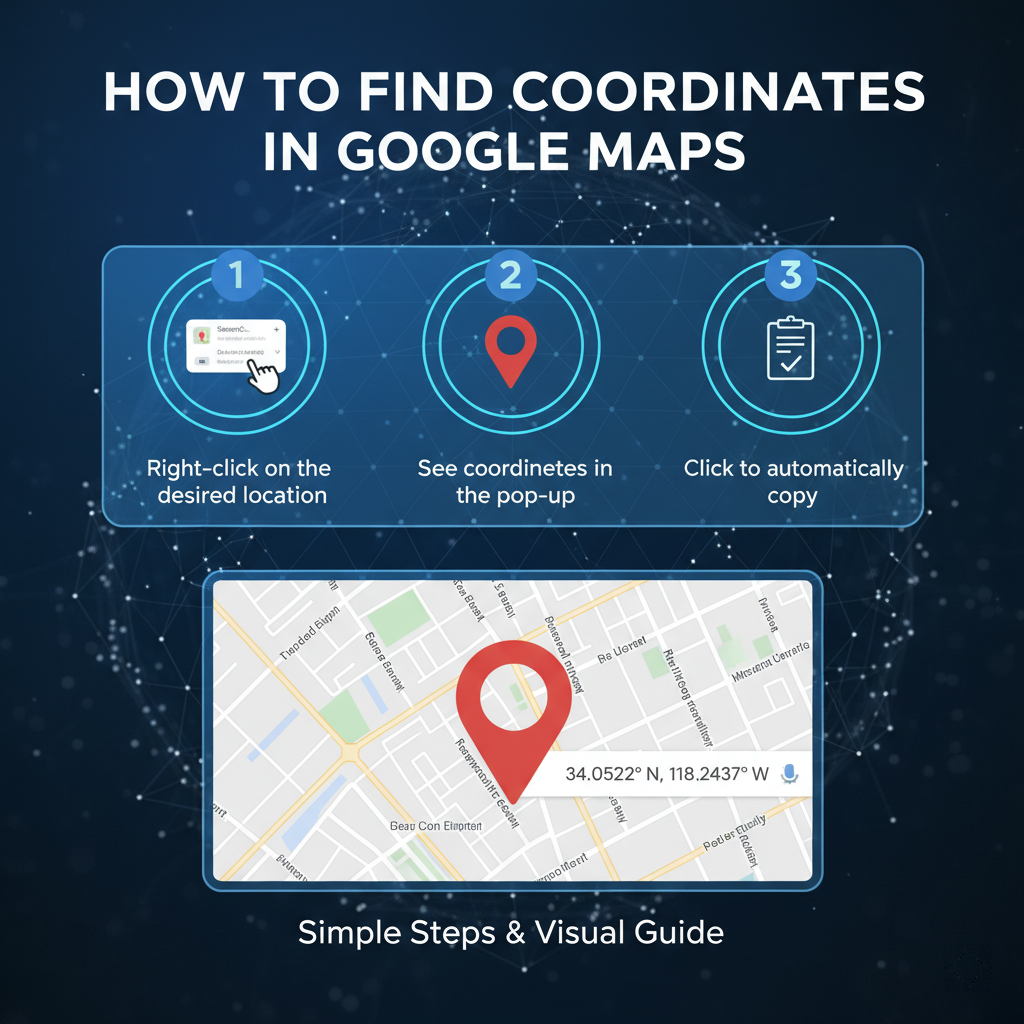
The best way to get GPS coordinates is to use Google Maps on a desktop computer. Simply type your target address into the search bar, hit enter, and right-click the red pin on the map. The latitude and longitude coordinates will appear at the top of the menu. Click them to copy.
Method 1: Using Google Maps (Step-by-Step)
For a single location lookup, Google Maps remains the most reliable and accessible GIS tool available. Here is how you can extract coordinates from Google Maps on both desktop and mobile devices.
Desktop Instructions (The Right-Click Method)
Using a computer is the most efficient way to grab coordinates manually.
- Open your web browser and navigate to Google Maps.
- Enter the exact street address into the top-left search bar.
- Wait for the red location pin to drop on the map.
- Hover your mouse cursor directly over the red pin and right-click.
- A drop-down menu will appear. The first item on this list is the decimal degree coordinates (e.g., 40.7128, -74.0060).
- Left-click the numbers to automatically copy them to your clipboard.
Mobile Instructions (The Dropped Pin Method)
If you are out in the field, you can easily pull location data using the Google Maps app on iOS or Android.
- Open the Google Maps app on your smartphone.
- Search for your desired address.
- Once the map centers on the location, tap and hold your finger on the red pin (or any unmapped area on the map).
- A red "Dropped Pin" marker will appear.
- Scroll down on the information panel at the bottom of the screen.
- You will see the latitude and longitude coordinates listed. Tap them to copy the data to your clipboard.
Method 2: Get Coordinates for Multiple Addresses

The manual Google Maps method works great for one or two locations. However, if you need to geocode hundreds of addresses, doing it by hand becomes an massive drain on your time.
Professionals working in data extraction, local SEO, and B2B marketing frequently face this problem. You cannot afford to spend hours right-clicking map pins when you need to bulk address to coordinates quickly. You need a batch geocoding tool.
Introducing Leads Sniper Google Maps Scraper
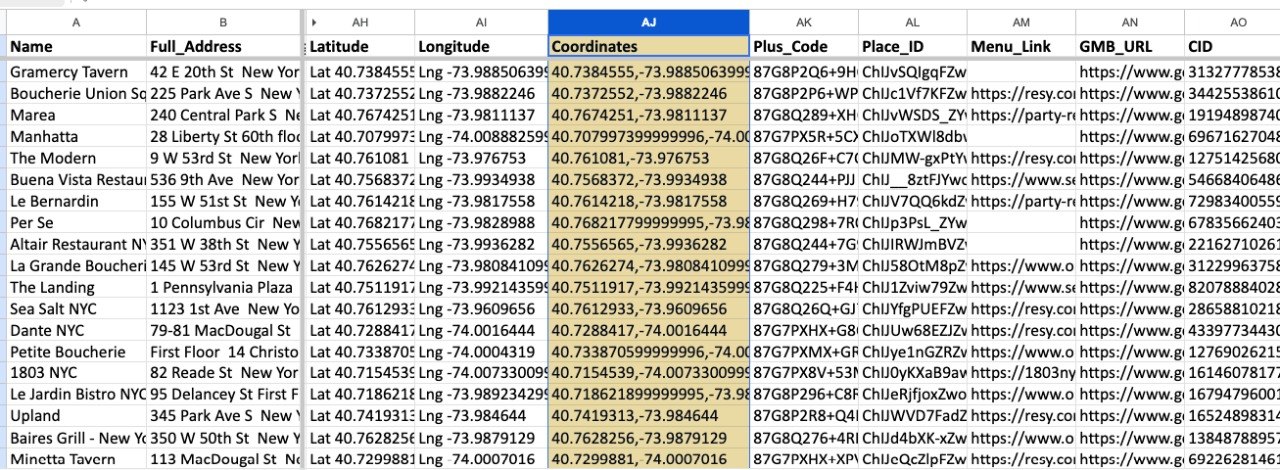
If you want to pull business data and coordinates at scale, the Leads Sniper Google Maps Scraper is your ideal solution.
Instead of typing addresses one by one, Leads Sniper automates the entire process. You simply input your target keyword and location, and the tool extracts complete business profiles.
Here is how Leads Sniper solves your bulk geocoding problems:
- Bulk Extraction: Pull thousands of business names, phone numbers, websites, and precise GPS coordinates in minutes.
- No Manual Lookup: Eliminate human error and tedious data entry.
- Local SEO Mastery: Perfect for building local citations and analyzing competitor locations.
- Lead Generation: Build highly targeted local lead lists with pinpoint geographical accuracy.
By automating your data collection, you free up hours of time to focus on closing deals and optimizing your campaigns.
Method 3: Using APIs (Advanced Users)
Developers, SaaS builders, and logistics coordinators often need to integrate location data directly into their own software. This requires an API-based geocoding approach.
Google Maps Geocoding API
The Google Maps Geocoding API allows applications to programmatically convert an address into coordinates. When a user submits an address form on your website, the API instantly returns the exact latitude and longitude.
- Best For: App developers, delivery automation, and dynamic map creation.
- How It Works: You send an HTTP request containing the address, and the API returns a structured JSON or XML file containing the coordinates and location metadata.
- Limitations to Consider: The API is not entirely free. While Google provides a monthly recurring credit, high-volume usage requires a paid billing account. Additionally, setting up API calls requires coding knowledge.
GPS Coordinate Formats Explained
When you get latitude and longitude from an address, the data usually appears in one of two standard GPS Coordinate formats. Understanding the difference ensures you input the data correctly into your navigation or mapping software.
Decimal Degrees (DD)
This is the most common format used in web mapping and digital databases. It expresses latitude and longitude as simple decimal numbers.
- Latitude comes first, followed by longitude.
- Positive numbers indicate North and East. Negative numbers indicate South and West.
- Example (New York City): 40.7128, -74.0060
Degrees, Minutes, and Seconds (DMS)
DMS is the traditional format used in maritime navigation and older GPS devices. It breaks the coordinates down into degrees (°), minutes ('), and seconds ("), followed by the compass direction.
- Example (Los Angeles): 34° 03' 07.9" N, 118° 14' 37.3" W
Always ensure your software accepts your chosen format. Most modern GIS tools prefer Decimal Degrees.
Common Use Cases for Geocoding Data
Why do so many professionals need to geocode address online? The applications span nearly every major industry.
Delivery and Logistics
Courier services and freight companies rely on precise coordinates to optimize delivery routes. A standard street address might point to a massive warehouse complex, but GPS coordinates can guide a driver to the exact loading dock at the back of the building.
Real Estate
Real estate platforms use coordinates to populate property maps, calculate distances to local schools, and generate heat maps for neighborhood property values.
Local SEO and Lead Generation
Digital marketers use coordinates to verify business locations, build local business directories, and ensure consistent NAP (Name, Address, Phone) data across the web. Tools like Leads Sniper make gathering this geographical data incredibly fast.
Emergency Location Sharing
First responders use precise coordinates to locate accidents on remote highways or in rural areas where street addresses do not exist or are poorly marked.
Common Mistakes to Avoid
Even seasoned professionals make errors when handling location data. Watch out for these common pitfalls:
- Swapping Latitude and Longitude: This is the most frequent error. Latitude always comes first. If you swap them, you will end up mapping a location in the middle of the ocean instead of downtown Chicago.
- Formatting Errors: Missing a negative sign on your longitude will send your map pin to the opposite hemisphere. Always double-check your negative symbols.
- Low Accuracy Addresses: Inputting incomplete addresses (e.g., "Main Street, Texas") will result in the geocoder placing a pin in the geographic center of the state, rather than a specific building.
- Manual Data Entry: Typing long decimal numbers by hand inevitably leads to typos. Always use copy-paste functions or automated scrapers.
Pro Tips for Location Data
Want to master geographical data? Follow these professional tips to maximize your workflow.
Verify Your Coordinates
Always use reverse geocoding to test your data. Reverse geocoding takes a GPS coordinate and translates it back into a readable street address. If the resulting address matches your original input, your coordinates are accurate.
Improve Address Accuracy
Clean your data before running it through a batch geocoding tool. Ensure all zip codes are correct and street abbreviations (like Blvd or St) are standard. Clean input data leads to highly accurate map pins.
Scale with Automation Tools
Stop doing manual lookups. If your business relies on location data, invest in automation. Using a dedicated scraper tool ensures your database remains updated, accurate, and ready for integration.
Frequently Asked Questions (FAQs)
What is the fastest way to get GPS coordinates?
The fastest manual method is to search for the address on Google Maps using a desktop computer, right-click the red location pin, and click the numbers at the top of the menu to copy them.
Can I convert multiple addresses at once?
Yes. You can use bulk geocoding tools or business data extractors like the Leads Sniper Google Maps Scraper to process thousands of locations simultaneously.
Is Google Maps free for geocoding?
Using the Google Maps consumer website or mobile app is completely free. However, if you are a developer using the Google Maps Geocoding API for bulk automated requests, you will incur costs after exceeding your free monthly credit allowance.
How accurate are GPS coordinates?
When derived from a clean, specific street address using a modern GIS tool, coordinates are incredibly accurate, often pinpointing the exact rooftop or front door of a building.
What format should I use?
Decimal Degrees (DD) is the standard format for almost all modern web applications, databases, and software. Example: 34.0522, -118.2437.
Conclusion
Knowing how to get GPS coordinates for an address unlocks a deeper level of efficiency for your business. Precise latitude and longitude data ensures your deliveries arrive on time, your apps function correctly, and your local marketing targets the right neighborhoods.
For single lookups, the manual Google Maps method is quick, free, and highly accurate. But when your business scales, manual entry simply cannot keep up with your data demands.
If you want to extract thousands of coordinates and business profiles effortlessly, it is time to upgrade your workflow. Try the Leads Sniper Google Maps Scraper today and turn hours of tedious location research into a fully automated lead generation machine.


