TL;DR:
To find GPS coordinates on Google Maps, right-click any location on desktop and select the coordinates shown at the top of the context menu.
On mobile, tap and hold to drop a pin, then read the latitude and longitude from the card at the bottom of the screen. Google Maps displays coordinates in Decimal Degree format by default and supports DMS and DDM formats for search input.
Most people use Google Maps daily without ever thinking about coordinates. But the moment you need them (verifying a business address, running a local SEO audit, building a prospect list, or planning sales territories), knowing exactly how to find and use GPS coordinates becomes surprisingly important.
This guide covers every method for finding Google Maps latitude and longitude on desktop, Android, and iPhone. Beyond the basics, you'll also learn how to enter and convert coordinates, troubleshoot common errors, and apply GPS coordinate data to real business workflows:
local SEO, territory mapping, multi-location verification, and geographic lead generation. Whether you're a first-time user or a professional working with Google Maps data at scale, there's something practical here for you.
What Are GPS Coordinates, and Why Do They Matter?
GPS coordinates are a pair of numbers, latitude and longitude, that pinpoint any exact location on Earth. No two locations share the same coordinate pair.
- Latitude measures how far north or south a location is from the equator, ranging from -90° (South Pole) to +90° (North Pole).
- Longitude measures how far east or west a location is from the Prime Meridian, ranging from -180° to +180°.
Together, they create a precise geographic address that works anywhere on Earth, regardless of street names, postal codes, or country borders.
Street addresses can be ambiguous, particularly in rural areas, newly developed zones, or international contexts. A coordinate like 40.748817, -73.985428 always refers to one specific point, with no room for interpretation.
What are the most common use cases for Google Maps coordinates?
- Navigating to unmarked or remote locations
- Verifying a business's exact physical placement on a map
- Sharing a precise meeting point with someone in a large, unmarked space (such as a warehouse loading dock or a festival site)
- Supporting geographic research, fieldwork, and property surveys
- Running local SEO audits on Google Business Profile pin accuracy
- Building territory maps for field sales teams
- Powering geographic lead generation and prospecting workflows
What are Plus Codes, and how do they differ from GPS coordinates?
Plus Codes are a location-sharing format developed by Google as a compact, shareable alternative to GPS coordinates. Rather than a decimal number like 48.8584, 2.2945, a Plus Code looks like 8FW4V75V+8Q: an alphanumeric string that maps to a roughly 14x14 meter area anywhere on Earth.
You'll find a Plus Code displayed in the information card whenever you tap or click on a location in Google Maps. Plus Codes are particularly useful in areas without formal street addresses and are fully compatible with Google Maps search. Paste one directly into the search bar to navigate there instantly.
For precision work, GPS coordinates remain the standard. For everyday sharing, Plus Codes are a practical shortcut.
How to Find GPS Coordinates on Google Maps on Desktop
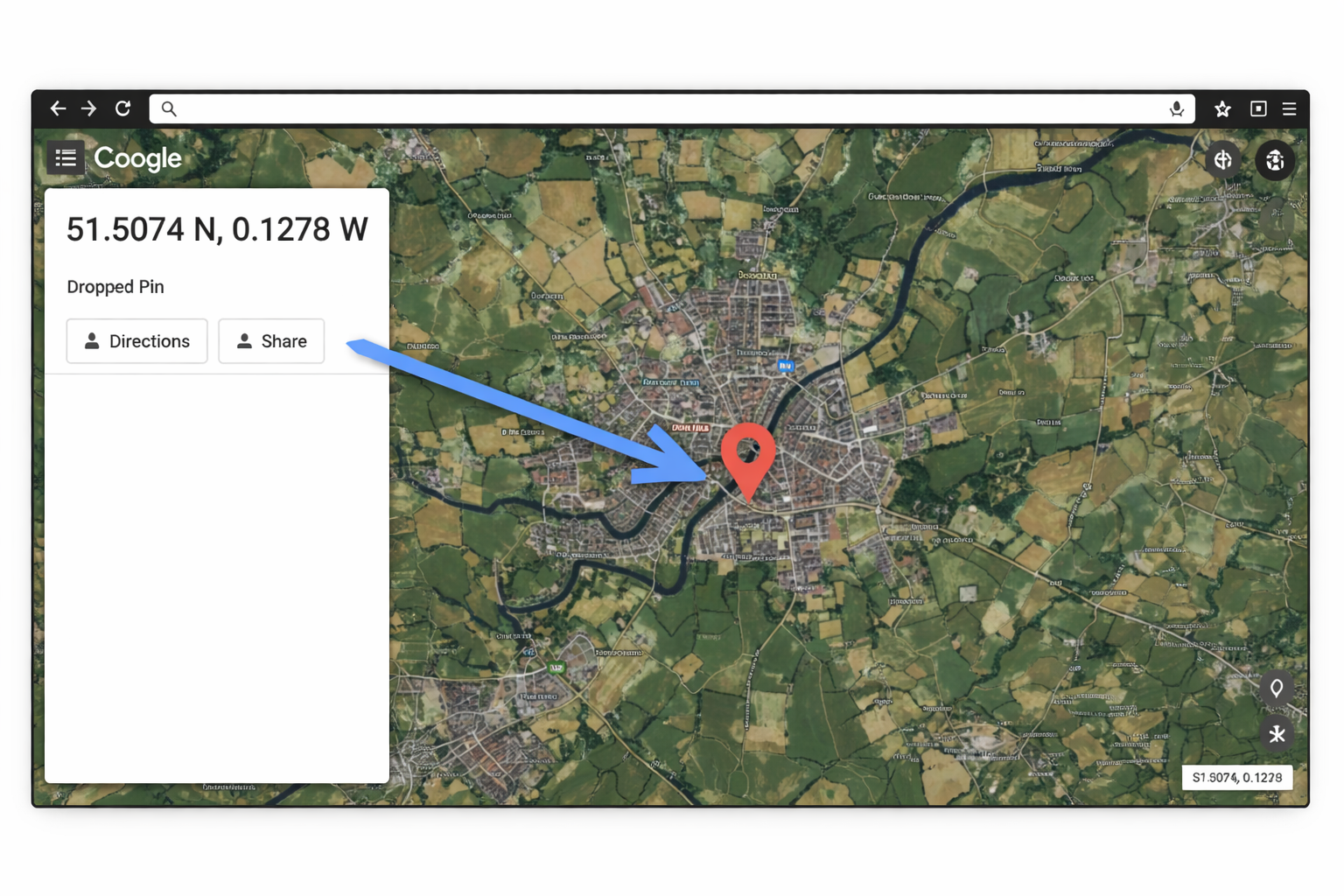
The desktop version of Google Maps offers the fastest coordinate retrieval method. One right-click is all it takes.
Step-by-step: the right-click method for finding coordinates on Google Maps desktop
- Open Google Maps in your browser.
- Navigate to the location you want. Search by name or browse the map manually.
- Right-click directly on the location.
- A context menu appears. The GPS coordinates display at the very top in Decimal Degree format (e.g.,
40.7128, -74.0060). - Click the coordinates to copy them to your clipboard automatically.
Real-world business examples of finding coordinates on desktop
Local restaurant: A restaurant owner wanting to verify their Google Business Profile pin can search their business name, right-click the map pin, and compare those coordinates against what's recorded in their Google Business Profile dashboard. A mismatch, even a small one, can affect how Google ranks the business in local search results.
Warehouse or distribution center: Large facilities often have multiple entrances. A logistics coordinator can right-click the exact loading dock location to get coordinates, then share those with drivers directly. Street addresses alone frequently lead drivers to the wrong entrance.
Service-area businesses: Plumbers, HVAC contractors, and cleaning companies that operate across a region rather than from a single location can use coordinates to define and document the geographic center of their service area for internal planning purposes.
How to read Google Maps coordinates from the browser URL
After navigating to a location, the URL follows this structure:
https://www.google.com/maps/@40.7128,-74.0060,17z
The numbers after the @ symbol represent latitude and longitude. This method is useful when you want to share a specific map view without dropping a pin. Just copy the URL and send it.
How to Find GPS Coordinates on Google Maps on Android
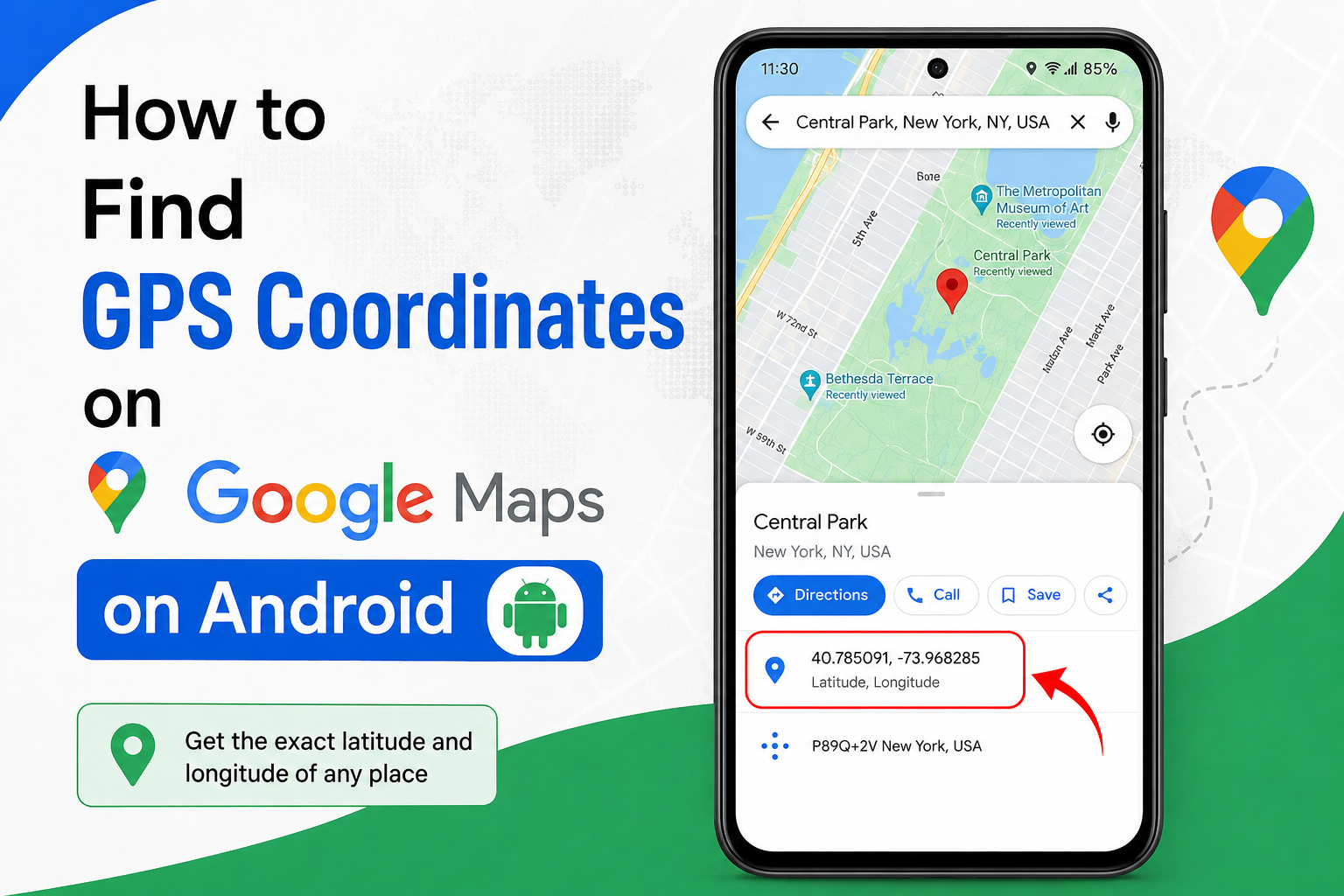
The Google Maps Android app uses a pin-dropping method to surface coordinates.
Step-by-step: finding latitude and longitude on Google Maps for Android
- Open the Google Maps app on your Android device.
- Navigate to the location using the search bar or by browsing the map.
- Tap and hold the location until a red pin drops.
- A card appears at the bottom of the screen showing "Dropped pin" and the GPS coordinates in decimal format directly beneath it.
- Tap the card to expand it, or tap the coordinates to copy them.
Tips for Android users
- Tapping a business name on the map brings up an information card. Scroll down within that card to find coordinates listed under location details.
- Drag the pin after dropping it to fine-tune the location. Coordinates update in real time as you move the pin, which is useful for pinpointing a specific entry point or property corner.
How to Find GPS Coordinates on Google Maps on iPhone
The iOS process is nearly identical to Android, with one small interface difference worth noting.
Step-by-step: finding coordinates on Google Maps for iPhone
- Open the Google Maps app on your iPhone.
- Search for the location or browse the map to find it.
- Press and hold the exact spot you want to pin.
- A red pin drops, and a card appears at the bottom of the screen with coordinates in decimal format.
- Tap the coordinates to copy them to your clipboard.
On smaller iPhone screens, coordinate information may sit below the visible area of the bottom card. If the numbers aren't immediately visible, swipe up on the card to expand it fully.
How to Enter GPS Coordinates in Google Maps
Retrieving coordinates is one skill. Entering them accurately is equally important, especially when someone shares a location by coordinate rather than address.
What coordinate formats does Google Maps support?
Google Maps accepts three coordinate formats:
How to search using GPS coordinates in Google Maps
- Open Google Maps on desktop or mobile.
- Click or tap the search bar.
- Type or paste the coordinates into the search bar.
- Press Enter (desktop) or tap Search (mobile).
- Google Maps navigates to the location and drops a pin.
Common coordinate formatting mistakes to avoid when searching Google Maps
- Missing the comma:
40.748817 -73.985428without a comma often returns no results. Always separate latitude and longitude with a comma. - Reversed order: Latitude must come first. Swapping the values can place a pin thousands of kilometers from the intended location.
- Missing negative signs: Negative longitude indicates west of the Prime Meridian. Dropping that minus sign from a North American address can place the pin in Central Asia.
- Extra characters: Coordinates copied from PDFs sometimes include hidden formatting characters. Strip coordinates down to numbers, a comma, and a decimal point before pasting into Google Maps.
How to Convert GPS Coordinates Between Formats
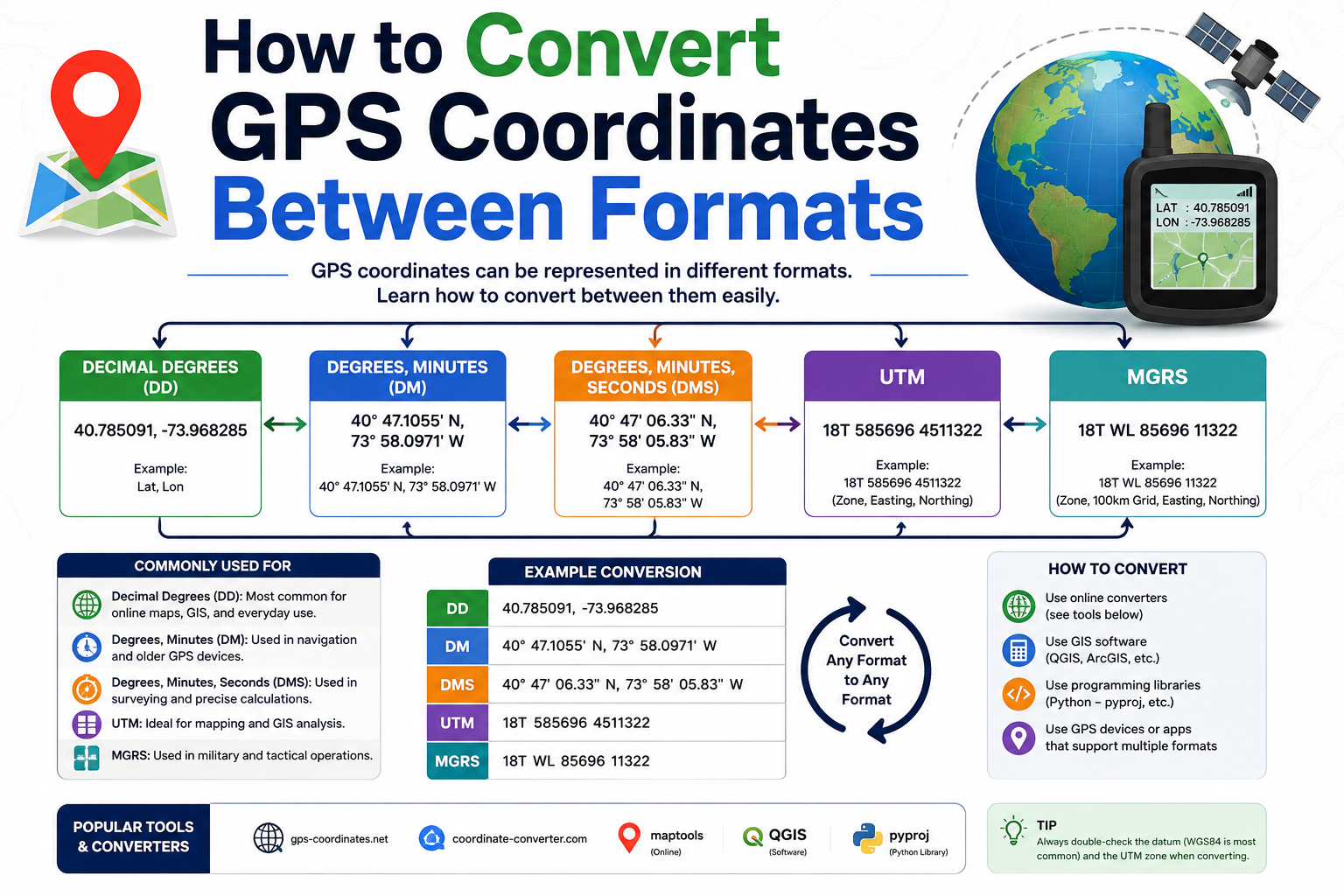
Different platforms use different formats. Here's how each works, along with a quick conversion reference.
Decimal Degrees (DD)
Google Maps' default. Latitude and longitude are expressed as simple decimal numbers. Positive latitude = north; negative = south. Positive longitude = east; negative = west.
- Example:
48.8584, 2.2945
Degrees Minutes Seconds (DMS)
A traditional format used in printed maps, surveying, and some GPS hardware. To convert DD to DMS: multiply the decimal portion of the degree by 60 to get minutes, then multiply the remaining decimal by 60 to get seconds.
- Example:
48°51'30.2"N, 2°17'40.2"E
Degrees Decimal Minutes (DDM)
Common in marine and aviation navigation. To convert DD to DDM: multiply the decimal portion of the degree by 60. The result is the decimal minutes value.
- Example:
48°51.504'N, 2°17.670'E
Quick coordinate conversion reference table
For quick conversions without manual calculation, LatLong.net and GPS Visualizer both handle all three formats reliably.
How to Extract GPS Coordinates for Multiple Locations at Scale
Finding a single coordinate takes seconds. Extracting coordinates for hundreds or thousands of locations is a different challenge, one that comes up regularly in business data workflows.
Batch coordinate workflows using Google Maps
For small batches (under 50 locations), the manual right-click method on desktop is workable. For anything larger, two approaches are commonly used:
Google Sheets with geocoding add-ons: Tools like Geocode by Awesome Table allow users to paste a list of addresses into a spreadsheet and retrieve corresponding latitude/longitude coordinates in bulk. This works well for internal data cleaning or CRM enrichment projects.
Google Maps Platform Geocoding API: Google's Geocoding API accepts address inputs and returns structured JSON responses that include latitude, longitude, formatted address, and place type. This is the standard approach for businesses building automated data pipelines, multi-location dashboards, or integration between Google Maps and a CRM.
Practical use cases for bulk coordinate extraction
- A restaurant chain with 40 locations verifying that each Google Business Profile pin matches the physical front entrance
- A field sales team downloading coordinates for every prospect in their territory before heading out for a day of cold calls
- A data provider enriching a business contact list with verified geographic coordinates before delivering it to a client
How GPS Coordinates Support Local SEO Audits
This is one of the most underappreciated applications of Google Maps coordinates, and one where precision genuinely matters.
How does Google Business Profile pin accuracy affect local search rankings?
Google uses a business's latitude and longitude as a geographic relevance signal for local search. When a Google Business Profile pin sits at the correct location (ideally the main entrance or the front door), Google can more confidently surface that business in "near me" searches relevant to that exact area.
A pin placed on a rear parking lot, an adjacent street, or a neighboring unit creates a small but measurable mismatch. For businesses competing in dense local markets (a restaurant row, a medical district, or a retail strip), that mismatch can be the difference between ranking in the local pack and appearing below it.
To audit this: retrieve the GPS coordinates of the physical front entrance using the right-click method on Google Maps desktop, then compare those coordinates against the pin location shown in the Google Business Profile dashboard. If they differ by more than a few meters, correcting the placement is a straightforward local SEO fix.
How does GeoCoordinates schema markup affect local SEO?
Google's structured data documentation lists GeoCoordinates as a recommended property for LocalBusiness schema. Adding latitude and longitude to a business's structured data gives Google an explicit, machine-readable signal about the business's exact geographic position. This supplements the Google Business Profile pin and reinforces geographic relevance for local pack rankings.
The implementation is straightforward. Embed the latitude and longitude values directly within the LocalBusiness JSON-LD block. For multi-location businesses, each location page should carry its own unique GeoCoordinates values.
How GPS Coordinates Are Used in Sales Territory Mapping
Sales teams have traditionally relied on ZIP codes or city names to define territories. Both approaches have real limitations: ZIP code boundaries shift, cities have fuzzy edges, and neither translates cleanly into the kind of geographic precision that field teams actually need.
GPS coordinates solve this. By defining territory boundaries using specific lat/long pairs, sales managers can draw precise, stable boundaries in tools like Google My Maps, Salesforce Maps, or Territories.io. Territories don't shift when ZIP code files update. Overlap disappears. Performance attribution by region becomes cleaner.
A practical workflow: export the coordinates for every existing customer and every prospect in a region, plot them in Google My Maps, and use the polygon tool to draw territory boundaries around natural geographic clusters. The result is a territory map built on actual data, not administrative guesswork.
GPS Coordinates vs. Plus Codes vs. Street Addresses vs. What3Words
Not all location systems serve the same purpose. Here's a direct comparison of the four most common formats:
How to Verify Business Locations Using GPS Coordinates
In business data workflows, coordinate verification is a critical quality control step. Unverified location data leads to drivers arriving at the wrong entrance, sales reps visiting the wrong suite, and marketing campaigns targeting the wrong service area.
A practical coordinate validation process
- Source the claimed address from the business's website, Google Business Profile, or CRM record.
- Search the address in Google Maps and retrieve the resulting pin coordinates using the right-click method.
- Compare those coordinates against any existing coordinate data in your records.
- Cross-reference with Street View to visually confirm the pin sits at the correct physical entrance.
- Flag discrepancies where the pin sits more than 20-30 meters from the claimed address or on the wrong building.
This process is particularly valuable when working with data sourced from third-party directories, which frequently carry outdated or incorrectly geocoded addresses.
Lead Generation and Prospect Research Using Google Maps Coordinates
Google Maps coordinates unlock a powerful approach to geographic lead generation, one that goes well beyond what any static business database can offer.
How do field sales teams use Google Maps coordinates for prospecting?
GPS coordinates allow sales teams to build hyper-targeted prospect lists organized by physical proximity. Rather than working from a spreadsheet sorted alphabetically by company name, a field rep can plan their day around a map of coordinate-tagged prospects within a defined radius of their current location.
Commercial cleaning prospecting example: A commercial cleaning company targeting office buildings in a specific business district can use Google Maps data workflows to identify every eligible building by category, extract coordinates for each, and cross-reference those coordinates against their existing customer list. Buildings that fall within the same block as a current customer become priority outreach targets. Proximity signals operational efficiency, which is a natural talking point.
How does geographic lead generation work using Google Maps data at scale?
For teams doing structured Google Maps data collection, the workflow typically involves:
- Defining a geographic search area using coordinates or a place name
- Extracting business listings by category from that area
- Enriching each listing with its verified coordinates
- Filtering by criteria such as business type, rating, review count, or presence/absence of a website
- Exporting the enriched list for outreach
Leads Sniper is built for exactly this kind of Google Maps data workflow, extracting structured business data, including location coordinates, at scale, for use in targeted lead generation and territory-based prospecting.
Common Problems When Finding Google Maps Coordinates (And How to Fix Them)
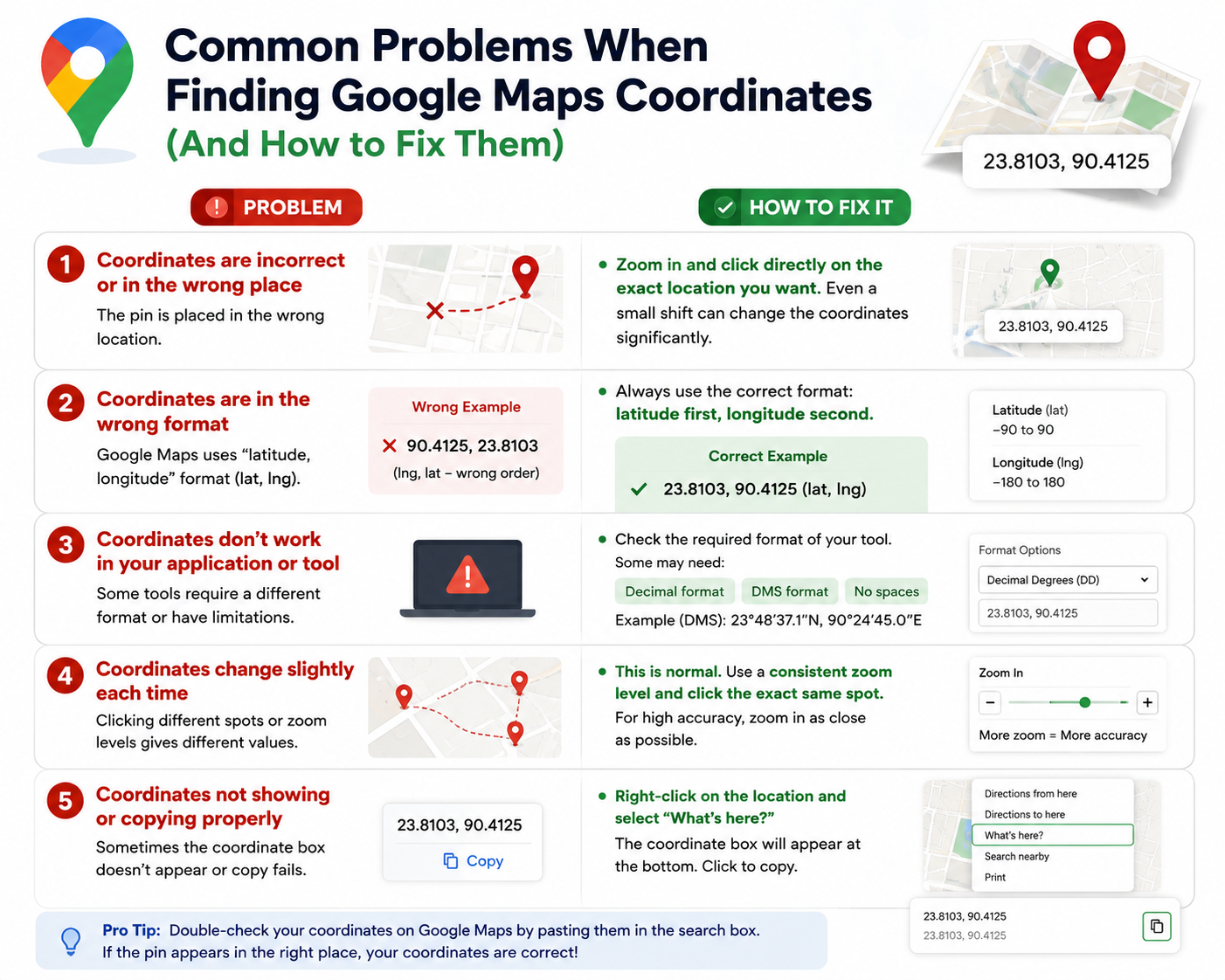
Coordinates aren't showing after a right-click on Google Maps desktop
Problem: The right-click menu appears, but no coordinates are visible.
Fix: Make sure you're right-clicking directly on the map background, not on a label, marker, or UI element. Try clicking on an open section of the map, away from any place name overlays or existing pins.
The coordinates point to the wrong location
Problem: Entered coordinates navigate to the wrong place.
Fix: Check the coordinate order. Latitude must come before longitude. Verify your negative signs. Negative longitude places a location west of the Prime Meridian; negative latitude places it south of the equator. One missing minus sign can shift a location by thousands of kilometers.
Google Maps doesn't recognize the coordinate format
Problem: The search returns no results or an unexpected location.
Fix: Convert your coordinates to Decimal Degrees format before entering them. Remove degree symbols (°), directional letters (N, S, E, W), and any extra punctuation. Google Maps parses DD most reliably.
Coordinates aren't visible in the Google Maps mobile app
Problem: After dropping a pin, no coordinates appear in the card.
Fix: Update the Google Maps app to the latest version. Coordinate display behavior has changed across app versions. Also confirm that Location Services are enabled, as some features behave differently without active location permissions.
Frequently Asked Questions About GPS Coordinates on Google Maps
How do I find GPS coordinates on Google Maps without dropping a pin?
On desktop, right-clicking any point on the map reveals coordinates without requiring a pin drop. On mobile, coordinates are only surfaced through the pin-drop method.
For named places, tapping the location on mobile brings up an information card where coordinates appear in the location details section, with no pin required.
Can I find GPS coordinates for an address on Google Maps without visiting the location?
Yes. Search for any address in Google Maps and right-click the pin (desktop) or drop a pin on the result (mobile). No physical visit is needed. The Google Maps Geocoding API can also retrieve coordinates from addresses programmatically.
Why do Google Maps coordinates sometimes appear to change for the same location?
Coordinates don't change, but how and where you click does. If you right-click slightly to the left or right of a previous click, you'll retrieve a slightly different coordinate pair. Google also periodically improves its underlying map data,
which can cause a business's official pin position to shift marginally. This is distinct from coordinate values themselves changing.
How accurate are Google Maps coordinates?
For well-mapped urban and suburban locations, Google Maps coordinates are accurate to within a few meters.
In remote or poorly mapped areas, accuracy decreases. For applications requiring legal-grade precision (property surveys, boundary disputes), always verify coordinates against official geospatial sources.
How do I find coordinates in Google Earth?
In Google Earth (desktop), right-click any location and select "What's here?" to see the GPS coordinates in decimal format.
Google Earth Pro also shows coordinates in the status bar as you hover over the map. Mobile versions of Google Earth display coordinates when you tap and hold a location.
How do I find the GPS coordinates of my current location on Google Maps?
On desktop, click the blue dot representing your location, then right-click it to see coordinates. On mobile, tap the blue dot to bring up a card showing current latitude and longitude. Location Services must be enabled for accurate results.
Can I find GPS coordinates on Google Maps without a Google account?
Yes. Finding and copying GPS coordinates requires no Google account on either desktop or mobile.
What coordinate format does Google Maps use by default?
Google Maps displays coordinates in Decimal Degrees (DD) format. For example, 51.5074, -0.1278 for central London.
Can I use coordinates retrieved from Google Maps in other apps?
Yes. Decimal Degree coordinates from Google Maps are compatible with Apple Maps, Waze, Gaia GPS, Google Earth, QGIS, and most other GPS-enabled mapping applications.
Is there a Google Maps API for retrieving GPS coordinates at scale?
Yes. The Google Maps Platform Geocoding API allows developers to retrieve latitude and longitude coordinates from addresses programmatically and at scale.
This is the standard approach for businesses building data enrichment pipelines, CRM integrations, or location-based applications.
How do I find coordinates for a large geographic area rather than a single point?
GPS coordinates always refer to a single point. For large areas, record coordinates for key boundary points or the geographic center.
For boundary-level work, Google Earth or GIS software like QGIS provides more appropriate tools, including the ability to export polygon boundaries as coordinate sets.
How do I share GPS coordinates with someone else using Google Maps?
On desktop, right-click a location and click the coordinates to copy them, then paste into a message.
On mobile, drop a pin, tap the card at the bottom, tap "Share," and choose your preferred channel. The recipient can paste the coordinates directly into Google Maps to navigate to the same spot.
Put Your Coordinate Knowledge to Work
GPS coordinates on Google Maps are a precise, universal location language, one that works equally well for sending a friend to an exact table at an outdoor market and for building a territory map for a national sales team.
Here's a quick recap of the methods covered:
- Desktop: Right-click any map point, coordinates appear at the top of the context menu, then click to copy.
- Android/iPhone: Tap and hold to drop a pin, read coordinates from the bottom card, then tap to copy.
- Entering coordinates: Type or paste Decimal Degree coordinates directly into the Google Maps search bar.
- Converting formats: Use DD for Google Maps compatibility; convert DMS or DDM using tools like LatLong.net.
- At scale: Use the Google Maps Platform Geocoding API or Sheets-based geocoding tools for batch workflows.
- Business applications: Audit Google Business Profile pin accuracy, add
GeoCoordinatesschema markup, define sales territories, and power geographic lead generation workflows.
The most common mistakes (reversed coordinates, missing negative signs, and unsupported formats) are easy to prevent once you know what to look for. Start with the right-click method on a location you already know. Once you see how fast and reliable coordinate-based navigation is, you'll reach for it far more often.
For teams working with Google Maps data at scale (extracting business listings, verifying locations, or building prospecting lists by geography), Leads Sniper provides the infrastructure to make coordinate-powered workflows fast and repeatable.