Navigating the world using physical addresses works fine for city streets, but it falls short when you are exploring off the grid, analyzing raw business data, or pinpointing a highly specific spot. If you want to know exactly how to find a location with gps coordinates, you have come to the right place. Understanding latitude and longitude is an essential skill, especially as modern 2026 mapping tools rely heavily on precise geographical data.
In this comprehensive guide, we will cover everything from basic coordinate formats to advanced reverse geocoding. You will learn how to input these numbers into your favorite apps and how businesses extract this data at scale to drive growth.
Quick Answer: How to find a location with gps coordinates
- Open Google Maps on your computer or mobile device.
- Tap the search bar at the top of the screen.
- Type your coordinates in a valid format (e.g.,
41.40338, 2.17403). - Press Enter or tap Search.
- A red pin will appear on the map at the exact location.
What Are GPS Coordinates?
GPS coordinates are a set of numbers representing a precise geographical point on Earth. The system uses a geographic coordinate system mapped across the globe through a grid of imaginary lines.
Latitude measures the distance north or south of the Equator. Longitude measures the distance east or west of the Prime Meridian. Together, these two numbers can pinpoint any square meter on the planet. This precision makes coordinates fundamentally different from standard street addresses. An address directs you to a building, but coordinates can direct you to a specific tree in a dense forest or a particular parking spot in a massive commercial lot.
Accuracy depends on the device, satellite visibility, map data, and the surrounding environment. In practice, many modern smartphones can estimate location quite closely in open areas, but real-world accuracy varies and may be less reliable near tall buildings, dense tree cover, underground spaces, or in poor signal conditions.
How to Find a Location with GPS Coordinates in Google Maps

Google Maps remains the most popular tool for handling coordinate data. Using the application to search for a specific latitude and longitude is straightforward, regardless of your device.
On a Desktop Computer
- Open your preferred web browser and navigate to Google Maps.
- Click on the search box in the top left corner.
- Type or paste your coordinates. Ensure you put the latitude first, followed by a comma, and then the longitude.
- Hit the Enter key. A red pin will drop exactly on the specified geographic point.
On Android Devices
- Open the Google Maps app on your Android smartphone or tablet.
- Tap the search box located at the top of your screen.
- Enter your coordinates using the correct format.
- Tap the search icon on your virtual keyboard. The map will center on the coordinate pin.
On iPhone and iPad
- Launch the Google Maps app on your iOS device.
- Tap the search bar at the top.
- Paste or type the latitude and longitude.
- Press the "Search" button on your keyboard.
Common Mistakes to Avoid
When entering coordinates, a single formatting error will confuse the mapping software. Always use a period for decimals, never a comma. Commas should only be used to separate the latitude number from the longitude number. Furthermore, check your negative signs. Missing a minus sign will send your map pin to the opposite hemisphere.
How to Find an Address from GPS Coordinates
Converting coordinates back into a readable street address is a process known as reverse geocoding. Most modern map tools handle this automatically.
When you enter coordinates into Google Maps, Apple Maps, or Bing Maps, the software places a pin on the location. If you click or tap on that pin, the application will display the nearest known street address. OpenStreetMap (OSM) also offers excellent reverse geocoding, often providing more detailed metadata about the specific building or natural feature located at those coordinates.
How to Find GPS Coordinates of a Place
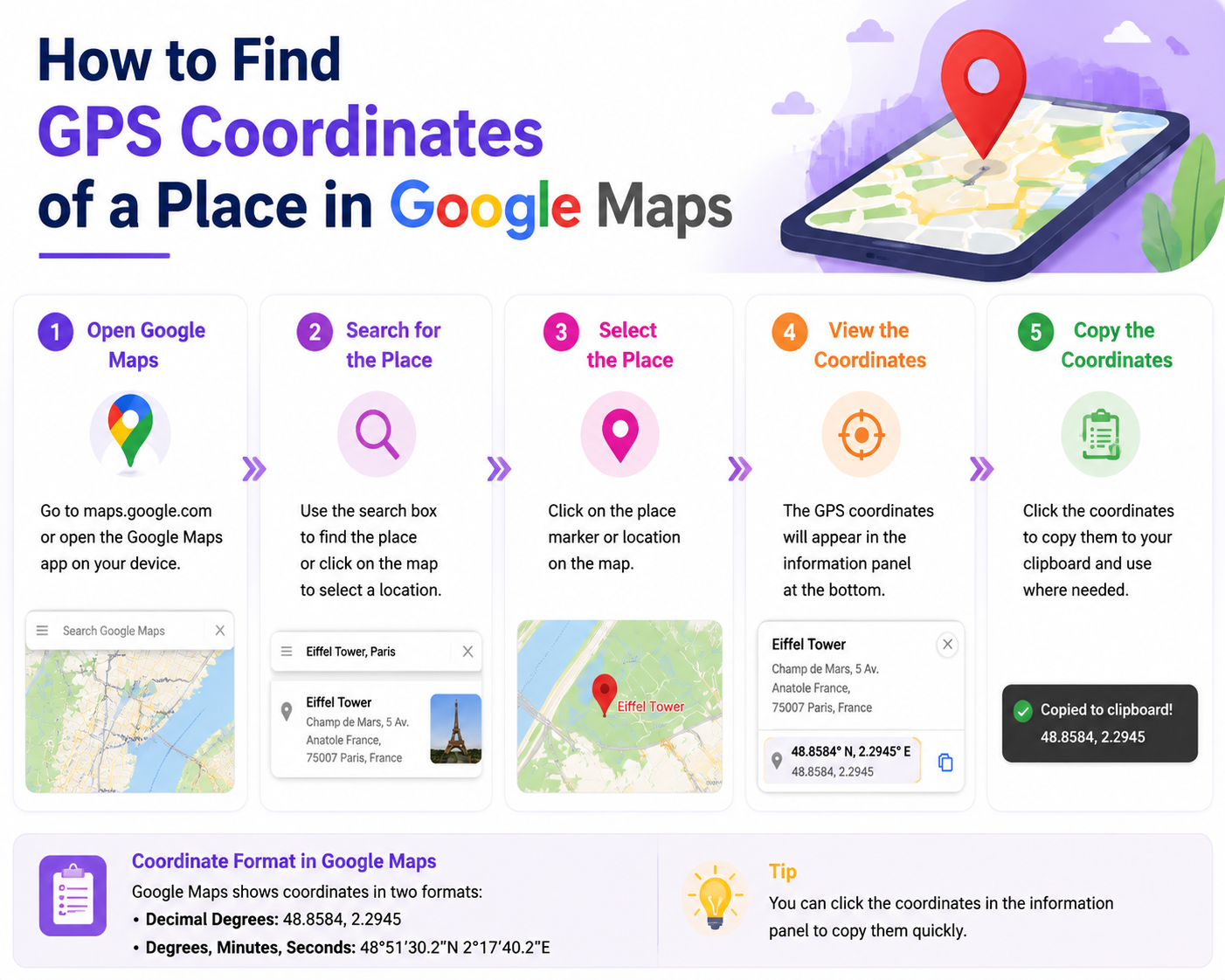
Sometimes you need to generate coordinates rather than search for them. You can easily extract this data from your devices.
On Desktop: Right-click anywhere on Google Maps. A small menu will appear with the latitude and longitude listed at the very top. Clicking those numbers copies them to your clipboard.
On Mobile: Tap and hold an unpinned area of the map to drop a red pin. Scroll down on the information panel that appears at the bottom of the screen to view the exact coordinates.
From Photos: Most modern smartphones embed location data into the metadata of photos (known as EXIF data). By viewing the "Details" or "Info" section of a photograph in your phone's gallery, you can often see a map and the exact coordinates where the image was captured.
Coordinate Formats Explained
Mapping software accepts coordinates in a few different formats. Understanding the difference will help you troubleshoot errors.
Best Tools to Find a Location with GPS Coordinates in 2026
Choosing the right tool depends on whether you are navigating a hiking trail or conducting enterprise-level market research.
Real Example: Find 23.8103, 90.4125 in Google Maps
Here is a simple walkthrough you can add to make the process more concrete for readers. The coordinates 23.8103, 90.4125 point to a location in Dhaka, Bangladesh.
On desktop:
- Open Google Maps in your browser.
- Click the search bar.
- Copy and paste this exact format:
23.8103, 90.4125 - Press Enter.
- Google Maps will drop a pin on the matching map location.
- You can then zoom in, switch to satellite view, or click Directions to navigate there.
On mobile:
- Open the Google Maps app.
- Tap the search bar.
- Paste
23.8103, 90.4125 - Tap Search.
- The app will center the map on that GPS location and show a pin.
What readers should notice:
- The first number is latitude:
23.8103 - The second number is longitude:
90.4125 - The comma helps Google Maps read the pair correctly
- If you reverse the order, you may land in the wrong place
Copy-paste coordinate format: latitude, longitude
Suggested screenshots to add in the article editor:
- Screenshot 1: Google Maps search bar with
23.8103, 90.4125pasted in - Screenshot 2: The resulting pinned location on the map
- Screenshot 3: Mobile Google Maps result after searching the same coordinates
Manual Google Maps Lookup vs Bulk Location Collection
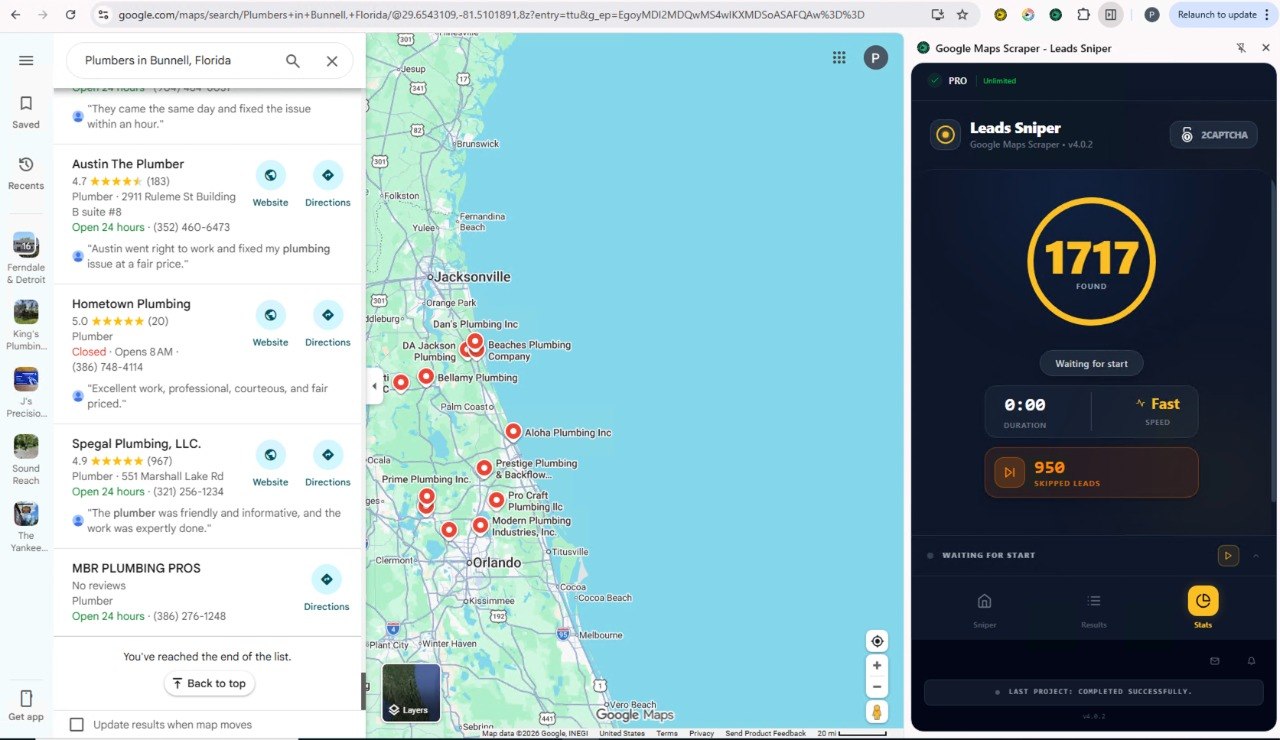
For one or two locations, manual Google Maps lookup is usually enough. You paste a coordinate pair, open the pin, and check the place details in seconds. But that workflow does not scale well. If you need to collect data from dozens or hundreds of listings, manual lookup means repeating the same clicks over and over, then copying names, addresses, phone numbers, websites, reviews, latitude, longitude, and other details into a spreadsheet by hand. For bulk collection, a tool like Leads-Sniper Google Maps Scraper is more practical because it helps turn many Google Maps results into organized business and location data much faster than reviewing each listing one by one.
This is where the Leads-Sniper Google Maps Scraper can help. Instead of manually clicking through map listings to collect latitude and longitude, the tool is designed to speed up the process. It lets businesses gather location-related data from Google Maps in a more structured and efficient way.
Leads-Sniper can pull a wide range of business fields, including latitude, longitude, formatted coordinates, phone numbers, emails, websites, ratings, and review counts. For teams working on local SEO, market research, sales outreach, or competitor tracking, that makes it easier to save Google Maps business data into a structured CSV or Excel file instead of collecting each detail manually.
Extract Google Maps Location Data with Leads-Sniper
Practical Examples of Using Coordinates
Using exact coordinates solves numerous real-world problems where standard addresses fail.
Campsites and Outdoor Recreation: National parks and wilderness areas lack street signs. When sharing a specific, secluded campsite with friends, sending GPS coordinates ensures they find the exact clearing in the woods, not just the general park entrance.
Complex Deliveries: Logistics companies frequently deliver to massive industrial complexes or rural farms. Coordinates guide the driver to the exact loading dock or barn door, saving time and reducing failed delivery attempts.
Property Boundaries: Real estate agents and land developers use coordinates to mark exact property lines, especially for large, undeveloped parcels of land that do not yet have an assigned street address.
Market Research: Businesses mapping out competitor locations use coordinate data to visualize market density. By plotting the exact latitude and longitude of competing storefronts, analysts can identify underserved neighborhoods ripe for expansion.
Troubleshooting: Why GPS Coordinates May Not Work
If you type in coordinates and end up in the middle of the ocean, you likely made a formatting error.
Check for missing negative signs. A positive latitude means North, while a negative latitude means South. A positive longitude means East, and a negative longitude means West. Missing a simple minus sign can move your location across the planet.
Ensure you are using the correct decimal placement and that you have not mixed formats (like combining DD and DMS in the same search). Remove any extra spaces before or after the comma separating the two numbers.
Privacy and Safety Tips
Location data is highly sensitive. Be cautious when sharing photographs online, as the EXIF data embedded in the image file may broadcast your exact home coordinates to the public. You can disable location tagging in your smartphone's camera settings to protect your privacy.
When sharing your current location coordinates with others, ensure you are sending them to a trusted contact, particularly if you are in an isolated area.
FAQs
1. Can I search for coordinates offline?
Yes, if you have downloaded offline maps in apps like Google Maps or Gaia GPS, you can still search for specific coordinates without an internet connection.
2. How can businesses collect GPS coordinates from Google Maps?
Businesses can collect GPS coordinates manually by opening Google Maps, selecting a place, and copying its latitude and longitude. If they need data for many listings, they often use specialized tools to organize business location data, such as names, addresses, phone numbers, websites, and coordinates, into a structured format.
3. What is the difference between GPS coordinates and Plus Codes?
GPS coordinates use latitude and longitude to mark an exact point on Earth. Plus Codes are short location codes created to represent places, especially where street addresses are missing or unclear. Both can help identify a place, but GPS coordinates are the standard geographic format used across most mapping and geolocation systems.
4. Can I export Google Maps location data to Excel or CSV?
Google Maps does not provide a simple built-in export for broad business location data searches. For small-scale use, people often copy details manually. For larger research, sales, or lead generation workflows, businesses typically use data collection tools that can organize map-based business data into Excel or CSV files.
5. Why does my GPS show me a few meters away from my actual location?
GPS relies on satellite signals. Tall buildings, heavy clouds, and tree cover can cause signal interference, resulting in a slight accuracy drop.
6. What is the difference between latitude and longitude?
Latitude represents north-to-south positioning, while longitude represents east-to-west positioning.
7. How do I convert DMS to DD?
Most modern mapping tools convert these automatically. You can type DMS directly into Google Maps, and it will process the location seamlessly.
8. Are GPS coordinates the same on all maps?
Yes, latitude and longitude form a universal system. A set of coordinates will point to the exact same physical spot on Apple Maps, Google Maps, and physical globes.
9. Can I use coordinates for my business location?
Yes, adding exact coordinates to your website contact page helps customers using specialized navigation systems find your physical storefront easily.
10. How do I read a coordinate like 41.40338, 2.17403?
To read a coordinate in Google maps scraper, you have to see the first number (41.40338) is the latitude. Because it is positive, it is North of the equator. The second number (2.17403) is the longitude. Because it is positive, it is East of the Prime Meridian.
11. What is the maximum number for latitude and longitude?
Latitude ranges from -90 to 90 degrees. Longitude ranges from -180 to 180 degrees.
Mastering Geographic Precision
Knowing how to find a location with gps coordinates empowers you to navigate the world with total precision. Whether you are charting a path through a remote wilderness, pinpointing a delivery drop-off, or leveraging massive datasets for business growth, mastering latitude and longitude is an invaluable skill.
Stop relying solely on basic street addresses. Start using exact coordinates to streamline your navigation, and if you are managing location data for your business, explore advanced tools to automate your workflow today.