
Have you ever stared at a string of numbers like 40.7128, -74.0060 and wondered exactly where that is? Sometimes an address simply is not enough. Whether you want to pinpoint a remote construction site, extract business listings for a specific neighborhood, or map out delivery routes, you need exact data.
When you want to search location by latitude and longitude, you unlock a precise way to navigate and analyze the world. Finding a location using coordinates strips away the confusion of changing street names and missing postal codes. Instead, it relies on the absolute precision of the Global Positioning System (GPS).
Let us break down exactly how you can use a latitude and longitude finder to your advantage, plus how businesses use these tools to scrape map coordinates and generate local leads.
What Does “Search Location by Latitude and Longitude” Mean?
Every single spot on Earth has a unique mathematical address. This is geolocation at its core. Latitude lines run east and west, measuring how far north or south a place is from the equator. Longitude lines run north and south, measuring distance east or west of the prime meridian.
When you put these two numbers together, you get exact GPS coordinates. A search location by latitude and longitude simply means plugging those numbers into a map or reverse geolocation software to reveal the physical place.
For example, if you input 23.8103, 90.4125 into a map coordinates search, the pin drops right on Dhaka. If you enter 51.5074, -0.1278, you will find yourself looking at the center of London. By converting lat long to an address, you remove all geographic guesswork.
How to Search Location Using Coordinates in Google Maps
Google Maps is the most accessible latitude and longitude finder available. It processes location data instantly. If you need to know how to use coordinates in Google Maps, follow these simple steps:
- Open Google Maps: Launch the app on your phone or open it in your desktop browser.
- Enter your coordinates: Click or tap the search box. Type your GPS coordinates directly into the bar. Make sure you enter latitude first, followed by longitude, separated by a comma.
- View the exact location: Hit search or press enter. Google Maps will instantly drop a red pin on that precise location.
From there, you can zoom in, check out Street View, or request driving directions.
Best Tools to Find Location by Latitude and Longitude
While Google Maps is great for everyday use, several other geolocation search tools exist for different needs.
- Google Maps: Perfect for quick, single-point searches and visual mapping.
- Dedicated GPS Tools: Devices from Garmin or specialized hiking apps often provide robust coordinate tracking without needing cellular data.
- Map APIs: Developers use mapping APIs to build coordinates to location converter features directly into their own software and websites.
- Data Scraping Tools: For professionals who need bulk location data, specialized scraping tools take raw coordinates and return complete business profiles.
Problems with Manual Coordinate Search
Typing numbers into a search bar works fine for finding a single restaurant or a specific meeting point. However, manual searches break down quickly when you need to scale up your efforts.
Manual searches are incredibly time-consuming. You have to type each string of numbers perfectly, wait for the map to load, and then manually record whatever information you find there. There is no bulk search option built natively into consumer map interfaces.
Furthermore, you cannot extract business data easily. If you look up a coordinate and find a business park, you still have to manually copy and paste the company names, websites, phone numbers, and reviews. For local SEO experts and lead generation agencies, this lack of scalability is a massive roadblock.
How Leads Sniper Google Maps Scraper Solves This
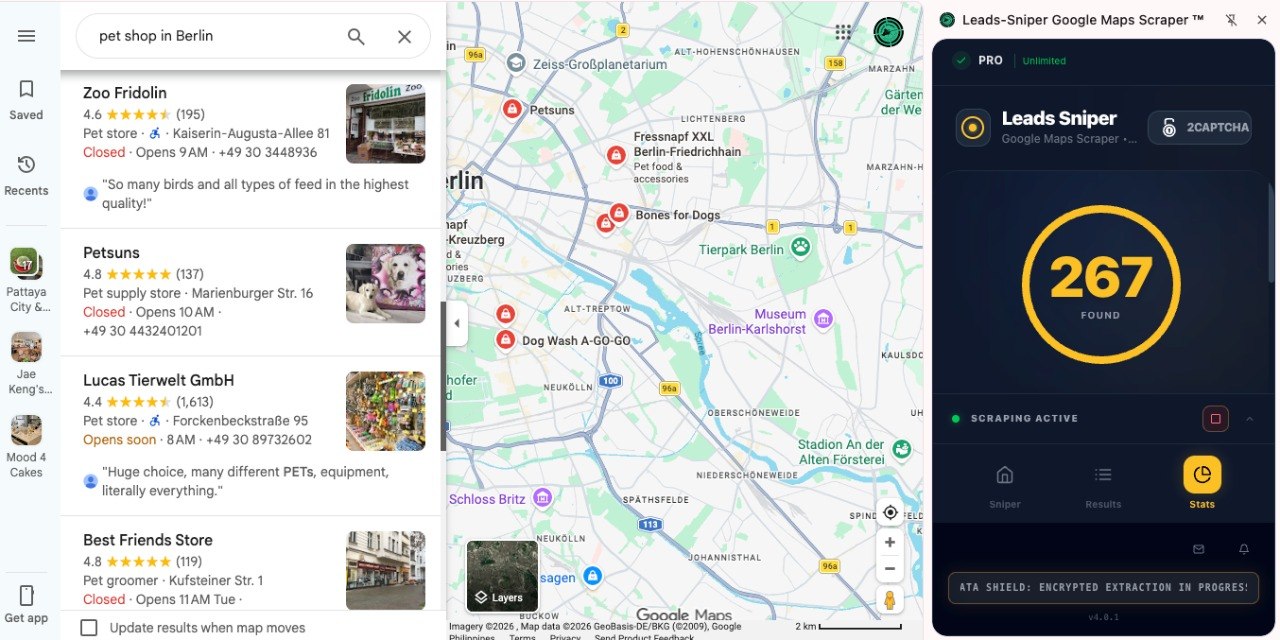
If you need to process hundreds of locations, you need automation. This is where the Leads Sniper Google Maps Scraper changes the game.
Instead of searching one coordinate at a time, you can input locations and extract hundreds of business listings instantly. This tool handles bulk coordinate-based searches effortlessly. You simply define your target area, and the software goes to work.
The scraper pulls rich business data from map locations. It extracts names, phone numbers, email addresses, review scores, and website links. It essentially functions as an automated local lead generation machine. By converting coordinates into highly targeted leads, you bypass hours of tedious manual data entry.
Whether you need to build a cold outreach list or analyze competitors in a specific grid, Leads Sniper gives you clean, exportable data in a fraction of the time.
Use Cases
Who actually benefits from bulk coordinate searches and data scraping? Accurate location data drives several key industries.
Local SEO Agencies
Agencies use coordinate data to audit local search rankings. They map out exactly where their clients rank in different parts of a city to build hyper-local content strategies.
Lead Generation Businesses
Data brokers and lead gen experts scrape business details from specific coordinates to build massive, highly targeted prospect lists for B2B sales teams.
Real Estate
Investors and developers track property values, commercial developments, and neighborhood amenities by monitoring exact GPS coordinates over time.
E-commerce Targeting Locations
Online retailers analyze regional business density and competitor locations to optimize their targeted advertising spend and logistics planning.
Freelancers & Marketers
Independent marketers use scraped coordinate data to find niche local businesses that lack a strong online presence, allowing them to pitch web design or social media services directly.
Coordinates Format Examples
To ensure your searches work perfectly every time, you must format your coordinates correctly. The standard format uses decimal degrees. Here are a few prominent examples:
- Dhaka: 23.8103, 90.4125
- London: 51.5074, -0.1278
- New York: 40.7128, -74.0060
- Sydney: -33.8688, 151.2093
Always put the latitude first and the longitude second. Use a comma to separate the two values.
Pro Tips for Using Latitude & Longitude Data

Getting the most out of GPS coordinates lookup tools requires a little attention to detail. Keep these tips in mind:
- Use the correct format: Stick to decimal degrees (like 40.7128, -74.0060) rather than degrees, minutes, and seconds. It is much easier for software to read.
- Avoid spacing errors: Do not put spaces before or after the comma between your numbers.
- Watch your negative signs: Remember that south latitudes and west longitudes require a negative sign. Missing a minus sign can send your search to the opposite side of the world.
- Combine with scraping tools: Never waste time doing manual data entry. Pair your coordinate lists with a tool like Leads Sniper to automate your data collection.
FAQs
How do I search coordinates on Google Maps?
Open Google Maps, click the search bar, and type your latitude followed by your longitude, separated by a comma (e.g., 41.40338, 2.17403). Hit enter to drop a pin on that location.
Can I convert latitude and longitude to an address?
Yes. You can use a reverse geolocation coordinates tool, or simply paste the coordinates into Google Maps to see the nearest valid street address.
What is the best tool for bulk coordinate search?
For extracting business information in bulk across specific coordinates, Leads Sniper Google Maps Scraper is the most efficient choice, allowing you to bypass manual data entry.
How accurate are GPS coordinates?
GPS coordinates are incredibly precise. Depending on the format and the number of decimal places used, they can pinpoint a location down to a few inches.
Conclusion
Understanding how to search location by latitude and longitude opens up a world of precision. You can bypass vague addresses and drop a pin on the exact spot you need to see. While searching manually works well for one-off inquiries, serious professionals need robust tools to handle bulk data.
Automating your location searches saves you countless hours and turns raw map data into actionable business intelligence. Stop wasting time manually copying and pasting business listings from single map points. Try Leads Sniper Google Maps Scraper today and transform your local lead generation strategy.