If you are reading this, you are likely in the middle of a specific frustrating workflow. You have probably tried setting up a scraper for Google Maps, realized the layout has changed again, or hit a wall with CAPTCHAs that standard proxies can't seem to bypass.
By 2026, scraping Google Maps has evolved from a simple data extraction task into a cat-and-mouse game against increasingly sophisticated anti-bot measures. The user interface updates more frequently now, rendering static scraping templates obsolete within weeks.
This brings most users to Octoparse. It is a giant in the web scraping industry a powerful, visual tool capable of scraping almost any site on the internet. But "capable" doesn't always mean "efficient." Many marketers and data analysts find themselves searching for an Octoparse alternative not because Octoparse is bad, but because it is often too broad and complex for the specific, high volume demands of local lead generation.
That is where specialized tools like Leads Sniper enter the conversation.
This article is not a sales pitch. It is a real-world, side-by-side comparison. We are going to look at how both tools handle the specific challenges of 2026:
- Setup Complexity: Do you need to build a workflow, or can you just click "start"?
- Maintenance: What happens when Google updates its CSS selectors?
- Data Readiness: How much cleanup does the Excel file need before your sales team can use it?
- Scalability: Can you actually scrape 10,000 leads without your IP getting flagged?
We will examine the strengths of Octoparse as a generalist builder and compare them against the focused utility of Leads Sniper to help you decide which tool fits your specific project.
What Octoparse Is Best At?
To understand where Octoparse fits in the 2026 landscape, you have to look at it as a Swiss Army knife. It is not a tool built exclusively for Google Maps; it is a platform built to scrape almost anything on the web.
For many users, this flexibility is its biggest selling point. If your project involves complex data extraction needs that go beyond standard contact info, Octoparse is often the industry standard.
The Visual Workflow Builder
The core strength of Octoparse is its visual operation pane. Unlike Python scripts where you stare at lines of code, Octoparse lets you interact with the target website directly.
In 2026, their "Smart Mode" has improved significantly. You simply click on the element you want business name, phone number, review count and the tool attempts to guess the pattern for the rest of the list. For users who need to visualize the logic of their scraper (e.g., "Click this listing, then copy the phone number, then hit the back button"), this visual flowchart is invaluable.
Multi-Site Scraping Flexibility
This is where Octoparse truly shines. Most businesses don't rely solely on Google Maps data. You might need to cross reference a business found on Maps with their LinkedIn profile, their Yelp reviews, or their actual website.
Because Octoparse is a generalist web scraping tool, you can build a workflow that handles multiple sources. You aren't locked into a single platform's architecture. If your lead generation strategy requires verifying a CEO’s name from a corporate website after finding the company on Maps, Octoparse can handle that multi step logic.
Granular Control Over Data
For power users, Octoparse offers control that simple "one-click" tools cannot match. If you need to:
- Extract data hidden inside a "pop-up" on a Maps listing.
- Scroll through precisely 50 reviews per listing, then stop.
- Format a phone number in a specific regex pattern before it hits your Excel sheet.
Octoparse allows for this level of customization. You can tweak the loop limits, adjust the scroll speed to mimic human behavior, and define custom XPaths to target stubborn data fields that standard templates might miss.
The Reality of the Learning Curve
However, this power comes at a cost: complexity.
While Octoparse markets itself as "no-code," the reality in 2026 is that it is "low-code." To effectively use it as a Google Maps scraper, you often need to understand concepts like:
- AJAX handling: Knowing how to tell the bot to wait for dynamic content to load.
- Pagination logic: Manually setting up how the bot moves to the "Next Page" (which is notoriously tricky on the infinite scroll of Google Maps).
- XPath modification: Sometimes the point-and-click selector picks the wrong element, and you must manually edit the code path to fix it.
If you are a technical marketer or a data analyst, this learning curve is manageable. But if you are a sales representative just wanting a list of leads, the setup time required to master these features can be a significant hurdle.
Common Problems Users Face with Octoparse (2026)

While Octoparse is a powerhouse for general web scraping, applying it specifically to Google Maps in 2026 often exposes significant friction points. The platform wasn't originally built as a dedicated Google Maps scraper, meaning users often have to force a generalist tool to handle a very specific, defensive platform.
For many users, the realization that "powerful" doesn't equal "easy" happens quickly. Here are the primary hurdles users face when deploying Octoparse for local lead generation.
1. Setup Complexity for Google Maps
The most immediate challenge is the configuration. Because Google Maps relies heavily on dynamic loading (AJAX) and infinite scrolling, a simple "point and click" setup rarely captures all the data correctly.
Users frequently report spending hours tweaking the "loop item" logic just to get the scraper to scroll down the list of businesses without freezing. Unlike a dedicated tool where the logic is pre programmed, Octoparse requires you to manually define:
- How long to wait between scrolls.
- How to handle the "You've reached the end of the list" signal.
- How to click on individual listings to reveal phone numbers without breaking the main loop.
If you miss one step in this logic, you might wake up to a scraping task that ran for 8 hours but only collected the first 20 results.
2. Frequent Template Breakage
Google Maps is notorious for subtle User Interface (UI) updates. In 2026, Google frequently changes the class names of HTML elements—the code that tells a browser (and a scraper) what is a phone number and what is a review.
Since Octoparse relies on these CSS selectors or XPaths to identify data, a minor update from Google can break your entire workflow. Users often find that a template working perfectly on Monday yields zero results on Tuesday. This forces you into a cycle of constant maintenance, re-checking XPaths, and troubleshooting broken tasks rather than focusing on the data itself.
3. CAPTCHA & IP Rotation Struggles
As Google’s anti-bot detection has become more sophisticated, basic IP rotation is often insufficient.
Octoparse offers cloud extraction with IP rotation, but standard datacenter proxies are easily flagged by Google Maps. When scraping at scale—say, trying to export Google Maps data to Excel for 5,000 restaurants users often encounter:
- Soft bans: Where the scraper returns empty fields because Google served a blank page.
- CAPTCHA walls: The scraping task halts because it cannot solve the visual puzzle presented by Google.
- Throttle limits: The speed drops drastically as Google detects non human behavior patterns.
To mitigate this in Octoparse, you often need to purchase and integrate premium residential proxies separately, adding to both the cost and the technical setup complexity.
4. Extensive Data Cleanup Required
Data extracted via Octoparse often requires significant "post-processing" before it is ready for a CRM or sales team.
Because the tool scrapes exactly what is on the screen, the raw export can be messy. Common issues include:
- Phone numbers: Extracted with mixed formatting (e.g., some with
+1, some with parentheses, some without). - Addresses: Often pulled as one long string rather than separated into Street, City, and Zip Code columns.
- Opening Hours: Frequently scraped as a large block of text that breaks Excel cells.
This means the "time saved" by scraping is often lost later in Excel, where you must manually clean and format columns before the data is usable.
5. Performance Issues at Scale
Octoparse runs browser instances to scrape data (rendering the page visually). This is resource-intensive.
For a small list of 100 leads, this is negligible. However, if you are an agency trying to scrape tens of thousands of leads, the performance overhead is massive. Local extraction can slow down your computer significantly, and cloud extraction while faster can get expensive quickly if you are paying based on task runs or data volume. Users looking for high-volume, enterprise-grade data often find the resource consumption of browser-based scraping to be a bottleneck compared to lightweight, API-based, or request-based alternatives.
Case Study Scenario
Theory is useful, but execution is what matters. To see how these tools perform in the real world, let's walk through a common scenario facing digital marketers in 2026.
The Mission: A digital marketing agency needs to build a cold outreach list.
The Target: 1,000 HVAC (Heating, Ventilation, and Air Conditioning) companies in Dallas, Texas.
The Goal: Extract Business Name, Phone Number, Website URL, and Address.
The Tool: Octoparse (Standard Plan).
Here is exactly what happens when you try to execute this task.
Phase 1: The Setup (Hours 0–1)
Our marketer, let’s call him Alex, downloads Octoparse and opens the visual builder. He navigates to Google Maps and types in "HVAC Dallas, TX."
- The First Hurdle: Alex tries to use the auto-detect feature. It successfully identifies the list of businesses on the left panel. However, it only highlights the visible businesses.
- The Pagination Problem: Alex realizes that Google Maps uses infinite scrolling, not standard "Next Page" buttons. He has to manually configure the scroll loop. He sets the scroll to repeat 100 times, waiting 2 seconds between scrolls to let the AJAX load new results.
- The Detail Page: Alex doesn't just want the list; he needs the website URL, which is often hidden on the detail page. He sets up a "Click Item" step to open each listing.
Time Spent: 45 minutes of tutorial watching and workflow building.
Phase 2: The Execution & Errors (Hours 1–3)
Alex hits "Run" on his local machine. The browser window pops up, and the bot starts working.
- Result 1-50: Smooth sailing. The bot clicks, scrapes, and returns.
- Result 51: The bot freezes. A Google Maps pop-up asks, "Are you finding what you're looking for?" The bot doesn't know how to close this pop-up, so the workflow stalls. Alex has to stop the task, add a "Handle Pop-up" step, and restart.
- Result 150: The scraping speed drops. Google detects the repetitive request pattern. The bot hits a CAPTCHA wall. Since Alex is running this locally without a premium residential proxy pool, he has to manually solve the CAPTCHA to let the bot continue.
Status: 2 hours in, only 150 leads collected, and manual intervention was required twice.
Phase 3: The Output Quality
After finally letting the scraper run overnight to reach the 1,000-lead target (a process that took significantly longer due to throttling), Alex exports the data to Excel.
The results are messy:
- Duplicate Entries: About 15% of the rows are duplicates. The infinite scroll logic sometimes scrolled back up or re-loaded the same results, capturing "Dallas HVAC Pros" four separate times.
- Missing Websites: For 200 listings, the "Website" column is empty. Why? Because some listings didn't have a website button in the exact same XPath location as others, or the page hadn't fully loaded before the scraper tried to copy the text.
- Address Formatting: The addresses are in a single string: "123 Main St, Dallas, TX 75001, United States". Alex now needs to use Excel formulas to split this into separate columns for City and Zip Code if he wants to use it in his CRM.
The Verdict
Alex got his data, but the "cost" wasn't just the software subscription.
- Total Time: ~4 hours (Setup + Monitoring + Cleanup).
- Usable Leads: ~850 (after removing duplicates and empty rows).
- Frustration Level: High.
This scenario highlights the core friction of using a generalist tool for a specialist job. Octoparse can do it, but it requires you to be the pilot, the mechanic, and the data janitor all at once.
What Leads Sniper Is Designed For?
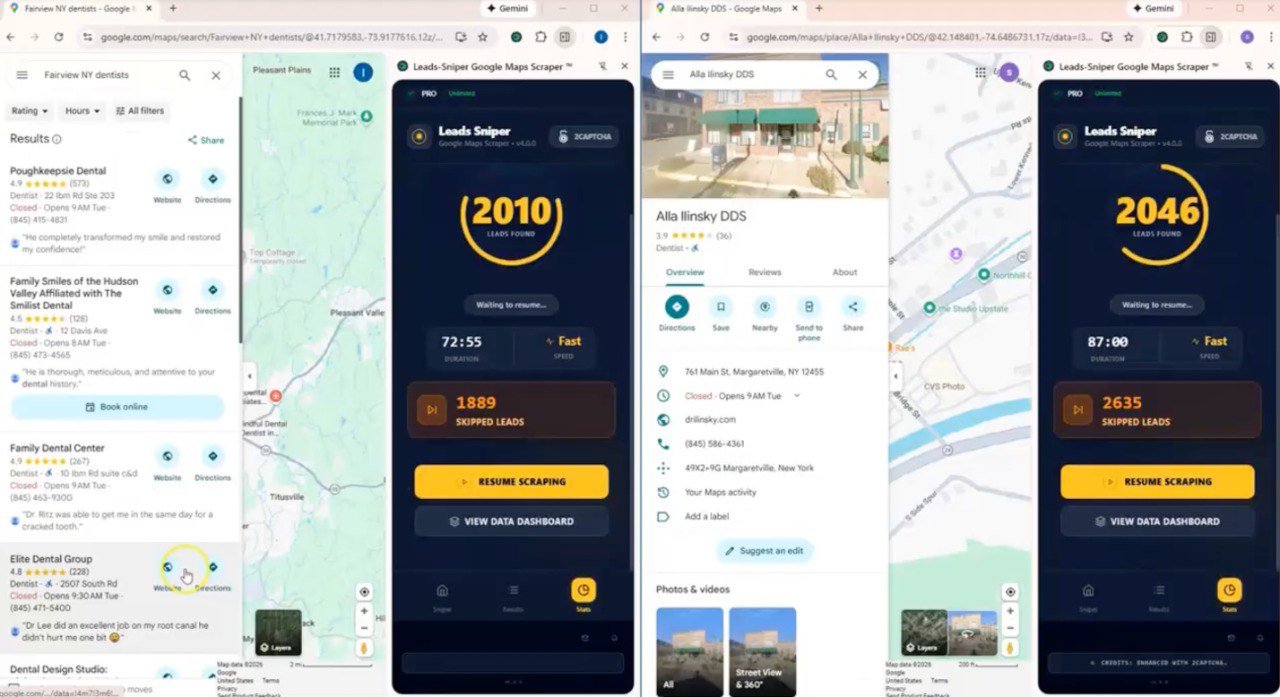
If Octoparse is a Swiss Army knife, Leads Sniper is a scalpel. It is not designed to scrape Amazon, LinkedIn, or Twitter. It is engineered with a singular focus: extracting data from Google Maps efficiently and accurately.
For users tired of building workflows and debugging XPaths, Leads Sniper offers a refreshing shift in philosophy. It assumes you don't want to learn how scraping works you just want the data.
Purpose-Built for Google Maps
Unlike generalist scrapers that must adapt to thousands of website structures, Leads Sniper is hard coded to navigate the specific architecture of Google Maps.
In 2026, this specialization matters. The tool’s internal logic already knows:
- How to handle infinite scrolling without duplicating results.
- Where hidden fields (like "claimed status" or specific lat/long coordinates) are located in the source code.
- How to bypass the specific "soft bans" Google Maps applies to high-volume searches.
Because the developers only have to maintain one target site, updates are pushed rapidly when Google changes its UI, meaning end users rarely experience the "broken template" frustration common with generalist tools.
Minimal Setup (The "One-Click" Reality)
The setup process removes the need for logic building. You do not drag and-drop elements or define loops.
The workflow is typically:
- Enter Keyword: Add keywords. (Multiple keywords is possible)
- Click START button.
- Launch: Wait for the tool to finish scraping all your keywords.
For sales teams or agencies that need to hand off lead generation tasks to junior staff or virtual assistants, this simplicity reduces training time from days to minutes.
Direct to Data: Excel and CSV Focus
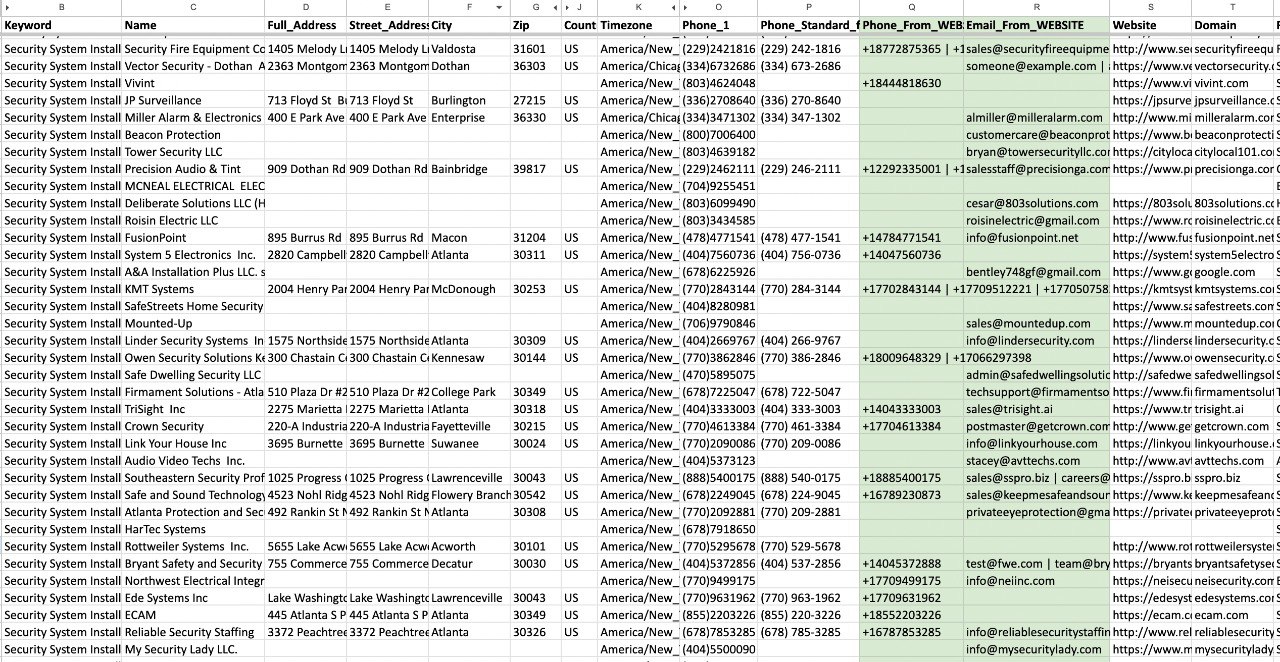
Leads Sniper recognizes that 99% of Google Maps data ends up in a spreadsheet or CRM. As a result, the output is pre-cleaned.
- Split Addresses: Street, City, State, and Zip Code are automatically separated into distinct columns.
- Phone Normalization: Numbers are formatted consistently.
- Email Discovery: The tool often includes a secondary step that visits the business website found on Maps to hunt for an email address a feature that usually requires building a complex "nested scraping" workflow in tools like Octoparse.
The goal is to provide a file that is "import-ready" for platforms like Salesforce, HubSpot, or a cold calling dialer immediately after the download finishes.
Where Leads Sniper Is NOT Suitable
To maintain an honest comparison, it is crucial to understand where this tool falls short. If your needs fall outside specific parameters, Leads Sniper is the wrong choice.
- Non-Maps Data: If you need to scrape Yelp, Yellow Pages, or LinkedIn, this tool cannot help you. It is a one-trick pony, albeit a very good one.
- Complex Custom Logic: You cannot tell Leads Sniper to "scrape the first 5 reviews, then click the owner's profile, then take a screenshot." It follows a strict, pre-defined extraction pattern. If you need highly customized behavior, you need a builder like Octoparse.
- Web-Based Interaction: Leads Sniper is often a browser extension or a local desktop application. It does not typically offer the same cloud-based, API-triggerable infrastructure that enterprise developers might need for deeply integrated, automated applications.
In summary, Leads Sniper trades flexibility for speed and ease of use. It is the superior choice for users whose primary bottleneck is "I need 5,000 local leads by tomorrow," but it is not a replacement for a comprehensive web scraping platform.
Key Takeaway
If you look at the table, the distinction is clear. Octoparse wins on flexibility. If you need to scrape 10 different websites, it is the better investment. However, Leads Sniper wins on efficiency specifically for Google Maps. It removes the technical friction of setup, maintenance, and data cleaning, allowing you to get to the outreach phase significantly faster.