
Google Maps holds data on hundreds of millions of businesses worldwide. It's no surprise that marketers, agencies, and developers all want access to it. But the tools they use to get that data are very different.
This guide compares Leads Sniper vs Google Maps API across features, pricing, technical requirements, and real-world use cases. Both tools can help you work with Google Maps business data, but they are built for different people with different goals.
The short version: Google Maps API is a developer platform for building custom mapping and location applications. Leads Sniper is a no-code tool designed specifically for extracting business leads. The right choice depends on what you're trying to accomplish, who's on your team, and what you can spend.
Let's break it down.
What Is Google Maps API?
Google Maps API is a collection of developer services offered through Google Cloud. It gives programmers programmatic access to maps, location data, and business information. Developers use it to build map-powered features into websites, mobile apps, and internal tools.
The API is made up of several distinct products, each serving a different function:
- Places API – Returns detailed information about businesses and points of interest, including names, addresses, phone numbers, ratings, and opening hours. Within this product, key endpoints include Text Search (find places by search query), Nearby Search (find places around a coordinate), and Place Details (fetch full data for a specific place).
- Maps JavaScript API – Embeds an interactive, customizable map into a web page.
- Maps Embed API – Lets you embed a map with a simple HTML iframe, no JavaScript needed.
- Geocoding API – Converts street addresses into geographic coordinates and vice versa.
- Distance Matrix API – Calculates travel time and distance between multiple origins and destinations.
- Directions API – Returns step-by-step route information between locations.
What Data Can the Google Maps API Return?
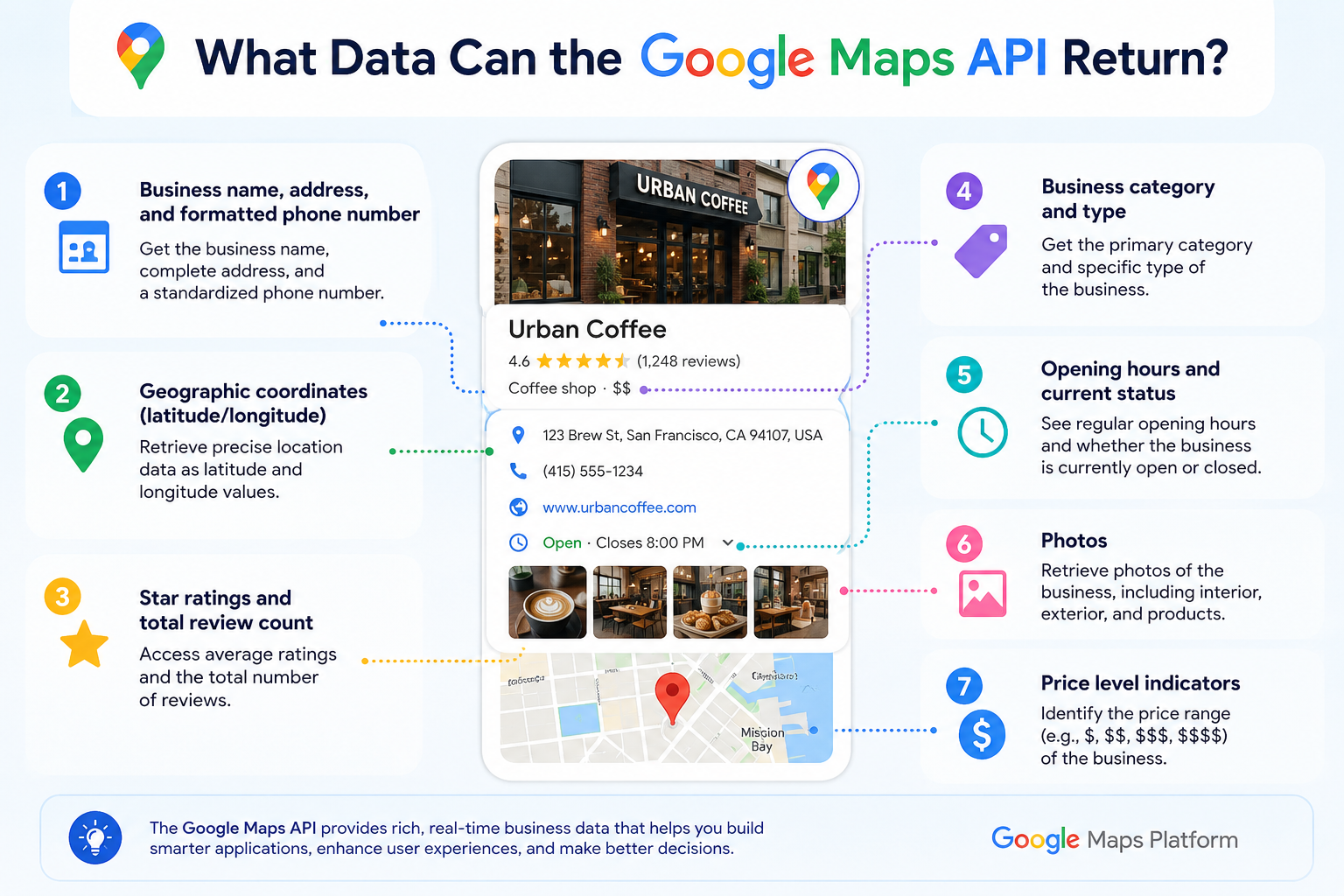
Through the Places API, a developer can retrieve a wide range of business and location details per result, including:
- Business name, address, and formatted phone number
- Geographic coordinates (latitude/longitude)
- Star ratings and total review count
- Business category and type
- Website URL
- Opening hours and current status
- Photos
- Price level indicators
This data is accurate and sourced directly from Google, which makes it highly reliable for mapping and location-based applications.
How Does It Work in Practice?
To use the Google Maps API, you need a Google Cloud account, a billing profile, and an API key. API keys authenticate your requests and tie usage to your account. Developers send structured requests to Google's servers via code typically REST API calls or a supported SDK and receive data in JSON format.
Setting up a working integration takes anywhere from a few hours to several days, depending on complexity. You'll need comfort with documentation, code, and error handling. It is not a tool designed for non-technical users.
Advantages of Google Maps API
When used for its intended purpose, Google Maps API is one of the most capable location data platforms available.
- Official Google data: All results come directly from Google's own index, ensuring accuracy and freshness.
- Rich data per record: Place Details can return dozens of fields per location, giving developers granular information.
- Developer flexibility: The API can be integrated into virtually any technology stack, from mobile apps to enterprise systems.
- Custom mapping and UX: Businesses can build branded, interactive maps with custom markers, filters, and overlays.
- Global reach: The API covers locations in nearly every country and supports dozens of languages.
- Enterprise scalability: Google's infrastructure handles massive request volumes reliably.
For product teams, SaaS companies, and enterprises that need location features inside their software, the Google Maps API is a mature, well-documented solution.
Limitations of Google Maps API
Despite its power, the Google Maps API has meaningful limitations for anyone trying to use it as a lead generation or prospecting tool.
It requires a developer. Without coding skills, you cannot query the API, parse the response, or export the data. Most marketing and sales teams don't have that capability in-house.
It is not built for bulk lead extraction. The API is designed for serving individual queries inside applications, not for pulling thousands of business listings into a spreadsheet. Businesses should review Google's data usage policies carefully before using API results for marketing or prospecting, as certain bulk uses and data caching practices may be restricted under the platform's terms of service.
Costs scale with usage. Every request to the API costs money beyond the free monthly credit. The Places API, particularly Place Details, is among the higher-priced SKUs. At scale, this can become expensive quickly.
Other practical limits include:
- Per-minute and per-day request quotas that can throttle large searches
- No native data export (CSV, Excel, or otherwise) you must build this yourself
- Restrictions on how long certain response data can be stored or cached
- A steep learning curve for teams unfamiliar with APIs and cloud platforms
In summary, the Google Maps API is a mapping and location infrastructure tool. Using it as a bulk lead list generator requires significant technical work and careful attention to policy.
What Is Leads Sniper?
Leads Sniper is a lead generation software built specifically for extracting business data from Google Maps. It is designed for people who don't write code marketers, sales reps, agencies, and freelancers who need prospect lists fast.
The workflow is simple: you enter a business category and a location, and Leads Sniper collects publicly visible business listings from Google Maps. The results include business names, addresses, phone numbers, websites, and other available contact details. Once collected, the data exports directly to a spreadsheet.
This makes Leads Sniper a practical option for teams focused on local business lead generation, B2B outreach, or building targeted prospect lists for specific industries and regions.
A practical example: A freelance marketing consultant wants to pitch digital services to 300 plumbing companies across three cities. Using Leads Sniper, she can search each city, collect the listings, and have a working contact list ready for outreach in an afternoon no developer required.
Leads Sniper vs Google Maps API: Detailed Comparison
Google Maps API and Leads Sniper solve fundamentally different problems. The better choice depends on whether your goal is application development or sales prospecting. That said, the comparison below helps clarify where each tool excels and where each falls short.
Neither tool is universally superior. They target different users with different workflows. The question is which one fits your specific situation.
Google Maps API Pricing vs Leads Sniper Cost
Understanding the full cost of each tool requires looking beyond the sticker price.
Google Maps API Pricing
Google Maps API uses a pay-as-you-go model. Every account receives a free monthly credit of $200, which covers a limited number of API calls depending on which services you use.
Beyond the free credit, you pay per request, and each product carries a different price. The Places API is one of the more expensive services. Place Details requests — which return the rich business data most useful for lead generation are charged per call. Text Search and Nearby Search are also billed separately per request.
Example scenario: If a team runs 10,000 Place Details requests in a month, and the free credit has already been used on other services, the cost for just those requests could reach hundreds of dollars. Add development time, code maintenance, and potential overages, and the total cost of ownership grows quickly.
The API pricing structure is transparent but complex. Teams should use Google's pricing calculator and monitor usage carefully to avoid bill surprises.
Leads Sniper Cost
Leads Sniper typically operates on a flat subscription model. You pay a fixed monthly or plan-based fee and can run searches within that plan's limits without per-query charges.
For teams running frequent prospecting campaigns, this predictability is a significant advantage. There are no surprise costs tied to search volume, and no need to track individual API calls.
Total Cost of Ownership
When comparing the two for lead generation purposes, the full picture includes:
- API development cost: Building and maintaining a system to query the API, parse results, and export them takes meaningful engineering time.
- API billing: Usage costs beyond the free tier can add up quickly at prospecting scale.
- Tool subscription: A flat-rate subscription is easier to budget and typically cheaper for high-volume lead collection without a developer on staff.
For teams without developers, Leads Sniper is almost always the more cost-effective and time-efficient path to a ready-to-use prospect list.
Real-World Use Case Scenarios
Understanding how each tool is used in practice helps clarify the decision.
Scenario 1: A marketing agency building a local SEO service
An agency wants to generate leads for a new service targeting restaurants in major cities. They need 2,000 contacts in two weeks. Using the Google Maps API would require a developer to build a data pipeline, handle pagination, and export results. With Leads Sniper, the account manager can run the searches directly and have an exportable list ready within hours.
Scenario 2: A SaaS company building a store locator
A retail brand needs an interactive map on their website showing nearby store locations. This is exactly what the Google Maps API is built for. Their developer integrates the Maps JavaScript API and Places API to display real-time, customizable results. Leads Sniper isn't relevant here this is a development task, not a prospecting task.
Scenario 3: A sales team prospecting for B2B outreach
A software company wants to reach out to 500 accounting firms across the Midwest. The sales rep uses Leads Sniper to collect firm names, addresses, phone numbers, and websites by city. The exported spreadsheet feeds directly into their CRM for outreach. No developer is involved at any point.
Scenario 4: A developer building a delivery app
A startup needs routing, distance calculations, and map rendering for their logistics platform. They integrate the Distance Matrix API, Directions API, and Maps JavaScript API. This is a clear Google Maps API use case. A lead generation tool serves no purpose here.
Google Maps API Alternatives: A Broader Look
If you're searching for a Google Maps API alternative, it's worth knowing that multiple tools exist across different categories. The right alternative depends on your technical skills, budget, and use case.
Each tool serves a different primary audience. Leads Sniper and Outscraper focus on extracting business contact data for prospecting. Apify offers more flexibility for developers who want to build automated scraping workflows. PhantomBuster extends into broader sales automation. The Google Maps API remains the standard choice for anyone building a product that needs official mapping infrastructure.
When evaluating alternatives, always check each platform's compliance approach, data freshness, export capabilities, and pricing model before committing.
Which One Should You Choose?
Your goal is the clearest indicator of which tool fits.
Choose Google Maps API if you:
- Are building a website, mobile app, or internal tool that needs maps or location search.
- Need custom functionality like store locators, route planning, or geofencing.
- Have software developers who can write and maintain integrations.
- Require real-time, official location data embedded inside a product.
- Are working at an enterprise level with specific technical and compliance requirements.
Choose Leads Sniper if you:
- Need a ready-to-use list of local businesses for outreach or sales prospecting.
- Want to collect leads without writing any code.
- Work as a marketer, freelancer, agency owner, or sales professional.
- Need results quickly in hours, not days.
- Want an exportable spreadsheet you can drop directly into your CRM or email tool.
The decision isn't really about which tool is "better." It's about which one was built for your workflow.
Why Businesses Choose Leads Sniper for Lead Generation
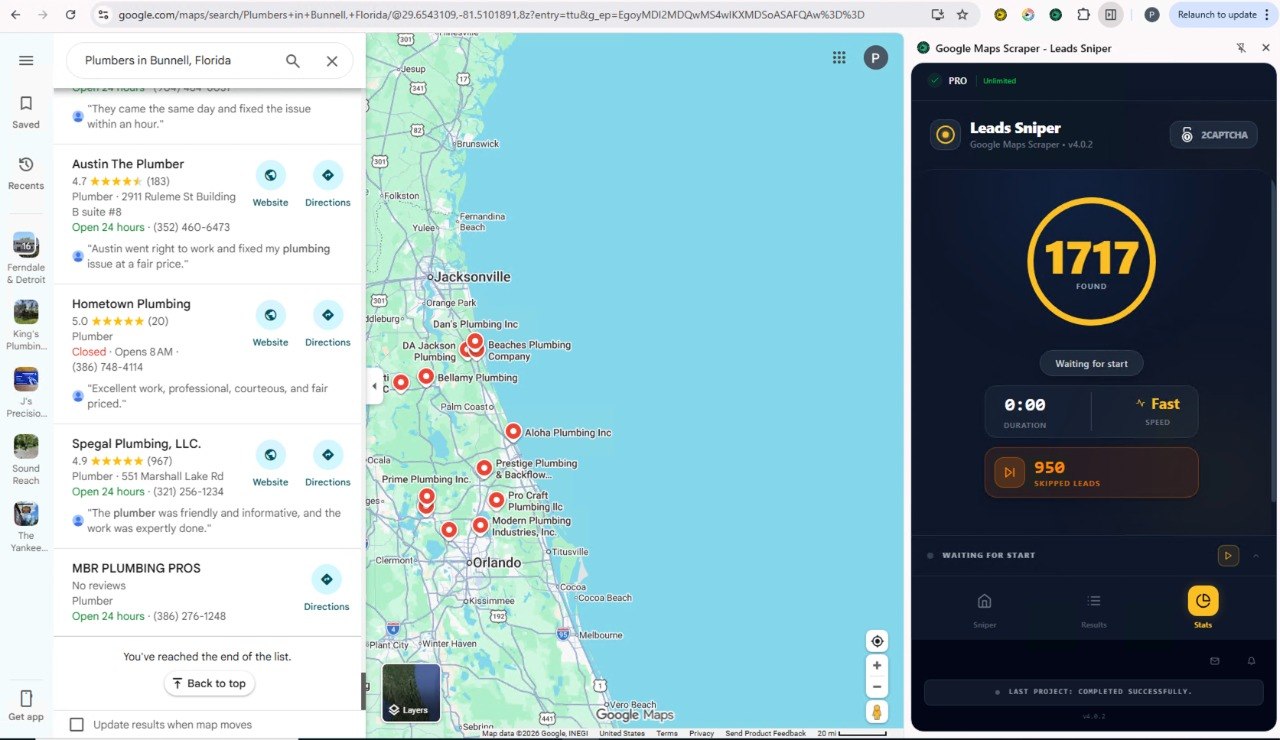
For teams focused on finding prospects rather than building software, Leads Sniper offers several practical advantages over assembling a custom Google Maps data pipeline.
No code, no developer dependency. Any team member can run a search, collect data, and export it. There's no waiting on engineering resources or maintaining a fragile scraping script.
Faster time to outreach. What might take days to set up with the API can often be done in under an hour with a dedicated lead tool. For agencies and freelancers working on client timelines, this matters.
Predictable costs. A flat subscription means you know what you're paying each month, regardless of how many searches you run. There are no per-request charges to track or calculate.
Export-ready data. Results come out in formats your CRM, email platform, or sales tool can use immediately. No data transformation pipeline required.
Repeatable prospecting workflow. Sales teams can build a consistent process around the tool searching new geographies or verticals each week without needing to rebuild anything.
For agencies managing multiple clients, local lead generation becomes a repeatable, scalable operation rather than a one-off technical project.
If your team needs to start building local business prospect lists, Leads Sniper offers a straightforward way to get started without technical overhead.
Frequently Asked Questions
What is the best Google Maps API alternative?
The best alternative depends on your goal. For no-code lead generation, Leads Sniper is a practical choice. For developer-driven data extraction at scale, Outscraper or Apify Google Maps Scraper are worth evaluating. For custom mapping without Google's pricing, open-source options like OpenStreetMap exist but require technical setup.
Is Google Maps API free?
Google Maps API includes a $200 monthly free credit, which covers a limited volume of API calls. Once usage exceeds that credit, Google charges per request based on the specific service used. For teams making large numbers of Place Details or Text Search requests, costs can grow significantly beyond the free tier.
Can Google Maps API generate leads?
The API can return business data names, addresses, phone numbers, and more — that could theoretically be used for prospecting. However, the API is not designed as a lead generation platform, and businesses should review Google's data usage policies before using retrieved data for marketing purposes. There is also no native export to sales-ready formats like CSV or Excel.
What is the difference between Leads Sniper and Google Maps API?
The core difference is purpose and audience. Google Maps API is a developer platform for building applications with maps and location features. Leads Sniper is a no-code tool built specifically to extract business listings from Google Maps for sales prospecting. They overlap in the data they can access but serve entirely different workflows.
Is Leads Sniper better than Google Maps API?
Neither is universally better. Google Maps API is the stronger choice for building mapping applications and location-powered software. Leads Sniper is the better fit for marketers, sales teams, and agencies who need prospect lists quickly without writing code. Evaluate based on your use case, not on a blanket preference.
What tools can extract Google Maps business data?
Several tools support Google Maps business data extraction, including Leads Sniper, Outscraper, and Apify Google Maps Scraper. Each differs in ease of use, pricing, data volume limits, and compliance approach. Always review a tool's terms and your own legal obligations around data use before running large collection campaigns.
Does Google Maps API have limits?
Yes. The Google Maps API applies rate limits, per-day quotas, and usage caps per endpoint. Place Details, Nearby Search, and Text Search all have separate billing thresholds. In addition, Google's platform terms place restrictions on caching, storing, and redistributing certain types of location data.
Who should use Google Maps API?
Software developers, product engineers, and technical teams building applications that require maps, routing, geocoding, or location search. It is not well-suited for non-technical users or for bulk lead generation without significant custom development.
What data does the Google Maps Places API return?
The Places API can return business name, address, phone number, website, star rating, review count, business category, coordinates, opening hours, price level, and photos, among other fields. The exact fields available depend on which endpoint you use and what data Google has indexed for that location.
How long does it take to set up Google Maps API vs Leads Sniper?
Setting up the Google Maps API including account creation, billing configuration, key setup, and building a working integration typically takes a developer several hours to a few days. Leads Sniper can be set up and producing results within minutes by a non-technical user.
Final Thoughts on Leads Sniper vs Google Maps API
The Leads Sniper vs Google Maps API comparison ultimately comes down to one question: are you building something, or are you selling something?
If you are building a product a website with a store locator, a logistics app with routing, a platform powered by real-time location data the Google Maps API gives you the official infrastructure to do that reliably and at scale.
If you are selling prospecting for clients, building outreach lists, identifying local businesses to contact a dedicated lead generation tool like Leads Sniper removes the technical barriers and gets you to outreach faster.
Both tools have genuine value. Neither is a perfect fit for everything. Evaluate your goals honestly, weigh the costs and constraints of each, and make sure whatever data you collect is used responsibly and in line with applicable marketing and privacy regulations.
The right tool is the one that fits your workflow today and scales with your needs tomorrow.