
Choosing between Leads Sniper and PhantomBuster is not really a question of which tool is "better." It is a question of what you are trying to accomplish and which tool is built for it. One is a purpose-built Google Maps scraper with deep local data extraction.
The other is a broad, cloud-based automation platform that spans multiple platforms. The overlap between them is smaller than it might appear.
This article breaks down both tools across the criteria that matter most: what they extract, how they work, what they cost, and which types of users will get the most value from each. There is no universal winner here. There is only the right tool for your workflow.
All pricing verified as of August 2026 from official vendor websites. Feature details, limits, and platform counts should be confirmed directly with each vendor before purchase, as SaaS products change frequently.
Quick Decision Table
What Each Tool Is Built For
Leads Sniper
Leads Sniper is a no-code, browser-based web scraping toolkit focused on local business data extraction. It runs as a Chrome and Edge extension with no proxies, no VPS, and no complex setup required. Its core product suite includes:
The primary use case is extracting structured business data at scale for local lead generation, competitive analysis, and market research.
According to the company's official website, the platform reports over 12,000 customers, 50,000+ active users, more than 10 million leads generated, and a 4.8/5 rating. These figures are self-reported and should be treated accordingly.
PhantomBuster
PhantomBuster is a cloud-based automation platform with a library of pre-built "Phantoms" and multi-step workflows covering LinkedIn, Instagram, X (formerly Twitter), Facebook, Google Maps, Sales Navigator, and additional platforms.
The company states support for 100+ automations across 15+ platforms, though users should verify current platform coverage on the official PhantomBuster website. It runs in the cloud, meaning automations continue without your browser open.
It is designed for teams that need to extract data, enrich it, and push it into outreach sequences or CRM pipelines within a single platform.
Is Leads Sniper a PhantomBuster Alternative?
This is worth addressing directly, because the honest answer is: it depends entirely on what you used PhantomBuster for.
Leads Sniper is not a 1:1 replacement for PhantomBuster. PhantomBuster does a great deal more than Google Maps scraping. It handles LinkedIn automation, multi-platform outreach, CRM sync, and AI-powered enrichment across a broad range of sources. Leads Sniper does none of those things.
Where Leads Sniper functions as a genuine PhantomBuster alternative is in the specific area of local business data extraction, particularly from Google Maps, Yellow Pages, and Google Search. For that specific workflow, it is a strong and often better-suited option. For everything else PhantomBuster does, it is not a replacement.
This distinction matters. If you are evaluating Leads Sniper purely as a PhantomBuster alternative for local data extraction, the case is strong. If you need a full PhantomBuster replacement across all of its capabilities, no single tool covers everything PhantomBuster does.
When Leads Sniper Is NOT the Right PhantomBuster Alternative
Some PhantomBuster use cases have no equivalent in Leads Sniper. If any of the following describe your primary workflow, Leads Sniper will not meet your needs.
LinkedIn automation and outreach. Leads Sniper has no LinkedIn capability whatsoever. It cannot scrape LinkedIn profiles, send connection requests, or run message sequences. If LinkedIn is your primary prospecting source, PhantomBuster or a dedicated LinkedIn tool is required.
Sales Navigator. PhantomBuster supports Sales Navigator search export and enrichment workflows. Leads Sniper does not interact with LinkedIn or Sales Navigator in any form.
CRM workflows. PhantomBuster offers native integrations with HubSpot (two-way sync), Salesforce, and Pipedrive (verify current integration status and sync direction on the PhantomBuster website before relying on this). Leads Sniper has no CRM integration. Data leaves Leads Sniper as a CSV or Excel file. Any CRM upload requires a separate, manual step.
Multi-platform automation. PhantomBuster supports automation across LinkedIn, Instagram, X, Facebook, Google Maps, and more from a single platform. Leads Sniper covers Google Maps, Google Search, Yellow Pages, and domain email extraction only.
Cloud-based execution. PhantomBuster automations run in the cloud and do not require your browser to stay open. Leads Sniper is a browser extension. The browser must remain open for scraping to run.
Outreach automation. PhantomBuster can send connection requests, messages, and run multi-step outreach sequences. Leads Sniper extracts data and exports it. It does not send anything.
If these capabilities are central to your workflow, Leads Sniper is the wrong choice, and that is worth stating clearly.
Leads Sniper vs PhantomBuster: Which Is Better for Each Use Case?
Feature Comparison Table
A Closer Look at Google Maps Data: Where Leads Sniper Has a Clear Edge
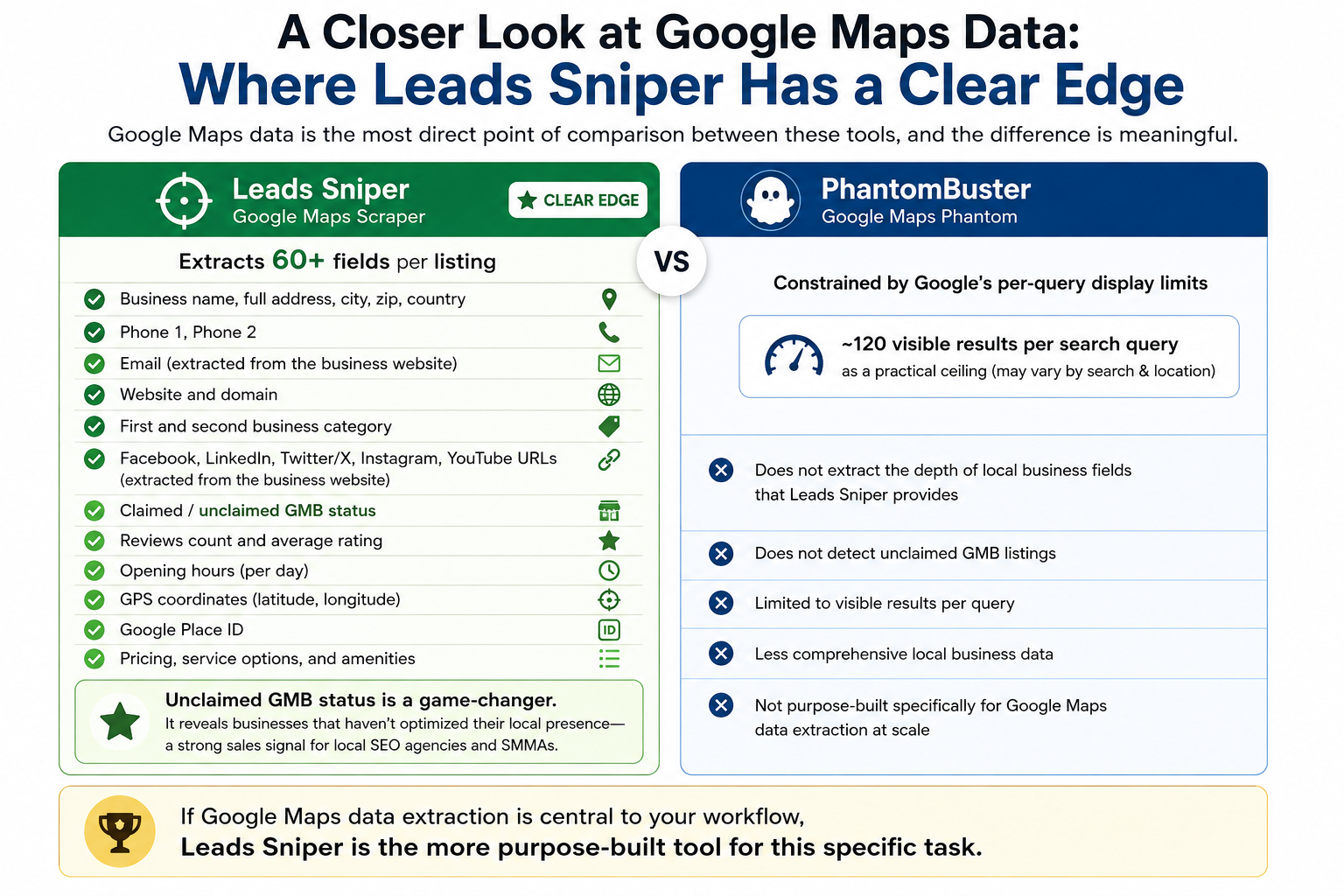
Google Maps data is the most direct point of comparison between these tools, and the difference is meaningful.
Leads Sniper's Google Maps Scraper is reported to extract 60+ fields per listing (verify the current field list in the product documentation), including:
- Business name, full address, city, zip, country
- Phone 1, Phone 2
- Email (extracted from the business website, not directly from the Google Maps listing)
- Website and domain
- First and second business category
- Facebook, LinkedIn, Twitter/X, Instagram, and YouTube URLs (extracted from the business website)
- Claimed / unclaimed GMB status
- Reviews count and average rating
- Opening hours (per day)
- GPS coordinates (latitude, longitude)
- Google Place ID
- Pricing, service options, and amenities
The unclaimed GMB status field deserves particular attention. For local SEO agencies and SMMA owners, identifying unclaimed Google Business Profiles is a direct sales signal. It shows you which businesses have not yet optimized their local presence and may be receptive to your services.
PhantomBuster's Google Maps Phantom exists and is functional, but it is constrained by Google's per-query display limitations. Independent sources, including Scrap.io's published comparison, cite approximately 120 visible results per search query as a practical ceiling, though this may vary depending on the search and location.
For users who need hundreds or thousands of records from a single category or geography, this is a meaningful limitation. PhantomBuster also does not extract the depth of local business fields that Leads Sniper provides, nor does it detect unclaimed GMB listings.
If Google Maps data extraction is central to your workflow, Leads Sniper is the more purpose-built tool for this specific task.
A Closer Look at Multi-Platform Automation: Where PhantomBuster Has a Clear Edge
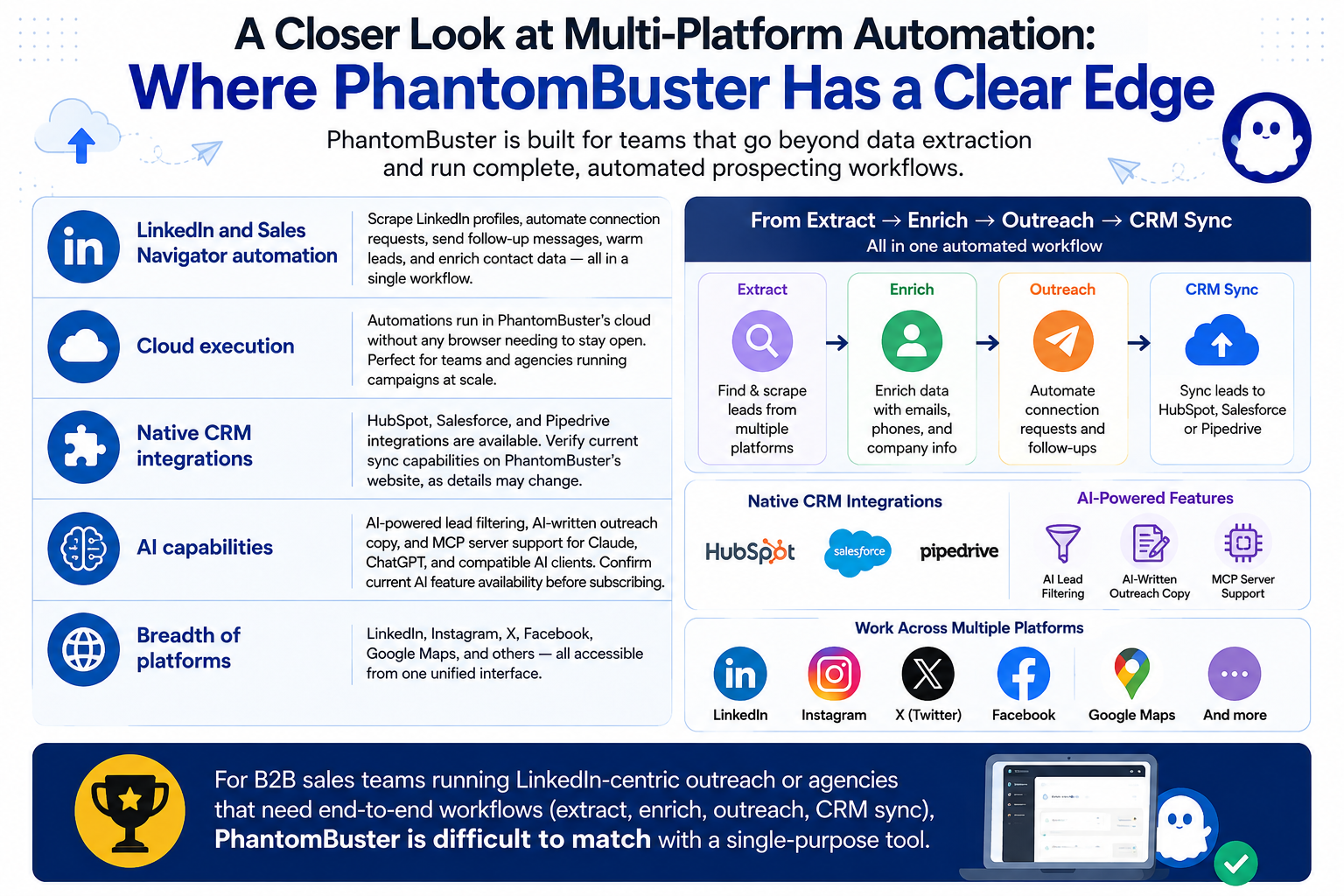
PhantomBuster is a genuinely capable platform for teams that need to move beyond data extraction into structured prospecting workflows. Its strengths in this area are well-documented:
- LinkedIn and Sales Navigator automation: PhantomBuster can scrape LinkedIn profiles, automate connection requests, send follow-up messages, warm leads, and enrich contact data within a single workflow.
- Cloud execution: Automations run in PhantomBuster's cloud without any browser needing to stay open, which is practical for teams and agencies running campaigns at scale.
- Native CRM integrations: HubSpot, Salesforce, and Pipedrive integrations are available. Verify current sync capabilities on the PhantomBuster pricing and features pages, as integration details may change.
- AI capabilities: PhantomBuster includes AI-powered lead filtering, AI-written outreach copy, and MCP server support for Claude, ChatGPT, and compatible AI clients. Confirm current AI feature availability before committing to a plan.
- Breadth of platforms: LinkedIn, Instagram, X, Facebook, Google Maps, and others are accessible from one interface.
For B2B sales teams running LinkedIn-centric outreach or agencies that need end-to-end workflows (extract, enrich, outreach, CRM sync), PhantomBuster is difficult to match with a single-purpose tool.
Ease of Use
Leads Sniper is straightforward. Install the Chrome or Edge extension, run a search, and export your data to CSV or Excel. No workflow builder, no proxy configuration, and no account linking is required. Most users are operational within minutes. The free trial requires no credit card.
PhantomBuster has a moderate learning curve. Building and scheduling Phantom workflows, managing execution time slots, and connecting platform accounts takes more initial setup.
The resource management system, with separate meters for execution time, email credits, URL finder credits, and AI credits, requires active attention to avoid workflows pausing mid-cycle. For teams comfortable with automation tools, PhantomBuster's interface is well-documented and the pre-built Phantom library covers most common use cases without requiring custom development.
Pricing and Cost Comparison
This is one of the most important structural differences between the two tools.
Leads Sniper: One-Time Payment
Leads Sniper uses a one-time payment model with no recurring fees. Lifetime access and lifetime updates are included according to the company's pricing page. Verify current pricing on the Leads Sniper website before purchase.
There is no refund policy after purchase. Taking advantage of the free trial before buying is strongly recommended.
PhantomBuster: Monthly Subscription (Annual Billing)
All figures below are from the PhantomBuster pricing page as of August 2026. Verify current plan details directly on the PhantomBuster website.
For freelancers, solo operators, and smaller agencies, the long-term cost difference is substantial. PhantomBuster's subscription pricing is more justifiable for teams that actively use its full feature set, including CRM integrations, multi-platform workflows, and AI enrichment, where the monthly investment has a clear return.
Limitations to Know Before You Buy
Leads Sniper Limitations
- No LinkedIn scraping or outreach: If your prospecting relies on LinkedIn, Leads Sniper is not relevant.
- No CRM integration: Data is exported to CSV or Excel. Any CRM upload is a manual step.
- No cloud automation: The browser extension must be running for scraping to occur.
- Email extraction depends on website data: If a business does not display an email on its website, Leads Sniper cannot extract one. Social URLs are similarly sourced from business websites, not from Google Maps listings directly.
- No refund policy: The free trial exists to mitigate this, but there is no safety net after purchase.
PhantomBuster Limitations
- Google Maps is not its primary strength: The per-query display cap limits bulk extraction. For high-volume Google Maps data, a dedicated tool is generally more effective.
- LinkedIn automation carries account risk: Automated activity on LinkedIn can result in account restrictions. PhantomBuster mitigates this with safety delays and conservative usage settings, but the risk cannot be entirely eliminated.
- Resource meters require active management: Running out of execution hours, email credits, or URL finder credits mid-cycle pauses workflows. There is no mid-cycle top-up for execution hours.
- Recurring cost: The subscription model is ongoing. For users with intermittent lead generation needs, the monthly fee continues regardless of usage.
- Email credits charged on attempts, not on successful finds: You pay for every enrichment attempt whether or not an email is returned.
Use-Case Scenarios
Scenario 1: Local SEO Agency Prospecting for New Clients
Workflow: Find businesses in a target city with unclaimed Google Business Profiles, extract contact info, and pitch GMB management services.
Best fit: Leads Sniper. The unclaimed GMB status field enables this workflow directly. Combined with the ability to extract phone numbers, emails, and social URLs at scale, an agency can build a targeted prospect list quickly. PhantomBuster's Google Maps Phantom does not surface unclaimed GMB status and is subject to per-query display limits that make city-wide extraction less practical.
Scenario 2: B2B SaaS Sales Team Running LinkedIn Outreach
Workflow: Scrape a list of marketing managers from LinkedIn, enrich with company data, sequence connection requests and follow-up messages, and sync qualified leads to HubSpot.
Best fit: PhantomBuster. This is exactly what it is designed for. Leads Sniper does not support LinkedIn in any capacity.
Scenario 3: SMMA Owner Scaling Lead Generation for Multiple Niches
Workflow: Build niche-specific prospect lists (restaurants, gyms, law firms) across multiple cities, and export clean data for cold email or cold calling campaigns.
Best fit: Leads Sniper. The combination of Google Maps Scraper and Yellow Pages Scraper covers the majority of local business prospecting workflows. One-time pricing makes it cost-effective to maintain across multiple client verticals without recurring monthly overhead. PhantomBuster could support this use case, but the subscription cost and per-query display limits make it less practical for high-volume, category-specific extraction.
Scenario 4: Marketing Agency Running Multi-Channel Prospecting Campaigns
Workflow: Prospect across LinkedIn, Instagram, and Google Maps simultaneously; enrich lead data with emails; push to CRM for sales follow-up.
Best fit: PhantomBuster. Leads Sniper covers Google Maps extraction in this stack, but cannot interact with LinkedIn or Instagram, and has no CRM integration. PhantomBuster handles the full workflow natively.
Scenario 5: Freelance Lead Gen Specialist Selling Targeted Lists
Workflow: Build and sell pre-packaged business lists by city, niche, and data quality for clients across industries.
Best fit: Leads Sniper. The one-time pricing eliminates recurring overhead on list-building revenue. The 60+ data fields per listing (self-reported; verify current field coverage in the product documentation) allow for rich, high-value deliverables. There are no per-export or credit-based limits on lead volume.
Scenario 6: Ecommerce Agency Identifying Wholesale or B2B Prospects
Workflow: Find local manufacturers, distributors, or retail businesses in specific categories, and extract contact data for outreach.
Best fit: Leads Sniper for local business discovery via Google Maps and Yellow Pages. If the target audience is primarily on LinkedIn (for example, procurement managers at mid-sized companies), PhantomBuster becomes more relevant.
Scenario 7: Coaches and Consultants Building a Local Client Pipeline
Workflow: Identify local businesses in a specific niche (such as medical practices or financial advisors), pull contact info, and run a cold outreach campaign.
Best fit: Leads Sniper. Low setup complexity, no technical background required, one-time cost, and straightforward CSV exports make it accessible for non-technical operators. PhantomBuster is workable but over-engineered for this use case.
Who Should Use What?
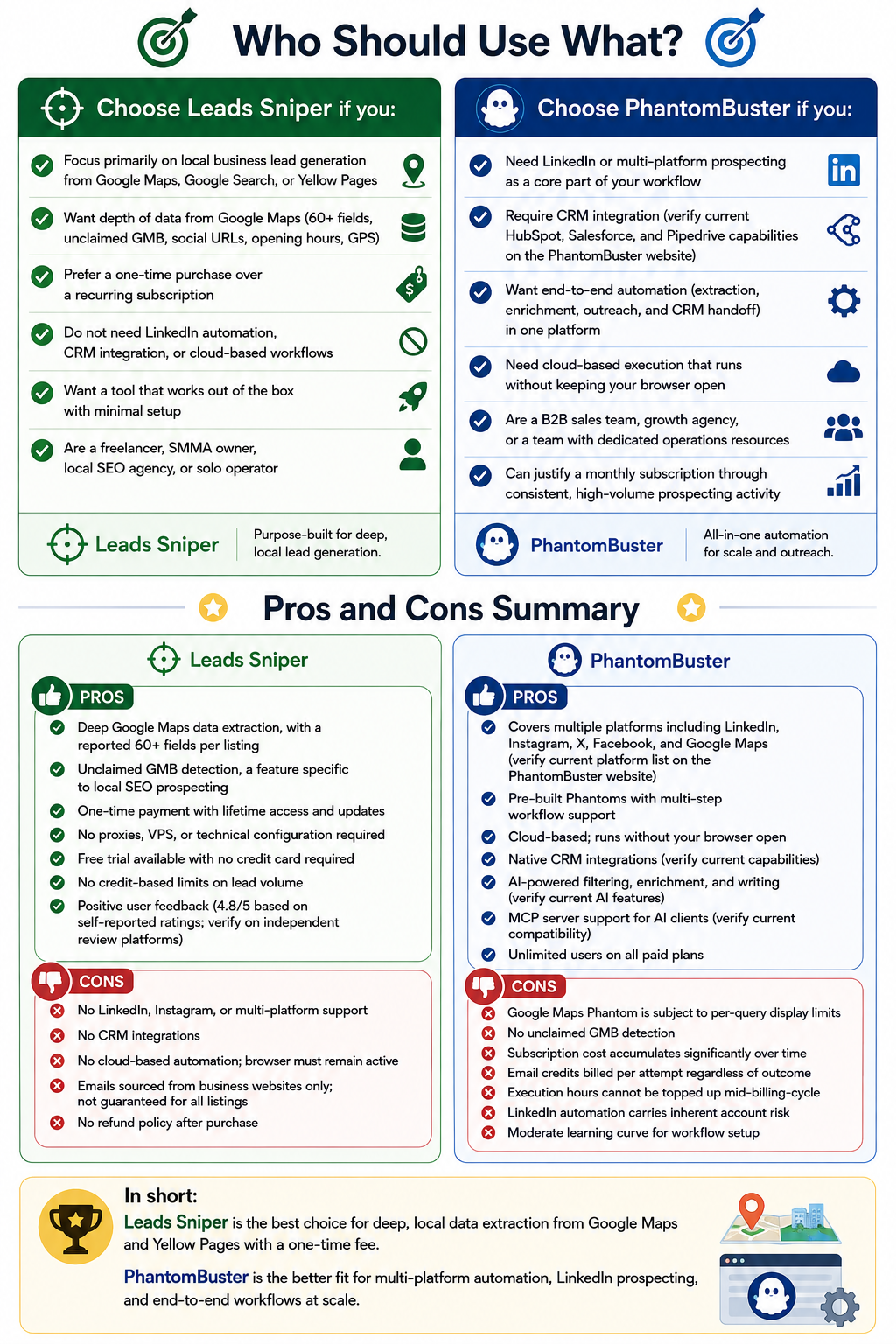
Choose Leads Sniper if you:
- Focus primarily on local business lead generation from Google Maps, Google Search, or Yellow Pages
- Want depth of data from Google Maps (60+ fields, unclaimed GMB, social URLs, opening hours, GPS)
- Prefer a one-time purchase over a recurring subscription
- Do not need LinkedIn automation, CRM integration, or cloud-based workflows
- Want a tool that works out of the box with minimal setup
- Are a freelancer, SMMA owner, local SEO agency, or solo operator
Choose PhantomBuster if you:
- Need LinkedIn or multi-platform prospecting as a core part of your workflow
- Require CRM integration (verify current HubSpot, Salesforce, and Pipedrive capabilities on the PhantomBuster website)
- Want end-to-end automation (extraction, enrichment, outreach, and CRM handoff) in one platform
- Need cloud-based execution that runs without keeping your browser open
- Are a B2B sales team, growth agency, or a team with dedicated operations resources
- Can justify a monthly subscription through consistent, high-volume prospecting activity
Pros and Cons Summary
Leads Sniper
Pros:
- Deep Google Maps data extraction, with a reported 60+ fields per listing
- Unclaimed GMB detection, a feature specific to local SEO prospecting
- One-time payment with lifetime access and updates
- No proxies, VPS, or technical configuration required
- Free trial available with no credit card required
- No credit-based limits on lead volume
- Positive user feedback (4.8/5 based on self-reported ratings; verify on independent review platforms)
Cons:
- No LinkedIn, Instagram, or multi-platform support
- No CRM integrations
- No cloud-based automation; browser must remain active
- Emails sourced from business websites only; not guaranteed for all listings
- No refund policy after purchase
PhantomBuster
Pros:
- Covers multiple platforms including LinkedIn, Instagram, X, Facebook, and Google Maps (verify current platform list on the PhantomBuster website)
- Pre-built Phantoms with multi-step workflow support
- Cloud-based; runs without your browser open
- Native CRM integrations (verify current capabilities)
- AI-powered filtering, enrichment, and writing (verify current AI features)
- MCP server support for AI clients (verify current compatibility)
- Unlimited users on all paid plans
Cons:
- Google Maps Phantom is subject to per-query display limits
- No unclaimed GMB detection
- Subscription cost accumulates significantly over time
- Email credits billed per attempt regardless of outcome
- Execution hours cannot be topped up mid-billing-cycle
- LinkedIn automation carries inherent account risk
- Moderate learning curve for workflow setup
Frequently Asked Questions
What is the best PhantomBuster alternative for Google Maps scraping?
For Google Maps specifically, Leads Sniper is one of the more capable alternatives in this niche. Its Google Maps Scraper is reported to extract 60+ fields per listing, including unclaimed GMB status, social media URLs, GPS coordinates, and opening hours.
Other PhantomBuster alternatives commonly cited for Google Maps extraction include Apify, Outscraper, and Scrap.io. Each has its own pricing model, coverage approach, and trade-offs worth evaluating separately.
What is the main difference between Leads Sniper and PhantomBuster?
The core difference is scope and workflow type. Leads Sniper is a focused, browser-based data extraction tool optimized for Google Maps, Google Search, Yellow Pages, and domain emails, with no outreach or CRM features.
PhantomBuster is a multi-platform cloud automation suite covering extraction, enrichment, outreach, and CRM sync across many platforms. They are designed for fundamentally different workflows.
Can Leads Sniper scrape Google Maps?
Yes. Google Maps scraping is Leads Sniper's primary capability. Its Google Maps Scraper is reported to extract 60+ data points per listing, including business name, full address, phone numbers, emails (sourced from business websites), social media URLs, ratings, reviews, GPS coordinates, opening hours, Place ID, and claimed/unclaimed GMB status.
There are no stated hard limits on the number of leads you can extract per session. Verify current capabilities in the product documentation.
Which tool is better for local lead generation agencies?
Leads Sniper is generally better suited for local lead generation agencies whose prospecting workflow centers on Google Maps and Yellow Pages data. Its combination of deep local business data fields, unclaimed GMB detection, and one-time pricing makes it purpose-built for this use case.
PhantomBuster's Google Maps capability is subject to per-query display limits and lacks the local-specific fields that most local agencies need.
Which tool is easier to use?
Leads Sniper has a lower barrier to entry. It is a browser extension with a free trial that requires no credit card, and most users can extract their first dataset within a few minutes.
PhantomBuster requires more initial configuration, including connecting platform accounts, building Phantom workflows, and managing resource meters. It is better suited to users with some familiarity with automation tools.
Is PhantomBuster's Google Maps scraper worth using?
It is functional but limited by Google's per-query display constraints. For occasional Google Maps lookups as part of a broader multi-platform workflow, it works.
For dedicated Google Maps prospecting at scale or for workflows that require deep local business data, a purpose-built tool is generally more effective.
How do the costs compare over time?
The difference is significant due to the two tools' fundamentally different pricing models. Leads Sniper uses a one-time payment (all pricing per the Leads Sniper pricing page, verified August 2026).
PhantomBuster uses a monthly subscription starting at $56 per month on annual billing (verified August 2026 on the PhantomBuster pricing page). Over three years, the cost gap widens considerably, especially at PhantomBuster's Grow and Scale tiers.
For users who need PhantomBuster's full feature set, the subscription may deliver clear ROI. For those who only need local data extraction, the ongoing cost is harder to justify.
Does Leads Sniper have a free trial? Is there a refund policy?
Yes, Leads Sniper offers a free trial with no credit card required. The company states there is no refund policy after purchase. Using the trial to confirm the tool meets your workflow needs before committing is strongly recommended.
Which tool is better for B2B prospecting?
It depends on where your B2B prospects are. If your targets are primarily local businesses (restaurants, contractors, law firms, clinics), Leads Sniper's Google Maps and Yellow Pages scrapers provide the most relevant data.
If your prospects are on LinkedIn, such as marketing managers, sales directors, or founders at specific company sizes, PhantomBuster is the right choice. Some B2B teams use both: a local data tool for offline businesses and a LinkedIn automation platform for professional network outreach.
Final Recommendations
There is no universal answer, and any article that declares one of these tools an outright winner is ignoring how different their use cases are.
Use Leads Sniper if your lead generation workflow centers on local businesses reachable through Google Maps, Google Search, or Yellow Pages. It is the stronger tool for extracting structured local business data, identifying unclaimed GMB listings, and building contact lists for cold outreach without an indefinite monthly subscription.
Use PhantomBuster if you need multi-platform automation, particularly LinkedIn, and want a single system to handle extraction, enrichment, outreach sequencing, and CRM sync. Its cloud infrastructure, AI features, and native integrations are genuine advantages for teams running structured, multi-touchpoint prospecting campaigns.
Some users will find that both tools play complementary roles: Leads Sniper for local and offline business data extraction, PhantomBuster for LinkedIn and professional network automation. The decision ultimately comes down to where your best prospects are and what your workflow requires after you find them.
Pricing, features, platform coverage, and integration details for both tools are subject to change. Verify all specifications directly on the official Leads Sniper and PhantomBuster websites before making a purchasing decision.