Quick Answer: Email scraping from social media is the process of extracting publicly available email addresses from social platforms to build prospect lists. Businesses use it for B2B sales, recruitment, and outreach. When done ethically and in compliance with GDPR, CAN-SPAM, and platform terms of service, social media email extraction is a powerful lead generation strategy.
Every day, millions of professionals share contact details across LinkedIn, Instagram, X, and dozens of other platforms. Their emails sit in bios, "About" sections, and public posts waiting to be found. The challenge isn't that this data doesn't exist. The challenge is finding it efficiently, verifying it accurately, and using it compliantly.
Email scraping from social media has become one of the most widely used tactics in B2B sales, lead generation, recruitment, and influencer outreach. Done right, it fills your CRM with high-intent prospects faster than almost any other method. Done wrong, it leads to spam complaints, legal exposure, and wasted effort.
This guide covers everything you need to know: how social media email extraction works, which platforms yield the best results, step-by-step workflows, tool comparisons, legal compliance, and advanced AI-powered prospecting techniques. Whether you're an SDR at a SaaS startup or a recruiter at a growing agency, the strategies here will help you build better lists and close more deals.
What Is Email Scraping from Social Media?
Email scraping from social media is the process of collecting publicly visible email addresses from social profiles, bios, posts, and pages either manually or using automated tools.
It differs from purchasing email lists. Scraped emails come from publicly accessible data that individuals or businesses have chosen to share. That distinction matters both ethically and legally.
Businesses use social media email extraction for several reasons:
- Lead generation: Building targeted outreach lists faster than traditional research
- Recruitment: Finding candidates who haven't applied but match a role
- Influencer marketing: Reaching creators directly rather than through platforms
- Partnership development: Identifying potential collaborators or referral partners
- Market research: Mapping industries, roles, and company structures
The practice isn't without limitations. Email addresses aren't always publicly listed. Platform restrictions, privacy settings, and data protection laws add complexity. And email quality varies widely depending on the method used.
The current state of social media prospecting is more sophisticated than it was five years ago. AI-powered tools now cross-reference profiles, enrich data, and predict email patterns at scale. At the same time, platforms like LinkedIn have tightened their APIs and rate limits. This means that manual research and smart tooling are both more important than ever.
How Does Social Media Email Extraction Work?
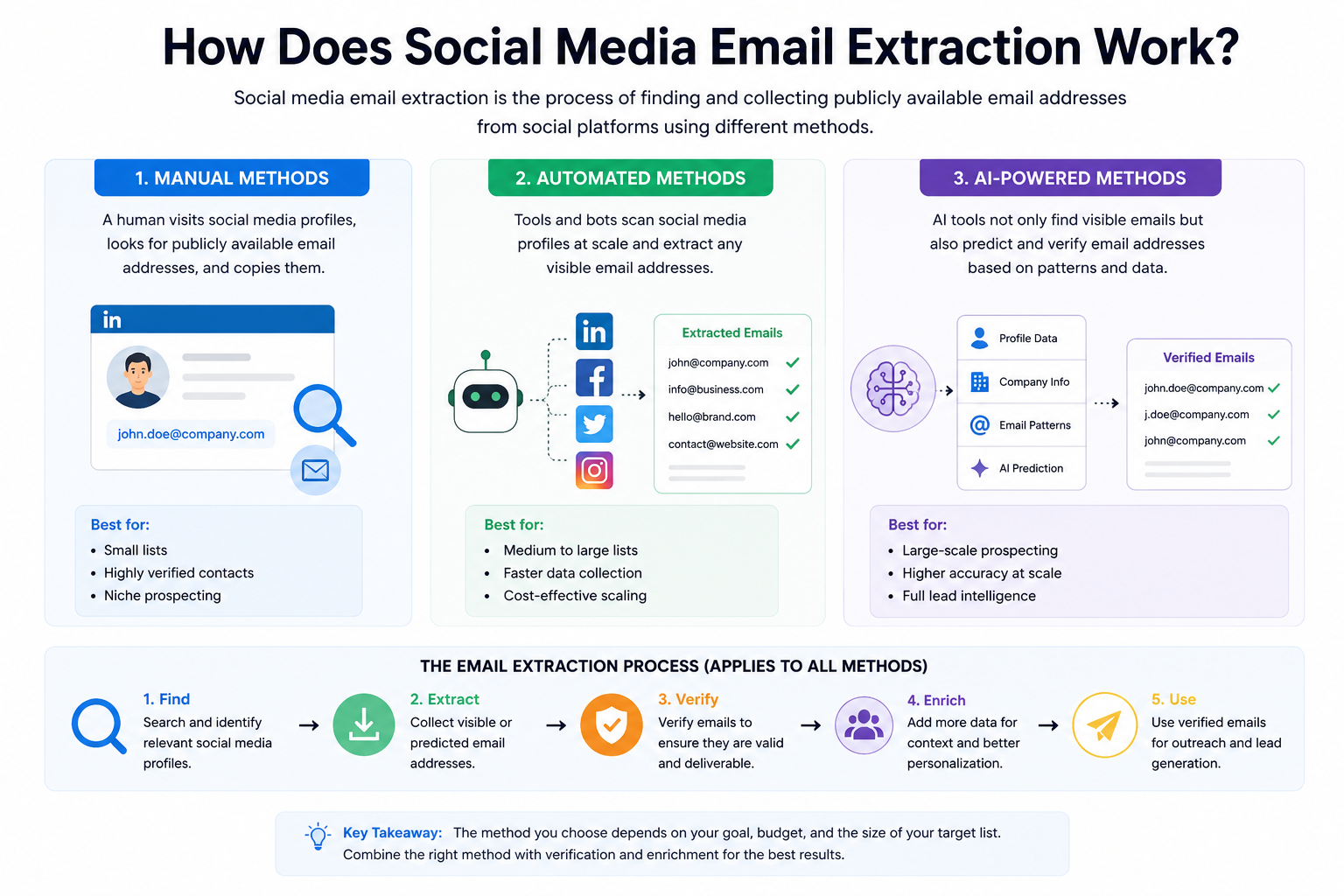
Manual Methods
Manual extraction is exactly what it sounds like: a human visits a social profile, looks for a listed email address, and copies it into a spreadsheet.
This works surprisingly well on platforms where email visibility is common Instagram creator bios, YouTube "About" tabs, and Reddit profiles sometimes list contact emails directly. It's time-intensive but produces high-accuracy results because a human verifies each entry.
Use manual methods when:
- Your target list is under 100 contacts
- You need highly verified, high-value contacts
- You're prospecting a very specific niche
Automated Methods
Automated scraping tools use bots or browser extensions to scan profiles at scale and extract any visible email addresses. Tools like PhantomBuster, Skrapp, and Hunter.io can process hundreds of profiles in the time it would take a human to review ten.
The tradeoff: automated tools are faster but produce more noise. You'll need a verification step to clean the output.
Common automated methods include:
- Browser extensions that extract emails from the pages you visit
- Scraping bots that crawl public profiles based on search criteria
- API-connected tools that pull contact data using authorized access
AI-Powered Prospecting Methods
AI-powered platforms take social media prospecting further. Rather than only extracting visible emails, these tools use pattern recognition to predict email addresses based on known formats (e.g., firstname@company.com), then verify those predictions against mail servers.
Platforms like Apollo.io, Clay, and Seamless.AI combine social data with company databases, job titles, hiring signals, and technographic data to build enriched prospect profiles not just an email address, but full context on who the person is and whether they're worth contacting.
Platform-by-Platform Guide to Social Media Email Extraction
Available contact information: LinkedIn is the richest platform for B2B prospecting. Users can list their email addresses on their profile under "Contact info," but this is often visible only to first-degree connections. Job titles, company names, and professional backgrounds are almost always public.
Best prospecting techniques:
- Connect first, then check contact info once accepted
- Use LinkedIn Sales Navigator to filter by role, industry, and company size
- Export your connections via LinkedIn's native data export tool to retrieve emails from connected profiles
- Use tools like Apollo.io, Lusha, or Hunter.io to find emails using name + company data from LinkedIn
Challenges: LinkedIn actively restricts automated scraping through its User Agreement and technical rate-limiting. LinkedIn's terms prohibit scraping without express permission, and the platform has pursued legal action against scrapers (e.g., hiQ Labs v. LinkedIn). Most emails aren't publicly visible without a connection.
Best practices: Connect genuinely before extracting. Use compliant tools that work within LinkedIn's API or permission-based export features. Avoid aggressive automation that risks account suspension.
Available contact information: Facebook Pages for businesses sometimes list email addresses in the "About" section. Personal profiles rarely do. Group members often don't share emails publicly.
Best prospecting techniques:
- Check the "About" section of business pages for listed contact emails
- Search Facebook Groups for leads, then research their names in LinkedIn or email finder tools
- Use Facebook's Graph API (within its permitted access tiers) for business page data
Challenges: Privacy settings have tightened significantly since 2018. Most personal profiles reveal no contact information. Facebook's terms prohibit automated data collection.
Best practices: Focus on business pages, not personal profiles. Use Facebook as an identification tool, then find emails through external finders like Apollo or Hunter.
X (Twitter)
Available contact information: Many users, especially marketers, founders, and content creators, list emails directly in their X bios. It's one of the most email-friendly social platforms for prospecting.
Best prospecting techniques:
- Search bios using keywords + "email" or "contact" (e.g.,
founder "email me") - Use advanced search filters to identify high-intent profiles
- Tools like PhantomBuster can extract bio data from Twitter/X at scale
Challenges: X's API access became significantly more restricted and expensive following Elon Musk's acquisition in 2022. Free-tier API access is limited. Rate limits reduce scraping viability for large-scale operations.
Best practices: Use X for targeted research, not mass extraction. Focus on niche communities and hashtags related to your ICP (ideal customer profile).
Available contact information: Instagram creator and business accounts often list email addresses in their bios or enable the "Email" contact button. This is especially common among influencers, freelancers, and small business owners.
Best prospecting techniques:
- Manually scan bios of accounts in your target niche
- Use Instagram's "Email" contact button on business profiles (available in-app)
- Search hashtags relevant to your industry to find profiles worth contacting
Challenges: Instagram's API is locked down for third-party tools. Automated scraping violates Instagram's Terms of Use. Creator emails in bios are common, but business decision-maker emails are rare.
Best practices: Use Instagram primarily for influencer and creator outreach. For B2B leads, treat Instagram as a discovery layer find names and businesses, then look up their emails elsewhere.
YouTube
Available contact information: The "About" tab on YouTube channels frequently lists a business email address, particularly for monetized creators who want brand deals. This is one of the most accessible sources for creator contact data.
Best prospecting techniques:
- Visit the "About" tab of any channel and click "View email address" (may require a simple CAPTCHA)
- Use tools like Ninja Outreach or Hunter.io to scale YouTube email extraction
- Search YouTube by category, subscriber count, or keyword to identify prospects
Challenges: YouTube requires a manual step to reveal emails (CAPTCHA), which limits bulk automation. Email visibility depends on the creator opting in.
Best practices: YouTube is ideal for influencer and creator outreach. For B2B prospecting, use YouTube to identify company channels, then research their teams on LinkedIn.
TikTok
Available contact information: TikTok business accounts and creator accounts often include email addresses in their bios, similar to Instagram. The platform's growth has made it increasingly relevant for influencer outreach.
Best prospecting techniques:
- Browse bios in your target niche for listed emails
- Filter by follower count and engagement rate for influencer prospecting
- Use influencer marketing platforms like Modash or Heepsy that aggregate TikTok contact data
Challenges: TikTok's API is restrictive. Most prospecting tools don't integrate deeply with TikTok. The platform skews younger, so B2B decision-makers are less common here.
Best practices: Focus TikTok prospecting on creator and influencer outreach rather than B2B lead generation.
Available contact information: Reddit profiles rarely list emails. However, subreddits are goldmines for identifying highly targeted audiences by interest, pain point, and professional background.
Best prospecting techniques:
- Find prospects in relevant subreddits (e.g., r/SaaS, r/Entrepreneur, r/SEO)
- Check user post history to identify their profession, role, or company
- Cross-reference Reddit usernames on LinkedIn or X to find email contact information
Challenges: Reddit usernames are often anonymous. Email extraction directly from Reddit is nearly impossible at scale.
Best practices: Use Reddit for prospect identification and intent research. Build lists elsewhere based on what you learn about your audience on Reddit.
Step-by-Step WorkflowsStep-by-Step Workflows
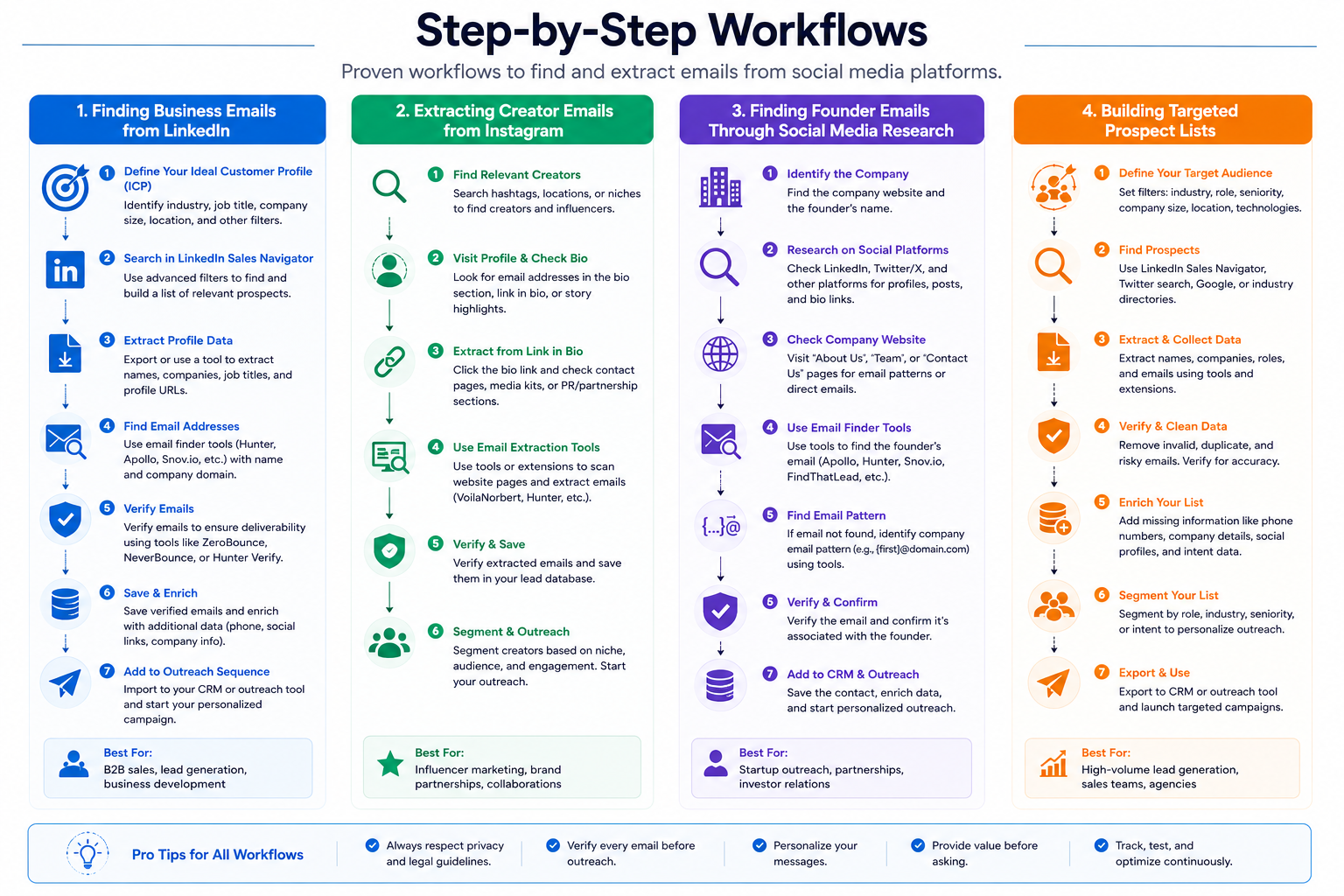
How to Find Business Emails from LinkedIn
- Use LinkedIn's search with filters (job title, industry, company size, location)
- Review matching profiles and note full name + company name
- Run that data through an email finder (Apollo.io, Hunter.io, or Lusha)
- Verify each email using a tool like NeverBounce or ZeroBounce
- Add verified contacts to your CRM with enrichment tags (title, company, source)
How to Extract Creator Emails from Instagram
- Identify your target niche using relevant hashtags or creator categories
- Visit each profile and check the bio or "Email" button on business accounts
- For bios with visible emails, copy directly
- For profiles without listed emails, search the creator's name + "contact" in Google
- Check their website, YouTube channel, or X bio as secondary sources
- Log verified emails in your outreach platform
How to Find Founder Emails Through Social Media Research
- Identify target companies using LinkedIn, Crunchbase, or Product Hunt
- Find the founder's name on LinkedIn or the company's "About" page
- Note the company's email domain
- Use Hunter.io's domain search to find the email format used at that company
- Apply the format to the founder's name and verify with an email validator
- Confirm via LinkedIn InMail or Twitter before sending cold outreach
How to Build a Targeted Prospect List
- Define your ICP: industry, company size, job title, geography
- Use LinkedIn Sales Navigator to filter and export a list of matching profiles
- Enrich that list using Apollo.io or Clay with email addresses, phone numbers, and technographics
- Verify emails using ZeroBounce or NeverBounce (aim for under 2% bounce rate)
- Segment your list by persona, industry, or funnel stage
- Load into your outreach platform (Instantly, Lemlist, Outreach) and launch campaigns
Tool Comparison: Which Method Is Right for You?
Advanced Strategies: AI, Enrichment, and Intent Signals
AI for Social Media Prospecting
AI prospecting tools have fundamentally changed what's possible. Platforms like Clay, Apollo.io, and Seamless.AI don't just find emails they build context. They analyze job changes, company funding events, technology stack updates, and social activity to identify prospects who are actively in a buying window.
For example, if a VP of Sales just joined a new company (visible on LinkedIn), that's a high-intent signal. They're likely to evaluate new tools. AI platforms can flag these signals automatically and surface them in your outreach queue.
Data Enrichment Workflows
Raw social media data is rarely enough. Enrichment tools layer additional context on top of an email address:
- Company data: Revenue, employee count, industry, funding stage
- Contact data: Direct phone number, LinkedIn URL, seniority level
- Technographic data: Software tools the company currently uses
- Intent data: Recent content consumption, keyword research behavior
A typical enrichment workflow: export LinkedIn search → enrich in Clay using multiple data providers → verify emails → push to CRM with tags.
Lead Qualification Using Social Signals
Not all scraped leads are created equal. Use social signals to prioritize outreach:
- Job changes: Recent hires signal budget availability and new priorities
- Company growth signals: New job postings suggest expansion and increased spend
- Engagement patterns: Likes or comments on competitor content suggest active evaluation
- Content sharing: Sharing thought leadership on pain points signals awareness stage
Multi-Channel Outreach Preparation
Email alone rarely converts at scale. Use social data to prepare multi-touch campaigns:
- Connect on LinkedIn with a personalized note
- Follow on X and engage with a relevant post
- Send a cold email referencing shared context
- Follow up via LinkedIn message 3–5 days later
This approach converts better because it creates familiarity before the ask.
Common Challenges and How to Solve Them
Missing Email Addresses
Problem: The prospect doesn't have a publicly listed email.
Solution: Use email finder tools to predict address patterns based on the company domain. Verify with a mail server ping before sending.
Invalid Emails (High Bounce Rates)
Problem: Scraped emails return hard bounces, damaging your sender reputation.
Solution: Always run emails through a verification tool (ZeroBounce, NeverBounce, or Bouncer) before import. Target a bounce rate below 2%.
Duplicate Contacts
Problem: The same contact appears multiple times across different sources.
Solution: Deduplicate your list using CRM deduplication tools or spreadsheet formulas before importing. Tools like Clay and Apollo handle this automatically.
Low-Quality Leads
Problem: Emails are valid, but the leads don't match your ICP.
Solution: Apply stricter filters during the sourcing phase. Use enrichment data to qualify before outreach rather than after.
Data Decay
Problem: Email addresses become outdated as people change jobs or companies.
Solution: Re-verify lists every 90 days. Focus on professional domains rather than personal Gmail addresses. Target stable roles (owners, partners, C-suite) over junior positions with higher turnover.
Legal and Compliance Considerations
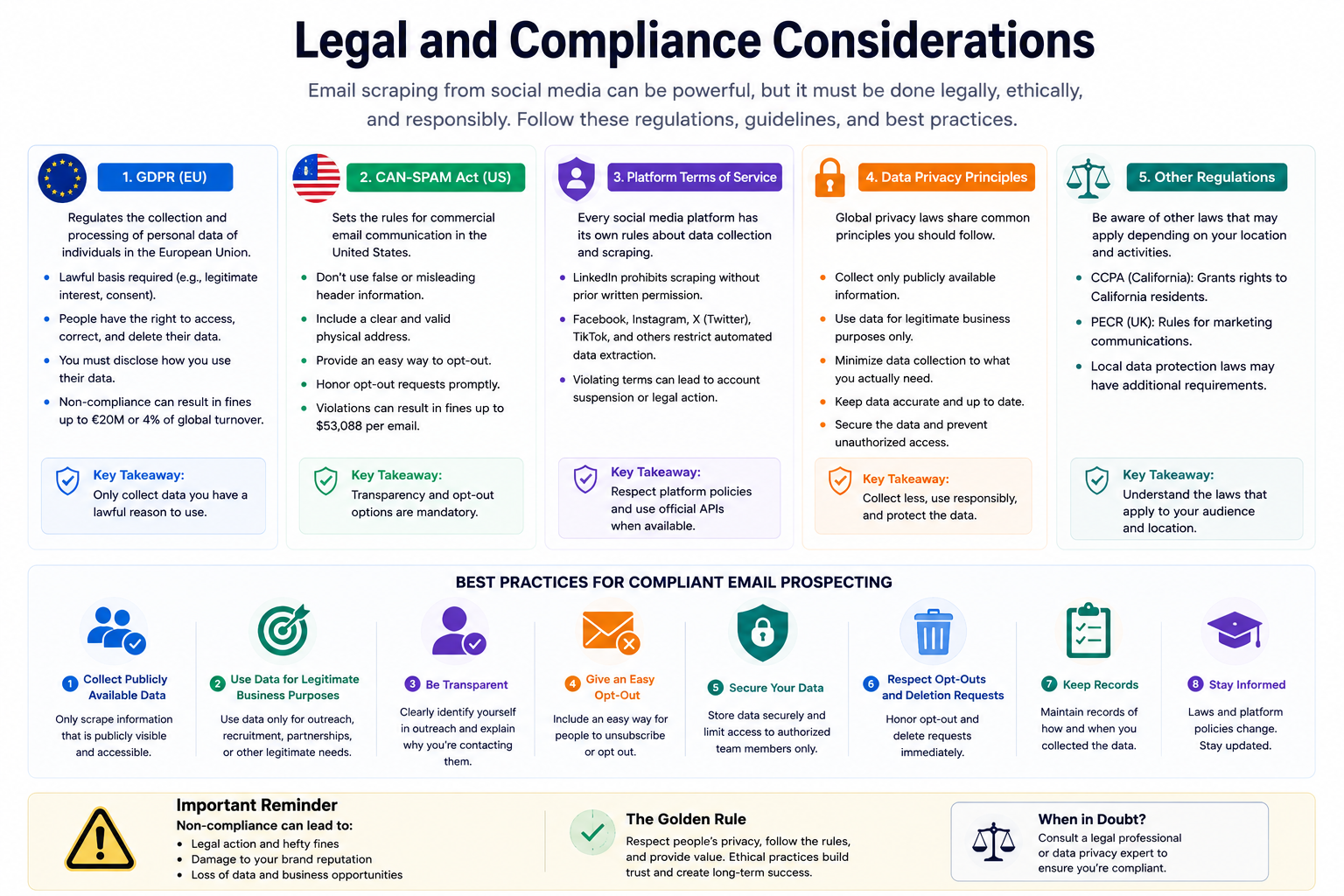
GDPR Overview
The General Data Protection Regulation (GDPR) applies to any business processing personal data of EU residents, regardless of where the business is located. Key requirements relevant to email scraping:
- You must have a lawful basis for processing personal data. "Legitimate interest" is often cited by B2B marketers, but it requires a documented balancing test.
- You must provide a clear opt-out mechanism in every email.
- You cannot store personal data longer than necessary.
- Collecting personal data from public sources does not automatically make it GDPR-compliant.
CAN-SPAM Overview
The U.S. CAN-SPAM Act governs commercial email. Key requirements:
- Don't use deceptive subject lines or sender information
- Include a physical mailing address in every email
- Honor opt-out requests within 10 business days
- Clearly identify the message as an advertisement when applicable
CAN-SPAM does not prohibit cold email to B2B contacts but it sets strict rules for how those emails must be formatted and managed.
Data Privacy Considerations
Beyond GDPR and CAN-SPAM, consider:
- CASL (Canada's Anti-Spam Legislation): Requires express or implied consent before sending commercial emails
- CCPA (California Consumer Privacy Act): Gives California residents rights over their personal data
- Platform Terms of Service: Violating LinkedIn's, Instagram's, or any other platform's terms can result in account suspension, even if the activity is technically legal elsewhere
Ethical Prospecting Guidelines
Legal compliance sets the floor, not the ceiling. Ethical prospecting goes further:
- Only contact people whose data is genuinely publicly shared for professional purposes
- Make it easy to opt out and respect every request immediately
- Send relevant, personalized outreach not generic blasts
- Don't share or sell scraped data to third parties
Best Practices for Compliance
- Document your lawful basis for processing each contact's data
- Maintain a suppression list and update it regularly
- Use a compliant ESP (email service provider) with unsubscribe management built in
- Review your data collection process with a legal professional familiar with your target markets
- Never scrape private or restricted data only process what is publicly visible and intended for professional contact
Real-World Use Cases
B2B SaaS Sales
An SDR at a CRM platform uses LinkedIn Sales Navigator to build a list of Operations Directors at 50–500 person companies. They enrich those contacts in Apollo.io, verify emails via ZeroBounce, and launch a 5-step cold email sequence targeting pain points around spreadsheet-based workflows. Personalization is added using LinkedIn activity data pulled via Clay.
Recruitment
A technical recruiter identifies senior engineers who have recently updated their LinkedIn profiles a signal of active job seeking. They use Hunter.io to find professional emails, cross-reference GitHub profiles for skills verification, and reach out with a highly personalized email referencing specific projects.
Agency Prospecting
A digital marketing agency targets e-commerce brands on Instagram with under 10,000 followers and high engagement rates the sweet spot for clients who need growth support. Emails are extracted from bios, enriched with Shopify data via Clearbit, and segmented by product category for targeted outreach.
Influencer Outreach
A DTC skincare brand identifies 200 micro-influencers on Instagram and TikTok using Modash. Emails are pulled from creator bios or the platform's built-in contact feature. The brand sends personalized partnership proposals referencing the creator's recent content.
Partnership Building
A SaaS founder uses Reddit to identify complementary tools that serve the same audience. They find the founders' names from the tools' websites, search LinkedIn to confirm details, then use Hunter.io to find email addresses. A short, specific partnership proposal converts 20% of outreach into introductory calls.
How Leads Sniper Simplifies Social Media Prospecting
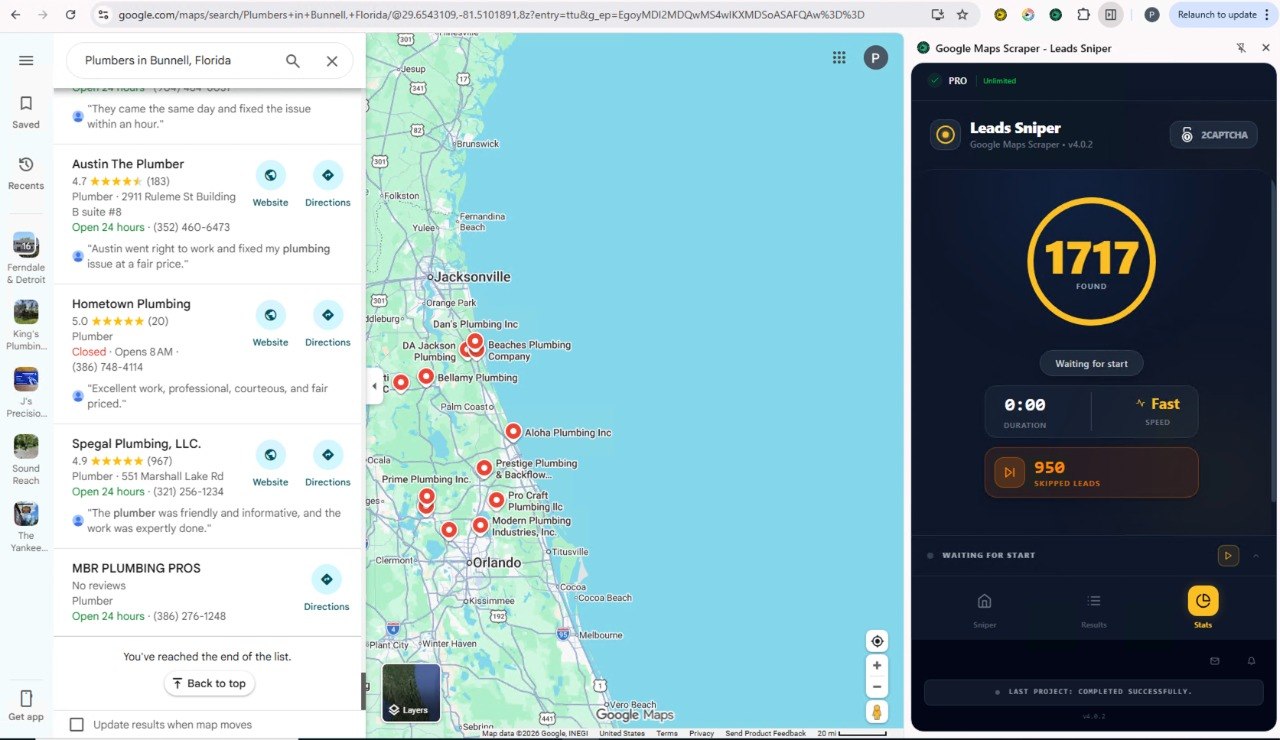
Building prospect lists manually can take hours. Between finding the right profiles, locating email addresses, verifying contact information, and enriching lead data, most sales and marketing teams spend more time researching than actually reaching out.
That's where Leads Sniper comes in.
Leads Sniper helps businesses streamline their lead generation process by combining prospect discovery, email finding, contact verification, and data enrichment into a single workflow. Instead of juggling multiple tools, teams can identify qualified prospects faster and focus on building meaningful conversations.
Whether you're targeting decision-makers on LinkedIn, creators on Instagram, founders on X, or business owners across multiple platforms, Leads Sniper helps you:
- Discover targeted prospects based on industry, role, location, and company size
- Find verified business email addresses
- Enrich contact records with additional company and professional data
- Build highly targeted outreach lists
- Improve campaign performance with cleaner, more accurate data
For businesses that rely on outbound sales, recruitment, partnership outreach, or lead generation, having access to accurate contact information is critical. A well-researched and verified prospect list can dramatically improve response rates while reducing wasted outreach efforts.
Why Businesses Choose Leads Sniper
Unlike generic data providers, Leads Sniper focuses on helping teams find relevant prospects quickly and efficiently. By combining advanced search capabilities with contact enrichment and verification workflows, users can spend less time gathering data and more time closing deals.
Whether you're a startup founder, SDR, recruiter, agency owner, or growth marketer, Leads Sniper can help you build better prospect lists and scale outreach with confidence.
Ready to generate more qualified leads?
Explore Leads Sniper's lead generation solutions and discover how businesses are finding verified contacts, improving outreach efficiency, and growing their sales pipeline.
Frequently Asked Questions
Is email scraping from social media legal?
It depends on jurisdiction, platform terms of service, and how the data is used. Scraping publicly available business contact data for legitimate outreach may be permissible under CAN-SPAM in the US. However, GDPR in Europe imposes stricter requirements around lawful basis for processing. LinkedIn's User Agreement explicitly prohibits scraping without permission. Always consult legal counsel before large-scale extraction.
How accurate are scraped emails from social media?
Accuracy varies by method. Manual extraction from bios is near 100% accurate (the email is published). Email finder tools that predict addresses based on name + domain typically achieve 70–90% accuracy before verification. Post-verification accuracy can exceed 95% with tools like ZeroBounce or NeverBounce.
What is the best tool for email scraping from social media?
There is no single best tool it depends on your use case. Apollo.io is widely regarded as the best all-in-one platform for B2B prospecting. Hunter.io excels at domain-based email finding. Clay is the top choice for advanced enrichment workflows. Ninja Outreach is preferred for influencer and creator outreach.
Can you scrape LinkedIn emails directly?
Not at scale without violating LinkedIn's terms. LinkedIn restricts automated data collection. However, you can export emails from your first-degree connections via LinkedIn's native data export tool. Email finder tools can locate professional emails using publicly available LinkedIn profile data (name + company) without directly scraping LinkedIn.
How do you verify scraped email addresses?
Use an email verification tool such as ZeroBounce, NeverBounce, or Bouncer. These tools check whether an email address exists on a mail server without sending an actual email. Aim for a list with less than 2% invalid addresses before launching any outreach campaign.
How do you avoid spam complaints from email outreach?
Keep your list clean and verified. Personalize outreach so it's relevant to the recipient. Always include an easy unsubscribe link. Honor opt-out requests immediately. Warm up new sending domains gradually using tools like Mailwarm or Warmup Inbox. Monitor your spam rate using Google Postmaster Tools.
What is the difference between email scraping and email finding?
Email scraping extracts visible email addresses from publicly accessible pages. Email finding uses name + domain data to predict or discover email addresses that may not be directly visible. Both approaches are used in lead generation, but email finding tools are generally more compliant because they don't directly access restricted platform data.
How long does it take to build a prospect list using social media?
Manual research: 2–5 minutes per contact. With browser extensions or email finder tools: 30–60 contacts per hour. With AI enrichment platforms like Apollo or Clay: 1,000+ verified contacts per hour, depending on your subscription tier and data availability.
What email bounce rate is acceptable for cold outreach?
Industry standard guidance recommends keeping your bounce rate below 2%. Higher bounce rates damage your sender reputation, leading to deliverability issues across your entire domain. Verification before sending is the most reliable way to stay within safe limits.
Can you use scraped emails for cold outreach in Europe?
Yes, under certain conditions. GDPR allows B2B cold email when you have a documented legitimate interest, the contact's data is being used for relevant professional purposes, and you include a clear opt-out mechanism in every email. You cannot rely on the same approach for consumer (B2C) email in Europe.
What data enrichment tools work best with social media prospecting?
Clay integrates with 50+ data providers and is widely considered the most flexible enrichment platform. Apollo.io has built-in enrichment across 275+ million contacts. Clearbit (now part of HubSpot) is strong for website-based intent data. Lusha offers fast enrichment for LinkedIn data specifically.
How often should you re-verify your email list?
At minimum, re-verify every 90 days. B2B email lists decay at approximately 22–30% per year as people change jobs or companies. For outreach to founder or executive-level contacts (who change roles less frequently), re-verification every 6 months may suffice.
What are intent signals, and how do you use them in prospecting?
Intent signals are behavioral indicators that a prospect is actively researching or evaluating a product category. Common signals include: job changes, new company funding rounds, recent LinkedIn posts about relevant pain points, job postings for roles related to your solution, and technology stack changes. Platforms like Bombora and 6sense specialize in aggregating intent signals to improve targeting precision.
How do you avoid duplicate contacts when scraping from multiple platforms?
Standardize your data fields (first name, last name, company domain) and deduplicate on a unique identifier—usually the email address itself. CRM platforms like HubSpot and Salesforce have built-in deduplication. Clay and Apollo also flag duplicates during list building.
What is the difference between a browser extension and a dedicated email finder tool?
A browser extension runs in your web browser and extracts contact data from pages you visit in real time. Dedicated email finder tools (like Hunter.io or Apollo) have searchable databases of pre-indexed contacts and operate via a web app or API. Extensions are better for small-scale, targeted research. Dedicated tools scale further and offer more enrichment options.