Introduction: Unlocking the Power of Location Intelligence
In today's digitally driven world, location data is no longer just a navigational tool; it's a strategic asset. Understanding where businesses are located, what services they offer, and what their customers think provides unparalleled insights into market dynamics, consumer behavior, and competitive landscapes. Google Maps, with its vast repository of this information, stands as a prime source. However, accessing this rich data often requires more than just a simple search.
This guide will equip you with the knowledge and practical steps to effectively scrape Google Maps data, transforming raw information into actionable intelligence that can drive business growth, inform strategic decisions, and unlock new opportunities. We'll explore the 'why' behind this process, the types of data you can extract, the methods available, and crucial considerations for ethical and legal compliance. By the end of this guide, you will possess the foundational understanding to embark on your own Google Maps data extraction journey.
What is Google Maps Data Scraping?

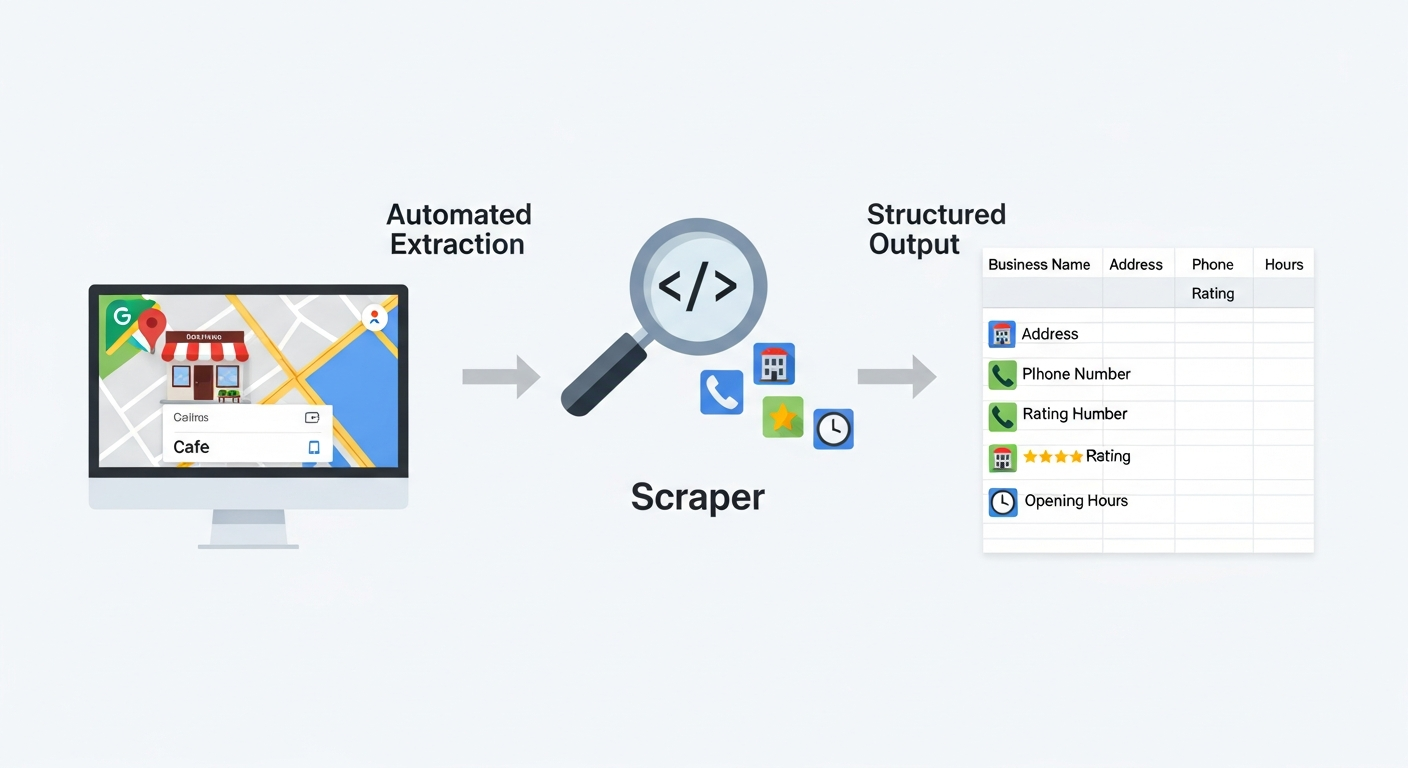
The scraping process automates the extraction of key data points from Google Maps and organizes them into a structured, usable format.
Google Maps data scraping is the automated process of extracting information from Google Maps. This typically involves using software, known as a scraper, to systematically navigate Google Maps listings, identify relevant data points, and collect them into a structured format. Unlike manually copying and pasting information, which is time-consuming and impractical for large datasets, web scraping automates this task, enabling the collection of thousands or even millions of data records efficiently.
This data extraction process can target specific locations, business categories, or search queries, allowing users to gather precisely the information they need. The scraped data often includes details like business name, addresses, phone numbers, reviews, ratings, and opening hours.
Why Google Maps Data is a Game-Changer for Businesses?
The intelligence derived from Google Maps is invaluable across a multitude of industries. This location-based data offers a unique lens through which to understand markets, customers, and competitors. Businesses that can effectively leverage this information gain a significant competitive advantage.
It provides granular insights into local economies, consumer preferences, and the competitive density in any given area, empowering data-driven decision-making that goes beyond traditional market analysis. This strategic advantage stems from the sheer volume and specificity of the data available, offering a real-time snapshot of the business world.
Why Scrape Google Maps Data? Real-World Applications and Benefits
The ability to systematically collect data from Google Maps opens up a vast array of practical applications for businesses, researchers, and strategists. This section delves into the core benefits and use cases that make Google Maps data scraping a powerful tool for gaining competitive intelligence and driving informed decisions.
1. Lead Generation and Sales Intelligence
One of the most significant benefits of scraping Google Maps data is its direct application in lead generation and enhancing sales intelligence. By identifying businesses within specific geographical areas or industries, sales teams can build targeted prospect lists. For instance, a company selling commercial cleaning services might scrape for all restaurants within a 50-mile radius.
This provides them with a list of potential clients, including their addresses and contact information like phone numbers. Beyond simple contact details, scraped reviews and ratings can offer insights into a business's operational quality, helping sales representatives tailor their pitch by understanding potential pain points or areas of excellence. This data can also inform territory management, helping sales managers allocate resources more effectively based on market density and potential.
2. Market Research and Competitor Analysis
Understanding the competitive landscape is crucial for any business strategy. Google Maps data scraping facilitates robust market research and competitor analysis. By scraping for businesses within a particular sector and location, companies can identify all existing competitors, their physical presence, and their relative market share as indicated by the number of locations or customer reviews.
Analyzing opening hours can reveal peak business times, while ratings and customer reviews provide direct feedback on competitor strengths and weaknesses. This intelligence allows businesses to identify market gaps, understand pricing strategies, and benchmark their own performance against rivals. For example, a new coffee shop owner could scrape all existing cafes in their target neighborhood to understand saturation, identify popular brands, and gauge customer sentiment towards existing offerings.
3. Strategic Planning and Urban Development
For businesses considering expansion, site selection, or for urban planners, Google Maps data offers critical insights. When a company is looking to open a new branch, scraping data can help identify optimal locations based on proximity to target demographics, customer traffic patterns (inferred from business density and operating hours), and the competitive environment.
Urban developers can analyze demographic trends by looking at the types and distribution of businesses in an area, helping to predict future growth patterns or identify underserved communities. Understanding the addresses and types of existing Points of Interest can inform zoning decisions, infrastructure planning, and resource allocation for public services. This macro-level view of urban activity is essential for sustainable development and informed investment.
4. Niche Use Cases and Data Enrichment
Beyond broad applications, Google Maps data scraping supports numerous niche use cases and data enrichment strategies. Real estate agencies can scrape property listings to understand neighborhood characteristics, proximity to amenities, and rental rates. Logistics companies can analyze the distribution of warehouses or delivery hubs.
The travel industry can leverage data on hotels, restaurants, and attractions to build comprehensive travel guides or personalized recommendations. Furthermore, scraped Google Maps data can be used to enrich existing datasets. For example, a CRM system might be updated with more accurate addresses, phone numbers, or recent reviews for existing clients, providing a more complete and up-to-date customer profile. This integration enhances the utility of internal data by adding a crucial location and customer sentiment dimension.
Understanding Google Maps Data: What Information Can You Extract?
Google Maps is a treasure trove of structured and unstructured information about businesses and locations worldwide. When you embark on web scraping this platform, you can extract a wide array of valuable data points, categorized for clarity. Understanding what's available is the first step to defining your data extraction strategy.
Core Business Information
This category includes the fundamental details that identify and describe a business. When you scrape a Google Maps listing, you can typically retrieve:
- Business Name: The official name of the establishment.
- Addresses: The full physical addresses, including street, city, state/province, postal code, and country.
- Phone Numbers: The primary contact phone number associated with the business.
- Website: The official URL of the business's website.
- Opening Hours: Daily operating schedules, including specific times and days of the week the business is open, often indicating if it's currently open or closed.
- Categories/Services: The classifications under which the business is listed (e.g., "Italian Restaurant," "Plumber," "Bookstore") and specific services offered.
Reputation and Customer Feedback
Customer sentiment and reputation are critical indicators of business success, and Google Maps provides rich insights here:
- Reviews: The text content of customer reviews, offering detailed feedback on products, services, and overall customer experience.
- Ratings: The star-based ratings (typically out of 5) that users assign to businesses, providing a quantitative measure of satisfaction.
- Number of Reviews: The total count of reviews a business has received, indicating its popularity and customer engagement level.
Location and Geospatial Data
Beyond the human-readable address, precise geographical coordinates are essential for mapping and spatial analysis:
- Latitude and Longitude: The exact geographical coordinates of the business Point, crucial for GIS applications, mapping visualizations, and proximity analysis.
- Geographical Area/Region: Information about the larger geographical area the business belongs to, such as a district or neighborhood.
Additional Metadata
Depending on the specific listing and scraping method, other useful metadata can be extracted:
- Photos: While scraping images themselves can be complex and may violate terms of service, the number of photos or links to photo albums might be accessible.
- Business Description: Some listings include a brief description provided by the business owner.
- Services Offered: Detailed lists of specific services or products that a business specializes in.
The breadth of this information means that a tailored scraper can be configured to collect precisely what is needed for specific data extraction goals.
How Leads Sniper Can Help You On Extracting Data On Google Maps?
Leads-Sniper is a powerful, automated and versatile tool designed to help you extract valuable data from Google Maps. It’s fast, easy to use, and packed with features to make your scraping efforts more efficient.
1.1 Benefits
By utilizing Leads-Sniper, you can:
- Save time and effort by automating the data extraction process.
- Get accurate and up-to-date information on businesses and locations.
- Improve your lead generation and marketing strategies.
1.2 Features
Some of the standout features of Leads-Sniper include:
- A user-friendly interface that makes it easy to set up and manage your scraping tasks.
- Support for multiple data formats, including CSV, XLSX, and Excel.
- Advanced filtering options to ensure you get the data you need.
Google Maps API vs. Web Scraping: Choosing the Right Strategy

When you need to access data from Google Maps, two primary methods come to mind: utilizing official APIs or employing web scraping techniques. Each approach has its own strengths, weaknesses, and ideal use cases. Understanding the differences is crucial for selecting the most effective and compliant strategy for your needs.
The Google Places API: Capabilities and Constraints
Google offers several APIs (Application Programming Interfaces) that allow developers to programmatically access Google Maps data. The most relevant is the Google Places API. This service provides access to a comprehensive database of places, including details, reviews, and photos.
Capabilities:
- Structured Data: Provides data in a well-defined format, typically JSON, making it easy to integrate into applications.
- Reliability: Generally stable and officially supported by Google.
- Specific Queries: Allows for targeted searches for places, nearby places, place details, and reviews.
- Compliance: When used within its terms of service, it is the officially sanctioned method for accessing this data.
Constraints:
- Cost: The Google Places API operates on a pay-as-you-go model. While there's a free tier, extensive usage can become expensive quickly.
- Rate Limits: Google imposes strict usage limits on API calls per second and per day. Exceeding these limits will result in your requests being throttled or blocked.
- Data Availability: Not all data visible on the Google Maps interface might be directly exposed through the API, or it may be in a different format. For instance, specific on-page formatting of opening hours or nuanced review snippets might be harder to retrieve consistently.
- Terms of Service: Strict adherence to Google's terms of service is mandatory. Misuse can lead to API key deactivation.
Why Web Scraping Becomes Necessary?
Despite the advantages of official APIs, web scraping becomes necessary in several scenarios:
- Scale and Cost: When the volume of data required exceeds the free tier or becomes prohibitively expensive with the API, web scraping can offer a more cost-effective solution, especially for bulk data collection.
- Data Not Available via API: Sometimes, the specific data points or the precise formatting required are not directly accessible through the Google Places API. Direct web scraping allows you to capture data exactly as it appears on the web page.
- Exploratory Data Analysis: For research or exploratory projects where the exact data needs are not fully defined, web scraping can allow for more flexibility in collecting a broader range of information to analyze later.
- Custom Data Formats: If you need data in a very specific, non-standard format or require complex parsing of information as it appears on the page, web scraping provides that granular control.
- Real-time Data Access: While APIs are designed for structured access, web scraping can sometimes be configured to capture more dynamic or rapidly changing information as it's presented to a user.
It's crucial to remember that while web scraping offers flexibility, it also comes with its own set of challenges, including the need to navigate anti-bot measures and adhere to ethical guidelines.
How to Scrape Google Maps: Methods and Tools?
Successfully scraping Google Maps data involves choosing the right approach and tools based on your technical expertise, the scale of your project, and your budget. Broadly, methods can be categorized into no-code/low-code solutions and code-based frameworks.
No-Code and Low-Code Scraping Tools (For Beginners)
For users who are not developers or prefer a more visual and intuitive approach, numerous no-code and low-code scraper tools are available. These platforms abstract away much of the technical complexity, allowing users to build scrapers through graphical interfaces.
- How They Work: Typically, you point the tool to a Google Maps search results page or a specific business listing. You then visually select the data elements you want to extract (e.g., business name, address, reviews). The tool records your actions and generates a scraper that can then be run to collect data from multiple pages or listings.
- Advantages:
- Ease of Use: Requires minimal to no programming knowledge.
- Speed: Quick to set up for simple scraping tasks.
- Pre-built Solutions: Many tools offer pre-built templates or crawlers for common websites like Google Maps.
- Disadvantages:
- Limited Flexibility: May struggle with highly dynamic websites or complex extraction logic.
- Cost: While some offer free tiers, advanced features or higher usage limits often require paid subscriptions.
- Scalability Issues: For very large-scale operations, these tools might be less efficient or more expensive than custom-built solutions.
- Examples: Tools like Octoparse, Bright Data's Web Scraper IDE, Apify (which also offers code-based options), and dedicated Google Maps scrapers are popular choices in this category. These often provide options to export data in formats like Excel or JSON.
Code-Based Scraping (For Developers and Advanced Users)
For maximum flexibility, control, and scalability, developers often opt for code-based web scraping frameworks and libraries. This approach requires programming knowledge, typically in Python or JavaScript.
- How They Work: You write scripts that programmatically interact with web pages, parse HTML or JSON responses, and extract the required data. This often involves using libraries that can simulate browser behavior or make direct HTTP requests.
- Advantages:
- Ultimate Flexibility: Can handle complex website structures, dynamic content, and intricate data extraction logic.
- Scalability: Highly scalable for massive data collection projects.
- Customization: Full control over every aspect of the scraping process, including error handling, data cleaning, and output formatting.
- Integration: Easily integrates with other programming tools and databases.
- Disadvantages:
- Technical Skill Required: Demands programming expertise.
- Steeper Learning Curve: Takes time to learn and master the relevant libraries and techniques.
- Maintenance: Scrapers may need to be updated as website structures change.
- Popular Tools and Libraries:
- Python:
- Beautiful Soup: Excellent for parsing HTML and XML documents.
- Requests: For making HTTP requests to fetch web page content.
- Scrapy: A powerful and comprehensive web crawling framework designed for large-scale scraping.
- Selenium/Playwright: For automating web browsers, essential for handling JavaScript-heavy websites like Google Maps that load content dynamically.
- JavaScript (Node.js):
- Puppeteer: Developed by Google, for controlling Chrome/Chromium.
- Playwright: A newer, more robust browser automation library.
- GitHub: Many open-source scraper projects and libraries for Google Maps can be found on Github. These can serve as excellent starting points, code examples, or inspiration for building your own custom scrapers. Examining existing projects on Github can significantly accelerate development.
Regardless of the method chosen, careful planning, understanding the target website's structure, and preparing for challenges like IP blocks and CAPTCHAs are essential for successful data extraction.
Step-by-Step Guide to a Google Maps Scraping Workflow

Embarking on a Google Maps data extraction project requires a structured approach. Following these steps will help ensure your web scraping efforts are organized, efficient, and yield the desired results.
1. Define Your Target and Data Requirements
Before writing any code or selecting a tool, clearly articulate your objectives.
- What specific information do you need? (e.g., business name, addresses, phone numbers, reviews, opening hours).
- What is your geographical scope? (e.g., a specific city, a radius around a Point, an entire country).
- What is the purpose of the data? (e.g., lead generation, market research, competitor analysis).
- What is the estimated volume of data? This will influence tool choice and strategy.
- What output format do you require? (e.g., JSON, Excel, CSV).
2. Select Your Scraping Tool or Framework
Based on your defined requirements and technical capabilities:
- Beginner/Low Volume: Consider no-code/low-code tools for their ease of use.
- Advanced/High Volume/Custom Needs: Opt for code-based frameworks like Scrapy or Selenium with Python.
If using code, explore Github for existing Google Maps scraping projects that might serve as a foundation.
3. Prepare Your Scraping Environment
This involves setting up your system to run the scraper.
- Install Necessary Software: Download and install Python, Node.js, or the chosen no-code tool.
- Install Libraries/Dependencies: If using code, install libraries like
requests,BeautifulSoup,Selenium, orScrapyusing package managers (e.g.,pip install ...). - Configure Proxies: For larger-scale scraping or to avoid IP bans, set up Proxies. This might involve using a proxy service that provides rotating IP addresses (residential or datacenter). Configure your scraper to use these Proxies.
- Browser Setup (if applicable): If using browser automation tools like Selenium or Puppeteer, ensure you have the corresponding browser (Chrome, Firefox) and its WebDriver installed and configured.
4. Identify Data Points and Navigation Logic
This step involves understanding how Google Maps structures its pages.
- Inspect Web Pages: Use your browser's developer tools (usually F12) to inspect the HTML structure of Google Maps search results and individual business listings. Identify the HTML tags, classes, and IDs that contain your target data (business name, addresses, reviews, etc.).
- Understand Dynamic Loading: Google Maps often loads data dynamically using JavaScript. This means simply fetching the initial HTML might not contain all the data. You'll need to identify how this content is loaded (e.g., via AJAX requests returning JSON or through browser rendering). Tools like Selenium or Puppeteer are essential for handling dynamic content.
- Navigation: Determine how to navigate through multiple search results pages or click on individual listings to access detailed information.
5. Implement the Data Extraction Logic
This is where you build or configure your scraper.
- No-Code Tools: Visually map out the elements to be scraped and the navigation steps (e.g., "click next page").
- Code-Based: Write scripts using your chosen libraries.
- Fetch the web page content.
- Parse the HTML/JSON to locate and extract specific data points.
- Handle pagination – loop through search results pages.
- Handle dynamic content loading – wait for elements to appear or trigger their loading.
- Implement delays between requests to mimic human behavior and avoid rate limits.
- Integrate Proxies and change User agents to avoid detection.
- Implement error handling for network issues, CAPTCHAs, or unexpected page changes.
6. Store and Export Your Scraped Data
Once data is extracted, it needs to be stored and made accessible.
- Data Structures: Store data in appropriate structures within your script (e.g., Python lists of dictionaries).
- Export Formats:
- JSON: Excellent for structured data, easily parsed by other applications and programming languages.
- CSV/Excel: Widely compatible with spreadsheet software, ideal for analysis and reporting.
- Databases: For large-scale projects, consider exporting directly to a database (SQL or NoSQL) for efficient querying and management.
- File Naming and Organization: Implement a clear naming convention for your output files and organize them logically.
This systematic workflow, from planning to execution and output, is fundamental to successful Google Maps data extraction.
Overcoming Common Google Maps Scraping Challenges

Web scraping Google Maps, while powerful, is not without its obstacles. Google employs sophisticated measures to prevent automated access, so anticipating and addressing these challenges is crucial for a robust and sustainable scraping process.
Dealing with IP Blocks and Rate Limits
One of the most frequent issues encountered is having your IP address blocked or facing rate limits. Google identifies and throttles or blocks IP addresses that exhibit automated behavior, such as making too many requests in a short period.
- Solution 1: Proxies: Employing a proxy server is essential.
- Rotating Proxies: Use a service that provides a pool of rotating IP addresses. Your scraper switches to a new IP address with each request or after a set interval, making it harder for Google to track and block a single IP.
- Residential Proxies: These IPs originate from actual home Users and are much harder for websites to distinguish from legitimate traffic, making them highly effective but also more expensive.
- Datacenter Proxies: More affordable but can be more easily detected and blocked by sophisticated anti-bot systems.
- Solution 2: Request Delays: Implement random delays between requests. Instead of sending requests back-to-back, wait for a few seconds (or even minutes) between each one. This mimics human browsing behavior.
- Solution 3: User Agents: Rotate your User agent strings. The User agent tells the website about the browser and operating system being used. Using a variety of common User agents can help your requests appear more like organic traffic.
- Solution 4: Respect API Limits (if applicable): If you are also using Google Maps APIs, ensure you are staying within their usage quotas and implementing back-off strategies when you hit rate limits.
Bypassing CAPTCHAs and Anti-Bot Measures
When automated behavior is detected, Google may present CAPTCHA challenges (like "I'm not a robot" puzzles) to verify that the User is human. These are designed to stop scrapers.
- Solution 1: CAPTCHA Solving Services: Integrate with third-party CAPTCHA solving services (e.g., 2Captcha, Anti-CAPTCHA). Your scraper detects a CAPTCHA, sends it to the service for solving, and then submits the solution back to Google. This adds cost and complexity.
- Solution 2: Browser Automation with Human-like Behavior: Tools like Selenium or Puppeteer, when configured carefully, can mimic human interaction more effectively. This includes realistic mouse movements, typing speeds, and interaction patterns.
- Solution 3: Slow Down and Mimic Browsing: A slower scraping pace, combined with realistic navigation (scrolling, clicking on elements before extracting data), can sometimes help avoid triggering CAPTCHA prompts altogether.
- Solution 4: Using Accounts: For certain types of scraping, using logged-in Google accounts can sometimes reduce the likelihood of encountering CAPTCHAs, though this is often against Google's terms of service and carries its own risks.
Handling Dynamic Content and Website Changes
Google Maps is a dynamic website, meaning content is loaded via JavaScript after the initial page load. Furthermore, website structures can change without notice, breaking your scraper.
- Solution 1: Browser Automation Tools: As mentioned, Selenium, Puppeteer, or Playwright are crucial for interacting with JavaScript-rendered content. They can wait for specific elements to load before attempting to extract data.
- Solution 2: Inspect Network Requests: Use browser developer tools to examine the network requests made by the page. Sometimes, data is loaded via AJAX calls that return JSON data directly, which can be easier to scrape than parsing complex HTML.
- Solution 3: Robust Selectors: When identifying HTML elements, use more robust selectors that are less likely to break if minor changes occur. Prefer IDs over complex class hierarchies.
- Solution 4: Monitoring and Maintenance: Regularly monitor your scraper's performance. Implement logging to track errors. Be prepared to update your selectors and logic whenever Google changes its website structure.
By proactively planning for these common challenges and implementing the right strategies, you can build a more resilient and effective Google Maps data extraction process.
Ethical and Legal Considerations in Google Maps Scraping
While the allure of readily available data is strong, it is paramount to approach Google Maps data extraction with a keen awareness of ethical implications and legal boundaries. Ignoring these can lead to serious consequences, including legal action, service suspension, and reputational damage.
Public vs. Private Information
Google Maps displays publicly accessible information. This includes business names, addresses, phone numbers, publicly shared reviews, and opening hours. Generally, scraping this kind of data is permissible because it is already intended for public consumption.
However, the line can blur with certain types of data. Information that is not explicitly intended for mass automated collection or that is behind a login (even if technically accessible via certain means) is generally considered private or protected. For instance, attempting to scrape private user account details or non-public operational data would be a clear violation.
Data Protection and Privacy Laws
Legislation such as the General Data Protection Regulation (GDPR) in Europe and the California Consumer Privacy Act (CCPA) in the US governs the collection and processing of personal data. While most Google Maps business data isn't personal User data, it's crucial to be mindful:
- Individual Data: If your scraping process inadvertently collects personal data (e.g., names of individuals mentioned in reviews, contact details of sole proprietors that could be considered personal), you must comply with relevant privacy laws. This often involves obtaining consent or having a legitimate basis for processing.
- Purpose Limitation: Use scraped data only for the purpose for which it was collected. Do not repurpose it without further consideration and potential consent.
Adhering to Terms of Service
Every online platform, including Google Maps, has Terms of Service (ToS) that users agree to. Google's ToS explicitly prohibits scraping, crawling, or using automated means to access the Services, except as expressly permitted by the Services.
- Consequences: Violating Google's ToS can result in your Google account being suspended, your IP addresses being permanently blocked, and potentially legal action.
- API Usage: If you choose to use Google's APIs, you are bound by their specific terms, which include usage limits, attribution requirements, and restrictions on how the data can be cached or redistributed.
- "Public" is Not Always "Scrapable": Even if data appears public on the website, Google's ToS may prohibit its automated collection. The API is the sanctioned method for programmatic access.
Responsible Scraping Practices
Beyond strict legal compliance, ethical considerations guide responsible data extraction:
- Minimize Impact: Scrape at low frequencies and during off-peak hours to minimize the load on Google's servers.
- Respect Robots.txt: While Google Maps is complex, the principle of respecting
robots.txtfiles is fundamental in web scraping. However, Google's dynamic nature and specific ToS often override itsrobots.txtfor direct scraping. - Data Minimization: Collect only the data you absolutely need for your stated purpose. Avoid excessive or unnecessary data extraction.
- Transparency: If possible and appropriate, be transparent about your data collection methods and usage.
Navigating these considerations requires diligence. Always consult legal counsel if you have specific concerns about compliance. The most secure and compliant way to access Google Maps data programmatically is through their official APIs, but for specific bulk or on-page data needs, a carefully planned and ethically executed web scraping strategy is required.
Working with Scraped Google Maps Data
Once you've successfully scraped your data, the real value lies in its transformation and analysis. Raw JSON or Excel files are just the beginning. This section outlines the critical steps to turn your scraped information into actionable business intelligence.
Data Cleaning and Transformation
Scraped data is rarely perfect. It often contains inconsistencies, errors, or missing values that need to be addressed before analysis.
- Handling Missing Values: Decide how to manage missing fields (e.g., phone numbers, opening hours). You might choose to leave them blank, impute them with a placeholder, or discard records with critical missing information.
- Standardization: Ensure formats are consistent. For instance, dates, times, and addresses should follow a uniform pattern. Phone numbers might need to be standardized to a specific country code format.
- Deduplication: Remove duplicate entries that may have been collected if your scraper visited the same listing multiple times or if there are overlapping search results.
- Data Type Conversion: Convert text fields (like ratings or counts) into numerical types for easier analysis.
- Geocoding (if needed): If you only scraped addresses, you might need to geocode them to obtain accurate latitude and longitude coordinates if your initial scrape didn't capture them directly.
Data Storage and Management
How you store your cleaned data depends on its volume and how you intend to use it.
- Spreadsheets (Excel, CSV): Suitable for smaller datasets or for initial analysis and reporting. Easily accessible and widely used.
- Databases: For larger datasets, a database is essential.
- Relational Databases (SQL): PostgreSQL, MySQL are good for structured data, allowing for complex queries and relationships between different data points.
- NoSQL Databases: MongoDB or Couchbase can be effective for semi-structured data like JSON, offering flexibility in schema.
- Cloud Storage: Services like Amazon S3, Google Cloud Storage, or Azure Blob Storage are ideal for storing large volumes of raw or processed data files.
Analysis and Visualization
With clean data in a manageable format, you can begin extracting insights.
- Statistical Analysis: Calculate averages (e.g., average rating for a business category), identify trends, and perform correlations.
- Geospatial Analysis: Use tools like QGIS, ArcGIS, or Python libraries (e.g., GeoPandas, Folium) to visualize data on maps. This can reveal geographic patterns of competition, customer density, or service availability.
- Sentiment Analysis: Analyze customer reviews to understand common themes, identify areas of customer satisfaction or dissatisfaction, and gauge overall brand perception.
- Reporting and Dashboards: Use business intelligence tools like Tableau, Power BI, or even advanced Excel features to create dashboards that visualize key metrics and trends for stakeholders.
Integration with Existing Systems
The ultimate goal is often to integrate this valuable location intelligence into your existing business workflows.
- CRM Integration: Import lead data into your Customer Relationship Management system to empower sales teams with detailed prospect information, including their location and customer feedback.
- Marketing Automation: Use location data to personalize marketing campaigns or to identify areas for targeted advertising.
- Business Intelligence Platforms: Feed analyzed data into broader BI systems for a comprehensive view of business performance.
By following these steps, you can ensure that the data you painstakingly scrape from Google Maps is not just collected, but actively leveraged to drive strategic decisions and create tangible business value.
What's Next?
You've now journeyed through the comprehensive landscape of scraping Google Maps data. We've explored the foundational understanding of what this process entails, the compelling reasons why this data extraction is so valuable for businesses, and the diverse types of information—from business names and addresses to reviews and opening hours—that you can acquire. We've critically examined the trade-offs between using official APIs and employing direct web scraping, highlighting when each strategy is most appropriate.
Crucially, you've gained insights into the practical methods and tools available, ranging from user-friendly no-code solutions to powerful code-based frameworks, with a nod to resources like Github. We've laid out a clear, step-by-step workflow for implementing your own scraping project, from initial planning and environment setup to data extraction logic and final output. Furthermore, we've addressed the inevitable challenges, such as dealing with IP blocks, CAPTCHAs, and dynamic content, providing actionable solutions using techniques like Proxies and browser automation.
Perhaps most importantly, we've underscored the non-negotiable importance of ethical and legal considerations, emphasizing adherence to Google's Terms of Service and relevant privacy laws to ensure your data extraction practices are responsible and sustainable. Finally, we've outlined the essential post-extraction steps: cleaning, storing, analyzing, and integrating your valuable Google Maps data to unlock true location intelligence and drive informed business decisions.
Your Next Steps:
- Refine Your Objective: Revisit your specific business goals. What precise questions do you need Google Maps data to answer? This will guide your data requirements.
- Choose Your Tool/Method: Based on your technical comfort level and project scale, select either a no-code/low-code tool or a code-based framework. If opting for code, explore relevant libraries and sample scraper projects on Github.
- Set Up Your Environment: Install necessary software, libraries, and configure your Proxies if you anticipate needing them.
- Start Small: Begin with a small-scale scraping task to test your chosen method, validate your data points, and troubleshoot any initial issues. Focus on collecting a subset of data to refine your logic.
- Iterate and Scale: Once your initial scraper is working, gradually increase the scale of your operation. Continuously monitor for errors, website changes, and potential blocks.
- Focus on Data Quality: Prioritize the cleaning and validation of your extracted data. High-quality data is the foundation for meaningful insights.
- Analyze and Act: Dedicate time to analyzing the scraped data using appropriate tools and visualizations. Translate your findings into concrete business actions.
- Stay Informed: Keep abreast of Google's platform changes and evolving legal requirements related to data scraping and privacy.
By diligently applying the knowledge gained in this guide, you are well-positioned to harness the power of Google Maps data responsibly and strategically, transforming it into a key asset for your business.
FAQs
Is web scraping Google Maps legal?
Web scraping can be a legal gray area, and Google’s terms of service prohibit unauthorized data extraction. Ensure you understand the legal implications before engaging in web scraping activities.
Can Google Maps block my IP address if I scrape data?
Yes, Google may block your IP address if it detects suspicious or automated activity. Using proxies and following the strategies mentioned in this article can help minimize the risk of getting blocked.
How can I store the data scraped from Google Maps?
You can store the extracted data in various formats, such as CSV, JSON, or XML. Leads-Sniper supports multiple output formats to suit your needs.
Do I need programming skills to scrape Google Maps?
While having programming skills can be advantageous, tools like Leads-Sniper make it possible to scrape Google Maps data without coding knowledge.
What are some common use cases for scraping Google Maps data?
Businesses use Google Maps data for various purposes, including lead generation, market research, competitor analysis, and location-based marketing campaigns.