A scraper that sends every request from the same IP address can work perfectly during testing, then become unreliable as the workload grows. Requests may slow down, location-specific content can differ from what you expect, and servers may start returning rate-limit responses or refusing requests altogether.
That is where proxy web scraping comes in. A proxy adds an intermediary between your scraper and the target website. Instead of every request coming directly from your server's IP address, traffic can be routed through other IP addresses based on the needs of the project.
Proxies are not a magic way to make a scraper invisible. They do not fix broken parsers, render JavaScript, maintain cookies automatically, or give permission to access restricted information. What they can do is give a scraping system more control over request routing, location, IP distribution, and sessions.
This guide explains how proxies for web scraping actually work, which proxy types fit different jobs, how proxy rotation should be handled, what can go wrong, and how to choose the best proxy for web scraping.
Quick answer: Proxy web scraping is the process of routing automated web scraping requests through proxy IP addresses instead of sending every request from the scraper's original IP. Proxies can help distribute requests, access location-specific public data, maintain scraping sessions, and reduce dependence on a single IP address.
What Is Proxy Web Scraping?
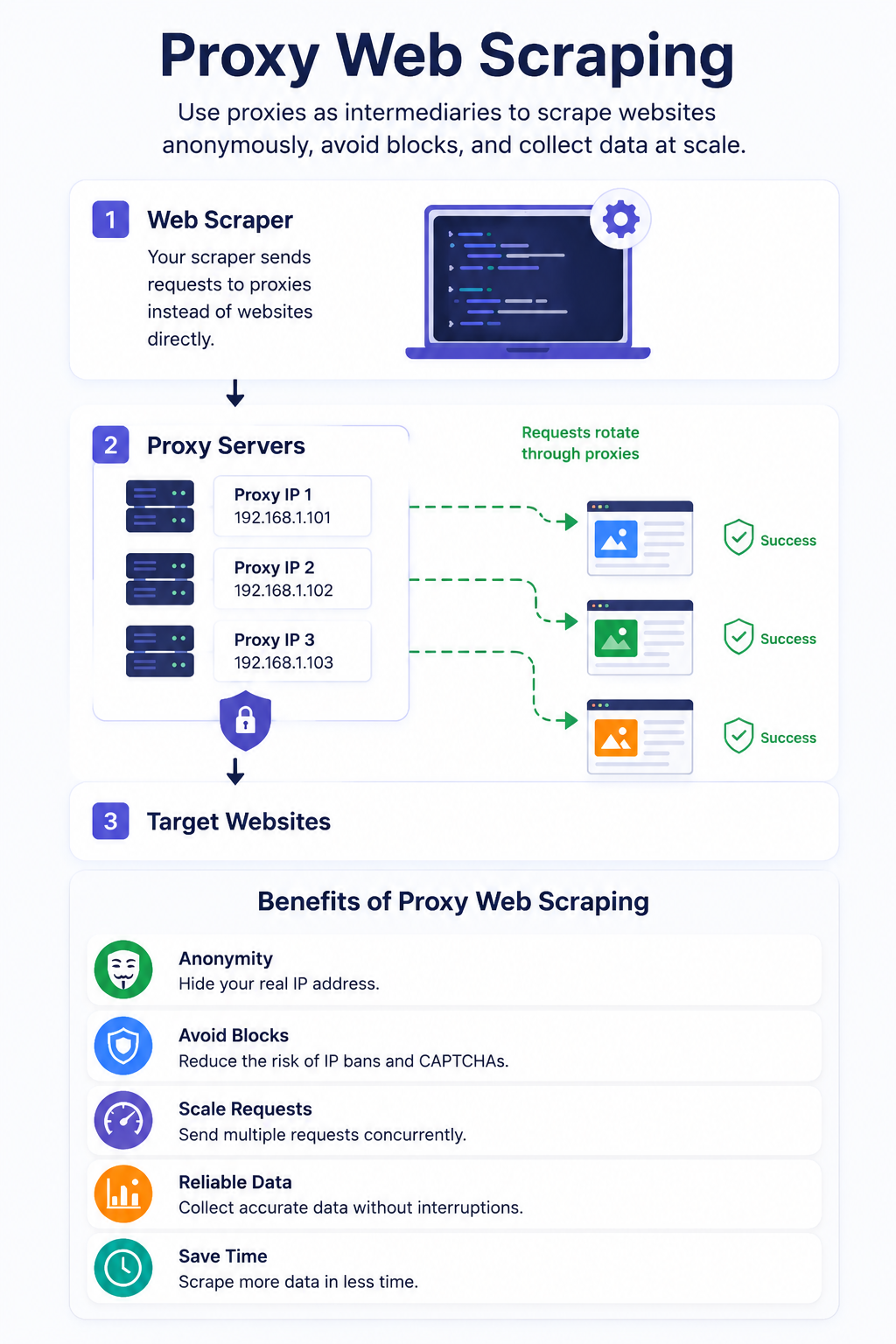
Proxy web scraping means routing automated web requests through a proxy server before they reach the target website.
A simplified request path looks like this:
Scraper → Proxy Server → Target Website → Proxy Server → Scraper
Suppose you have a Python script running on a server with the IP address 203.0.113.10. Without a proxy, the website receives requests directly from that address.
When you add a proxy, your scraper first connects to the proxy server. The proxy sends the request onward using its own exit IP. The target website therefore sees the proxy's IP address rather than the original IP used by your scraper. The response follows the reverse path and eventually reaches your application.
This setup gives the scraper control over which IP address, network type, and sometimes geographic location are associated with each request. A web scraping proxy is therefore not the scraper itself. It is part of the network infrastructure that sits between the scraping software and the destination.
How Do Web Scraping Proxies Work?
The underlying process is relatively simple.
Your application prepares an HTTP or HTTPS request. Instead of connecting directly to the target domain, it sends that request through a configured proxy endpoint. The proxy accepts the connection and forwards the request.
The target server processes it and returns a response. From the target's perspective, the immediate network connection originates from the proxy IP. The proxy then forwards the response back to your scraper, where your program processes the HTML, JSON, or other returned data.
If you are using a rotating proxy gateway, you may continue connecting to the same proxy hostname while the provider selects different exit IP addresses behind it. This saves you from maintaining a long list of individual proxy servers yourself. With a sticky session, the gateway instead tries to preserve the same exit IP for a period of time.
That distinction becomes important once cookies, multi-page flows, pagination, or other session-dependent behavior enters the picture.
Why Use Proxies for Web Scraping?
The most obvious reason is IP distribution. If thousands of requests originate from a single address, the target server can associate all of that activity with one source. A proxy pool makes it possible to distribute requests across several addresses rather than putting the entire workload on one IP.
Rate limiting is another consideration. An HTTP 429 Too Many Requests response specifically indicates that a client has sent too many requests during a period of time. Servers may apply those limits by IP address, account, resource, cookie, or other criteria. A Retry-After header may also tell the client when another request should be attempted.
Proxies for web scraping can also help when the information you are researching changes by location. Search results, product availability, prices, advertising, and other public content may differ between countries or regions. A geographically targeted proxy lets the scraper make a request using an IP associated with the required market. Anyone collecting location-sensitive local-business data—the kind you would gather with a Google Maps scraper—often runs into this exact situation, where results shift depending on the region the request appears to come from.
Other legitimate uses include managing larger data-collection workloads, separating scraping infrastructure from the original server IP, and maintaining different sessions for different workflows.
What a proxy does not do is guarantee access. A website can consider much more than an IP address when deciding how to respond to a request.
Types of Proxies for Web Scraping
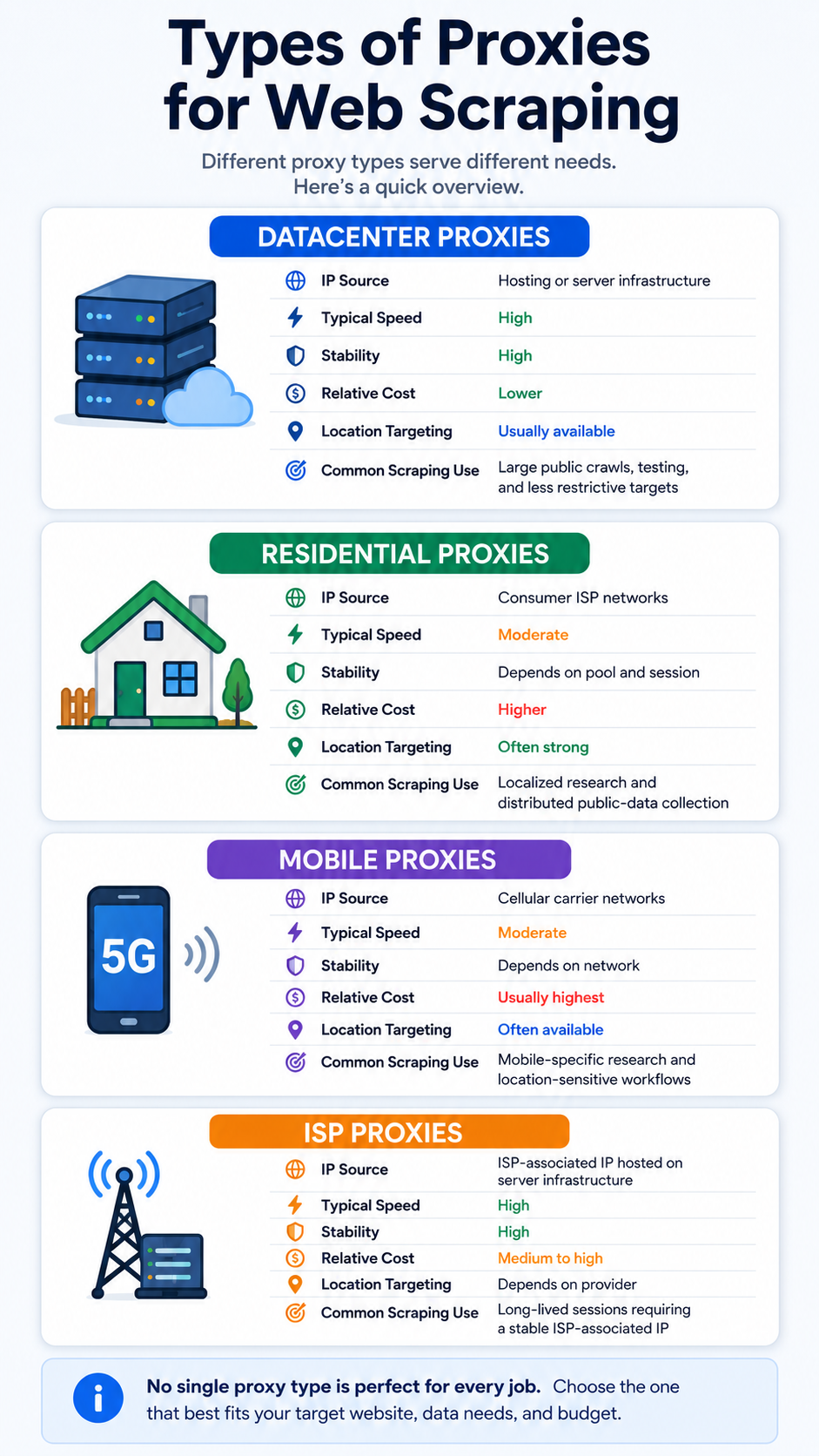
There is no universally best proxy server for web scraping. The right type depends on the target, request volume, required location, budget, and whether the workflow needs a stable session.
Residential Proxies for Scraping
Residential proxies use IP addresses associated with consumer internet connections. Their main advantage is that the IP belongs to an ISP network rather than an obvious hosting or cloud-server range. They are commonly used when location matters or when a scraping project needs a broad pool of geographically distributed IPs.
The trade-off is cost and sometimes performance. Residential traffic is usually more expensive than ordinary datacenter proxy traffic, so using it for every request can be unnecessary when the target is easy to access. A practical approach is to reserve residential proxies for scraping workloads where their characteristics actually provide value for example, collecting search results that vary by region, which you might pair with a Google Search scraper.
“For teams that need more granular location and session control, Proxidize residential proxies offer country, city, and ISP targeting with both rotating and sticky sessions across 195+ countries.”
Datacenter Proxies for Scraping
Datacenter proxies use IP addresses hosted on server infrastructure. They are generally a good fit for public pages that tolerate automated access and for workloads where throughput and cost matter more than appearing to originate from a consumer ISP. They are often faster and less expensive than residential alternatives.
The downside is that datacenter IP ranges are comparatively easy to classify. A site that applies stricter policies to hosting-network traffic may therefore treat them differently. For straightforward public-data collection, however, starting with datacenter proxies can be more economical than immediately paying for residential or mobile traffic.
Mobile Proxies
Mobile proxies route traffic through IP addresses associated with cellular networks such as 4G or 5G connections. They can be useful when the project specifically requires mobile-network geography or when you need to examine content that varies for cellular users.
They are also usually more expensive, which means using mobile proxies for a simple public website can be excessive. Choose them because the workload needs mobile-network characteristics, not simply because they sound more advanced.
ISP Proxies
ISP proxies, sometimes called static residential proxies, combine characteristics of datacenter hosting with IP addresses associated with internet service providers. They can be useful for longer-lived sessions where you want a stable IP without relying on a rotating residential connection.
Not every proxy provider offers ISP proxies, and they should not automatically replace residential or datacenter options. Their usefulness depends heavily on whether the workflow needs both session stability and an ISP-associated address.
Residential vs Datacenter vs Mobile vs ISP Proxies
The target website should determine the proxy type, not the other way around. Paying for mobile traffic to collect a small public catalog would probably add cost without solving a real problem. At the opposite extreme, a small datacenter pool may be unsuitable for a large project where geographically diverse requests are necessary.
Test the simplest reasonable setup first, measure the results, and move to a different proxy type only when the evidence justifies it.
Rotating vs Sticky Proxies for Web Scraping
Rotation is one of the most misunderstood parts of proxy web scraping.
A rotating proxy changes the exit IP according to a predefined policy. That might happen after every request, after several requests, or after a specified amount of time. This works well when requests are independent. Imagine collecting a set of publicly accessible product pages where one request has no relationship to the next. Distributing those requests across a proxy pool may make sense.
A sticky proxy session does the opposite. It keeps the same exit IP for a defined period. That matters when several requests belong to one logical session. If a website associates a cookie or workflow state with a particular IP and your address changes on every request, the session may behave unexpectedly.
Pagination can sometimes benefit from sticky sessions. Authentication-based workflows may also require stable network identity, although you should never use a proxy to bypass authentication or other access controls.
Rotation should therefore be based on the structure of the workload rather than the assumption that more IP changes are always better.
How Proxy Rotation Works
A proxy provider usually exposes a gateway through which your scraper connects to a pool of available IP addresses. Several rotation models are common.
- Per-request rotation assigns a new exit IP when a new request or connection is made. It suits independent pages that do not require continuity.
- Time-based rotation keeps an address for a certain duration before replacing it.
- Session-based rotation associates an identifier with a particular exit IP so related requests can remain on the same address.
A well-designed scraping system should also expect individual proxies to fail occasionally. Connections can time out, exit nodes can disappear, or the target can respond differently than expected. That means your application needs sensible retry logic. A retry should not simply hammer the target repeatedly. Temporary failures should generally trigger a delay, and repeated failures should eventually stop rather than creating an infinite loop.
For 429 responses, reducing request pressure and respecting Retry-After when present is more appropriate than blindly switching IPs and continuing at the same aggressive rate.
How to Choose the Best Proxy for Web Scraping
Choosing proxies becomes easier when you evaluate them against your actual workload.
Start with the target. Is it a simple public website, a location-sensitive search result, an e-commerce catalog, or a multi-page session? Then consider the scale. A few hundred requests per week require a very different setup from a distributed crawler processing millions of URLs.
Location is another major factor. Country-level targeting may be enough for one project, while another may require state, city, ZIP-code, or ASN selection. Rotation should also match the workflow. If every page is independent, rotating sessions can be convenient. If several requests belong to the same user session, sticky IPs may be more appropriate.
Protocol support matters as well. HTTP and HTTPS proxies cover many applications, while SOCKS5 can be useful for software that needs a more general proxy transport. Other practical questions include authentication options, concurrency limits, bandwidth pricing, proxy-pool size, success rates on your actual targets, latency, documentation quality, usage monitoring, session controls, and technical support.
Do not evaluate a provider only by how many IP addresses it advertises. A smaller pool that consistently returns the data you need can be more valuable than a massive network that performs poorly for your specific targets. For production systems, a useful metric is cost per accepted record, not simply cost per gigabyte. Failed requests, retries, incorrect locations, and unusable responses all consume resources.
Proxy Performance in Real Scraping Workflows
Leads Sniper builds scraping tools rather than selling proxies, which gives us a slightly different vantage point. After running large volumes of public-data collection across many targets, a few patterns show up again and again.
Datacenter proxies are often enough. For straightforward public pages that tolerate automated access, datacenter proxies frequently deliver everything a project needs at a fraction of the cost of residential traffic. Reaching for residential IPs first is a common and expensive mistake.
Residential proxies earn their keep on specific jobs. They become genuinely useful when a target treats hosting-network traffic differently, or when the data itself shifts based on the consumer ISP and location behind a request. In those cases, the higher cost buys measurable improvement rather than reassurance.
Location changes results more than people expect. The same query can return different rankings, listings, and prices depending on where the exit IP appears to be. If your locations are wrong, your data is wrong—even when every request returns a clean 200 OK.
Aggressive rotation can hurt. Switching IPs on every step of a stateful workflow tends to break sessions, reset pagination, and trigger more challenges, not fewer. Slower, session-aware rotation often produces cleaner results.
Latency quietly caps your speed. A distant or overloaded exit node adds time to every request. Across millions of requests, that latency becomes the real bottleneck, regardless of how large the proxy pool is.
Pool size is a weak signal. A provider advertising tens of millions of IPs means little if success rates on your targets are poor. Quality and consistency beat raw pool size almost every time.
Not every failure is a proxy failure. Broken parsers, changed page layouts, missing JavaScript rendering, and unrealistic request rates are frequently blamed on proxies. Before swapping providers, confirm the problem is actually in the network layer.
Proxy4U for Web Scraping
Once you understand the proxy types and selection criteria above, it becomes easier to evaluate a specific provider. Leads Sniper maintains a dedicated Proxy4U partner page as part of its proxy-related resources.
Proxy4U currently offers residential, mobile, and datacenter proxy services. Its official residential service supports HTTP(S) and SOCKS5, IP whitelisting, rotation, sticky sessions, and geographic selection. Proxy4U states that residential sticky sessions can keep a node for up to 30 minutes and that location selection can include country, state, city, ZIP code, and ASN.
Its mobile product similarly supports HTTP(S)/SOCKS5, rotation, sticky sessions, IP whitelisting, location targeting, ASN targeting, and mobile networks including 3G, 4G, 5G, and LTE. Proxy4U's main site also lists residential, mobile, and datacenter options, rotating and sticky sessions, and a global pool advertised at more than 90 million IPs across 195 countries.
For teams that need those capabilities, Proxy4U is one provider worth evaluating alongside alternatives. The important step is to test its performance against your own targets rather than assuming that a provider's network size or feature list automatically translates into better scraping results.
Review the Leads Sniper Proxy4U partner page →
How to Use a Proxy for Web Scraping — Example
Python's Requests library supports proxies through its proxies argument. Its official documentation also supports proxy credentials and optional SOCKS proxy functionality.
A basic configuration could look like this:
import requestsproxy_url = "http://username:password@proxy.example.com:8000"proxies = { "http": proxy_url, "https": proxy_url,}url = "https://example.com/public-page"try: response = requests.get( url, proxies=proxies, timeout=20 ) if response.status_code == 200: print(response.text[:500]) elif response.status_code == 429: print("Rate limited. Slow down before retrying.") else: print(f"Received status code: {response.status_code}")except requests.RequestException as exc: print(f"Request failed: {exc}")
The proxy host, port, username, and password would normally come from your provider. In production, credentials should not be hard-coded into a public repository. Requests' own documentation warns that storing proxy credentials in environment variables or version-controlled files can create security risks.
This example deliberately keeps the logic simple. Its purpose is to demonstrate legitimate proxy routing rather than techniques intended to defeat sophisticated access controls.
Common Web Scraping Proxy Problems
Proxy infrastructure introduces its own failure modes. Identifying the actual cause matters because changing IP addresses does not solve every problem.
It is also worth remembering that 200 OK only tells you that a response was successfully returned. Your scraper should still verify that the expected product, listing, search result, or other content is actually present before accepting the record.
Proxy Web Scraping Best Practices
A reliable scraping setup depends as much on request discipline as it does on proxy quality.
- Check whether automated access is appropriate. Review the website's terms, applicable laws, API policies, and robots.txt where relevant. The standardized Robots Exclusion Protocol provides rules for how crawlers are requested to access site paths, although the specification explicitly notes that robots.txt is not an authorization mechanism.
- Prefer an official API when it solves the same problem. An API can be more stable and less resource-intensive than repeatedly downloading pages.
- Keep request rates reasonable. A larger proxy pool should not become an excuse to generate unnecessary traffic.
- Use exponential backoff for temporary failures. Increase the delay between retries rather than immediately repeating the same request.
- Respect Retry-After. When a server gives an explicit retry window, use it.
- Cache information that does not need to be collected again. Re-downloading unchanged pages wastes bandwidth for you and resources for the target.
- Monitor results by proxy type and location. Track latency, response codes, failed requests, retries, and accepted records.
- Match rotation to the workflow. Rotate independent requests and preserve the IP when session continuity genuinely requires it.
- Secure proxy credentials. Keep usernames, passwords, API keys, and whitelisted infrastructure out of public source code.
- Minimize sensitive-data collection. Do not collect private, restricted, or sensitive personal information without a legitimate and lawful basis.
The most reliable scraping systems are usually the ones that avoid unnecessary requests in the first place.
Do You Need Proxies for Web Scraping?
Not always. This is one of the most important decisions to make before buying proxy traffic.
If you are retrieving a small number of publicly accessible pages once per day, direct requests may work perfectly well. Adding a residential proxy network could increase cost and complexity without improving the result. You may also be able to avoid scraping entirely when the website provides an API, downloadable dataset, RSS feed, CSV export, or another official source.
A proxy becomes more relevant when your project requires geographically distributed research, larger request volumes, network separation, or multiple controlled sessions.
The key question is not, "Which proxy should I buy?" It is, "What network problem does this scraping project actually have?" If you cannot identify that problem, adding proxies may not solve anything.
Using Proxies With Lead Generation Scrapers
Proxy infrastructure usually sits behind a larger data workflow.
Someone collecting public local-business information may use a specialized tool rather than building the entire collection system from scratch. Leads Sniper provides a Google Maps scraper for this type of workflow. For search-result collection, there is also a Google Search scraper, while directory-focused projects can use the Yellow Pages scraper. If a later stage of a legitimate lead-generation process involves finding publicly listed contact information from domains, Leads Sniper also provides a Domain Email Extractor.
These tools solve a different part of the problem from proxies. The scraper handles collection and extraction logic. The proxy controls how network requests are routed. Keeping those responsibilities separate makes the overall system easier to troubleshoot.
Frequently Asked Questions
What is a proxy in web scraping?
A proxy is an intermediary that routes a scraper's request to the target website. The website receives the connection from the proxy IP rather than directly from the scraper's original address.
How many proxies do I need for web scraping?
There is no fixed number. It depends on request volume, target policies, required locations, session length, and how the provider's network works. With a rotating gateway, you may not manage individual IP addresses at all—the provider handles pool selection behind a single endpoint. A practical starting point is to measure your acceptable request rate per target, then size the pool to stay within it. Focus on cost per accepted record and successful response rates rather than chasing an arbitrary proxy count.
Residential vs datacenter proxies: which is better for web scraping?
It depends on the target. Datacenter proxies are cheaper and faster, making them the better choice for straightforward public pages, testing