Web scraping powers a huge slice of modern business decisions. Price monitoring, SEO research, lead generation, market analysis, machine learning datasets: they all depend on collecting public data at scale. But there's a catch. The moment you send hundreds or thousands of automated requests to a website, that site notices.
Websites don't like sudden bursts of traffic from a single source. It looks unusual, it strains their servers, and it often signals a bot. So they push back. They slow you down, throw CAPTCHAs at you, or block your IP address entirely.
This is where a proxy server for web scraping becomes essential. A proxy spreads your requests across many different IP addresses, making your scraper look like normal traffic instead of a single machine hammering the same endpoint. Get the setup right, and you collect clean data reliably. Get it wrong, and your project stalls behind bans and blocks.
This guide walks through everything you need to know: how proxies work, the different types available, how to pick the right one, the legal side of scraping, and practical best practices. Whether you're writing your first scraper or scaling a data pipeline across millions of pages, you'll find useful ground here.
What Is a Proxy Server for Web Scraping?
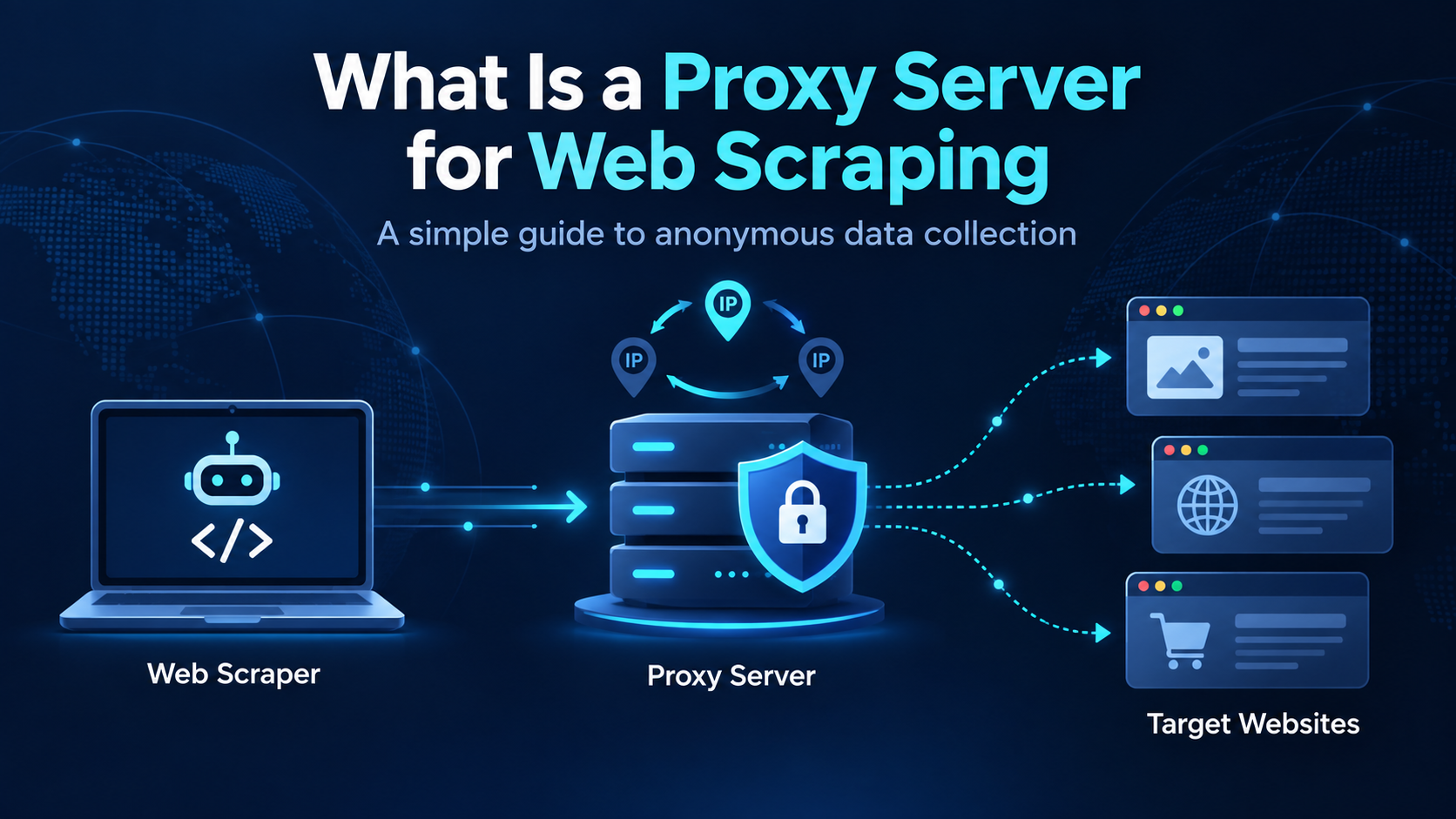
A proxy server is an intermediary that sits between your scraper and the website you want to collect data from. Instead of connecting directly to the target site, your requests pass through the proxy first. The proxy then forwards those requests using its own IP address.
Think of it as a middleman that relays messages. The website you're scraping sees the proxy's IP, not yours. This process is called IP masking, and it's the core reason proxies matter for data extraction.
Here's why that masking helps. Every device on the internet has an IP address, which acts like a return address on a letter. When you send many requests from one IP, the target site can easily link them together and flag the pattern as automated. A web scraping proxy breaks that link by rotating through a pool of different IPs.
So instead of one visitor asking for 5,000 pages, the website sees what looks like thousands of separate visitors each asking for a few pages. That difference is what keeps your scraper running.
Proxies also give you control over where your requests appear to come from. Need to see how a product is priced in Germany versus Japan? Route your requests through proxies located in those countries. The website serves the local version of the page, and you get accurate, region-specific data.
Why Do Web Scrapers Need Proxy Servers?
You could technically scrape without proxies. For a handful of pages on a small, unprotected site, it might even work. But once you scale up, proxies stop being optional. Here's why they matter.
Avoiding IP blocking. This is the big one. Websites monitor request patterns, and too many requests from a single IP triggers a block. Once your IP is banned, your scraper is dead in the water. Proxies let you distribute requests so no single IP looks suspicious, which helps you avoid IP bans.
Handling large-scale scraping. Serious data collection means thousands or millions of requests. A single IP simply can't handle that volume without getting flagged. A large proxy pool spreads the load and keeps your crawler bots moving.
Accessing geo-specific data. Prices, search results, product availability, and ad placements often change based on location. Proxies in specific countries or cities let you see exactly what a local user would see. This is critical for market researchers and SEO professionals tracking regional rankings.
Managing request limits. Many sites set rate limits that cap how many requests one IP can make in a given window. By rotating IPs, you stay under those limits per address while still collecting data at the pace you need.
Improving reliability. When one proxy fails or gets blocked, a good setup automatically switches to another. This redundancy keeps your scraping automation stable instead of crashing every time a site pushes back.
How Does a Proxy Server Work in Web Scraping?
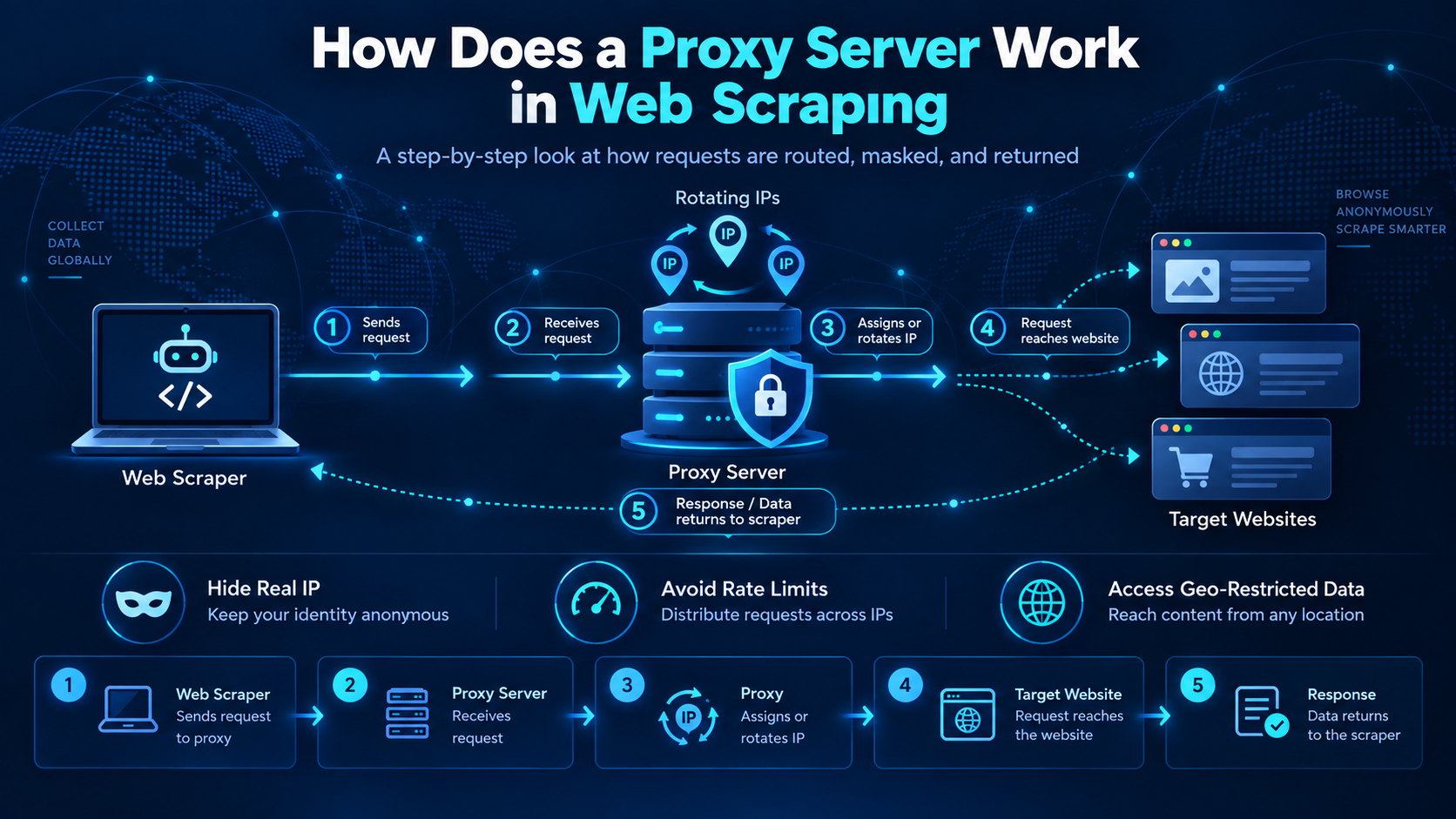
The workflow is simpler than it sounds. Once you understand the flow, the whole system clicks into place.
Here's the basic path a request takes:
Your scraping tool -> Proxy server -> Target website -> Data returned to you
Let's break that down step by step.
- Your scraper sends a request. Your web scraping tool wants to fetch a page, say, a product listing. Instead of connecting straight to the site, it sends the request to the proxy server.
- The proxy forwards the request. The proxy receives your request and passes it along to the target website using one of its own IP addresses. Your real IP stays hidden.
- The website responds. The target site processes the request as if it came from the proxy's IP. It sends the page content back to the proxy.
- The proxy returns the data. The proxy relays that response back to your scraper. You now have the HTML, JSON, or whatever data you asked for.
- Rotation happens (if configured). With a rotating proxy setup, the next request may use a completely different IP. This proxy rotation is what makes large-scale scraping look natural.
Here's a quick example. Say you're scraping 1,000 pages from an e-commerce site. Without a proxy, all 1,000 requests come from your IP, and the site blocks you after 50. With a rotating proxy pool of 500 IPs, each address handles just two requests. The site sees ordinary traffic, and your scraper finishes the job.
The proxy can use different protocols to carry this traffic. An HTTP proxy handles standard web requests and is the most widely supported by web scraping tools. A SOCKS5 proxy works at a lower level, handling any kind of traffic, and tends to be a bit more flexible and stable. For most scraping, either works fine.
Types of Proxy Servers Used for Web Scraping
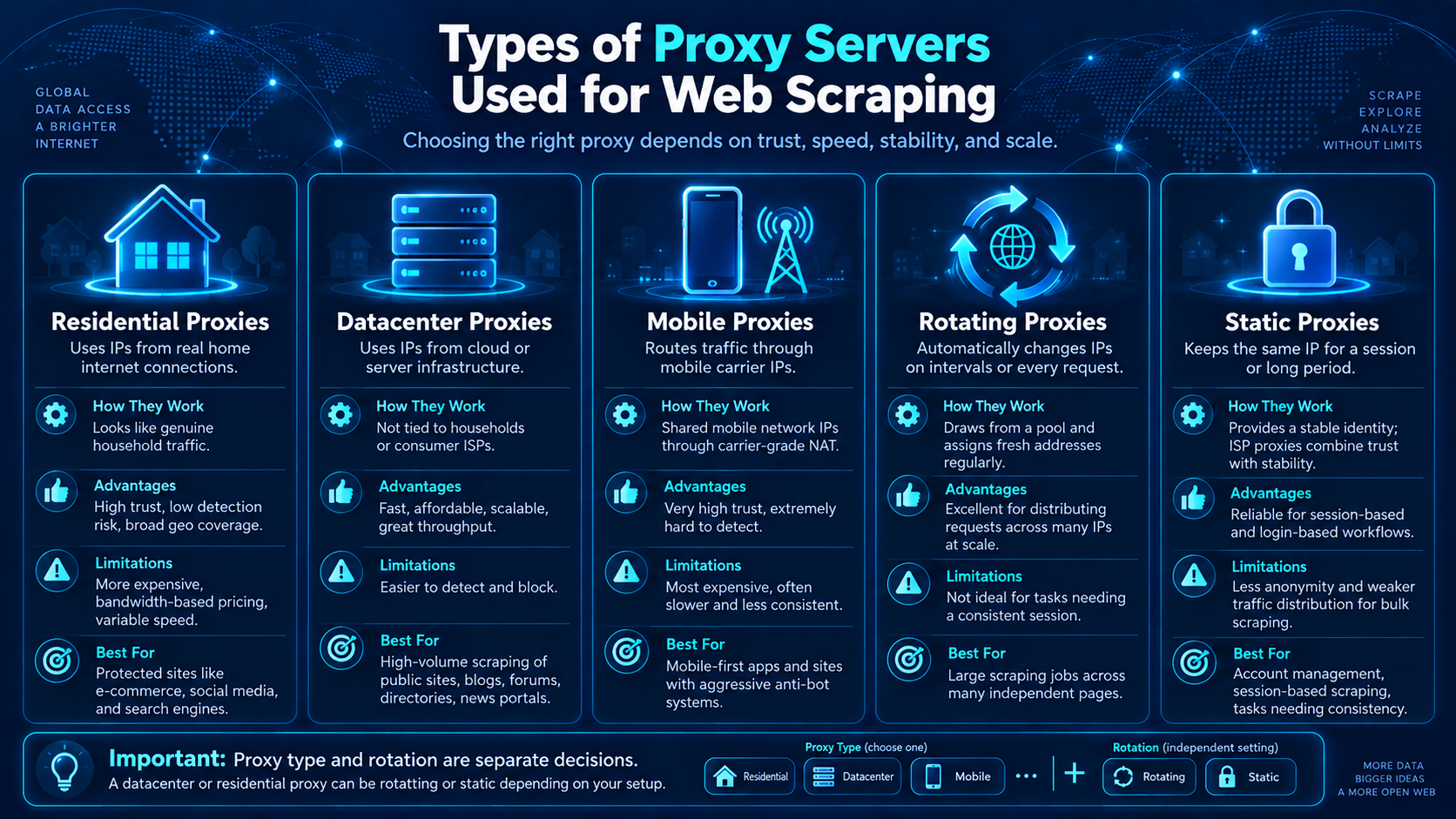
Not all proxies are the same. The type you choose affects your cost, speed, and how likely you are to get blocked. Here's a breakdown of the main options.
Residential Proxies
A residential proxy routes your requests through IP addresses assigned to real home internet connections by internet service providers.
How they work: These IPs belong to actual households, so to a target website they look like genuine visitors.
Advantages: High trust score, low detection risk, and broad geographic coverage. Websites rarely block them outright because doing so risks blocking real customers.
Limitations: More expensive than datacenter options, often priced by bandwidth. Speed can vary since traffic depends on real consumer connections.
Best for: Scraping heavily protected sites like large e-commerce platforms, social media, or search engines where detection risk is high.
Datacenter Proxies
A datacenter proxy uses IP addresses hosted on cloud or server infrastructure rather than home connections.
How they work: These IPs come from data centers and aren't tied to an ISP or a household.
Advantages: Fast, cheap, and easy to scale. Great throughput for high-volume jobs.
Limitations: Easier to detect. Websites can identify the address ranges belonging to known hosting providers and apply stricter rules to them.
Best for: High-volume scraping of public, less-protected sites like news portals, blogs, forums, and directories.
Mobile Proxies
A mobile proxy routes traffic through IP addresses assigned by mobile carriers to phones and mobile devices.
How they work: Mobile networks share IPs among many users through carrier-grade NAT, so blocking one address risks affecting many real subscribers.
Advantages: Very high trust score and extremely hard to detect. Websites are cautious about blocking mobile IPs.
Limitations: The most expensive option, and often slower and less consistent than other types.
Best for: The toughest targets, such as mobile-first apps or sites with aggressive anti-bot systems.
Rotating Proxies
A rotating proxy automatically switches your IP address at set intervals or on every request.
How they work: Instead of sticking to one IP, the proxy draws from a pool and assigns a fresh address regularly.
Advantages: Excellent for spreading requests across many IPs, which is the whole point of anonymous scraping at scale.
Limitations: Not ideal for tasks that need a consistent session, like logging in or moving through a multi-step checkout.
Best for: Large scraping jobs made up of many independent pages.
Static Proxies
A static proxy keeps the same IP address for the entire session or for a long, fixed period. Static residential proxies (often called ISP proxies) combine the trust of residential IPs with the stability of datacenter infrastructure.
How they work: You get one address that stays consistent, giving you a stable identity.
Advantages: Reliable for stateful workflows where the same IP must persist, like maintaining a login.
Limitations: Less useful for spreading traffic, and fewer IPs means less anonymity for bulk scraping.
Best for: Account management, session-based scraping, and any task where consistency matters more than variety.
One thing worth clearing up: proxy type and rotation are separate decisions. A datacenter proxy can rotate or stay static. A residential proxy can rotate or hold a sticky session. Don't assume "residential" means "rotating" -- you configure those independently based on your task.
Residential Proxy vs Datacenter Proxy
This is the comparison that trips up most people, so let's lay it out clearly. Both types work well in different situations. The right choice depends on your target site and your budget.
Here's the practical takeaway. Start with datacenter proxies when your target site serves the data you need without heavy blocking. They're faster and far cheaper, which matters a lot across millions of requests.
Switch to residential proxies when testing shows that datacenter IPs are getting blocked, or when you need precise geographic targeting. Residential proxies cost more, so reserve them for the sites and locations that actually require them.
A smart approach many teams use is a hybrid setup: datacenter proxies as the default, residential proxies only where the evidence justifies the extra spend. Don't pay premium prices for residential IPs on a site that doesn't need them.
How to Choose the Right Proxy Server
Picking a proxy provider isn't just about price. A cheap proxy that gets blocked constantly costs more in the long run than a reliable one. Here are the factors that actually matter.
IP pool size. A larger pool means more addresses to rotate through, which lowers your chance of hitting the same IP too often. For big scraping jobs, look for providers offering millions of IPs.
Rotation options. Check whether you can control how often IPs rotate and whether sticky sessions are available. Flexible rotation lets you match the proxy behavior to each task.
Location coverage. If you need geo-specific data, make sure the provider covers the countries and cities you care about. Granular targeting down to the city or ASN level is a real advantage for regional research.
Speed and success rate. A fast proxy that fails half its requests isn't fast at all. Look at real-world success rates, not just advertised connection speeds. Test with your actual target sites before committing.
Authentication methods. Most providers offer either username/password authentication or IP whitelisting. Pick whichever fits your infrastructure. A clean proxy API also makes integration with your web scraping tools much smoother.
Scalability. Your needs will grow. Choose a provider that lets you scale up bandwidth, IPs, and concurrent connections without switching services.
Pricing model. Some providers charge per GB of bandwidth, others per IP or per request. Bandwidth pricing can spike fast when scraping image-heavy pages, so estimate your usage carefully. Calculate the cost per successful record, not just the cost per request.
Always run a small pilot before scaling. Test a representative sample of your target pages, hold everything else constant, and measure success rates, data quality, and total cost. A quick test saves you from costly surprises later.
Common Web Scraping Problems and How Proxies Help
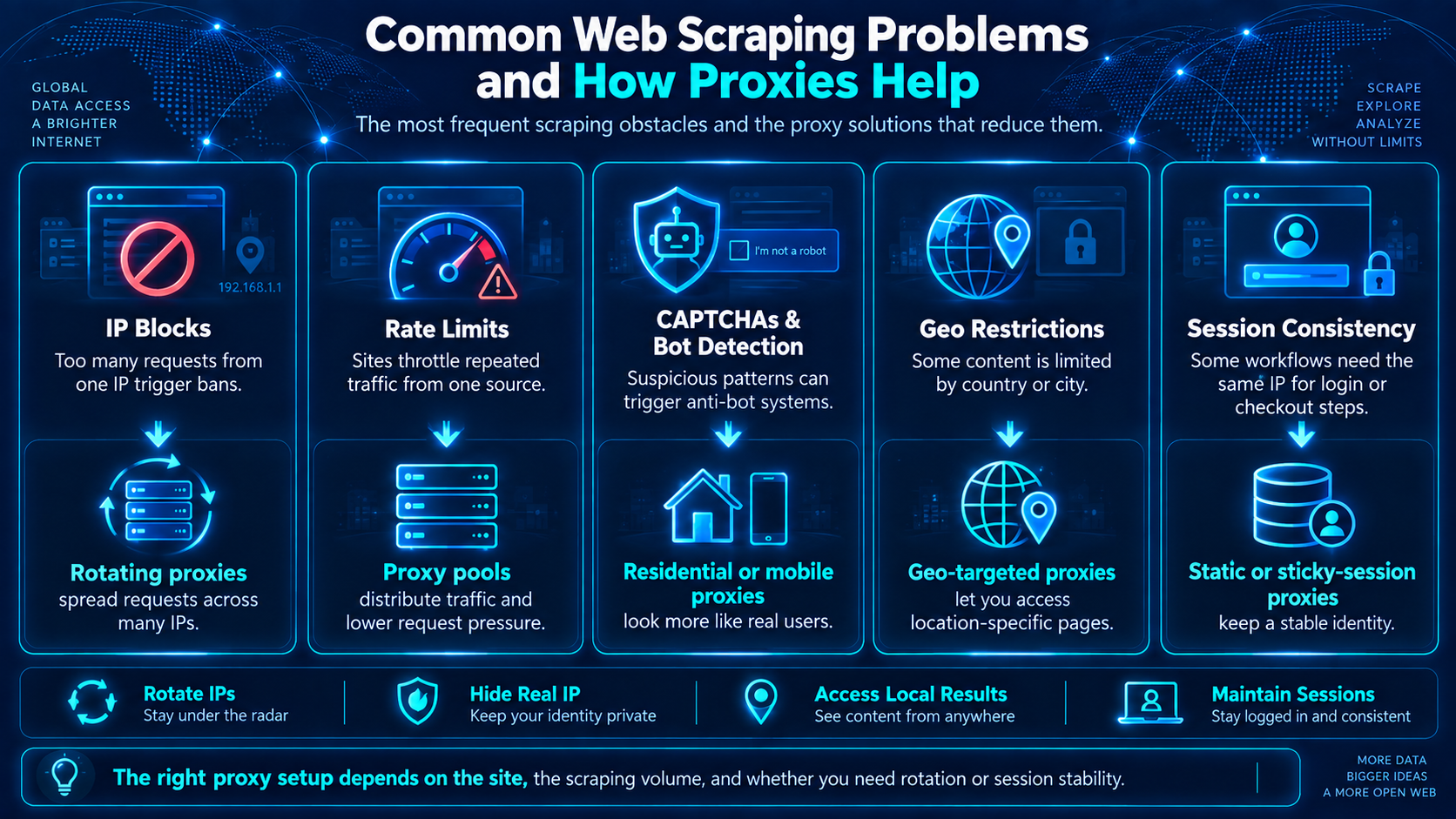
Every scraper runs into obstacles. Here are the most common ones and how proxies fit into the solution.
CAPTCHA challenges. Sites throw CAPTCHAs when they suspect automation. High-quality residential and mobile proxies trigger fewer CAPTCHAs because they look like real users. That said, proxies alone won't eliminate CAPTCHAs; you may still need proper request pacing and browser handling.
IP bans. The classic problem. When a site bans your IP, everything stops. Rotating proxies solve this by spreading requests across many addresses, so no single IP does enough to earn a ban.
Rate limits. Many sites cap requests per IP over a time window. By rotating IPs, each address stays under the limit while your overall collection speed stays high. Pair this with sensible delays between requests for the best results.
Geo-restrictions. Some content is only available in certain regions. Proxies located in the target country unlock that data by making your requests appear local.
Blocked requests. Beyond outright bans, sites may serve fake pages, empty responses, or redirects to bots. Quality proxies reduce these soft blocks, though you should always validate that the data you receive is the real page, not a decoy.
One important caveat: proxies fix the IP part of the puzzle, not everything. Websites also look at browser fingerprints, headers, cookies, and behavior patterns. A proxy improves your network identity, but a complete scraping setup needs proper headers, realistic timing, and clean session handling too.
Are Proxy Servers Legal for Web Scraping?
This question deserves a careful, balanced answer. Proxies themselves are legal tools. Businesses use them every day for legitimate purposes. But how you use them, and what data you collect, is where things get nuanced.
Legitimate use cases. Scraping publicly available data for price comparison, SEO research, market analysis, and academic study is generally accepted. Proxies simply help you do this reliably at scale. Using a proxy is not inherently sketchy; it's a standard part of professional data extraction.
Website terms of service. Many sites include anti-scraping clauses in their terms. Violating those terms can create legal or contractual risk, even for public data. Review the terms of the sites you plan to scrape, and pay attention to their robots.txt file, which signals crawler preferences.
Ethical scraping practices. Good scraping respects the target site. Don't overload servers with aggressive request rates. Scrape during off-peak hours when possible, identify your bot honestly where appropriate, and only collect the data you actually need.
Data privacy responsibilities. This is critical. If you're collecting personal information, privacy laws like GDPR and CCPA may apply even when the data is publicly visible. Handle personal data lawfully, store it securely, and process it only for legitimate purposes. When in doubt, get legal advice.
There's also an ethical dimension to proxy sourcing itself. Reputable providers acquire residential IPs through consent-based networks where users knowingly share bandwidth. Less reputable operations have used compromised devices. Ask your provider how they source their IPs; it matters both legally and ethically.
The short version: proxies are legal, but responsibility rests on how you use them. Scrape public data, respect site policies, honor privacy laws, and you're on solid ground.
Best Practices for Using Proxy Servers for Scraping
A good proxy is only half the equation. How you use it determines your success rate. Follow these practices to keep your scraper running smoothly.
Respect website policies. Check robots.txt and terms of service before you start. Avoid off-limits areas, and don't scrape data you're not permitted to collect. Responsible scraping keeps you out of trouble and reduces blocks.
Control your request frequency. Slamming a site with rapid-fire requests is the fastest way to get flagged. Add delays between requests and randomize the timing slightly so your traffic looks human. Pacing matters as much as IP rotation.
Rotate IPs properly. Match your rotation to the task. Use rotating proxies for independent pages, but switch to sticky sessions for anything that needs a consistent identity, like logins or multi-step flows. Rotating mid-session breaks cookies and state, which causes failures.
Handle errors gracefully. Build in retry logic with exponential backoff. When you hit a 429 (too many requests) or a temporary failure, wait and retry rather than hammering the server. Respect any Retry-After headers the site sends.
Monitor performance. Track success rates, response times, and data quality continuously. A drop in valid responses often signals that IPs are getting blocked or the site changed its layout. Catching this early saves your data pipeline.
Validate your data. A 200 OK response doesn't guarantee good data. Check that you're getting the actual page content, not an empty shell, a CAPTCHA, or a decoy page. Field-level validation keeps your dataset clean.
Use quality proxy infrastructure. Free proxy lists are tempting but rarely worth it. They fail often, get blocked fast, and can pose security risks. Reliable paid proxies deliver far better ROI once you factor in the engineering time saved.
Proxy4U as an Example Proxy Solution
To ground this discussion, it helps to look at a real provider. Proxy4U is one example of a service that offers proxy infrastructure for data collection tasks.
Leads Sniper Partner Proxy4U supports HTTP, HTTPS, and SOCKS5 protocols, which makes it compatible with a wide range of web scraping tools, bots, and automation software. It offers three main proxy types: residential, datacenter, and mobile, each available in both rotating and sticky session configurations.
The network covers over 90 million IP addresses across 195 countries, with targeting options down to the country, state, city, zip code, and ASN level. This kind of granular geographic coverage suits projects that need region-specific data.
Common use cases for a service like this include web scraping, SEO research, e-commerce price monitoring, and scraping automation. The choice between rotating and sticky sessions lets you match the proxy behavior to your specific task, whether that's spreading requests across many IPs or holding a consistent address for a session.
As with any provider, the sensible approach is to test it against your own target sites first. Measure success rates and data quality on a representative sample before scaling up, and compare the total cost against your project requirements.
Frequently Asked Questions
What is a proxy server in web scraping?
A proxy server is an intermediary that sits between your scraper and the target website. It forwards your requests using its own IP address, hiding your real one. This IP masking lets you distribute requests across many addresses so your scraper looks like normal traffic instead of a single bot.
Why do web scrapers use proxies?
Scrapers use proxies mainly to avoid IP blocking. Sending many requests from one IP gets that address banned quickly. Proxies spread requests across a pool of IPs, help access geo-specific content, manage rate limits, and keep large-scale data extraction reliable.
Are proxies necessary for web scraping?
For small, one-off jobs on unprotected sites, you might not need proxies. But for any serious or large-scale scraping, they're essential. Without proxies, your single IP gets blocked fast, and your project stalls.
Which proxy is best for web scraping?
It depends on your target. Datacenter proxies are best for high-volume scraping of less-protected sites because they're fast and cheap. Residential proxies work better for protected or geo-sensitive sites since they're harder to detect. Many teams use a mix of both.
What is proxy rotation?
Proxy rotation is the practice of automatically switching your IP address at set intervals or on every request. It draws fresh IPs from a pool so no single address makes enough requests to get flagged. Rotation is what makes large-scale scraping look natural.
Are residential proxies better than datacenter proxies?
Not always. Residential proxies have a higher trust score and lower detection risk, but they cost more and can be slower. Datacenter proxies are faster and cheaper but easier to detect. The best choice is whichever meets your data-quality needs at the lowest cost.
Can websites detect scraping proxies?
Yes, they can. Datacenter proxies are relatively easy to identify because their IP ranges are published. Residential and mobile proxies are much harder to detect but not impossible. Websites also look at browser fingerprints, headers, and behavior, so a proxy alone doesn't guarantee you'll go unnoticed.
Is web scraping with proxies legal?
Proxies are legal tools, and scraping public data is generally accepted. But legality depends on how you use them. Respect website terms of service, follow robots.txt guidance, and comply with privacy laws like GDPR and CCPA when handling personal data. For high-risk projects, consult a legal professional.
What is the difference between HTTP and SOCKS5 proxies?
An HTTP proxy handles standard web traffic and is the most widely supported option for scraping. A SOCKS5 proxy works at a lower level and can handle any type of traffic, often with a bit more stability and flexibility. For most web scraping, either works well.
How many proxies do I need for web scraping?
It depends on your request volume and the site's tolerance. As a rough guide, spread your requests so each IP makes only a small number over any time window. A larger pool lets you scrape more pages without triggering blocks. Test with your target site to find the right balance.
Proxies are a foundational tool for anyone serious about web scraping. Choose the right type for your target, configure rotation to match your task, respect the sites you collect from, and validate your data along the way. Do that, and you'll build scraping systems that stay reliable as the web keeps changing.