Quick Answer: Email scraping is the process of automatically extracting email addresses from websites, directories, maps platforms, and public databases. Done right, it fuels targeted outreach at scale. Done wrong, it tanks your sender reputation and puts you in legal gray zones. This guide covers every step, from extraction and verification to compliance and automation, so you build lists that actually convert.
Cold outreach only works when the list is good. That sounds obvious until you send a thousand emails and get 200 bounces, two replies, and a spam complaint. Then the cost of bad data becomes very real.
Most teams focus on volume. They scrape fast, export a CSV, and hit send. The ones who actually see ROI do something different: they treat email quality as the foundation, not an afterthought. They verify before sending. They enrich before personalizing. They clean before every campaign.
This guide is built for the people who want to do it right: marketers, sales reps, agency owners, recruiters, and founders who use email as a genuine growth channel. You'll learn exactly how email scraping works, which data sources produce the best results, how to build workflows that scale, and what to watch out for on the compliance side.
No fluff. No filler. Let's get into it.
What Is Email Scraping?
Email scraping is the automated process of collecting email addresses from publicly accessible online sources, including websites, business directories, Google Maps listings, social profiles, and public databases.
The term gets used interchangeably with "email harvesting" and "email extraction." They all refer to the same thing. A scraper, whether it's a browser extension, desktop application, or cloud-based platform, crawls target sources and pulls any email addresses it finds into a structured list.
That list then feeds into CRM systems, cold email sequences, recruiting pipelines, or marketing campaigns.
The key word is "public." Email scraping tools extract data that's already visible on the open web: contact pages, Google Maps business profiles, directory listings, and similar sources. This is what distinguishes scraping from data breaches or illicitly obtained data.
How Does Email Scraping Work?
At a technical level, email scrapers follow a predictable process:
- Crawl a source: The tool visits one or more URLs or queries a search engine or directory
- Parse the page content: It scans the HTML for patterns that match email address formats (e.g., name@domain.com)
- Extract matching strings: Any string matching an email pattern is captured
- Follow links: More sophisticated tools follow internal links across an entire website or domain
- Deduplicate and structure: Results are cleaned, deduplicated, and exported as CSV or Excel
Modern email scrapers go beyond basic pattern matching. Tools like Leads Sniper's Domain Email Extractor crawl every page of a given domain, not just the contact page, to maximize the chances of finding a valid address. The Google Maps Scraper pulls emails linked to business websites directly from Maps listings, a source that most competitors miss entirely.
Types of Email Scraping
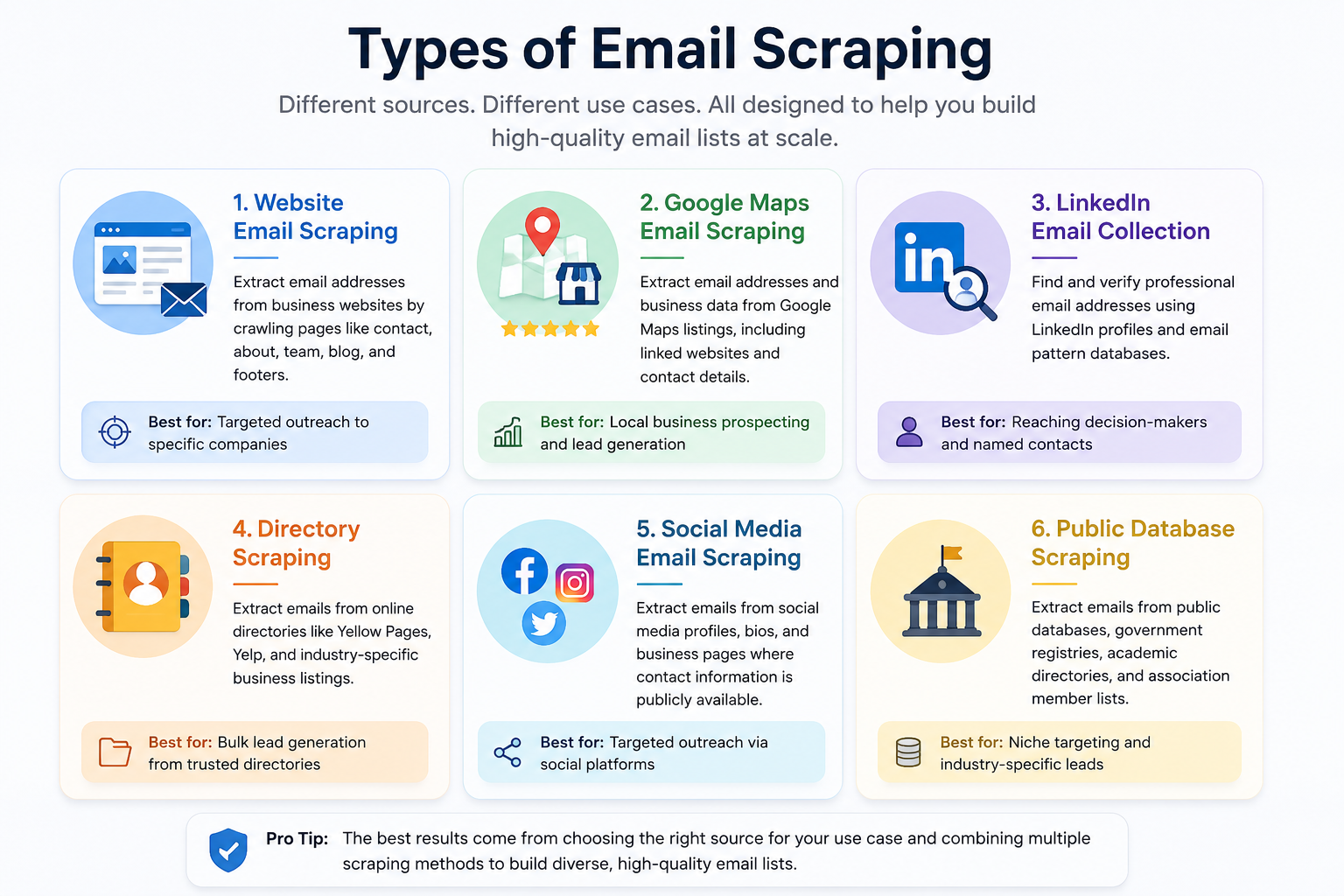
Different use cases call for different data sources. Here's a breakdown of the main approaches:
Website Email Scraping
The most common method. A domain-level scraper visits every page on a website (homepage, about, team, contact, blog, footer) and extracts all visible email addresses. Useful for targeting specific companies.
Google Maps Email Scraping
Extracts business information from Google Maps listings, including linked website emails, phone numbers, and social profiles. Exceptionally powerful for local business prospecting. Because listings are actively maintained by business owners, the data tends to be fresher than static directories.
Tools like Leads Sniper's Google Maps Scraper extract 60+ data fields per listing: business name, address, email, phone, social URLs, ratings, review count, and more. With 17M+ places and 2M+ emails already extracted across its user base, it's one of the most data-dense options available for local B2B prospecting.
LinkedIn Email Collection
LinkedIn doesn't expose email addresses publicly, so "LinkedIn scraping" typically involves tools that cross-reference profile data with email pattern databases to predict likely business email addresses. Accuracy varies significantly. Always verify these before outreach.
Directory Scraping
Business directories like Yellow Pages, Yelp, and industry-specific listings publish structured contact data. Tools built for directories, like Leads Sniper's Yellow Pages Scraper, automate extraction across thousands of entries.
Social Media Email Scraping
Some social profiles include email addresses in their bio or contact section. Facebook business pages in particular often list contact emails publicly. This is viable for targeted outreach but typically lower volume than directory or Maps-based approaches.
Public Database Scraping
Government business registries, academic directories, trade association member pages, and other public databases often contain structured contact data that can be extracted systematically.
Manual vs. Automated Email Scraping
The verdict is straightforward: automated scraping wins for volume. Manual review still has a role in high-value, low-volume outreach where quality matters more than scale.
Email Scraping vs. Email Finder Tools
These two categories are often confused but serve different functions:
Use email finders when you know the person's name and company. Use email scrapers when you're building volume lists from geographic or categorical searches.
Email Scraping vs. Web Scraping
Web scraping is the broader category. It refers to any automated extraction of data from websites: product prices, reviews, addresses, phone numbers, social URLs, business details, and yes, email addresses.
Email scraping is a specific subset of web scraping where the target data is email addresses.
In practice, the best lead generation workflows combine both. A tool like Leads Sniper scrapes Google Maps (web scraping) and retrieves emails linked to business websites (email extraction) in a single workflow, so you get a full contact record, not just an isolated email.
How Businesses Use Email Scraping
Lead Generation
The most common use case. Sales teams build prospecting lists by industry, location, or category, then feed those lists into outreach sequences. A marketing agency targeting restaurants in a specific city, for example, can pull every relevant Google Maps listing in under an hour.
Sales Prospecting
B2B sales reps use scraped emails to identify decision-makers at target companies. Combine with domain enrichment and you can build a prospect file that includes email, phone, website, social media, and business category.
Recruitment
Recruitment agencies scrape job boards, company websites, and professional directories to identify potential candidates or to reach companies looking to hire. For outbound recruiting, a targeted list of HR directors or department heads at qualifying companies can be built quickly.
Market Research
Beyond outreach, scraped data reveals market structure: how many businesses operate in a category, where they're concentrated, how many have web presence, and what review volumes look like. This informs strategy before a single email is sent.
Competitor Analysis
Scraping competitor listings and directories can reveal which companies they're likely targeting and which segments are underserved. Combined with review data, it can surface competitive weaknesses worth exploiting.
Partnership Outreach
Agencies, SaaS companies, and consultants use email scraping to identify potential referral partners, co-marketing candidates, and integration prospects, particularly useful for reaching local businesses that don't show up in LinkedIn searches.
Why Most Scraped Email Lists Fail
Here's the uncomfortable truth: a big list of scraped emails is almost worthless without proper handling. Most campaigns that underperform fail for one of four reasons:
- No verification: Unvalidated emails produce high bounce rates, which damage sender reputation and reduce inbox placement for future campaigns
- No segmentation: A generic blast to a mixed list produces generic results. Geographic or category-based segmentation dramatically improves relevance
- Stale data: Email addresses change. Business owners move on. Companies fold. Scraped data degrades over time, so recency matters
- No enrichment: An email address alone is rarely enough. Without context (business name, category, size, location) personalization is superficial
The scraping step is actually the easy part. What happens after scraping determines whether the list produces pipeline or just burns domain reputation.
How to Build a High-Quality Email List
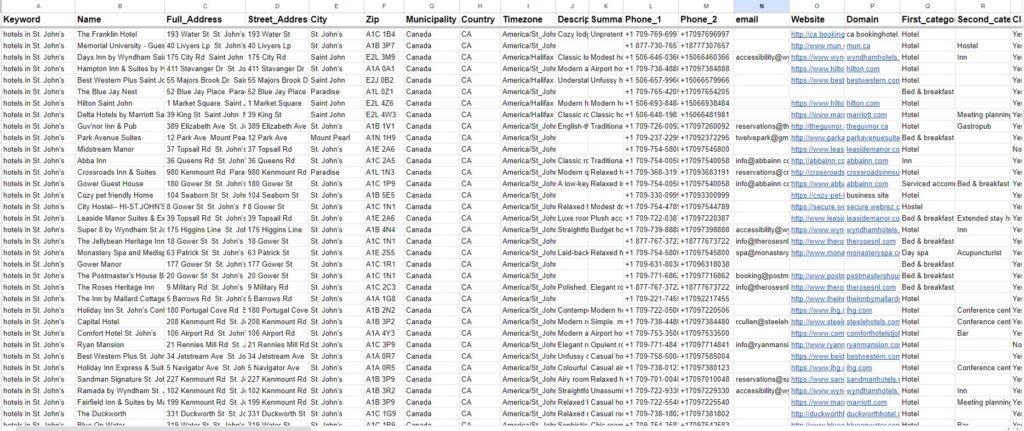
High-quality email lists share four characteristics: accuracy, relevance, freshness, and depth.
Accuracy means the email addresses exist and are deliverable. Verification handles this.
Relevance means the contacts match your actual ICP (Ideal Customer Profile). Define your target before you scrape: geography, business category, size indicators like review volume, and whether they have a website.
Freshness means the data was recently pulled from live sources. Google Maps listings are actively maintained by business owners, making them one of the freshest sources available.
Depth means each record contains enough context for personalized outreach: not just an email, but name, company, phone, website, social profiles, and category.
Step-by-Step: How to Scrape Emails Responsibly
- Define your ICP clearly: Location, business type, size, and any category-specific qualifiers
- Choose the right source: Google Maps for local businesses, Yellow Pages for directory-listed companies, domain scraping for specific websites
- Run the scraper with targeted parameters: Use keyword filters, geographic filters, and category filters to narrow results before export
- Export to CSV or Excel: Review a sample of the raw data for quality
- Deduplicate: Remove duplicate records before verification
- Verify: Run the list through an email verification tool (see below)
- Enrich: Add any missing context from secondary sources
- Segment: Group contacts by category, location, or intent signal before building sequences
Pre-Scraping Checklist
- ✓ ICP is clearly defined (industry, location, size)
- ✓ Target source selected and tested with a small sample
- ✓ Scraping parameters configured (keywords, geographic filters)
- ✓ Export format confirmed (CSV preferred for most CRMs)
- ✓ Verification tool ready for post-export processing
- ✓ Compliance reviewed for target region
How to Verify Scraped Emails
Scraped emails are only as good as their deliverability. Sending to an unverified list is one of the fastest ways to destroy a sending domain's reputation.
What Is Email Bounce Rate and Why Does It Matter?
According to Apollo.io (April 2026), a healthy bounce rate from paid or scraped data should stay below 2%, with hard bounces ideally under 1%. The industry-wide average sits at 0.89% when proper list hygiene is applied (Folderly, 2025).
For B2B specifically, rates trend higher because job changes, company restructures, and domain expirations happen constantly. Powered By Search data from 2025 put the B2B average bounce rate at 2.48%, which means verification is non-negotiable.
The consequences of exceeding 5% are severe: inbox providers flag your domain, placement rates drop, and future campaigns suffer even if the new lists are clean.
Research from The Digital Bloom found that organizations sending over one million emails monthly saw a 22.35 percentage point decline in inbox placement when they skipped email list verification. That's a cliff, not a slope.
Email Verification Methods Compared
For most use cases, a tool that combines domain validation, SMTP verification, and catch-all detection covers the bases.
Step-by-Step: How to Verify Scraped Emails
- Export your scraped list: Ensure all records have clean formatting
- Run syntax checks: Remove malformed addresses (missing @, no domain, etc.)
- Domain validation: Confirm MX records exist for each domain
- SMTP verification: Ping each address to check deliverability without triggering a send
- Flag and remove catch-alls: These domains accept anything, so you can't confirm validity
- Suppress role-based emails: Unless your campaign is specifically addressed to a team
- Remove disposable emails: Temp email services generate false positives
- Segment results: Valid, Risky, and Invalid categories. Only send to Valid. Review Risky before including.
Email Hygiene Checklist
- ✓ No duplicate email addresses
- ✓ All addresses pass syntax validation
- ✓ Domains confirmed with active MX records
- ✓ SMTP verification run on full list
- ✓ Catch-all emails flagged and handled separately
- ✓ Role-based emails removed or tagged
- ✓ Disposable/temporary emails suppressed
- ✓ Bounced addresses from previous campaigns suppressed
How Email Quality Affects Sender Reputation
Your sender reputation is a score that inbox providers (Gmail, Outlook, Yahoo) maintain for your sending domain. It determines whether your emails land in the inbox, the spam folder, or don't arrive at all.
According to the Validity 2025 Email Deliverability Benchmark Report, global inbox placement in 2024 averaged just 83.5%, with 6.7% going to spam and 9.8% never arriving at all. That means nearly one in five emails from a typical sender doesn't reach the inbox, and that's before factoring in bad list hygiene.
High bounce rates are the fastest path to reputation damage. Each hard bounce signals to inbox providers that you're sending to invalid addresses, a pattern associated with spam operations. Once your domain reputation drops below certain thresholds, even sends to valid addresses start landing in spam.
The fix isn't complex: verify before sending, suppress bounces immediately, and never reuse a list without refreshing it first.
Compliance: What You Need to Know
Email scraping operates in a legal landscape shaped primarily by two frameworks: GDPR in Europe and CAN-SPAM in the US. The rules aren't identical, and "public data" doesn't automatically mean "fair game."
GDPR (EU/UK)
The General Data Protection Regulation requires a legal basis for processing personal data. For B2B email scraping, "legitimate interest" is the most commonly cited basis: the idea that contacting businesses about relevant services serves a legitimate purpose.
The key distinctions:
- Business emails on public directories (e.g., info@companydomain.com listed on Google Maps): Generally acceptable under legitimate interest
- Individual personal emails scraped without clear business context: Higher risk, requires careful justification
- Personal social media data: Significantly riskier. The Ninth Circuit's LinkedIn v. HiQ Labs ruling covers US public data, but GDPR operates independently
Italy's Garante data protection authority fined a company 20 million euros for GDPR violations related to data scraping. That number sharpens the conversation quickly.
CAN-SPAM (US)
CAN-SPAM doesn't require opt-in consent for commercial emails, but it does require:
- Clear identification of the message as an ad
- Valid physical address in the email footer
- An obvious, functioning opt-out mechanism
- Prompt processing of opt-out requests
CAN-SPAM has more teeth than most people assume, and FTC enforcement is active.
Compliance Checklist
- ✓ Targeting business email addresses (not personal)
- ✓ Data sourced from publicly accessible directories
- ✓ Legitimate interest documented for GDPR-applicable targets
- ✓ CAN-SPAM requirements included in email templates (opt-out, address)
- ✓ Opt-out requests processed within 10 business days
- ✓ No personal data stored beyond what's needed for the campaign
- ✓ Data sources documented for audit trail purposes
- ✓ robots.txt respected on scraped domains
Compliance note: Publicly available business information on platforms like Google Maps (business name, phone, website, category) is generally compliant to scrape and use for B2B outreach under legitimate interest. Personal email addresses, login-gated data, or data explicitly marked as non-reusable in a platform's terms of service fall into a different category. When in doubt, get a legal opinion for your specific jurisdiction and use case.
Common Myths About Email Scraping
Myth 1: "All scraped emails are spam." Scraping is a data collection method. Whether the resulting outreach constitutes spam depends entirely on what you do with it: targeting, relevance, and compliance, not the source.
Myth 2: "More emails = better results." A list of 50,000 unverified, poorly targeted emails will underperform a clean, verified, segmented list of 2,000. Volume is not a proxy for quality.
Myth 3: "Public data can always be used freely." "Public" and "freely usable for any purpose" are not the same thing. GDPR's legitimate interest test, platform terms of service, and context of collection all matter.
Myth 4: "Email scraping is dying because of AI." The opposite is true. AI is making scraping faster, more accurate, and more adaptive. The web scraping software market is projected to grow from $0.99B in 2025 to $1.17B in 2026, an 18.5% CAGR (The Business Research Company). The AI-powered segment is forecast to reach $38.44B by 2034 (Market Research Future).
Myth 5: "You don't need to verify — the scraper handles that." Scrapers extract. Verifiers validate. These are separate steps that require separate tools.
Best Practices for Email Scraping
- Scrape from high-quality, actively maintained sources: Google Maps listings are maintained by business owners, making them more current than many static directories
- Use geographic and category filters: Targeted scraping produces relevant lists; bulk scraping without filters produces noise
- Always verify before sending: No exceptions
- Keep records of your data sources: Critical for GDPR compliance documentation
- Enrich records with context: An email plus a business category and review count is far more actionable than an email alone
- Refresh lists regularly: B2B email data decays fast; data older than 90 days should be re-verified before sending at scale
- Segment before sequencing: Group contacts by category or geography and personalize accordingly
- Suppress previous bounces: Never re-send to addresses that have hard-bounced
- Respect platform terms of service: Some platforms prohibit automated extraction; understand the rules before scraping
- Test with small batches: Run 100 to 200 email pilot sends before scaling to full list volume
Common Mistakes to Avoid
How to Combine Scraping with Enrichment
A scraped email address is a starting point, not a finished record. Enrichment layers additional context (job title, company size, tech stack, review count, social profiles) onto a raw contact record.
The workflow looks like this:
- Scrape: Pull business data from Google Maps, Yellow Pages, or domain sources
- Export: Structured CSV with available fields
- Enrich: Append missing data from secondary sources (social media URLs, review count, business hours, category)
- Segment: Group enriched records by campaign-relevant attributes
- Verify: Validate email deliverability on the enriched list
- Sequence: Build personalized outreach using enriched context (e.g., mentioning review count, category, or location)
Tools like Leads Sniper already capture much of this enrichment at the scraping stage. The Google Maps Scraper, for instance, extracts not just email and phone but also Facebook, LinkedIn, Twitter, and Instagram URLs, review count, average rating, business hours, pricing, and 60+ additional fields, cutting the enrichment step significantly.
How to Scale Email Scraping
Scaling email scraping requires shifting from ad hoc tools to systematic workflows. Here's how agencies and growth teams do it:
Step-by-Step: Scaling Email Scraping for Agencies
- Standardize your ICP definitions: Create a template for each campaign type that specifies source, keywords, geographic scope, and required fields
- Build a source library: Identify the highest-value scraping sources for your target categories and document them
- Automate scraping cadence: Schedule regular scrapes to refresh lists rather than building from scratch each time
- Centralize list management: All scraped data flows into a master database; segments are pulled from there for campaigns
- Integrate verification into the workflow: No list exits the database without verification status
- Track campaign outcomes by list source: Google Maps lists vs. Yellow Pages lists vs. domain-scraped lists perform differently; measure which converts best for your use case
- Iterate on targeting criteria: Refine your ICP based on which segments produce replies, not just valid emails
For teams running multiple clients or multiple campaigns simultaneously, tools with multi-seat licensing (like Leads Sniper's 5- or 10-installation plans) allow parallel workflows without stepping on each other.
Real Outreach Workflow Used by Agencies
Here's the actual sequence that agency owners and sales teams use when working with scraped email data:
Day 1: Build
- Define campaign target (e.g., roofing contractors in Dallas with 10+ reviews)
- Run Google Maps Scraper with location and keyword filters
- Export to CSV: business name, email, phone, category, review count, website
Day 2: Clean
- Remove duplicates
- Run through email verification tool
- Suppress role-based emails; flag catch-alls
- Segment: Valid, Risky, No Email Found
Day 3: Enrich and Personalize
- Review sample records for personalization hooks (review count, website status, business category)
- Build email templates using merge tags for name, category, city
- Assign to sending subdomain (not primary domain)
Day 4: Warm up and pilot
- Send 100-email test batch to highest-confidence records
- Monitor bounce rate and replies at 24 hours
Day 5+: Scale
- If pilot bounce rate is under 2%, proceed to full list
- Load sequence into email platform
- Monitor daily: bounces, replies, opt-outs
- Suppress opt-outs and bounces within 24 hours
Campaign Preparation Checklist
- ✓ ICP defined and documented
- ✓ Source selected and tested
- ✓ List scraped and exported
- ✓ Duplicates removed
- ✓ Emails verified
- ✓ Catch-alls and role-based addresses handled
- ✓ Records enriched with relevant context
- ✓ Segments created for personalization
- ✓ Sending domain warmed up
- ✓ Email templates comply with CAN-SPAM
- ✓ Opt-out mechanism functioning
- ✓ Pilot batch tested before full send
The Future of AI in Email Scraping
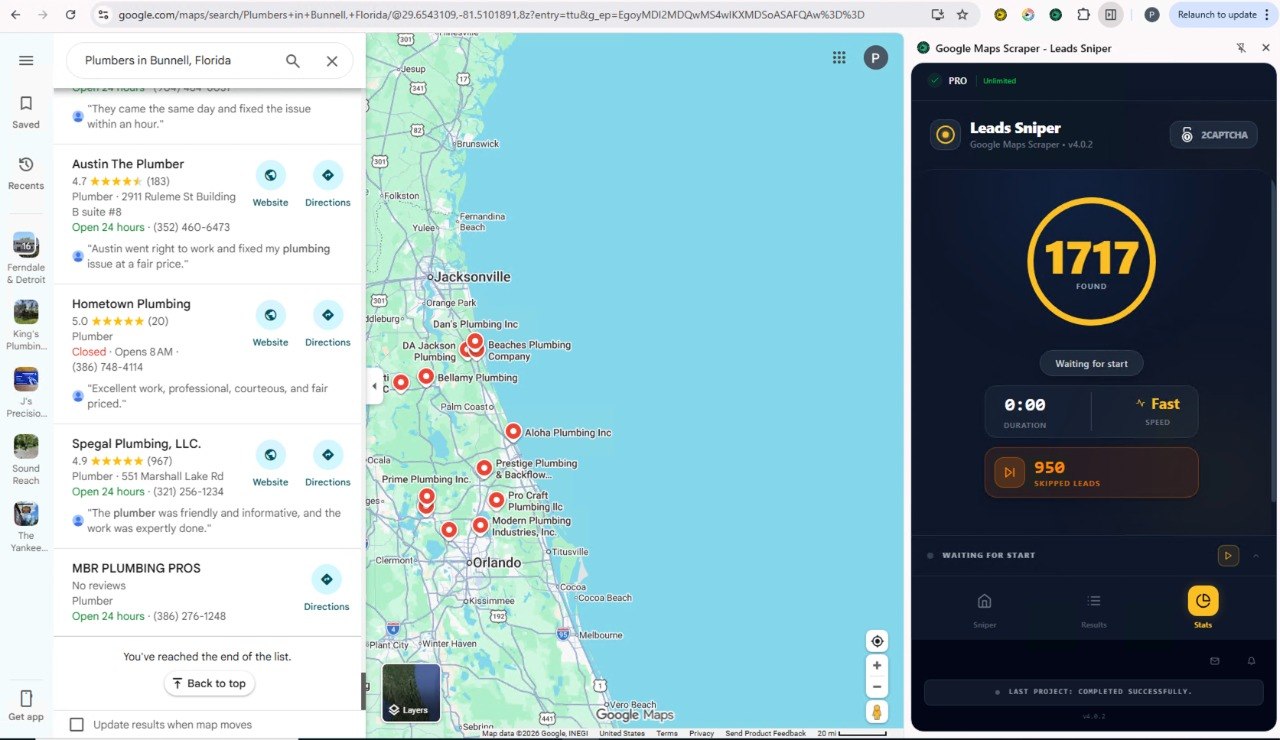
Email scraping is getting faster, smarter, and more adaptive, and AI is driving most of that progress.
Traditional scrapers rely on hardcoded selectors. Change one div class on the target website and the scraper breaks. AI-powered scrapers recognize patterns and adapt when layouts change, without human intervention. ScraperAPI reports 95% accuracy on websites their neural-network extractor has never encountered before, compared to near-zero for traditional selectors on unfamiliar sites (Scrap.io, 2026).
The web scraping market is on a steep trajectory. The Business Research Company puts the software market at $0.99B in 2025, growing to $1.17B in 2026 at an 18.5% CAGR. The broader AI-powered data extraction segment is forecast to reach $38.44B by 2034 (Market Research Future). A BrowserCat 2024 survey found 65% of companies already feed scraped data directly into AI projects, and that figure is climbing fast.
What this means practically:
- Self-healing scrapers: Tools that adapt to site changes automatically, reducing maintenance overhead by roughly 40% compared to traditional approaches
- Predictive extraction: Scrapers that learn when data updates and pull it proactively
- Multimodal extraction: AI systems that process text, images, PDFs, and video to build richer contact records
- Natural language targeting: Describing what you want in plain language ("all HVAC companies in Phoenix with fewer than 20 reviews") and having the tool handle the rest
The shift isn't coming. It's already underway. Agencies and sales teams that build AI-augmented scraping into their workflows now are establishing an advantage that compounds over time.
Popular Data Sources for Email Scraping
Leads Sniper's pricing model is worth noting here: rather than monthly subscriptions, it offers lifetime access with a one-time payment, which changes the unit economics significantly for teams doing ongoing outreach. All plans include unlimited lead extraction.
Frequently Asked Questions
What is email scraping?
Email scraping is the automated process of extracting email addresses from publicly accessible online sources: websites, business directories, Google Maps listings, social profiles, and public databases. The extracted data is typically exported to CSV or Excel for use in outreach, marketing, or research.
Is email scraping legal?
Scraping publicly available business data is generally legal. The Ninth Circuit affirmed this in LinkedIn v. HiQ Labs for US public data. Under GDPR in Europe, scraping publicly listed business emails can qualify under the legitimate interest basis. The legal picture becomes more complex with personal data, login-gated content, or platform terms that explicitly prohibit scraping. Always match your approach to your target region's regulatory requirements.
What's the difference between email scraping and email finding?
Email scrapers crawl public sources and extract addresses that are already published. Email finders predict or guess a business email based on a person's name and company domain. Scrapers are better for volume list-building from geographic or categorical targets; finders work better when you know specific names at specific companies.
How accurate is scraped email data?
Accuracy depends heavily on the source and how recently the data was collected. Google Maps listings, actively maintained by business owners, tend to produce fresher data than static directories. Regardless of source, verification is essential: run every list through an SMTP and domain validation tool before sending.
What bounce rate should I aim for with scraped emails?
According to Apollo.io (2026), target under 2% total bounce rate, with hard bounces ideally below 1%. The industry-wide average with proper hygiene is 0.89% (Folderly 2025). B2B lists naturally trend higher due to job churn, with an average of 2.48% (Powered By Search, 2025). Anything above 5% warrants an immediate pause and list review.
How do I verify scraped emails?
The most reliable verification flow combines: (1) syntax checking, (2) domain/MX record validation, (3) SMTP verification (pinging the mail server to confirm the address exists), and (4) catch-all domain detection. Role-based and disposable email addresses should be handled separately or suppressed entirely.
How often should I refresh my scraped email lists?
For B2B outreach, re-verify any list older than 90 days before sending at scale. B2B email data decays faster than B2C due to job changes, company restructures, and domain expirations. Re-scraping high-priority segments quarterly keeps data current.
Can I scrape Google Maps for emails?
Yes. Google Maps listings often include links to business websites, from which the scraper retrieves associated emails. Tools like Leads Sniper's Google Maps Scraper extract emails directly from business websites linked to Maps listings, along with phone numbers, social profiles, addresses, review counts, and 60+ additional fields.
What data can I scrape from Google Maps?
Beyond emails, a Google Maps scraper can extract business name, full address, phone numbers, website URL, social media URLs (Facebook, LinkedIn, Instagram, Twitter, YouTube), review count, average rating, business hours, category, pricing, and more. Leads Sniper's Google Maps Scraper captures 60+ fields per listing.
Do I need coding skills to scrape emails?
Not with modern tools. Browser-extension-based scrapers like Leads Sniper require no technical knowledge: install the extension, open the target source, and export. Coding becomes relevant only if you need custom scrapers for highly specific or unusual data sources.
How do I avoid getting my domain blacklisted?
Use a dedicated subdomain for outreach, not your primary business domain. Warm new domains gradually before scaling volume. Keep bounce rates below 2%. Suppress opt-outs immediately. Authenticate your domain with SPF, DKIM, and DMARC records. Monitor sender reputation scores through tools like Google Postmaster Tools.
What's the best source for scraping B2B emails?
Google Maps is one of the most effective for local and regional B2B prospecting: listings are actively maintained, data is structured, and geographic filtering makes targeting precise. For national or global B2B outreach targeting named contacts, a combination of domain scraping and email finder tools typically performs best. For industry-specific outreach, vertical directories often produce the highest-relevance data.
Can I use scraped emails for cold outreach?
Yes, provided your outreach complies with the applicable regulations (CAN-SPAM in the US, GDPR in Europe). This means including a clear opt-out mechanism, a valid physical address, accurate sender identification, and, for GDPR, a documented legitimate interest basis for contacting each recipient.
What is a catch-all email address?
A catch-all is a domain configured to accept any email sent to it, regardless of whether the specific address exists. This means SMTP verification can't confirm individual address validity on catch-all domains. These addresses should be flagged separately as they carry a higher risk of bounce or non-delivery. Send to them only after other segments have been cleared.
How does AI improve email scraping?
AI-powered scrapers use machine learning to recognize page structures and adapt when sites