
TL;DR: Leads Sniper and Bright Data serve fundamentally different users. Bright Data is a robust enterprise web data infrastructure platform built for developers, large-scale scraping, and complex data pipelines. Leads Sniper is a purpose-built, no-code Google Maps lead generation tool designed for non-technical users, agencies, and SMBs who need local business data fast, affordably, and without proxies or VPS.
Choosing the wrong tool doesn't just waste money; it wastes time. A solo agency owner trying to source local plumber leads doesn't need access to 400 million residential proxy IPs. A data engineering team building a custom pipeline probably doesn't need a Chrome extension.
This comparison cuts through the noise. Both tools are legitimate, both have real customer bases, and both can extract data from Google Maps. But they solve very different problems, and the right choice depends entirely on your workflow, technical ability, and budget.
Below, you'll find a full feature-by-feature breakdown, real-world use case analysis, pricing scenarios, and an honest assessment of where each tool wins and falls short.
Quick Verdict: Leads Sniper vs Bright Data at a Glance
Sources: ¹ leads-sniper.com/products/google-maps-scraper · ² brightdata.com/products/web-scraper · ³ leads-sniper.com · ⁴ brightdata.com/pricing/web-scraper · ⁵ brightdata.com · ⁶ trustpilot.com/review/leads-sniper.com · ⁷ trustpilot.com/review/brightdata.com · ⁸ g2.com/products/bright-data
What Is Leads Sniper?
Leads Sniper is a browser-based lead generation tool that installs as a Chrome or Edge extension. It's built specifically for extracting business data from Google Maps, Google Search, Yellow Pages, and business websites. The product suite includes four tools:
- Google Maps Scraper — Extracts 60+ fields from Google Maps listings, including emails sourced from business websites
- Google Search Scraper — Pulls business data and contact details from Google SERP results
- Yellow Pages Scraper — Scrapes 45 fields from Yellow Pages directories
- Domain Email Extractor — Crawls specific domains to extract email addresses and contact details
According to leads-sniper.com, the platform has served 12,000+ customers and extracted over 17 million places, 17 million phone numbers, 2 million emails, and 4 million social media profiles. Leads Sniper operates on a one-time lifetime payment model with no subscriptions or renewal fees; all plans include unlimited lead extraction. Trustpilot rating: 4.6/5 based on 102 reviews.
No VPS or proxy infrastructure is required. Users open Google Maps in their browser, activate the extension, and export results to CSV or Excel in a single click.
What Is Bright Data?
Bright Data is an enterprise-grade web data infrastructure platform. According to brightdata.com, it serves more than 20,000 customers globally. Its product portfolio spans proxy networks, scraping APIs, browser automation, AI-powered scraping, and a dataset marketplace.
Key products include:
- Web Scraper API — 1,417+ ready-made scrapers, including a Google Maps scraper, with a free tier of 5,000 records/month
- Proxy Networks — 400M+ residential proxy IPs across 195 countries, plus datacenter, ISP, and mobile proxies
- Scraping Browser — A cloud browser compatible with Puppeteer, Playwright, and Selenium, priced from $499/month (71 GB included)
- Web Unlocker — An automated tool for bypassing anti-bot protections; starts free and scales via pay-as-you-go
- SERP API — For extracting structured data from search engine results pages
- Dataset Marketplace — Pre-collected, ready-to-download datasets
- Scraper Studio — An AI-powered interface for building custom scrapers
- MCP Server — Connects Bright Data to LLM-based AI agents and workflows
Bright Data reports 99.99% uptime and compliance with GDPR, CCPA, SOC 2, and ISO 27001. Trustpilot: 4.4/5 (1,013 reviews); G2: 4.7/5 (338 reviews).
Leads Sniper vs Bright Data: Key Differences
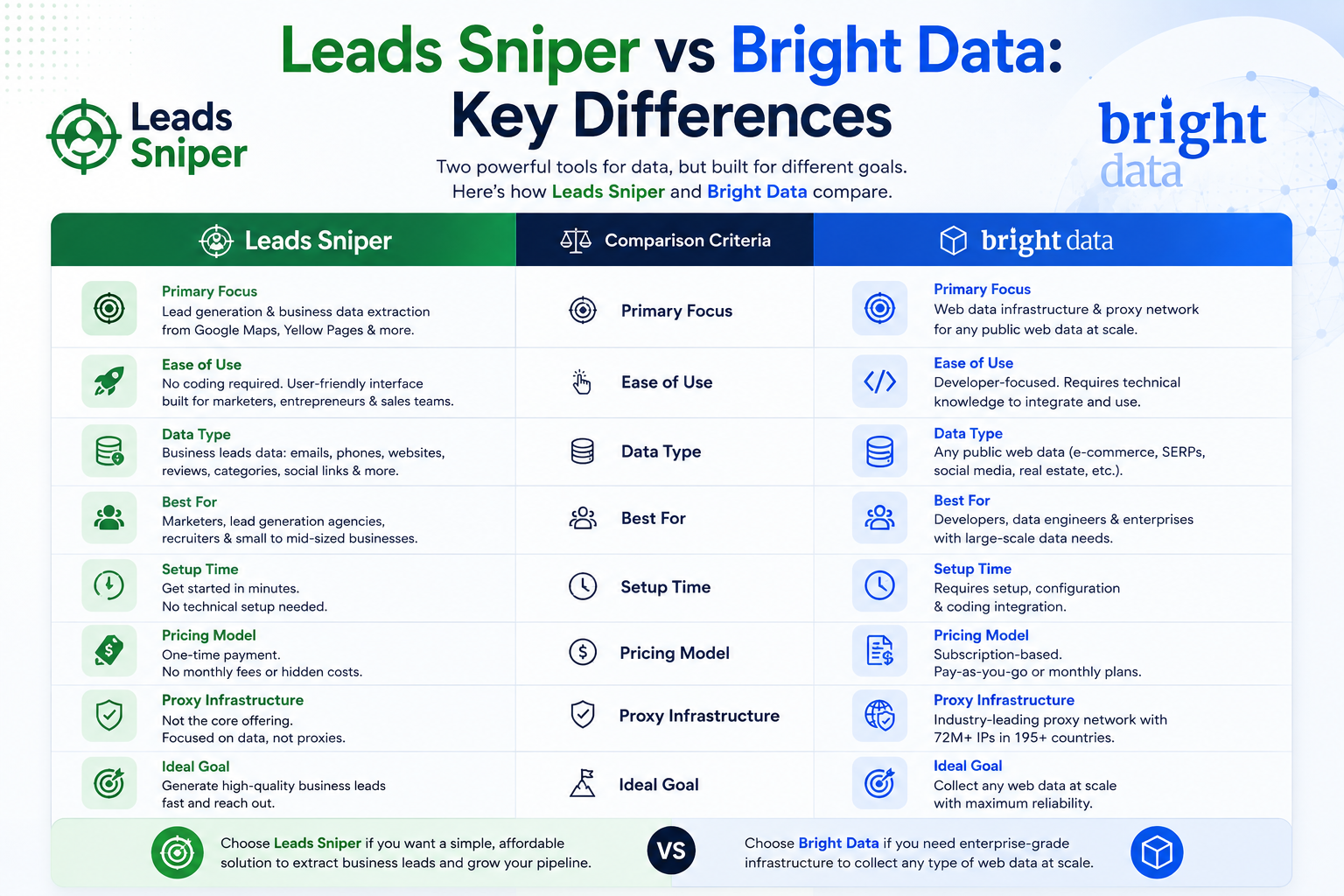
The fundamental distinction between these tools is scope and intent.
Bright Data is infrastructure. It provides the building blocks (proxies, cloud browsers, APIs) that developers use to collect data from anywhere on the web at scale. Google Maps is one of 1,417+ supported sites, not its primary focus.
Leads Sniper is a focused application. Its entire product line is oriented around a single workflow: find local businesses, extract their contact data, export it to a spreadsheet, and start outreach. There's no API to configure, no proxy pool to manage, and no SDK to install.
Choose Bright Data when:
- You need to scrape many different websites, not just Google Maps
- Your team includes developers capable of working with APIs and browser automation
- You need enterprise-grade compliance, proxy infrastructure, or a 99.99% uptime SLA
- You're building a product or data pipeline that requires customization at scale
Choose Leads Sniper when:
- Google Maps (or Google Search, Yellow Pages) is your primary data source
- You need emails, social media URLs, and 60+ business fields in one export
- You have no technical background and want results in minutes, not hours
- You want to pay once and use the tool indefinitely without recurring fees
How Do Leads Sniper and Bright Data Compare for Google Maps Data?
This is the core question for most users comparing these two tools.
Leads Sniper Google Maps Scraper extracts 60+ fields from Google Maps listings, including business name, full address, phone 1 and phone 2, GPS coordinates, Place ID, first and second category, timezone, pricing, per-day operating hours, claimed Google My Business status, review count, average rating, website URL, and social media profile URLs (Facebook, LinkedIn, Twitter, Instagram, YouTube). Email addresses are extracted by visiting the linked business website, not from the Maps listing itself, where emails are not publicly shown. This is an important technical distinction that applies equally to both tools.
Bright Data's standard Google Maps Web Scraper API returns approximately 8 core fields as listed in its output schema: Place ID, URL, country, name, category, address, description, and business details. The standard scraper does not return emails, secondary phone numbers, social media URLs, per-day hours, or GMB claimed status out of the box. Additional fields may be obtainable through Bright Data's Scraping Browser with custom scripting, or through other products, but that requires developer effort and goes beyond what the standard Web Scraper API delivers by default.
For direct outreach workflows requiring rich contact data, Leads Sniper delivers more actionable fields out of the box. For infrastructure, scale, and multi-site flexibility, Bright Data offers a more capable foundation.
Features Compared
Sources: ¹ leads-sniper.com/products/google-maps-scraper · ² brightdata.com/products/web-scraper · ³ leads-sniper.com/pricing · ⁴ brightdata.com/pricing/web-scraper · ⁵ brightdata.com · ⁹ brightdata.com/products/scraping-browser · ¹⁰ brightdata.com/trustcenter
Pricing Comparison
Pricing structures differ significantly between the two tools, and total cost depends heavily on use case and volume.
Leads Sniper Pricing (leads-sniper.com/pricing)
Leads Sniper charges a one-time lifetime fee per tool. Per the pricing page, standard pricing is $149 (standard license) or $249 (enhanced) per tool per license, with no recurring subscriptions. All plans include unlimited lead extraction. Volume discounts are automatically applied: 25% off for 2–4 licenses of the same tool, 40% off for 5–9, and 70% off for 10 or more. Bundle discounts of 25–45% apply when purchasing multiple different tools together.
Bright Data Pricing (brightdata.com/pricing/web-scraper)
- Web Scraper API (Google Maps): Free tier at 5,000 records/month at no cost. Pay-as-you-go charged per 1,000 records at a published per-record rate. Scale plan with 384,000 records included per month at a fixed monthly fee. Enterprise with custom pricing.
- Scraping Browser: Pay-as-you-go at $8/GB. Monthly plans from $499/month (71 GB included) to $1,999/month (399 GB included).
- Residential Proxies: Priced by bandwidth; rates vary by plan and proxy type.
Practical Cost Comparison
A direct apples-to-apples cost comparison between these two tools is not straightforward, because their pricing models are fundamentally different. Leads Sniper charges a one-time fee for unlimited use; Bright Data charges per record or per GB of bandwidth consumed. The numbers below reflect the pricing each vendor publishes and are intended to illustrate the structural difference, not to imply equivalent output.
Note: Bright Data does not publish a fixed per-record price for the Web Scraper API on its public pricing page; rates vary by plan tier. For an accurate quote, use the pricing calculator or contact Bright Data directly.
Key structural difference: At low, one-time volumes, Bright Data's free tier has no upfront cost. For recurring, high-volume Google Maps campaigns specifically, Leads Sniper's one-time fee structure may become more economical over time, though the crossover point depends on which Bright Data plan you'd use and the actual per-record rate.
How Easy Are Both Tools to Use Without Technical Skills?
Leads Sniper requires no coding knowledge. Installation involves adding the Chrome or Edge extension, activating a license key, opening Google Maps, and clicking export. According to the product page, no VPS or proxy is required.
Bright Data has invested in reducing technical barriers. Scraper Studio provides a visual interface for building scrapers, and the Web Scraper API includes pre-built scrapers that don't require coding. However, getting meaningful output still requires understanding API calls, authentication, JSON responses, and integrating with downstream tools. For non-developers, the learning curve is notably steeper.
If your workflow starts and ends with Google Maps lead exports to CSV, Leads Sniper is operationally simpler. Bright Data is better suited to workflows that require customization, large-scale automation, or integration with data pipelines that Leads Sniper cannot support.
Data Quality and Available Fields: A Precise Comparison
Leads Sniper extracts 60+ distinct fields per Google Maps business record. Beyond name, address, and phone number, these include secondary phone numbers, per-day operating hours (Sunday through Saturday), GMB claimed status, business highlights, service options, dining options, accessibility information, atmosphere descriptors, payment methods, and more. Emails are retrieved by visiting each business's linked website, not from the Maps listing, where emails are not publicly displayed.
Bright Data's standard Google Maps Web Scraper API returns the fields listed in its output schema: Place ID, URL, country, name, category, address, description, and business details, approximately 8 core fields. This is sufficient for use cases like market mapping, competitor tracking, or database enrichment. However, it does not include emails, secondary phone numbers, social media URLs, per-day hours, or GMB claimed status in its standard output. Obtaining additional fields may require custom extraction using Bright Data's Scraping Browser, Scraper Studio, or other products, but that involves additional setup and, depending on the product, additional cost.
For data breadth per Google Maps record oriented toward direct outreach, Leads Sniper's standard output is more immediately complete. For infrastructure, flexibility, and multi-site data collection, Bright Data offers more capability at greater setup complexity.
API and Developer Capabilities
This is where Bright Data holds a clear advantage.
Bright Data provides full REST API access, a Puppeteer/Playwright/Selenium-compatible Scraping Browser, a SERP API, an MCP server for AI agent workflows, and an AI-powered Scraper Studio. Developers can integrate Bright Data into virtually any data pipeline, automate data collection on a schedule, and manage extraction programmatically.
Leads Sniper does not offer an API. It is a browser extension-based tool. There is no programmatic access, no webhook support, and no integration layer for developers.
If API access or developer-level automation is a core requirement, Bright Data is the more suitable choice between the two.
Where Is Bright Data the Better Choice?
Bright Data is the stronger option in these scenarios:
- Enterprise-scale data collection across multiple websites simultaneously
- Developer and engineering workflows that require REST API access or browser automation via Puppeteer/Playwright/Selenium (brightdata.com/products/scraping-browser)
- Proxy infrastructure — 400M+ residential IPs across 195 countries, with datacenter, ISP, and mobile options
- Compliance-sensitive environments — Bright Data holds SOC 2 and ISO 27001 certifications
- AI agent and LLM integration via its MCP server
- Custom scraping from any of 1,417+ supported websites beyond Google Maps
- Uptime guarantees — Bright Data's 99.99% uptime SLA matters for production data pipelines
Where Is Leads Sniper the Better Choice?
Leads Sniper is the stronger option in these scenarios:
- Google Maps lead generation requiring full contact data in a single export, including 60+ fields per record
- Email extraction from business websites linked to Maps listings, not included in Bright Data's standard Google Maps scraper
- Non-technical users who need results without developer involvement
- Agencies and SMBs needing a simple, repeatable prospecting workflow
- Budget-conscious buyers who prefer a one-time payment over monthly subscriptions
- Social media URL extraction (Facebook, LinkedIn, Twitter, Instagram, YouTube), not returned by Bright Data's standard Maps output
- GMB claimed status detection — useful for identifying unclaimed listings for local SEO pitches
- Yellow Pages scraping — Bright Data has no dedicated Yellow Pages scraper
- Recurring campaigns where lifetime pricing may be more economical than per-record costs over time
Decision Table: Which Bright Data Alternative Fits Your Needs?
If you're evaluating Bright Data alternatives, this table helps narrow down the right fit based on specific requirements:
Real-World Use Cases: Which Tool Fits Each Scenario?
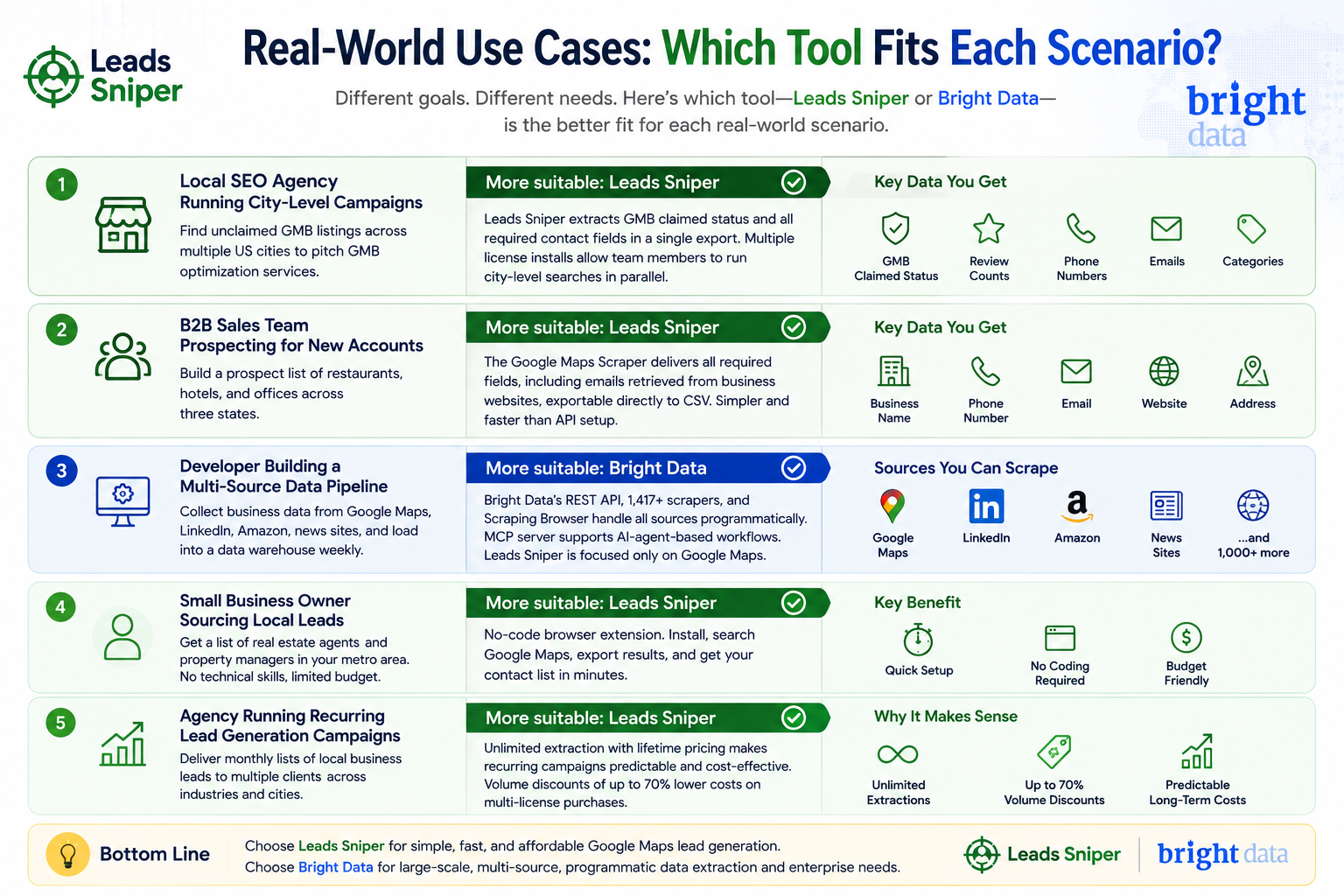
Scenario 1: Local SEO Agency Running City-Level Campaigns
A local SEO agency needs to identify unclaimed Google My Business listings across multiple US cities to pitch GMB optimization services. They need GMB claimed status, review counts, phone numbers, emails, and business categories.
More suitable: Leads Sniper. The Google Maps Scraper extracts GMB claimed status and all required contact fields in a single export. Multiple license installs allow team members to run city-level searches in parallel. Bright Data's standard Google Maps Web Scraper API does not return GMB claimed status in its published output schema.
Scenario 2: B2B Sales Team Prospecting for New Accounts
A B2B sales team wants to build a prospect list of restaurants, hotels, and offices across three states. They need business name, phone, email, and website to load into their CRM.
More suitable: Leads Sniper. The Google Maps Scraper delivers all required fields, including emails retrieved from business websites, exportable directly to CSV. Bright Data can retrieve this data but requires API configuration and a separate step to obtain emails, adding complexity without proportional benefit for this specific workflow.
Scenario 3: Developer Building a Multi-Source Data Pipeline
A data engineer is building an automated pipeline that collects business data from Google Maps, LinkedIn, Amazon, and news sites, then loads it into a data warehouse on a weekly schedule.
More suitable: Bright Data. Leads Sniper covers Google Maps but cannot scrape LinkedIn, Amazon, or news sources. Bright Data's REST API, 1,417+ scrapers, and Scraping Browser handle all sources programmatically, and its MCP server supports AI-agent-based workflows. Leads Sniper does not operate at this level of technical flexibility.
Scenario 4: Small Business Owner Sourcing Local Leads
A painting contractor wants a list of real estate agents and property managers in their metro area. They have no technical background and a limited budget.
More suitable: Leads Sniper. The no-code browser extension means this user can install the tool, search Google Maps, export the results, and have a contact list ready within minutes. Bright Data's API-based setup and pay-as-you-go pricing may be less practical for this use case.
Scenario 5: Agency Running Recurring Lead Generation Campaigns
A lead generation agency delivers monthly lists of local business leads to multiple clients across different industries and cities.
More suitable: Leads Sniper. The unlimited extraction model with lifetime pricing makes recurring campaigns economically predictable. Volume discounts of up to 70% on multi-license purchases reduce costs further. Bright Data's recurring subscription costs scale with usage, which can make long-term campaign budgeting more complex without enterprise-level contracts.
Is Leads Sniper a Good Bright Data Alternative for Lead Generation?
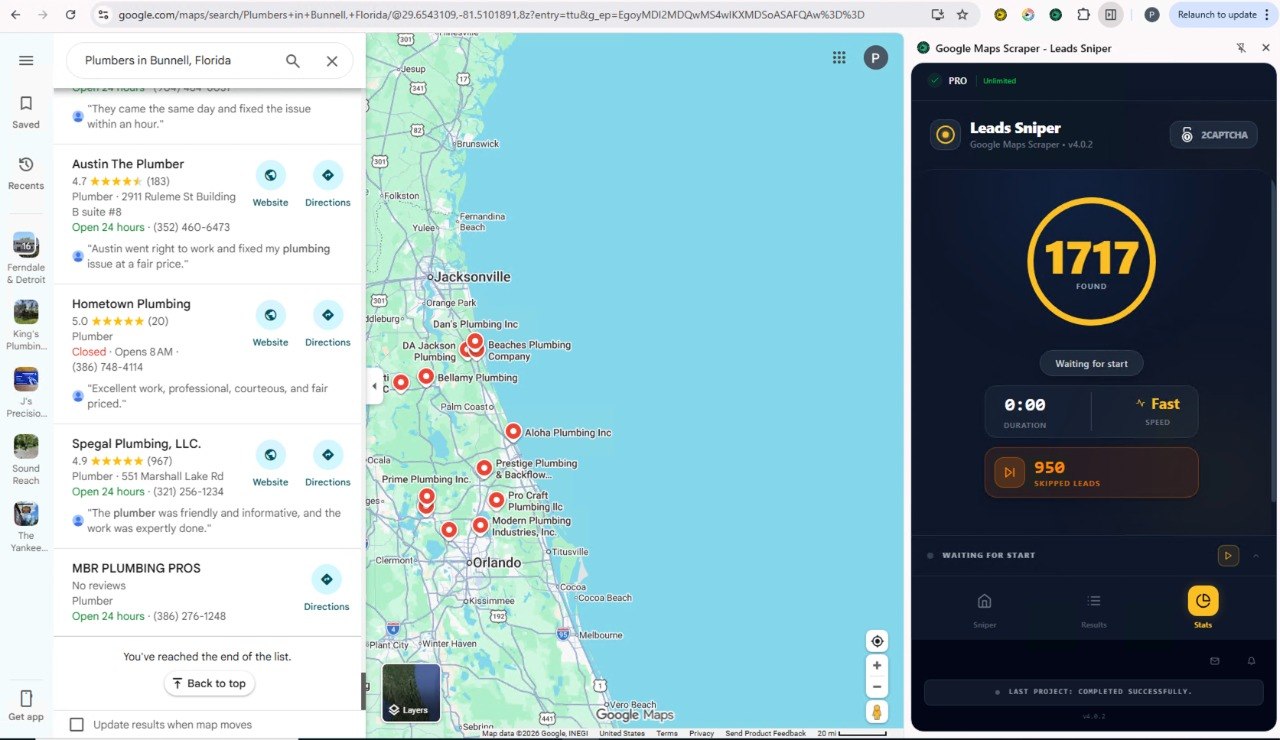
For users specifically looking for a Bright Data alternative for Google Maps lead generation, Leads Sniper is a practical and well-suited option, with important caveats.
Leads Sniper extracts more fields per Google Maps record than Bright Data's standard Web Scraper API output, includes email extraction that Bright Data's standard scraper does not, and delivers results without API configuration or proxy management. For non-technical users prospecting local businesses, it offers a more direct path from search to exportable contact list.
However, Leads Sniper is not a Bright Data alternative in the broader sense. It cannot replace Bright Data's proxy infrastructure, multi-site scraping capability, developer API, or enterprise compliance features. Users comparing the two for data pipelines, large-scale web scraping, or programmatic access will find Leads Sniper out of scope.
Other Bright Data alternatives for proxy infrastructure and enterprise scraping include Oxylabs, Decodo, Apify, and Zyte, none of which focus on Google Maps lead generation the way Leads Sniper does.
Pros and Cons
Leads Sniper
Pros
- 60+ data fields from Google Maps in a single export
- Email extraction from linked business websites (not available in Bright Data's standard Maps scraper)
- Social media URLs (Facebook, LinkedIn, Twitter, Instagram, YouTube) per record
- No proxies, VPS, or technical setup required
- One-time lifetime payment with no recurring fees
- Unlimited lead extraction on all plans
- Free trial available (no credit card required)
- Volume discounts up to 70% for multiple licenses
- 12,000+ customers; Trustpilot 4.6/5
Cons
- No REST API or developer access
- Limited to 4 data sources (Google Maps, Google Search, Yellow Pages, domain email)
- No proxy infrastructure or browser automation API
- Not suitable for multi-site or enterprise data pipelines
- No published compliance certifications (SOC 2, ISO 27001)
Bright Data
Pros
- 1,417+ ready-made scrapers, including Google Maps
- 400M+ residential proxy IPs across 195 countries
- Full REST API, Scraping Browser (Puppeteer/Playwright/Selenium), and MCP server for AI agents
- 99.99% uptime SLA
- GDPR, CCPA, SOC 2, and ISO 27001 certified
- Free tier of 5,000 records/month for testing
- AI-powered Scraper Studio for building custom extraction workflows
- Dataset marketplace for pre-collected data
- 20,000+ customers; G2 4.7/5 (338 reviews)
Cons
- Steep learning curve for non-technical users
- Standard Google Maps Web Scraper API returns ~8 core fields; additional fields require custom extraction or other products
- No email extraction or social media URL extraction in the standard Maps scraper
- Recurring subscription costs scale with usage
- Requires API configuration for most workflows
- May be excessive for simple, single-source lead generation use cases
Which One Should You Choose?
Choose Leads Sniper if:
- Your goal is extracting local business leads from Google Maps for outreach
- You need emails, social media URLs, dual phone numbers, and 60+ fields per record
- You have no coding background and want a workflow that runs in a browser
- You prefer paying once rather than committing to a monthly subscription
- You're an agency, freelancer, or SMB running recurring prospecting campaigns
Choose Bright Data if:
- You need programmatic API access or browser automation via Puppeteer/Playwright/Selenium
- Your team scrapes data from multiple websites beyond Google Maps
- You require enterprise-grade proxy infrastructure for anti-bot bypass
- Your organization requires SOC 2 or ISO 27001 compliance documentation