Finding the right lead generation tool can have a direct impact on how fast you build prospect lists, how efficiently your team works, and how much value you get from your software investment. If you are comparing Leads Gorilla and Leads Sniper, you are likely looking for a tool that can help you find local business leads quickly and turn that data into real outreach opportunities.
Both tools are built for lead generation, but they are not designed in exactly the same way. Leads Gorilla is often seen as a user-friendly option for users who want business insights and reporting, while Leads Sniper Google Maps Scraper is built for speed, scale, export flexibility, and long-term value. This updated guide covers their core abilities, major differences, pricing approach, pros and cons, and which type of user each tool may fit best.
Quick Comparison Table
Overview: Leads Gorilla vs. Leads Sniper
When people search for Leads Gorilla vs Leads Sniper, they usually want to know which tool is faster, which one offers better data handling, and which one gives better value over time. That is the real difference between these platforms.
Leads Gorilla focuses on helping users find local business leads with a simple workflow. It is approachable, especially for users who do not need large-scale scraping every day.
Leads Sniper Google Maps Scraper is more focused on operational efficiency. It is designed for users who want to scrape more leads in less time, work across multiple keywords, and export data cleanly for outreach, sales, or agency use.
Core Abilities of Both Tools
Before choosing one, it helps to understand what each platform is actually built to do.
Leads Gorilla Abilities
Leads Gorilla is designed to help users identify local businesses and gather useful lead information in a relatively simple way. Its main abilities include:
- Searching for local business leads
- Reviewing business profile information
- Working through targeted searches one keyword at a time
- Supporting users who want a straightforward interface
- Providing reporting-oriented outputs for business prospecting
This makes it a practical option for freelancers, consultants, or smaller teams that run focused campaigns and do not need to process large lead lists at high speed.
Leads Sniper Google Maps Scraper Abilities
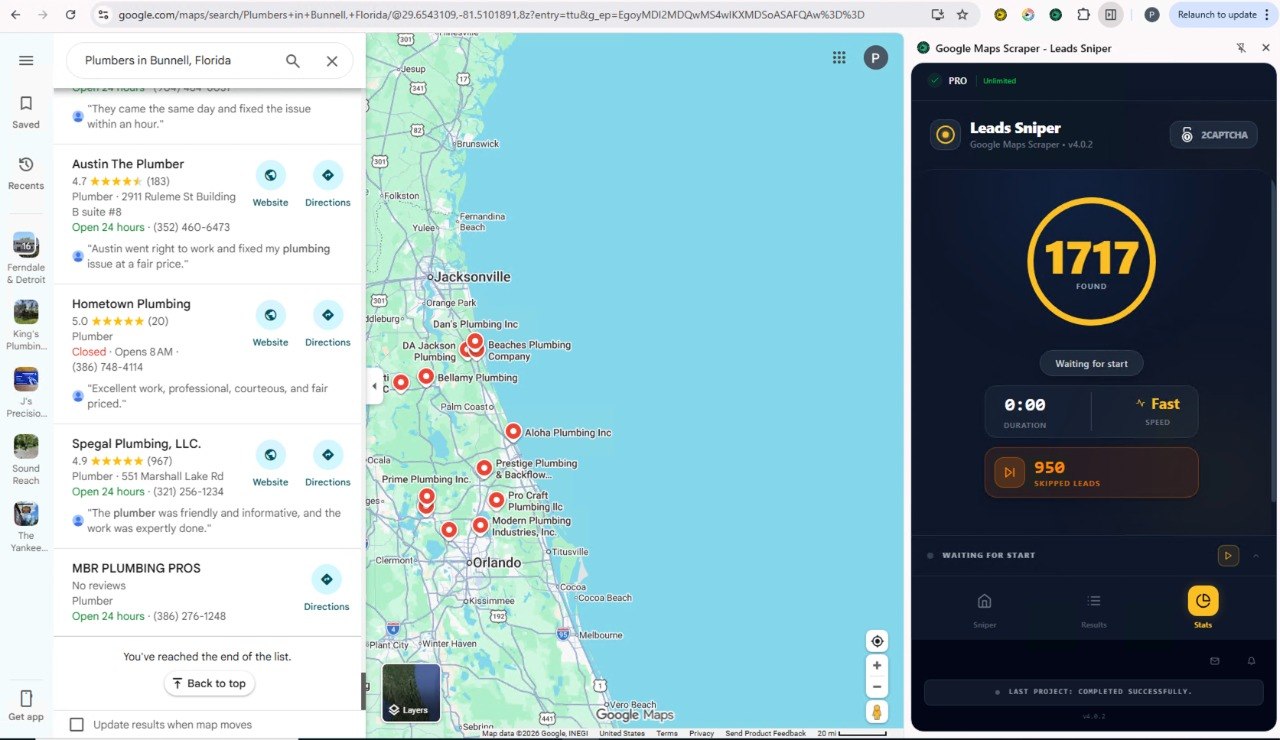
Leads Sniper Google Maps Scraper is built for users who need faster and broader lead extraction from Google Maps. Its main abilities include:
- Scraping Google Maps business leads at scale
- Processing multiple keywords in a single workflow
- Running up to 10 browser instances at the same time
- Exporting scraped leads to CSV
- Supporting bulk lead collection for sales teams and agencies
- Helping users organize lead data for CRM imports and outreach campaigns
These abilities make it especially useful for users who want to build lead lists fast and move quickly into prospecting.
Features: Keyword Processing Capabilities
A major factor in choosing a scraping tool is how effectively it handles your search inputs.
Leads Sniper Google Maps Scraper stands out by offering multiple keyword processing. This allows you to work through different niches, business categories, or location terms in one broader workflow. For agencies, list builders, and outbound sales teams, that can save a significant amount of time.
Leads Gorilla, by contrast, works with one keyword at a time. That setup may be manageable for small campaigns, but it becomes slower when you need to repeat the same process across many industries or cities.
If your lead generation process depends on scale, Leads Sniper has the clear edge here.
Speed and Efficiency: Scraping Power
Speed matters because the faster you gather leads, the faster your team can qualify them and start outreach.
Leads Sniper Google Maps Scraper is built with high-speed collection in mind. One of its most notable advantages is the ability to open up to 10 browsers simultaneously, allowing users to scrape multiple batches of leads at once. For users running high-volume campaigns, this can dramatically reduce manual waiting time.
Leads Gorilla offers a more standard pace and does not provide the same multi-browser scraping capability. For occasional users, that may not be a major issue. For teams that need thousands of leads across multiple searches, it can slow production significantly.
Lead Management and Export Flexibility
Lead generation does not stop at collecting data. You also need to move that data into spreadsheets, CRMs, or outreach tools without friction.
Leads Sniper Google Maps Scraper offers CSV export, which is one of its strongest practical advantages. CSV files are easy to clean, segment, sort, share, and upload into many sales and marketing systems.
Leads Gorilla supports lead management in a more reporting-oriented format, which may work well for some users. However, if your main goal is to export raw lead data quickly and use it in bulk outreach workflows, Leads Sniper offers a more flexible path.
Detailed Pricing Information
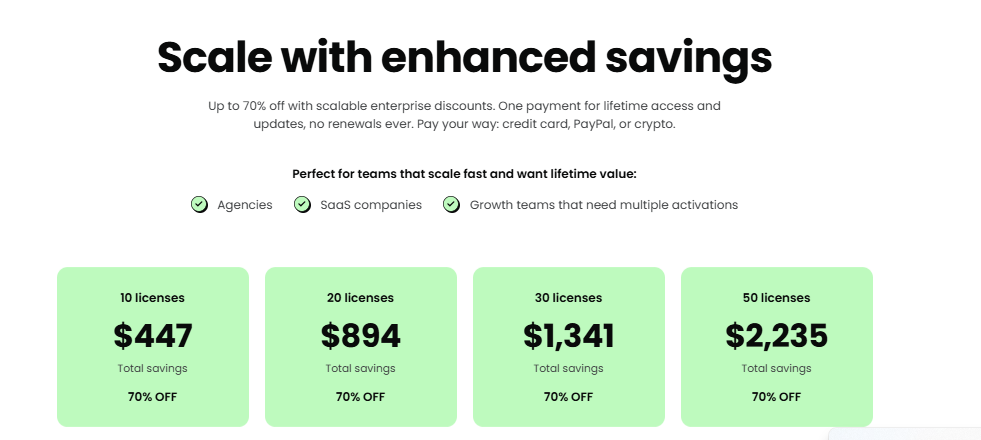
Pricing is one of the biggest decision factors when comparing Leads Gorilla vs Leads Sniper.
Leads Sniper Google Maps Scraper Pricing
Based on the source content provided in the earlier version of this comparison, Leads Sniper Google Maps Scraper uses a one-time payment model that includes lifetime access. That means:
- You pay once
- You continue using the software without recurring subscription charges
- Your long-term cost stays predictable
- The value increases the more often you use the tool
For agencies, lead generation businesses, and teams that scrape leads regularly, this model can be very attractive because it reduces software overhead over time.
Leads Gorilla Pricing
Based on the same source content, Leads Gorilla uses a recurring payment model, meaning users need to continue paying on a monthly or annual basis to keep access to the platform.
That means:
- Ongoing access depends on continued payments
- Costs accumulate over time
- Total ownership cost may become much higher for frequent or long-term users
- Budget planning is less predictable than with a one-time purchase
Pricing Model Comparison
If you plan to use the software consistently, Leads Sniper offers the stronger long-term value proposition.
Pros and Cons of Leads Gorilla
Every tool has strengths and tradeoffs. Here is a balanced view of Leads Gorilla.
Pros of Leads Gorilla
- Easy to understand for newer users
- Useful for local lead generation
- Good fit for smaller, more targeted prospecting efforts
- Reporting-oriented approach may suit consultants and local marketers
- Simpler workflow for users who do not need bulk scraping
Cons of Leads Gorilla
- One-keyword-at-a-time workflow can slow large campaigns
- Less efficient for scaling across many niches or locations
- Does not match Leads Sniper in scraping speed
- Less flexible for raw bulk export workflows
- Recurring pricing can become expensive over time
Pros and Cons of Leads Sniper Google Maps Scraper
Here is the same breakdown for Leads Sniper Google Maps Scraper.
Pros of Leads Sniper Google Maps Scraper
- Multiple keyword processing saves time
- Fast lead collection with up to 10 simultaneous browsers
- CSV export supports practical lead management
- Well suited for agencies and high-volume lead generation
- One-time payment with lifetime access offers strong long-term value
- Better fit for scalable outreach systems
Cons of Leads Sniper Google Maps Scraper
- May offer more scraping power than a casual user needs
- Users focused mainly on presentation-style reporting may prefer a different workflow
- Best value is realized by users who plan to generate leads consistently
Which Tool Is Better for Different Types of Users?
The best choice depends on how you work.
Choose Leads Gorilla if:
- You run smaller lead generation campaigns
- You prefer a simpler workflow
- You are comfortable processing one search at a time
- You value business insight and reporting features in your workflow
- You do not need high-volume scraping every day
Choose Leads Sniper Google Maps Scraper if:
- You want to scrape large numbers of Google Maps leads
- You need to process multiple keywords efficiently
- You want faster output for agency or sales use
- You need clean CSV exports for CRM and outreach workflows
- You want to avoid ongoing subscription costs
- You care about long-term ROI and scalability
Final Verdict: Leads Gorilla vs. Leads Sniper
If you are looking for a straightforward tool for lighter lead generation tasks, Leads Gorilla can be a workable option. It is approachable and may suit users who prefer a simpler, more manual process.
However, if your priority is speed, scalability, export flexibility, and long-term cost efficiency, Leads Sniper Google Maps Scraper stands out as the stronger option. Its ability to process multiple keywords, run up to 10 browsers at once, export lead data to CSV, and provide lifetime access through a one-time payment makes it especially attractive for serious lead generation work.
For businesses, agencies, and marketers who want to build outreach lists faster and with less ongoing cost, Leads Sniper Google Maps Scraper is the better fit.