Quick Answer: Every top-ranking page for this query is either a tool landing page or a step-by-step tutorial focused on how to click a button and export a CSV. None of them answer the question that matters in practice: what do you do with the data after you export it, and how do you make it convert? That's what this guide covers, drawn from our own experience building lead lists at Leads Sniper.
The SERP for "How to Scrape Yellow Pages for Business Leads" is almost entirely owned by scraper tool vendors. Webscraper.io ranks with a tutorial that walks you through their Chrome extension. Thunderbit, YPExtractor, and yellow-pages-scraper.com are product pages dressed as guides. The Chrome Web Store listing for a free extension rounds out the top five.
What's missing from every single one of them: qualification logic, CRM import protocol, enrichment sequencing, category-level targeting strategy, and any honest account of what happens after the export. They stop at the CSV file. That's where this guide starts.
What the Top-Ranking Pages Cover (And What They Don't)
Here's an honest map of what currently ranks and what it actually covers:
Every page treats the scrape as the end goal. None of them explain what separates a 2% contact rate from an 18% one. That gap lives entirely in what happens after the export.
The Five-Phase Workflow
The most important reframe in Yellow Pages lead generation: scraping is phase two of a five-phase process. Treating it as the whole process is why most campaigns underperform.
Phase 1 - Category and Geography Targeting: Decide which business categories and ZIP code clusters to pull before you open any scraping tool. This decision shapes list quality more than any technical factor.
Phase 2 - Extraction and Deduplication: Run the scrape, then resolve duplicates before anything else. Yellow Pages lists businesses under multiple category tags, and in our experience with directory-based lead gen, cross-category duplication is one of the most consistent sources of inflated list counts.
Phase 3 - Data Quality Scoring: Filter every record against freshness, completeness, and formatting benchmarks before touching your CRM. This is the phase that nearly every tutorial skips, and the one that determines whether your bounce rate is tolerable or painful.
Phase 4 - Lead Qualification: Apply filters (review count, website presence, category tier, years in business) before sequencing any outreach.
Phase 5 - CRM Import and Enrichment: Push clean, qualified records into your system and append missing contact data through a structured enrichment stack.
In our work building SMB lead lists, the teams that import raw directory data directly into a CRM consistently report the worst contact rates. The cleanup work that should happen at phase three ends up happening during outreach, which is slower, more expensive, and more demoralizing.
Yellow Pages Data Structure: The Fields Everyone Ignores
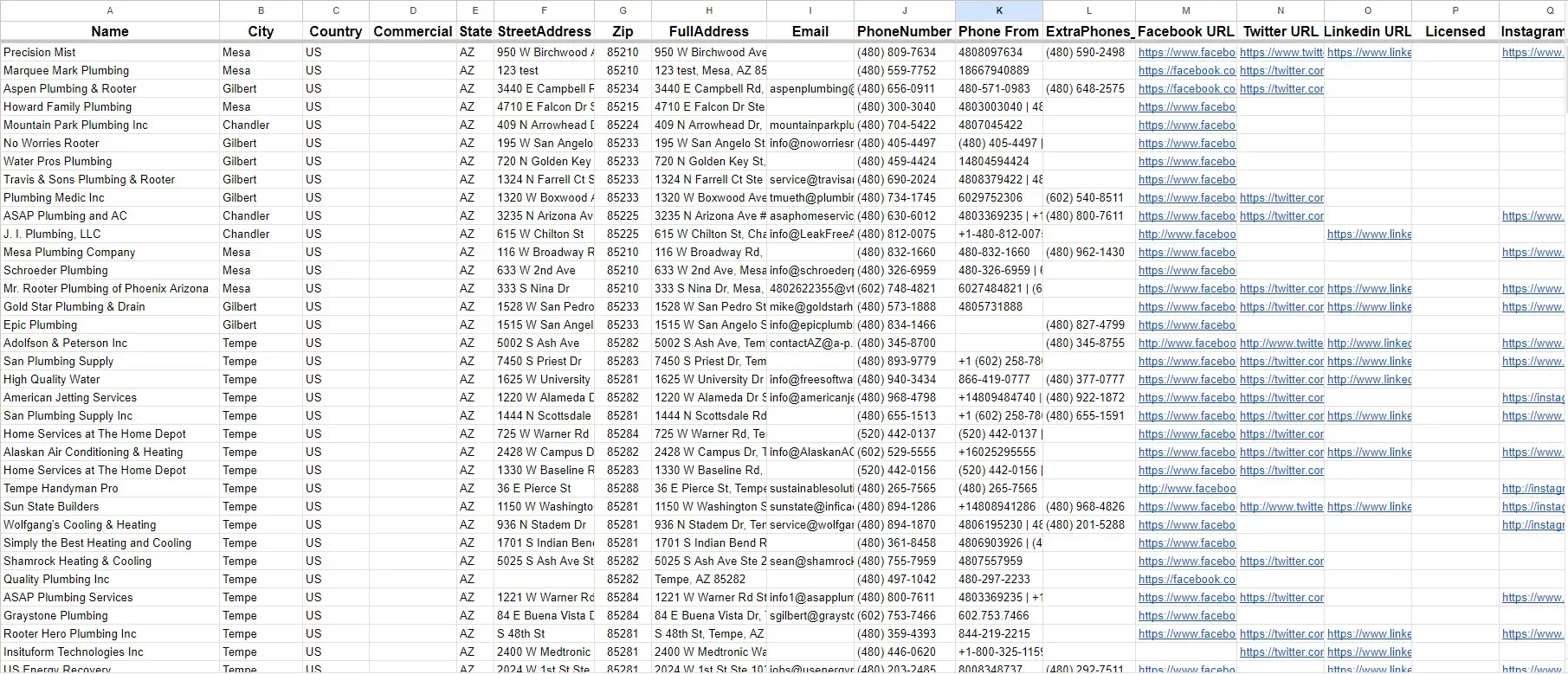
Webscraper.io's tutorial lists 14 extractable fields. What it doesn't explain is which fields are strategically useful and which are noise.
The fields every tool advertises:
- Business name
- Phone number
- Address
- Category
- Website URL
- Rating and review count
The fields most scrapers either miss or don't explain how to use:
Secondary category tags: Most listings carry two to four category tags. A roofing contractor may also appear under "General Contractors" and "Home Improvement." Scraping only the primary tag misses targeting opportunities and causes duplicate inflation when you later pull adjacent categories.
Years in business: Not present on every listing, but where it appears, it's one of the more useful firmographic filters. A business operating for 10+ years is categorically different from one that launched 18 months ago: different budget expectations, different decision-making pace, different appetite for new vendors.
Payment methods accepted: An easy-to-overlook signal. Listings that include "accepts credit cards, PayPal, and financing" tend to represent more operationally mature businesses than those listing "cash only." For B2B SaaS vendors, this serves as a rough proxy for whether a business has any digital payment infrastructure at all.
Hours of operation: Signals active business status. Listings with no hours or "call for appointment" frequently represent solo operators or semi-retired businesses, which is worth knowing before spending outreach budget.
Neighborhood and district tags: More granular than ZIP codes. For campaigns targeting specific urban neighborhoods, such as local SEO prospecting, district-level tags allow more precise filtering than ZIP-based queries.
Review count as a scale proxy: A plumber with 200+ reviews almost certainly runs a larger, more established operation than one with four. When building SMB lead lists, we use review count as one of the first filters because it removes most dormant and micro-operations before any other step.
Website URL as the enrichment key: The most undervalued field in the dataset. A confirmed website URL enables email pattern discovery through tools like Hunter.io, LinkedIn cross-referencing, and domain-based lookups. In our internal workflows, Tier 1 leads (those with a confirmed website URL) produce meaningfully better email discovery rates than those without, simply because the domain gives you a usable matching key.
Data Quality: What to Actually Expect After You Export
No ranking page provides honest data quality expectations. These are internal observations from SMB lead generation workflows; your numbers will vary by category, geography, and how recently a scrape was run.
Phone number accuracy: In stable service categories (HVAC, legal, dental, plumbing), we've found that a significant share of numbers are active and correctly attributed to the listed business. Hospitality and retail listings tend to be less reliable. Those categories see more annual turnover, and listings go stale faster.
Address accuracy: More reliable for established businesses than for newer or less-maintained listings. The strongest predictor we've found is whether a listing includes a website URL. Businesses that maintain their YP listing carefully tend to maintain their website too.
Direct email presence (listed in the YP listing itself): A small minority of listings include a direct email address. In our experience, you shouldn't count on finding emails this way. Enrichment is the primary email discovery method for the vast majority of records.
Duplicate rate: Higher than most practitioners expect. Because businesses appear under multiple category tags, a full category scrape in a major metro produces a meaningful percentage of duplicates. Deduplication before CRM import is not optional.
Practical implication: Plan for significant list reduction through quality filtering before your data is campaign-ready. If you need 500 workable leads, build in substantial buffer at the scrape stage.
Category Selection: Which Verticals Produce the Best Leads
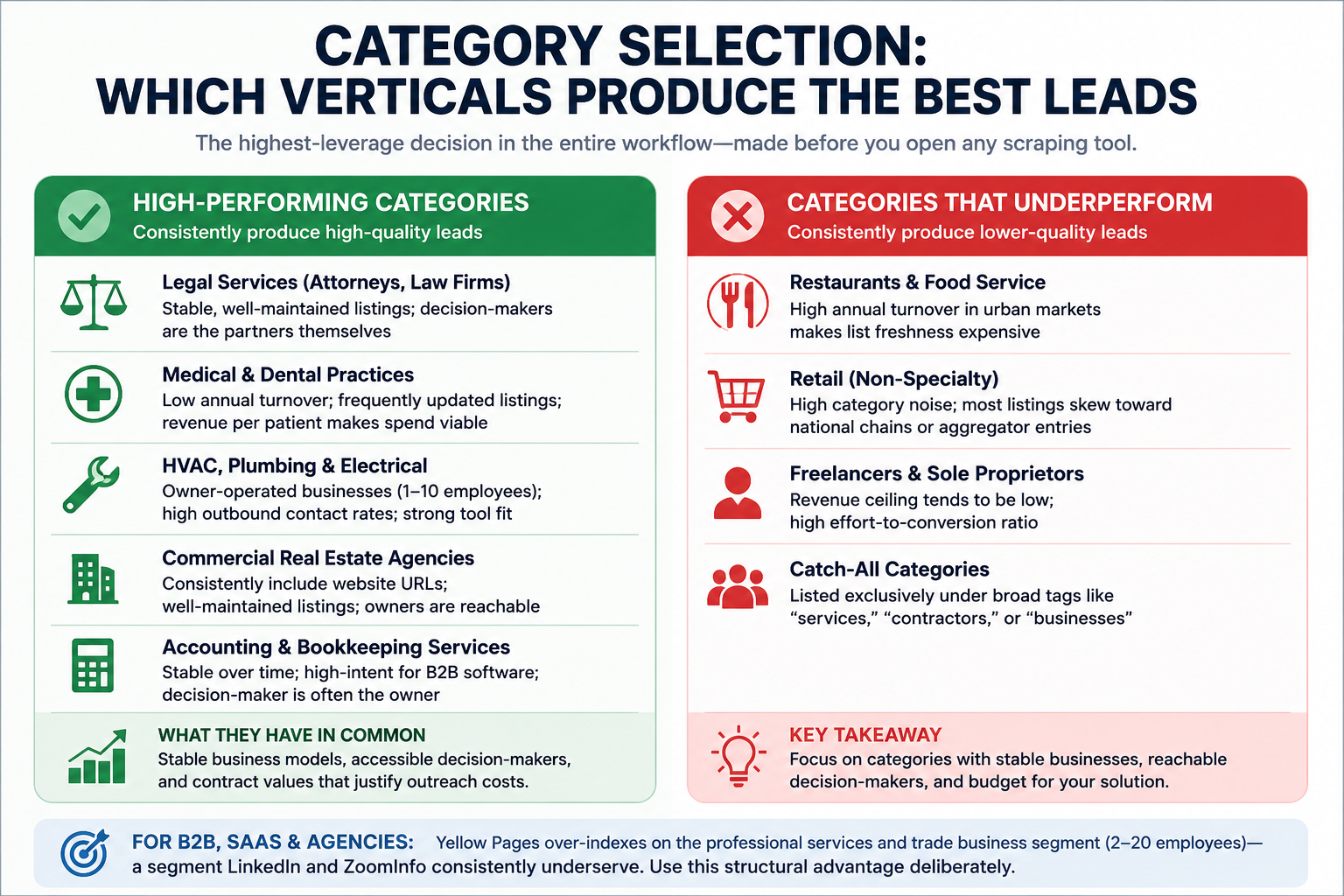
No tool landing page covers this, but it's the highest-leverage decision in the entire workflow, made before you open any scraping tool.
High-performing categories for B2B lead generation tend to share three characteristics: stable business models, accessible decision-makers, and contract values that justify the cost of outreach.
Consistently high-quality categories:
- Legal services (attorneys, law firms): Stable, well-maintained listings; decision-makers are the partners themselves; email discovery rates are strong when website URLs are present
- Medical and dental practices: Low annual turnover; frequently updated listings; revenue per patient makes software and service spend viable
- HVAC, plumbing, and electrical: Owner-operated businesses in the 1-10 employee range; high outbound contact rates; strong fit for scheduling and field service tools
- Commercial real estate agencies: Consistently include website URLs; well-maintained listings; owners are generally reachable
- Accounting and bookkeeping services: Stable over time; high-intent for B2B software; decision-maker is often the owner
Categories that consistently underperform:
- Restaurants and food service: High annual turnover in urban markets makes list freshness expensive to maintain
- Retail (non-specialty): High category noise; most listings skew toward national chains or aggregator entries; low B2B conversion potential
- Freelancers and sole proprietors listed as businesses: Revenue ceiling tends to be low; high effort-to-conversion ratio
For software vendors, agencies, and B2B service providers, Yellow Pages over-indexes on the professional services and trade business segment, specifically the 2-20 employee range that LinkedIn and ZoomInfo consistently underserve. That's a structural advantage worth using deliberately.
Geographic Targeting: Four Layers Most Campaigns Don't Use
ZIP code queries are how every tool tutorial approaches geography. That approach creates coverage gaps and noise problems that compound throughout the workflow.
Layer 1 - MSA-Level Clustering: Group ZIP codes by Metropolitan Statistical Area rather than searching city by city. City-name queries miss businesses in adjacent suburbs that belong to the same market. Scraping by MSA-aligned ZIP clusters ensures full geographic coverage.
Layer 2 - Density Calibration: High-density urban ZIP codes produce large listing volumes but also more noise, including aggregators, national chains, and franchise locations that lack local decision-makers. Mid-density suburban areas typically produce cleaner lists of owner-operated businesses with better decision-maker access.
Layer 3 - Economic Overlay: Cross-referencing target ZIP codes against the U.S. Census Bureau's ZIP Code Business Patterns dataset (free and publicly available) lets you prioritize areas with higher small business density. This helps focus outreach budget on markets where businesses are more likely to have discretionary budget for your offer.
Layer 4 - Competitive Gap Analysis: For agencies prospecting for SEO, web design, or digital advertising clients, identifying listings that lack a website URL within specific geographies is the sharpest signal in the dataset. No website means no digital presence, which means an explicit, demonstrable need that your offer addresses directly.
Lead Qualification Framework: Three Tiers, Applied Before CRM Import
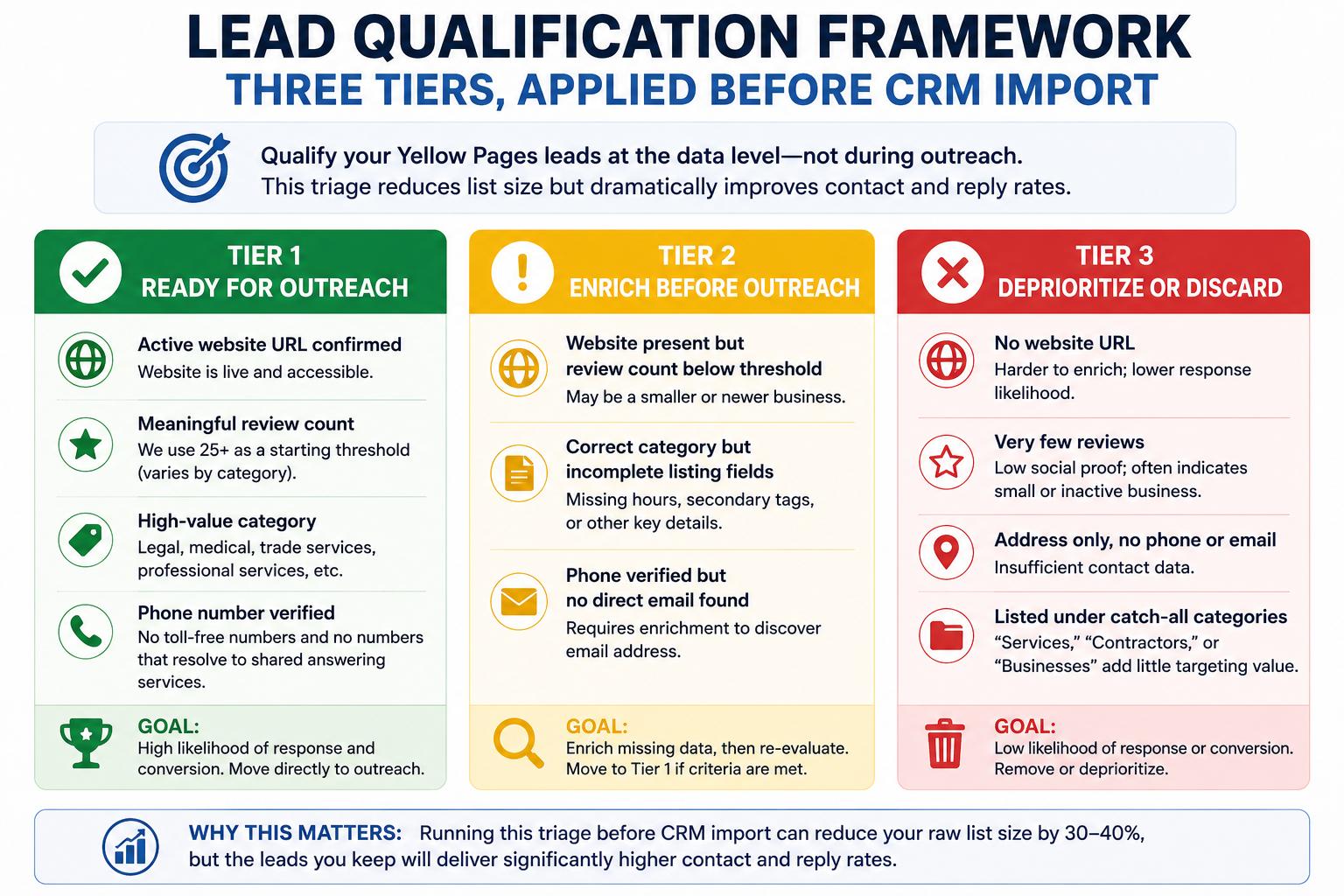
Yellow Pages leads need a qualification pass before entering any outreach sequence. This triage happens at the data level, not during outreach.
Tier 1 - Ready for Outreach:
- Active website URL confirmed
- Meaningful review count (we use 25+ as a starting threshold, though this varies by category)
- Listed in a high-value category (legal, medical, trade services, professional services)
- Phone number format verified; no toll-free numbers, no numbers that resolve to shared answering services
Tier 2 - Enrich Before Outreach:
- Website URL present but review count below threshold
- Correct category but incomplete listing fields (missing hours, no secondary tags)
- Phone verified but no direct email found
Tier 3 - Deprioritize or Discard:
- No website URL
- Very few reviews
- Address only, no phone or email
- Listed exclusively under catch-all categories ("services," "contractors," "businesses")
In our experience, running this triage before CRM import reduces raw list size substantially, but it also produces contact rates and reply rates that make the smaller list far more productive. Qualification at the data layer is cheaper than qualification through failed outreach.
CRM Import: The Operational Details That Rarely Get Published
This is where scraping projects most commonly break down, not technically, but operationally.
Normalize phone numbers before import. Every number should follow a consistent format (E.164 or your CRM's preferred format). Mixed formats cause deduplication failures and integration errors with calling and SMS tools.
Parse addresses into discrete fields. Yellow Pages exports addresses as single strings. Import them as-is and you lose the ability to filter by city, state, or ZIP independently. Parse street, city, state, and ZIP into separate fields before import.
Clean up business name formatting. Older Yellow Pages listings frequently appear in ALL-CAPS. Title-case normalization and removal of common directory artifacts prevents duplicate records from appearing as unique entries.
Map Yellow Pages categories to a custom CRM field. Don't force YP category data into the native "Industry" picklist in Salesforce or HubSpot. The taxonomy doesn't align, and the mismatch corrupts downstream filtering. Create a custom field and preserve the original category value.
Tag every record with a source identifier. A source tag like "Yellow Pages - [Category] - [YYYY-MM]" on every imported record lets you measure conversion rate by category and scrape batch after the campaign runs. Without this, you can't tell which categories are worth refreshing and which to drop.
Deduplication key hierarchy. In our import workflows, we match on phone number first, as it's the most reliable unique identifier for SMBs, then on business name plus ZIP code. Email is unreliable as a dedup key at import time because most records won't have one yet.
Enrichment Workflow: Three Steps, Applied in Sequence
Enrichment converts a directory listing into a workable outreach record. The tools exist; what's missing from most guides is a sequenced process that applies them efficiently.
Step 1 - Email Discovery: Run confirmed website URLs through Hunter.io or Snov.io. These tools pattern-match against known email formats for the domain and return addresses with confidence scores. For listings without a website URL, search the business name and city in Apollo or Clearbit. In our internal testing, Tier 1 leads (those with a confirmed website URL) yield meaningfully higher email discovery rates than Tier 3 leads without one.
Step 2 - Decision-Maker Identification: For higher-value categories (legal, medical, commercial real estate), cross-reference the business name against LinkedIn to identify the owner or managing partner by name. Adding a verified first name to outreach enables personalization that generic directory outreach can't replicate, and it consistently moves reply rates.
Step 3 - Phone Validation: Run every number through a validation API (Twilio Lookup and NumVerify both work). Classify each number as mobile, landline, or VoIP, and confirm active status. Disconnected numbers removed before dialing campaigns translate directly into saved call time and cleaner activity data.
Source Comparison: Yellow Pages vs. Google Maps, Yelp, and Paid Databases
At Leads Sniper, we've found that Yellow Pages consistently outperforms paid databases on coverage of local, owner-operated businesses with 2-20 employees, a segment that Apollo and ZoomInfo underserve relative to their cost. Google Maps is more current but harder to scale and noisier in competitive urban categories. Yelp is useful for hospitality-adjacent prospecting but offers minimal B2B utility. Paid databases earn their cost at mid-market and above; below that threshold, they're expensive for the depth they provide.
Common Scraping Mistakes That Show Up in Experienced Campaigns
Stopping at page one. Yellow Pages returns 30 listings per page. A category in a mid-size metro can span dozens of pages. Scrapers that default to the first page miss the overwhelming majority of the addressable market. Set pagination depth before running any category pull.
Scraping only primary category tags. A business listed under "Roofing Contractors" may also appear under "General Contractors" and "Home Improvement." Pulling only primary categories misses targeting opportunities and creates hidden duplicates when you later pull adjacent categories.
Aggressive request rates without rate limiting. Yellow Pages uses Cloudflare Bot Management. Scraping without throttled requests triggers IP blocks that produce silently incomplete datasets. You get a file, but it's missing large portions of the target category without any indication that the scrape failed.
Treating the listing phone as a direct dial. Many SMB listings on Yellow Pages route to shared front desks, answering services, or office lines. Cold call scripts built around direct decision-maker access fail at the first step. The listing phone is a first-contact point; direct dials require phone validation and LinkedIn cross-referencing.
Treating a scrape as a permanent asset. Directory data decays. Businesses close, move, and change numbers. A list pulled a year ago has meaningful staleness before the first outreach goes out. For ongoing campaigns, we recommend quarterly refreshes on priority categories as a minimum.
Treating the CSV export as the deliverable. Every tool in the top SERP results positions CSV export as the finish line. It isn't. A CSV of raw Yellow Pages data is raw material. It becomes a lead list after deduplication, quality scoring, qualification, enrichment, and CRM import.
Illustrative Campaign Examples
These examples are composites drawn from patterns we've observed across SMB lead generation campaigns. They're meant to illustrate how the workflow performs at different stages, not to claim specific verified outcomes.
Illustrative Example 1 - Web Design Agency Prospecting
Targeting: businesses without a website URL across 10-12 Yellow Pages categories in a mid-sized U.S. metro. The targeting logic: no website means a demonstrable, specific need, which means a warmer angle for outreach than cold prospecting against businesses with full digital presence.
A scrape at this scale typically produces several thousand raw listings. After deduplication and quality filtering, the workable list tends to shrink by 30-40%. After enrichment (email discovery via Hunter.io plus LinkedIn first-name lookup), the contact-ready list shrinks further. Cold email campaigns against this kind of list, where the offer directly addresses the signal in the data, tend to outperform generic directory outreach significantly. The no-website filter is doing most of the qualification work before a single email is written.
Illustrative Example 2 - SaaS Tool Targeting Trade Businesses
Targeting: HVAC and plumbing businesses across multiple metro areas, filtered by review count as a scale proxy. The logic: businesses with 50+ reviews are large enough to have a scheduling problem but small enough to convert through self-serve SaaS.
At this scale, the qualification framework does the heavy lifting. A raw scrape of 15,000+ listings might yield 5,000-7,000 after Tier 1/2/3 triage. Email discovery rates on Tier 1 leads (confirmed website URL) tend to be substantially higher than Tier 3. Multi-touch cold sequences against a well-qualified list in this category can produce reply rates that are 2-3x what the same sequence achieves against an unfiltered export. The review count filter is the variable that explains most of that difference.
What Running These Campaigns Over Time Actually Teaches You
Three things we've learned at Leads Sniper from treating Yellow Pages as an ongoing data source rather than a one-time pull:
Yellow Pages is a lagging indicator, not a leading one. Businesses that appear in YP directories have been around long enough to maintain a listing. That stability is useful for campaigns where tenure signals budget and authority, such as insurance, B2B software, and professional services. It's a liability for campaigns targeting growth-stage or recently-launched companies.
The no-website signal is the most actionable data point in the directory. A listing without a website isn't a low-quality lead. It's a high-need lead with a specific, verifiable problem. For agencies selling web design, SEO, or digital marketing services, filtering to website-absent listings in high-value categories produces a list where every record has an explicit pain point your offer addresses. No other data source hands you that cleanly.
The value compounds with cadence. A single scrape is a snapshot. A quarterly refresh across the same categories lets you detect new listings (potential new businesses worth early outreach), identify disappeared listings (businesses that closed, which is relevant for list hygiene and competitive intelligence), and track review count changes as a proxy for business growth. The biggest returns come from treating Yellow Pages as a monitoring system, not a list you pull once and run campaigns against until it stops working.
Building a Workflow That Gets Better Over Time
The ceiling on Yellow Pages lead generation isn't the directory's size. It's the quality of the workflow built around it.
The scrape itself is a commodity. Any tool in the top SERP results will produce a CSV. What isn't a commodity: a deduplication process that catches cross-category duplicates, a category-targeting model calibrated to your ICP, a qualification framework that filters at the data layer, an enrichment stack that turns a name and phone number into a workable contact, and a refresh cadence that keeps quality above the decay line.
Start with one metro, one category, and one clear offer. Build the pipeline so it produces clean data. Measure contact rates, reply rates, and conversion rates by category and batch. Expand based on what the numbers show, not assumptions about which markets should perform.
The campaigns that produce consistent returns from Yellow Pages data aren't running bigger scrapes. They're running tighter workflows.
Frequently Asked Questions
Is scraping Yellow Pages legal?
Publicly available business directory data occupies a legally complex position. The hiQ Labs v. LinkedIn decision affirmed that scraping publicly accessible data generally does not violate the Computer Fraud and Abuse Act. However, Yellow Pages' terms of service prohibit automated scraping. Legal exposure is typically low for internal business use; commercial resale of scraped data carries meaningfully higher risk. Consult legal counsel for your jurisdiction and use case.
How fast does Yellow Pages data go stale?
In our experience, stable SMB categories decay meaningfully over the course of a year, faster in hospitality and retail, where business turnover is higher. Quarterly refreshes are a reasonable minimum for priority categories in ongoing campaigns.
What tools are most commonly used to scrape Yellow Pages?
Python-based scrapers using BeautifulSoup or Scrapy for those who code; no-code tools like Apify, Octoparse, or Web Scraper for those who don't; pre-built marketplace scrapers (Web Scraper Marketplace, Thunderbit, YPExtractor) for fastest deployment. Each trades off cost, flexibility, freshness control, and scale differently.
How does Yellow Pages compare to Apollo or ZoomInfo for SMB lead generation?
Yellow Pages outperforms paid databases on coverage of local, owner-operated SMBs, especially in trade services, legal, and medical categories. Paid databases have stronger coverage of mid-market and enterprise companies with verified direct dials and pre-built enrichment. For SMB campaigns where cost-per-lead matters, a Yellow Pages scrape with a structured enrichment workflow often delivers a lower cost per qualified lead than a ZoomInfo or Apollo subscription.
What's the best method for finding email addresses for Yellow Pages leads?
Run confirmed website URLs through Hunter.io or Snov.io for pattern-based discovery. For listings without a website, search the business name in Apollo or LinkedIn Sales Navigator to surface owner-level contacts. Tier 1 leads with a confirmed website URL consistently yield higher discovery rates than Tier 3 leads without one.
Does Yellow Pages scraping work for SaaS companies, or mainly for agencies?
Yellow Pages data works well for SaaS vendors selling into service-heavy SMB categories. Scheduling tools, field service management, invoicing software, POS systems, and practice management platforms are strong fits. The directory's depth in trade services and professional services covers exactly the segment most SaaS companies describe as their ICP but struggle to find in paid databases.