


How to Scrape Google Maps for B2B Leads in 2025
TL;DR: Google Maps scraping means extracting publicly available business data (names, phone numbers, websites, ratings, and more) using a dedicated tool. When combined with contact enrichment and targeted outreach, that data becomes a repeatable B2B lead generation system.
This guide goes further than most: it covers what to do with the data after you extract it, including a real anonymized campaign with verified metrics, a full Places API comparison, an original dataset benchmark, common mistakes most teams make, and advanced workflows competitors typically skip.
Google Maps is one of the largest structured databases of local business information publicly available. According to Google, there are over 200 million places represented across Maps globally, and each listing contains data that businesses have voluntarily made public: name, category, address, phone number, website, reviews, ratings, and operating hours. For anyone running outbound prospecting, that's not just a map. It's a continuously updated lead database that no sales intelligence platform can fully replicate at the local level.
The challenge isn't access. It's scale. Manually searching, clicking, and copying business information one listing at a time is impractical for any real campaign. A Google Maps scraper handles in minutes what would otherwise take days.
This guide covers the full picture: what data you can extract, how extraction works, which tools to use, how to enrich and qualify leads, and how to build a workflow that generates revenue consistently, not just a one-time spreadsheet.
Summary of what this guide covered:
- Google Maps contains over 200 million business listings: structured, searchable, and publicly available
- Place ID is an underused field that enables clean deduplication, territory mapping, and multi-location discovery
- A Google Maps scraper outperforms the Places API for lead generation on cost, coverage, and workflow fit
- Based on Leads Sniper benchmark data across 50,000 listings: 18% have no website, 31% have fewer than 10 reviews, and verified email enrichment yields roughly 58% of businesses with a listed website
- An anonymized Leads Sniper customer targeting roofing contractors in Texas turned 1,243 scraped businesses into 712 enriched leads, 31 replies, 8 booked calls, and 2 closed clients
- The most common mistakes (broad niche scraping, skipping qualification, generic outreach, no email verification) are all avoidable with the right workflow
What Is Google Maps Scraping?
Google Maps scraping is the automated collection of business listing data from Google Maps search results. A scraper navigates Google Maps the same way a human would (entering a keyword and location, scrolling through results, opening listings) but does it at machine speed, structuring everything into an exportable file.
The underlying data comes from Google Business Profile (formerly Google My Business) listings. Businesses create and manage these profiles themselves. Because the information is publicly visible on Google Maps without authentication, scraping it doesn't involve bypassing logins or accessing private systems.
Most Google Maps scrapers fall into one of three categories:
- Browser extensions that automate extraction from your local browser session
- Cloud-based scrapers that run keyword jobs remotely and return structured exports
- Developer APIs built for integrating Google Maps extraction into existing data pipelines
The output is typically a CSV, Excel, or JSON file ready for import into a CRM, outreach tool, or qualification workflow.
One thing competitors rarely explain clearly: scraping and the Google Places API are fundamentally different approaches to the same underlying data. We cover that distinction in its own dedicated section below. It's one of the most practically important decisions for any team building a lead generation system at scale.
What Data Can You Extract from Google Maps?
A well-configured Google Maps scraper returns a wide range of structured data fields. Some come directly from Google Business Profile listings. Others (like email addresses and social media profiles) require a secondary enrichment step that cross-references each business's website.
The combination of these fields transforms a raw listing into a qualified prospect profile, especially once email and social enrichment is applied.
What Is a Google Place ID and Why Advanced Users Should Care
Every listing on Google Maps is assigned a unique identifier called a Place ID. It looks something like this: ChIJJQz5EZzKw4kRCZ95UajbyGw. Most articles on Google Maps scraping ignore it entirely. That's a mistake. For serious prospecting workflows, Place ID is one of the most useful fields you can collect.
Duplicate Detection
When you run multiple keyword searches across overlapping geographies (say, "dentist Chicago" and "dental clinic Chicago") the same business can appear in both result sets. Without a reliable deduplication key, your list ends up with inflated numbers and wasted outreach.
Place ID solves this cleanly. Because each Google Maps listing has exactly one Place ID, deduplicating by this field is faster and more accurate than matching on business name (which can vary slightly) or phone number (which can be shared across locations).
Territory Mapping
Place IDs combined with coordinates allow you to build precise geographic territories. Instead of filtering by city name (which can be inconsistently applied across listings) you can define a bounding polygon or radius and match listings against it using their stored coordinates, then use Place ID to reference each one uniquely in your CRM or tracking system.
This is particularly useful for sales teams dividing territories between reps. Each rep gets a clean, deduplicated list of Place IDs covering their assigned area, with no overlap and no ambiguity.
Multi-Location Account Discovery
For agencies and SaaS companies targeting regional chains or franchise groups, Place ID enables multi-location account mapping. By scraping all listings that share a brand name and then grouping them by Place ID, you can identify how many locations a business operates, where they're concentrated, and whether the account is better treated as a single enterprise deal or multiple independent leads.
A roofing company with 1 location is a different opportunity than a pest control franchise with 40. Place ID is what lets you make that distinction systematically rather than manually.
Actionable takeaway: Always include Place ID in your scraped export, even if you don't immediately need it. It costs nothing to collect and saves significant time when you need to clean, merge, or segment your data later.
What the Data Actually Looks Like: Leads Sniper Benchmark Analysis
To give you a realistic view of what Google Maps data contains and what's missing, we analyzed 50,000 Google Maps business listings across 12 industries using Leads Sniper. The findings below reflect real extraction results, not estimates.
A few things stand out from this data:
18% of businesses have no website. For web design agencies and digital marketing firms, this is a directly actionable signal. Filter for no-website listings in your target niche and you have a pre-qualified list of businesses with a clear, demonstrable gap.
31% have fewer than 10 reviews. These are typically newer businesses, owner-operated practices, or companies that have never actively managed their online presence. They're more likely to be receptive to services that help them grow.
58% enrichment rate for verified emails. Across businesses with a listed website, roughly 58% yield a verified email address after enrichment. That means for every 1,000 scraped businesses with websites, expect around 580 contactable email leads, not 1,000. Plan your campaign size accordingly.
Why Businesses Scrape Google Maps
The use cases for Google Maps data extraction span nearly every outbound sales and marketing function:
Local SEO agencies use scraping to identify businesses with incomplete profiles, low review counts, or missing websites. These are classic signals that a business needs SEO help and likely has budget available.
Web design agencies search for businesses in target verticals that have no website listed or an outdated site, then run targeted campaigns offering redesigns or first-time builds.
Marketing agencies pull business data by niche and location to build cold email lists for service offerings, matching their specialization to relevant prospects in a defined geography.
SaaS companies use Maps data to find businesses that match their ideal customer profile, filtering by category, location, and review volume to identify prospects at the right growth stage.
Recruiters scrape Maps to find businesses in high-hiring industries or fast-growing local markets before they post jobs publicly.
Franchise development teams extract multi-location business data to identify regional chains as acquisition or expansion targets.
B2B sales teams and SDRs use Google Maps as a prospecting channel alongside LinkedIn and company databases, particularly effective for local and regional businesses underrepresented on platforms like ZoomInfo or Apollo.
Google Maps Scraping vs Google Places API: Full Comparison
This is one of the most searched topics adjacent to Google Maps data collection, and most articles treat it as a throwaway FAQ answer. It deserves a dedicated breakdown, because the choice between scraping and the official API fundamentally affects cost, coverage, and the quality of your lead data.
The Google Places API is Google's official developer interface for accessing Maps data programmatically. It requires API key setup, charges per request, and is subject to strict usage limits. It returns reliable, structured data, but with important coverage restrictions.
A dedicated Google Maps scraper like Leads Sniper operates differently: it navigates the Maps interface directly, extracts data at the UI level, and applies enrichment to expand what the API doesn't provide.
When to use the Google Places API: You're building a consumer-facing product or internal application that needs reliable, structured map data. You have development resources. You don't need email enrichment or social profiles. Your use case requires real-time data at the listing level rather than batch lead generation.
When to use a Google Maps scraper: You're running outbound prospecting. You need email addresses. You want to filter by review count, rating, or website presence. You don't have developer resources or don't want to manage API billing and rate limits. You need hundreds or thousands of leads, not individual lookups.
For lead generation, scraping wins on cost, coverage, and practical workflow fit. The Places API is a better choice for product development, not prospecting.
How to Scrape Google Maps: 3 Methods
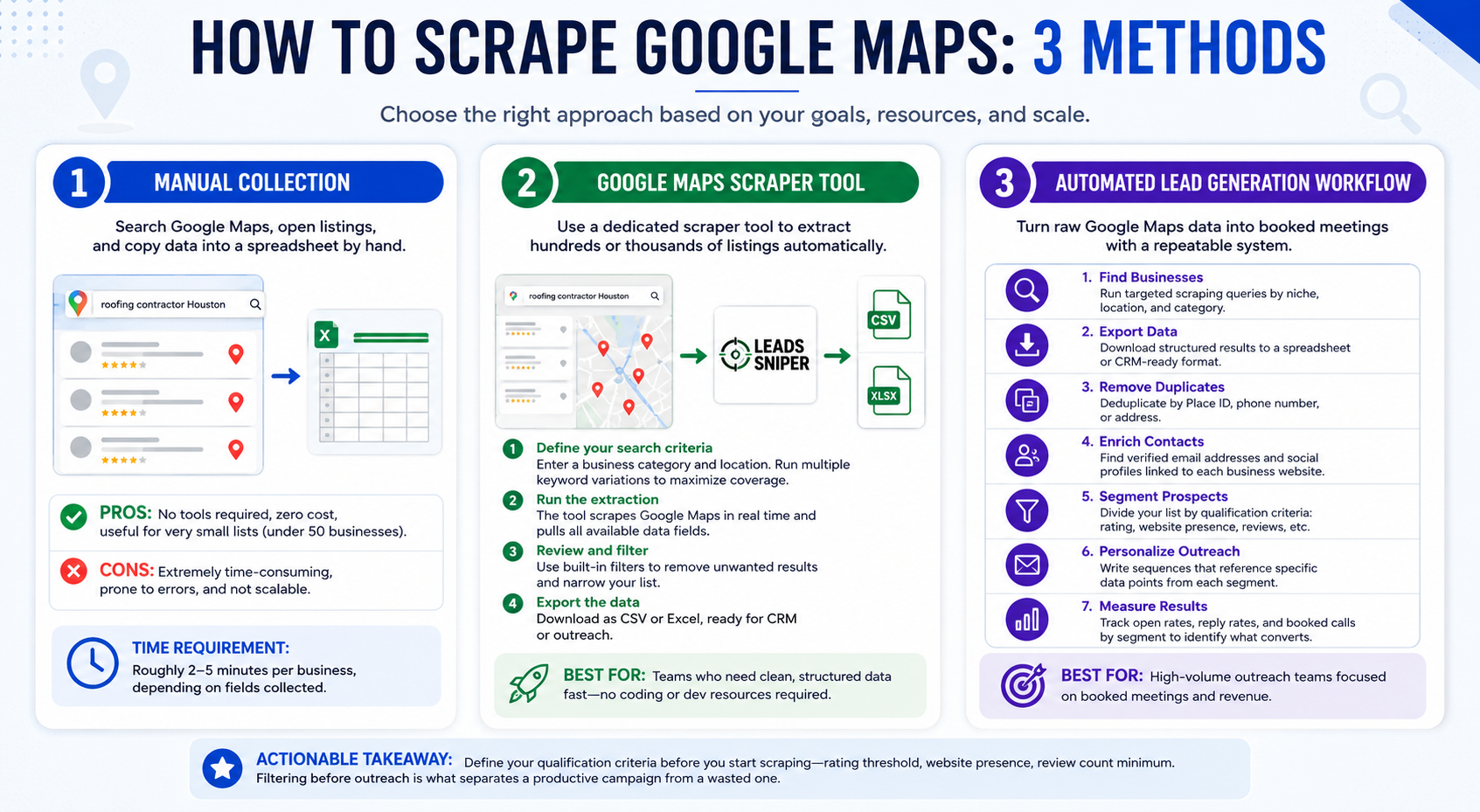
Method 1: Manual Collection
Manual scraping means searching Google Maps, reviewing listings, and copying data into a spreadsheet by hand.
Pros: No tools required, zero cost, useful for very small lists (under 50 businesses).
Cons: Extremely time-consuming. Extracting 100 records manually can take 3-5 hours. Data is prone to transcription errors. Not scalable for any serious prospecting effort.
Time requirement: Roughly 2-5 minutes per business, depending on how many fields you're collecting.
Manual collection is only practical for validating a niche before investing in a larger campaign. For anything beyond a pilot test, a dedicated Google Maps scraper is the right approach.
Method 2: Google Maps Scraper Tool
A Google Maps scraper handles extraction automatically, collecting hundreds or thousands of listings in a fraction of the time.
Step-by-step workflow using Leads Sniper:
- Define your search criteria. Enter a business category and location (e.g., "roofing contractor Houston TX"). Run multiple keyword combinations in a single session to maximize coverage.
- Run the extraction. Leads Sniper scrapes Google Maps results in real time, pulling all available data fields from each listing.
- Review and filter. Use built-in filters to remove businesses without websites, narrow by rating range, or isolate specific categories.
- Export the data. Download results as a CSV or Excel file, ready for upload into your CRM or outreach platform.
This method is best for teams running regular prospecting campaigns who need clean, structured data fast, without engineering resources.
Method 3: Automated Lead Generation Workflow
For teams running high-volume outreach, scraping is just the first step. The full workflow turns raw Google Maps data into booked meetings:
- Find businesses - Run targeted scraping queries by niche, location, and category
- Export data - Download structured results to a spreadsheet or CRM-ready format
- Remove duplicates - Deduplicate by Place ID, phone number, or address
- Enrich contacts - Find verified email addresses and social profiles linked to each business's website
- Segment prospects - Divide your list by qualification criteria: rating score, website presence, review volume, business age signals
- Personalize outreach - Write sequences that reference specific data points from each segment
- Measure results - Track open rates, reply rates, and booked calls by segment to identify the highest-converting criteria
Actionable takeaway: Define your qualification criteria before you start scraping: rating threshold, website presence, review count minimum. Filtering after the fact is time-consuming. Filtering before outreach is what separates a productive campaign from a wasted one.
Real Campaign Example: Roofing Contractors in Texas
This is an anonymized example from an actual Leads Sniper customer, a B2B outreach agency running a campaign targeting roofing contractors across Texas.
Search criteria: "Roofing contractor" across major Texas markets (Dallas, Houston, San Antonio, Austin, Fort Worth) using multiple keyword variations to maximize coverage.
Starting dataset: 1,243 businesses extracted.
Qualification filters applied:
- Removed businesses with no website (excluded from email enrichment workflow; flagged separately for phone outreach)
- Filtered for businesses with fewer than 50 reviews (targeting owner-operated contractors less likely to have a dedicated marketing team)
- Excluded businesses rated below 3.5 (too high a risk of operational issues affecting close rate)
After enrichment: 712 verified email addresses.
Campaign results:
- 31 replies
- 8 booked discovery calls
- 2 closed clients
That's a reply rate of approximately 4.4% on a cold email list, within normal range for a well-targeted B2B campaign. Two closed clients from a single campaign covering one vertical in one state.
The key factor wasn't volume. It was qualification. The agency didn't email all 1,243 businesses. They enriched down to 712 contactable leads, then personalized outreach around roofing-specific pain points. The campaign paid for itself before the second client closed.
Common Google Maps Lead Generation Mistakes
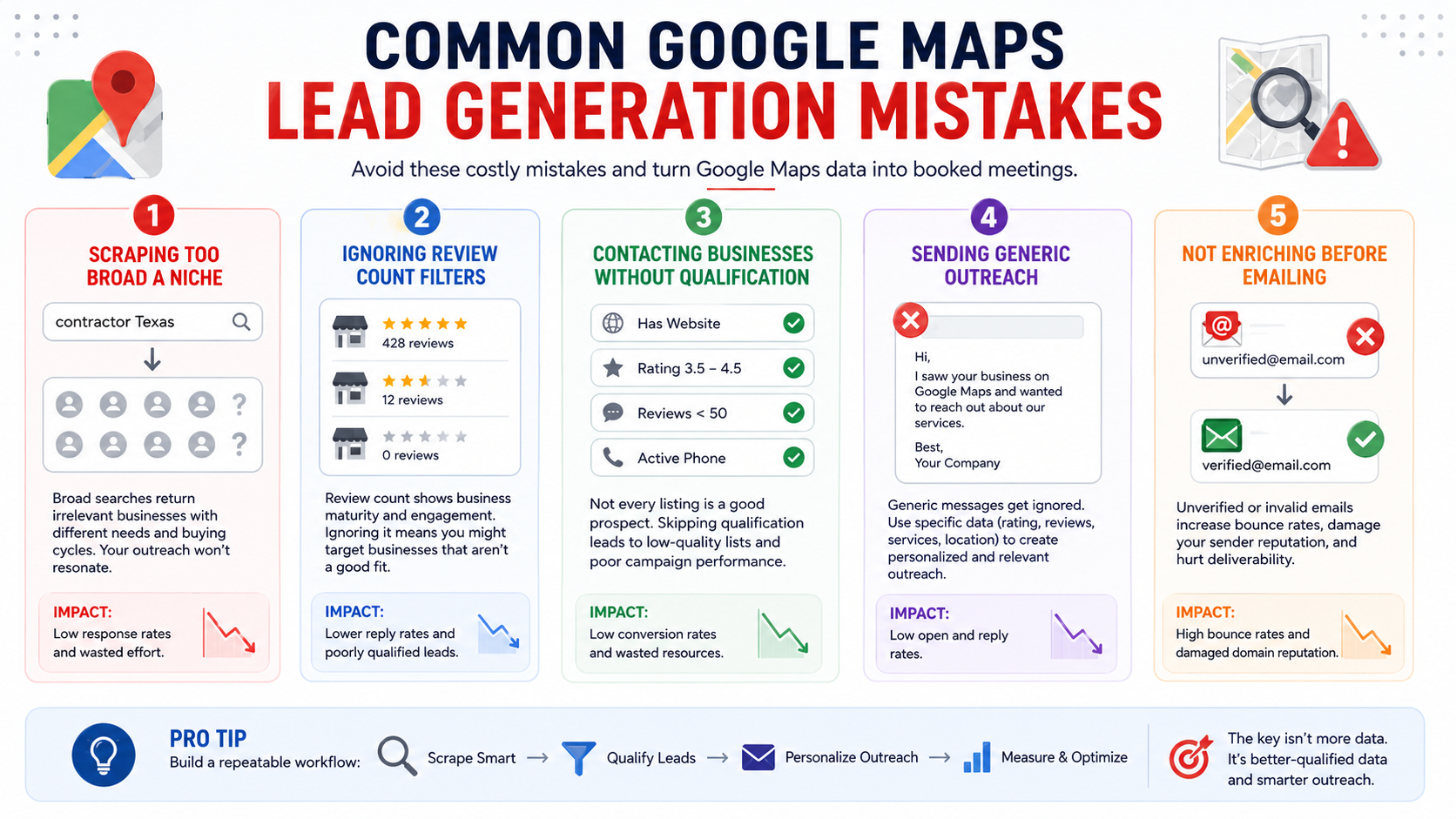
Most guides tell you how to scrape. Fewer tell you what goes wrong after you do. These are the five mistakes that consistently reduce campaign performance for teams using Google Maps data.
1. Scraping Too Broad a Niche
Searching for "contractor" in a major city returns roofing contractors, general contractors, electrical contractors, plumbers, and HVAC companies. These are businesses with completely different buying cycles, decision-makers, and pain points. Outreach written for one won't resonate with the others.
Specificity is what makes a campaign work. "Roofing contractor Dallas TX" is a better starting point than "contractor Texas." Narrow your search terms before you build your list, not after.
2. Ignoring Review Count Filters
Review count is one of the most useful qualification signals in Google Maps data, and most teams ignore it entirely.
A business with 400+ reviews is likely an established operation with a marketing team, agency relationships, and vendor contracts already in place. A business with 12 reviews is often owner-operated, actively growing, and actively looking for tools and services to support that growth. They're not the same prospect.
Filter by review count before you enrich. It saves enrichment credits and dramatically improves reply rates.
3. Contacting Businesses Without Qualification
Exporting 2,000 businesses and emailing all of them is not a lead generation strategy. It's a deliverability risk.
Every business on a Google Maps list has a Google Business Profile. That doesn't mean they're a qualified prospect. Rating, review count, website presence, category specificity, and business size signals all matter. Building a qualification layer between your scrape and your outreach is what turns a list into a campaign.
4. Sending Generic Outreach
"I noticed your business on Google Maps and wanted to reach out about our services" is the most common opening line in cold email. Recipients see it immediately for what it is.
Google Maps data gives you specific, personalized context that most outreach sequences don't use. A business with a 3.6 rating and 80 reviews has a different conversation available to it than one with a 4.8 rating and 12 reviews. Use the data you collected to write outreach that could only be sent to that specific segment.
5. Not Enriching Before Emailing
Sending outreach to unverified email addresses increases bounce rates, damages domain reputation, and reduces deliverability for your entire sending domain over time.
Always run enriched email addresses through a verification step before sending. Expect to lose 15-25% of enriched emails through verification. That's normal. The emails that remain are worth far more than a larger unverified list.
Compliance and Best Practices
Google Maps scraping involves publicly available business information: data that businesses have voluntarily listed on a public platform for the purpose of being found. That said, responsible data usage matters, and the regulatory environment is increasingly specific.
GDPR (European Union): Under GDPR, business contact data may still be subject to data protection requirements depending on the nature of the contact and the individual involved (e.g., a sole trader). If you're targeting businesses in EU member states, review the legitimate interest basis for processing and ensure you honor opt-out requests promptly. The ICO (UK) and EDPB (EU) have published guidance on this.
CCPA (California): The California Consumer Privacy Act gives individuals rights over their personal data. For B2B outreach targeting California businesses, review CCPA obligations around data collection and processing, particularly if you're storing or selling enriched contact data.
Ethical use: Use Google Maps data to contact businesses in a relevant, professional context. Maintain suppression lists. Include clear opt-out mechanisms in all outreach. Do not resell scraped data.
Practical tip: Verify contacts before outreach. Sending to outdated or invalid addresses damages sender reputation and reduces deliverability across your entire domain.
Note: This section is informational and does not constitute legal advice. Consult qualified legal counsel for guidance specific to your use case and jurisdiction.
Google Maps Scraper Tool Comparison
How to choose:
- Leads Sniper if you need a purpose-built lead generation tool with enrichment, no technical setup, and production-ready exports
- Apify if you're a developer who wants full API control and custom pipeline integration
- G Maps Extractor if you want a low-cost entry point with basic enrichment
- Octoparse if Google Maps is one of many scraping use cases you need to cover with a single platform
Advanced Prospecting Strategies
Once you understand the basics, Google Maps data opens up more sophisticated targeting approaches.
Find businesses without websites. Filter exported data for records with no website field. These are high-intent prospects for web design, digital marketing, and local SEO services. Our benchmark data shows 18% of listings fall into this category, a substantial segment in any niche.
Target low-review businesses. Businesses with fewer than 20 reviews are often newer, owner-operated, or underinvested in online presence. They're more receptive to services that help them grow. Our data shows 31% of all scraped listings have fewer than 10 reviews.
Identify poor-rated businesses. A rating below 3.8 with meaningful volume often signals a business under operational or reputation pressure. Reputation management agencies and customer experience consultants can build highly personalized pitches around this signal. 22% of listings in our dataset fall below 4.0.
Map multi-location chains using Place ID. Group scraped listings by brand name, then use Place ID to count unique locations. Businesses with 5+ locations are likely franchise operations or regional chains, candidates for enterprise-level deals rather than single-seat services.
Run competitor analysis workflows. Scrape the top-rated businesses in a niche to benchmark market leaders by review volume, category specificity, and service descriptions. Use that benchmark to identify and pitch their lower-rated competitors.
Frequently Asked Questions
What is Google Maps scraping?
The automated collection of publicly available business listing data from Google Maps. Tools like Leads Sniper extract structured information (names, phone numbers, websites, ratings, and more) and export it in formats like CSV or Excel.
Is scraping Google Maps legal?
Scraping publicly visible business data from Google Maps is generally legal in most jurisdictions. How you store and use that data is subject to applicable privacy laws, including GDPR in Europe and CCPA in California. Always follow regional regulations and use data ethically. This is not legal advice; consult qualified legal counsel for your specific situation.
What data can you extract?
Business names, categories, addresses, phone numbers, websites, ratings, review counts, opening hours, coordinates, and Place IDs. With email enrichment, you can also surface verified emails and social media profiles linked to a business's website.
How many results can I get per search?
Google Maps returns up to approximately 120 results per keyword search. To build larger lists, use multiple keyword variations, neighborhood-level location modifiers, or geo-splitting across a target region.
What's the difference between scraping and the Google Places API?
The Places API is Google's official developer interface: reliable but limited to 60 results per search, charged per request, and without email enrichment or popular times data. A Google Maps scraper extracts more fields at lower cost and is better suited for lead generation at scale. See the full comparison section above.
Can I get email addresses from Google Maps?
Email addresses aren't on Google Maps directly. Tools with built-in enrichment (like Leads Sniper) find them by cross-referencing each business's website. Expect a verified email for roughly 58% of businesses with a listed website, based on our benchmark data.
What's the best Google Maps scraper for agencies?
Leads Sniper is purpose-built for lead generation: no coding, built-in enrichment, Place ID included, and exports ready for any CRM or outreach platform.
How do I remove duplicates from a scraped list?
Deduplicate by Place ID for the cleanest results. You can also match on phone number or full address. Excel's Remove Duplicates function works for smaller lists; for larger datasets, use a CRM deduplication feature or a simple script.
Can I scrape Google Maps reviews?
Yes. Most Google Maps scrapers can extract review text, counts, and average ratings. This data is useful for reputation management prospecting, competitive benchmarking, and sentiment analysis.
How do I turn scraped data into booked meetings?
Scrape, clean and deduplicate, enrich, segment by qualification criteria, personalize outreach by segment, send, then measure by segment. The biggest variable is qualification: filtering your list to businesses that match your ideal customer profile before sending a single email.
Key Takeaways and Next Steps
Google Maps data extraction is not a magic button. A raw export of 1,000 businesses means nothing without a qualification framework, enrichment workflow, and targeted outreach strategy behind it.
The teams generating consistent revenue from Google Maps prospecting share one approach: they treat the data as the input to a system, not the output of a task. They define ideal customer criteria before scraping. They clean and enrich before outreach. They personalize by segment, not just by name. And they measure what works, then repeat it.
Ready to build your first Google Maps prospecting campaign? Start with Leads Sniper. Your first list is free.


