Finding quality business leads has never been more competitive. As digital databases grow and buyer expectations rise, marketers and small business owners are under increasing pressure to build targeted prospect lists faster and more accurately than ever before.
Yellow Pages remains one of the most reliable directories for local business data, but manually sifting through thousands of listings is neither scalable nor efficient.
That's where automated scraping tools come in. By 2026, Yellow Pages scraping has evolved from a niche developer skill into an accessible workflow that business owners, marketers, and data professionals can set up in minutes.
This post walks you through exactly how yellow page data extraction works, when to use it, and how tools like the Leads-Sniper Yellow Pages Scraper can help you extract business data at scale without the manual grind.
Why Yellow Pages is still a goldmine for business data in 2026
Despite the rise of LinkedIn, Google Maps, and industry-specific directories, Yellow Pages continues to serve as a structured, category-organized database of local and national businesses. It covers millions of listings across industries from contractors and dentists to restaurants and logistics providers making it particularly useful for B2B prospecting, competitive research, and market analysis.
What makes Yellow Pages especially valuable is the consistency of its data. Each listing typically includes:
- Business name
- Phone number
- Address and ZIP code
- Website URL
- Business category
- Customer reviews and ratings
For anyone building lead lists, this structured format is ideal for automated extraction. The challenge has always been scale there's simply no practical way to collect thousands of records by hand.
Manual extraction vs. automated scraping: a real comparison
To understand the value of automation, it helps to see what manual extraction actually looks like in practice.
The manual approach
Say you're a marketing agency looking to build a list of 500 plumbers across three cities. Manually, that means:
- Searching each city on Yellow Pages
- Clicking into each listing
- Copy-pasting the business name, phone, address, and URL into a spreadsheet
- Repeating across multiple pages and categories
At roughly 2–3 minutes per listing, 500 records could take 15–25 hours of tedious, error-prone work. That's before you account for duplicate entries, inconsistent formatting, or listings that have moved or closed.
The automated approach
With a Yellow Pages scraper, the same 500 records can be collected in minutes. You define your search criteria keyword, location, category and the tool handles the rest. Results are exported directly into CSV or Excel format, clean and ready for use in your CRM or outreach platform.
The efficiency gains are significant, but it's not just about speed. Automated tools also improve data consistency, reduce human error, and allow you to scale to tens of thousands of records without adding manual labor.
How to extract Yellow Pages data with Leads-Sniper
.jpg)
The Leads-Sniper Yellow Pages Scraper is built specifically for this use case. It's designed to work across multiple regional Yellow Pages sites, supports flexible export formats, and requires no coding knowledge to get started. Here's how the process works from start to finish.
Step 1: Install and set up the tool
Visit the Leads-Sniper website and download the Yellow Pages Scraper. Installation is straightforward follow the on-screen prompts and launch the application once complete. No developer experience is required.
Step 2: Define your search parameters
Once inside the tool, you'll configure your extraction criteria:
- Keyword or category: Enter the type of business you're targeting (e.g., "electricians," "real estate agents," "auto repair")
- Location: Specify the city, state, or ZIP code you want to target
- Yellow Pages region: The tool supports multiple regional Yellow Pages directories, so you can target listings in different countries or markets if needed
This flexibility makes it useful for both hyper-local campaigns and broader, multi-region data collection.
Step 3: Run the extraction
With your parameters set, initiate the scrape. The tool will systematically work through the Yellow Pages listings that match your criteria, collecting all available data fields for each business. Depending on the scale of your search, this can take anywhere from a few seconds to a few minutes.
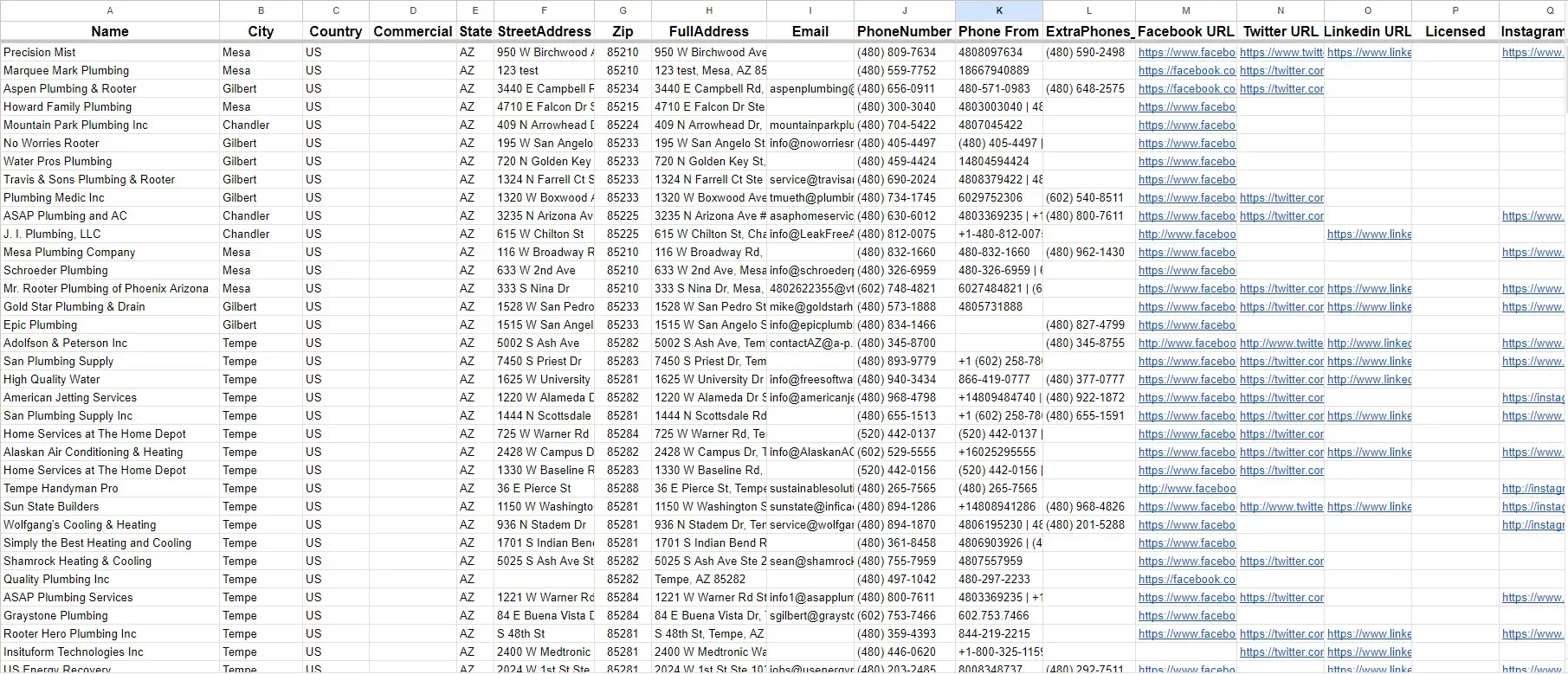
Fields typically captured include:
- Business name
- Phone number
- Street address, city, state, and ZIP
- Website URL
- Business category
- Star rating and review count
- Years in business (where listed)
Step 4: Review and export your data
Once extraction is complete, review the results within the tool's interface. You can filter, sort, or remove irrelevant entries before exporting.
Leads-Sniper supports CSV and Excel export formats, making it easy to import your data directly into tools like HubSpot, Salesforce, Mailchimp, or any spreadsheet-based workflow.
Step 5: Put your data to work
Extracted data is most valuable when it's actioned quickly. Common next steps include:
- Uploading leads into your CRM for sales outreach
- Segmenting by category or location for targeted email campaigns
- Cross-referencing with existing customer data to identify gaps in your market
- Building prospect databases for business development teams
Real use cases for Yellow Pages business data
Knowing how to extract the data is only half the picture. Here's how different types of businesses are actually using Yellow Pages scraping in practice.
Local service businesses
A roofing company expanding into a new metro area uses Yellow Pages data to identify competitors, understand market density, and find potential subcontracting partners all before spending a dollar on advertising.
Marketing agencies
An agency managing outreach campaigns for multiple clients uses automated Yellow Pages scraping to build fresh, category-specific lead lists on demand. Rather than purchasing outdated data from a list broker, they extract current listings and verify contact details in real time.
Commercial real estate
A commercial property firm tracks business openings and closings in target neighborhoods by regularly scraping Yellow Pages data. Shifts in listing volume help them gauge neighborhood commercial activity and identify prospective tenants.
B2B SaaS companies
A software company targeting small healthcare providers uses Yellow Pages to build a list of independent clinics, dental offices, and physiotherapy practices across a specific region feeding directly into their account-based marketing campaigns.
Key benefits of using a dedicated Yellow Pages scraper
There are several generic web scraping tools on the market, but using one built specifically for Yellow Pages offers distinct advantages.
Time savings at scale: Collecting thousands of leads manually is simply not viable for most teams. Automation compresses what would take days into minutes.
Comprehensive data fields: A purpose-built scraper captures all available data points from each listing, not just the basics. This gives your sales and marketing teams richer context for personalization and segmentation.
Multi-region coverage: Many businesses operate across borders or want to explore new markets. Leads-Sniper's support for multiple regional Yellow Pages sites means you're not limited to a single country or directory.
Flexible export formats: Whether your team works in Excel, imports into a CRM, or feeds data into a marketing automation platform, CSV and Excel exports keep the workflow frictionless.
Scalability: As your business grows and your prospecting needs expand, the tool scales with you no need to hire additional staff for data collection.
What to watch out for when scraping business directories

A few practical considerations will help you get the most out of Yellow Pages scraping while avoiding common pitfalls.
Data freshness: Business listings can go stale quickly. Run extractions close to when you plan to use the data, and consider verifying high-priority contacts before outreach.
Relevance filtering: Large extractions sometimes include listings that don't quite fit your criteria. Build in a review step before importing data into your CRM to avoid cluttering your pipeline with irrelevant contacts.
Legal and ethical use: Always use scraped data responsibly and in compliance with applicable data privacy regulations. Using business contact information for legitimate B2B outreach is generally acceptable in most regions, but it's worth reviewing the rules specific to your market.
Duplicate management: If you're running multiple extractions across overlapping regions or time periods, deduplicate your lists before outreach to avoid contacting the same business multiple times.
Frequently asked questions
Is Yellow Pages scraping legal?
Scraping publicly available business directory data for legitimate business purposes is generally permitted in most jurisdictions. However, laws vary by region and use case.
Always consult relevant data privacy regulations such as GDPR or CAN-SPAM before using extracted data for outreach or marketing.
How current is the data extracted from Yellow Pages?
The data reflects what's currently published in the Yellow Pages directory at the time of extraction. Since Yellow Pages listings are updated by business owners and the directory's editorial team, accuracy varies.
It's a good practice to verify critical contacts especially phone numbers before large outreach campaigns.
Can I target specific business categories?
Yes. The Leads-Sniper Yellow Pages Scraper lets you filter by keyword and category, so you can target specific types of businesses rather than extracting broad, unfiltered data.
Do I need technical skills to use the tool?
No. The tool is designed for non-technical users. If you can run a search on Yellow Pages, you have enough experience to configure and use the scraper.
What file formats can I export to?
Leads-Sniper supports CSV and Excel exports, which are compatible with virtually all CRM platforms, email marketing tools, and spreadsheet applications.
How many records can I extract at once?
This depends on your plan and the scope of your search. The tool is built to handle large-scale extractions, making it suitable for both small targeted campaigns and high-volume data collection projects.
Turn directory listings into actionable leads
Yellow Pages remains one of the most reliable sources of structured local business data available and in 2026, the tools to extract that data efficiently are more accessible than ever.
Whether you're building prospect lists for a sales campaign, conducting competitive research, or mapping out a new market, automated Yellow Pages scraping removes the bottleneck of manual data collection.
If you're ready to stop copying and pasting leads one by one, explore the Leads-Sniper Yellow Pages Scraper and see how much faster your lead generation workflow can be. Start with a focused test pick one category, one city and measure the time saved against your current process. The results tend to speak for themselves.