You scrape 1,000 leads from Google Maps, feeling confident about your next outreach campaign. But after sending emails or making calls, you realize something frustrating:
1. The same business appears multiple times.
2. Duplicate listings are one of the biggest hidden problems in modern lead generation. They silently damage your campaigns by wasting time, inflating your data, and hurting your ROI.
In 2026, where automation, AI, and large-scale data scraping dominate, clean data is everything. If your dataset is messy, your results will be too.
That’s why understanding how a Google Maps scraper handles duplicate listings is critical—especially if you rely on local business data for growth.
A Quick Answer For This Problem:
A Google Maps scraper handles duplicate listings by identifying similar entries using key data points such as business name, phone number, address, and coordinates. Advanced tools apply matching algorithms and deduplication logic to remove repeated records, ensuring a clean and accurate dataset for lead generation and outreach.
What Are Duplicate Listings in Google Maps?
Duplicate listings occur when the same business appears multiple times in Google Maps search results.
Example:
A single restaurant might show up as:
- “Pizza Palace”
- “Pizza Palace Ltd.”
- “Pizza Palace Downtown Branch”
Even though it's the same business, these variations create multiple entries.
Common Duplicate Data Variations:
- Slightly different business names
- Different phone numbers (same company)
- Address formatting differences
- Multiple listings for different services
This is a common issue in local business data extraction and affects both manual and automated workflows.
Why Duplicate Listings Happen
Duplicate business listings don’t happen randomly. They’re usually caused by data inconsistencies and user behavior.
1. Business Owner Errors
- Creating multiple profiles unintentionally
- Rebranding without deleting old listings
2. Google Maps Data Aggregation
- Data pulled from multiple sources
- Inconsistent formatting across platforms
3. User-Generated Edits
- Public edits create variations
- Duplicate submissions
4. Multiple Locations or Services
- One business listed under different categories
- Separate entries for branches or departments
5. Inconsistent Data Formatting
- “Street” vs “St.”
- Different phone number formats
Why Duplicates Are a Big Problem
Duplicate listings aren’t just annoying—they directly impact your business performance.
1. Wasted Leads
You think you have 1,000 leads… but maybe only 700 are unique.
2. Poor Outreach Results
- Sending duplicate emails
- Calling the same business multiple times
3. Damaged Brand Perception
Repeated outreach looks unprofessional and spammy.
4. Messy CRM Systems
Duplicate data clutters your pipeline and reduces efficiency.
5. Lower ROI
You spend time and money targeting the same prospects repeatedly.
👉 In short: duplicate data = lost revenue
How Google Maps Scrapers Detect Duplicates
Modern lead generation tools use multiple layers of logic to identify duplicate listings.
1. Name Matching
- Exact match: “ABC Marketing” = “ABC Marketing”
- Partial match: “ABC Marketing Ltd.” ≈ “ABC Marketing”
2. Phone Number Matching
Phone numbers are one of the strongest unique identifiers.
- Same phone = likely duplicate
- Even with different formatting
3. Address Similarity
- Matching street, city, and ZIP
- Handling variations like “Road” vs “Rd”
4. GPS Coordinates (Latitude & Longitude)
Highly accurate method:
- Same coordinates = same location
- Useful for nearby duplicate entries
5. Fuzzy Matching Algorithms
Advanced scrapers use data deduplication logic like:
- String similarity scoring
- Token matching
- AI-based entity recognition
👉 This helps detect duplicates even when data isn’t identical.
How to Remove Duplicate Listings (Actionable Guide)
You can clean duplicate listings either manually or automatically.
Manual Method (Small Datasets)
- Export your data
- Sort by: Business name and Phone number
- Identify repeated entries
- Delete duplicates
⚠️ Time-consuming and error-prone
Automated Deduplication (Recommended)
Use tools that support data accuracy in scraping:
Steps:
- Import scraped data
- Apply filters: Same phone number and Similar names
- Use deduplication rules
- Export clean dataset
Pro Workflow Tip
Combine multiple filters:
- Name + Phone
- Address + Coordinates
This gives maximum accuracy.
How Our Google Maps Scraper Solves This Problem
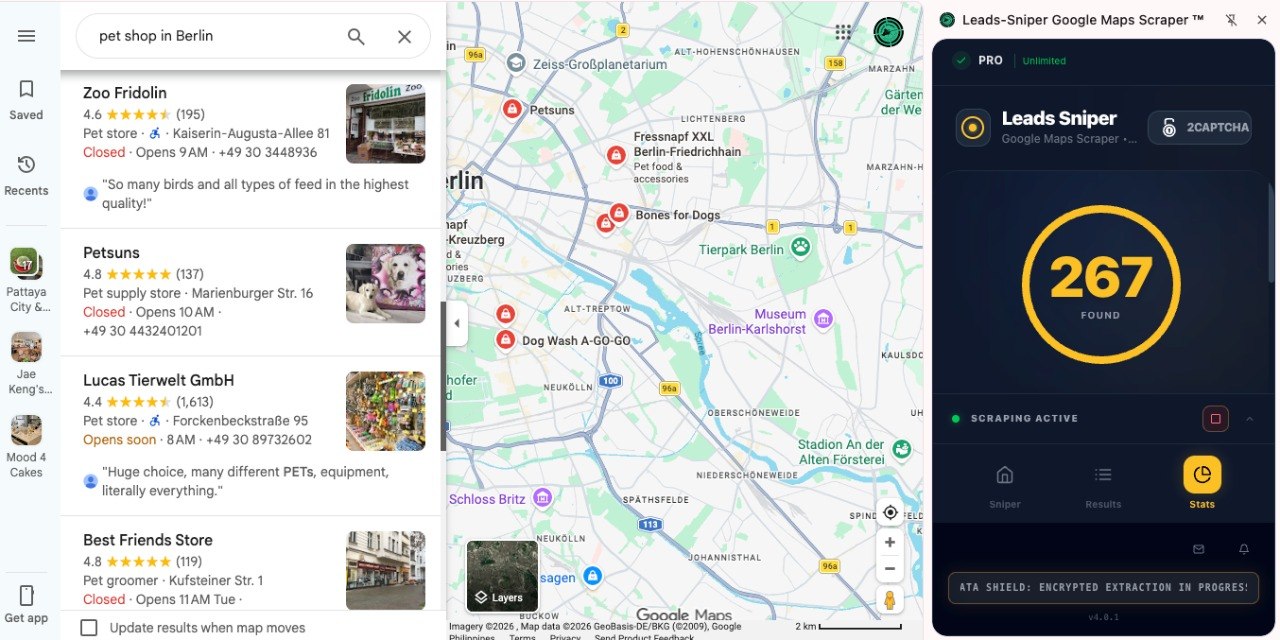
If you're serious about clean lead generation, manual cleaning is not scalable.
That’s where our tool comes in:
👉 https://www.leads-sniper.com/products/google-maps-scraper
Key Features That Eliminate Duplicates
1. Built-in Duplicate Filtering
Automatically removes repeated entries during scraping.
2. Smart Data Matching
Uses:
- Name similarity
- Phone matching
- Address logic
3. Clean Data Export
You get:
- Unique leads only
- Structured, ready-to-use datasets
4. Time-Saving Automation
No need for manual cleanup.
5. High Data Accuracy
Improves campaign performance and outreach efficiency.
Why This Matters
Instead of:
❌ Scraping → Cleaning → Fixing mistakes
You get:
Clean, ready-to-use leads instantly
Best Practices for Clean Data Extraction
Follow these tips to avoid duplicates from the start:
1. Checklist:
- Use advanced scraping tools
- Always include phone numbers in data
- Avoid scraping overlapping keywords repeatedly
- Use filters (location, category) carefully
- Clean data immediately after scraping
- Maintain a central database
Common Mistakes to Avoid
1. Ignoring duplicates
Leads to poor campaign results
2. Relying only on name matching
Names can vary—use multiple identifiers
3. Not using automation
Manual cleaning doesn’t scale
4. Scraping the same area multiple times
Creates redundant data
5. Exporting raw data without validation
Always clean before use
FAQs
1. What is duplicate data in Google Maps scraping?
Duplicate data refers to multiple entries of the same business appearing due to variations in name, address, or listing details.
2. How do I remove duplicate leads from scraped data?
You can use Excel filters manually or automated tools with deduplication features for faster and more accurate results.
3. Are duplicate listings common in Google Maps?
Yes, they are very common due to user edits, multiple listings, and inconsistent data sources.
4. What is the best way to avoid duplicate leads?
Use a scraper with built-in duplicate filtering and apply multiple matching criteria like phone, name, and address.
5. Why is clean data important in lead generation?
Clean data ensures better targeting, higher response rates, and improved ROI.
Conclusion
Duplicate listings are one of the biggest obstacles in Google Maps scraping and lead generation.
They:
- Waste time
- Reduce accuracy
- Hurt your campaigns
But with the right approach—and the right tool—you can eliminate this problem entirely.
👉 If you want clean, accurate, ready-to-use leads, try:
https://www.leads-sniper.com/products/google-maps-scraper
Start scraping smarter, not harder.