


Quick Answer: Agencies in 2026 are using Google Maps scrapers to extract fresh, targeted local business data, including emails, phone numbers, and social profiles, and turn it into high-quality prospect lists. Tools like Leads Sniper automate the extraction process, allowing agencies to build niche-specific lead lists in minutes and outreach at scale without buying outdated data.
Cold outreach has gotten harder. Ad costs have climbed. Inboxes are more crowded than ever. And the number of agencies competing for the same local business clients has exploded. The result? Generic prospecting doesn't cut it anymore.
Agencies that are still winning new clients in 2026 have something in common: they're working from better data. Specifically, they've shifted away from expensive, stale lead lists and toward real-time local business data pulled directly from Google Maps, the world's largest active database of local businesses.
Google Maps contains over a billion business listings, updated constantly with phone numbers, websites, reviews, addresses, hours, and more. A Google Maps scraper gives agencies direct access to that data, filtered by location, industry, and business type. The result is a prospecting workflow that's faster, cheaper, and more accurate than anything a purchased list can offer.
This guide breaks down exactly how agencies are using Google Maps scrapers to fill their pipelines in 2026, from the first search to the signed retainer.
What Is a Google Maps Scraper?
A Google Maps scraper is a tool that automatically extracts business data from Google Maps listings. Instead of manually clicking through hundreds of profiles and copying contact details into a spreadsheet, a scraper does it in seconds.
Most Google Maps scrapers work by:
- Accepting a keyword and location as inputs (e.g., "dental clinics" + "Austin, TX")
- Crawling the Google Maps results for that search
- Extracting structured data from each listing
- Exporting that data to a CSV or Excel file
What data does a Google Maps scraper extract?
A well-built scraper can pull 60+ fields per listing. The most useful for agencies include:
Agencies use this data for prospecting, market research, competitive analysis, and local SEO audits. It's raw intelligence that would take a junior team member days to compile manually.
Why Agencies Are Using Google Maps for Lead Generation
Google Maps isn't just a navigation app. It's a structured, constantly updated directory of local businesses, and most of those businesses are potential agency clients.
Here's why Google Maps has become the go-to prospecting source for smart agencies:
- Fresh data. Listings are updated by business owners in real time. Phone numbers, websites, and operating hours reflect current reality, not what a data vendor scraped six months ago.
- Geographic precision. You can target any city, neighborhood, or region globally, down to the zip code.
- Industry granularity. Google's business category system is detailed. You can filter for "HVAC contractor" rather than just "home services."
- Intent signals. Businesses with low ratings, few reviews, or an unclaimed GMB listing are signaling exactly where they need help.
- Scale. There is no ceiling on how many industries or geographies you can target.
Google Maps Leads vs. Purchased Lead Lists
The difference is significant. A purchased list gives you contacts. Google Maps gives you context, and context is what makes outreach convert.
How Different Agencies Use Google Maps Scrapers to Get Clients
Different agency types use Google Maps scraping in different ways, but the core workflow is the same: find businesses that need what you sell.
SEO Agencies
Search for businesses with low review counts, no website, or an unclaimed GMB listing. These are easy conversation starters. A quick audit showing a competitor ranking above them is a compelling pitch.
Web Design Agencies
Filter for businesses with no website or a website URL that returns a 404. Google Maps lists the website field for each business, making it trivial to spot companies that are still running on a phone number alone.
Digital Marketing Agencies
Cross-reference review counts and ratings to identify businesses that are growing (lots of reviews, high ratings) and are likely investing in marketing, or businesses that are struggling (few reviews, low ratings) and clearly need help.
Reputation Management Agencies
Sort by average rating. Businesses with under 3.5 stars on Google and 50+ reviews have a visible problem. That's your opening.
Lead Generation Agencies
Scrape by niche and region, then resell those lists to clients in that vertical, or use them to demonstrate the value of your prospecting service.
The Exact Google Maps Lead Generation Workflow Agencies Use
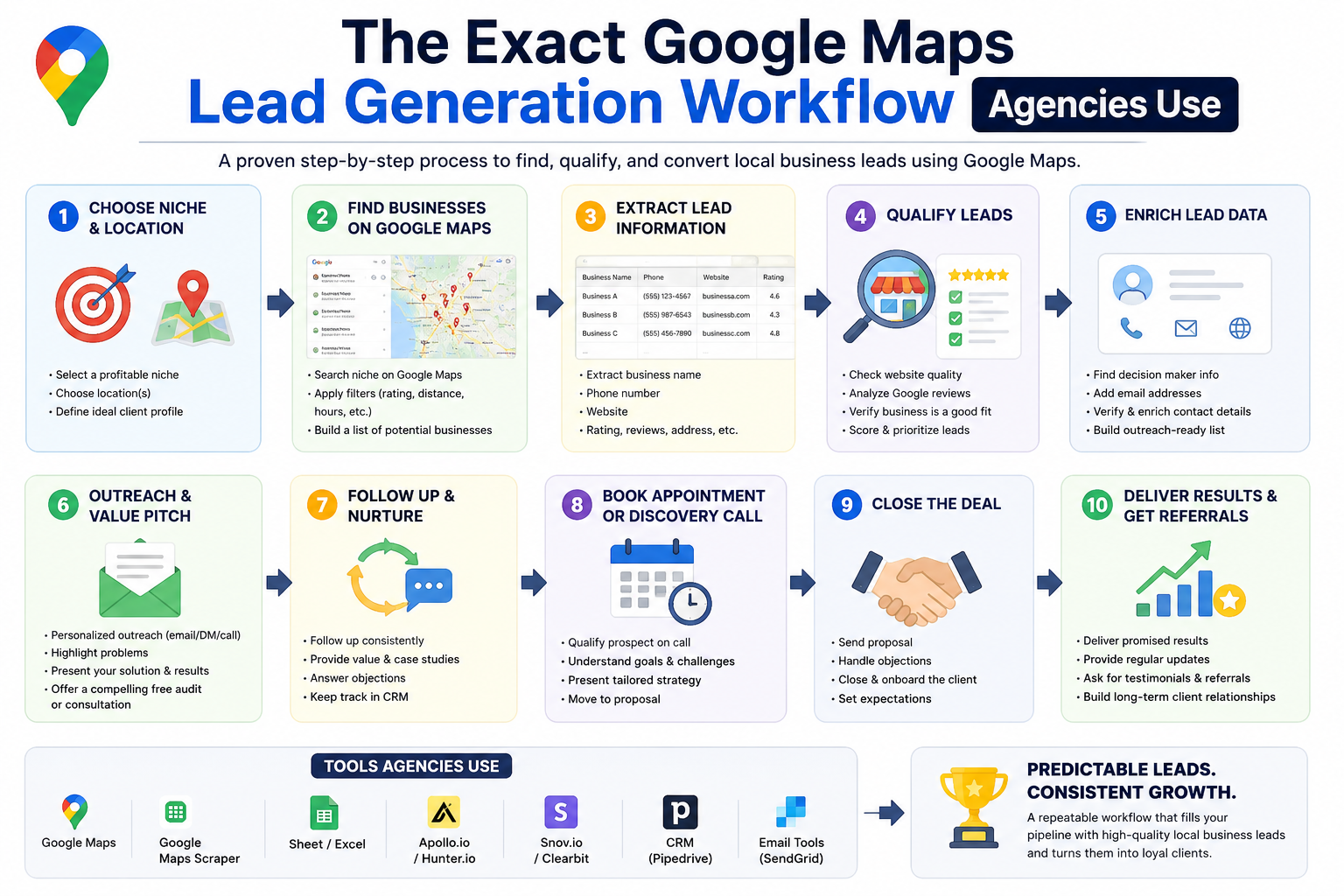
This is the step-by-step process that experienced agency operators use to turn a blank spreadsheet into a qualified prospect list.
Step 1: Choose a Niche
Don't scrape everything. Pick a specific vertical: roofing contractors, dental clinics, law firms, gym owners. Niche-specific outreach gets dramatically higher response rates than generic agency pitches.
Step 2: Choose a City (or Multiple Cities)
Start with one metro area you understand. Once the workflow is dialed in, you can expand to every major city in the country.
Step 3: Extract Business Data
Open your Google Maps scraper, enter your keyword and location, and run the extraction. A good tool will pull all relevant fields, including contact info, ratings, social profiles, and GMB claim status, into a clean export.
Step 4: Enrich and Qualify Leads
Not every extracted business is worth contacting. Filter your list by:
- Review count (under 20 reviews = low visibility = opportunity)
- Rating (under 4.0 = reputation management opportunity)
- Missing website (web design opportunity)
- Unclaimed GMB (local SEO opportunity)
- Missing email (filter out if email outreach is your primary channel)
Step 5: Personalize Outreach
Use the data you extracted to make your first message specific. Reference their review count, their location, their GMB status. Generic emails get ignored. Specific emails get replies.
Step 6: Follow Up Consistently
Most responses come on follow-up 2 or 3, not the first message. Build a simple 4-touch sequence across email and phone.
Real-World Example: Building 500 Qualified Prospects in One Afternoon
Here's a practical scenario. A local SEO agency wants to target dental practices in three cities: Phoenix, Denver, and Las Vegas.
- They run three scrapes: "dentist" + each city
- Each scrape returns roughly 300 to 400 listings
- They filter for practices with under 50 reviews and an average rating under 4.2
- That leaves around 500 qualified prospects
- The scraper has already collected phone numbers, websites, and emails for most of them
- Total time: under 2 hours
Without a scraper, the same task would take days.
How Agencies Turn Google Maps Leads Into Monthly Retainers
Extracting data is just the start. The agencies that convert prospects into retainer clients do one thing differently: they lead with value.
Before pitching, they prepare:
- A website audit – Is the site mobile-friendly? Does it load fast? Is it indexed?
- A local SEO audit – How does the business rank for its core keywords?
- A review audit – How many reviews does it have compared to its top competitor?
- A GMB completeness check – Is the listing claimed? Are photos, hours, and services filled in?
- A competitor snapshot – Which competitors are outranking them and why?
This takes 15 to 20 minutes per prospect when you're working from good data. And it transforms your outreach from a cold pitch into a specific, relevant observation: "I noticed your competitor across town has 200+ reviews and is ranking #1 for [keyword]. Here's what's holding you back."
That's the message that books calls.
Google Maps Scraping vs. Buying Lead Lists
This comparison deserves its own section because many agencies are still spending thousands of dollars per year on lead list subscriptions.
The case for scraping over buying is strong. The data is better, cheaper, and more actionable, especially for agencies doing hyper-local outreach.
Common Mistakes Agencies Make With Google Maps Prospecting
Even with the right tools, many agencies still struggle. Here's where things go wrong, and how to fix them.
Scraping without an ICP (Ideal Client Profile)
Pulling thousands of random businesses and blasting them all is a waste of everyone's time. Define who you're targeting before you scrape. Industry, business size (use review count as a proxy), location, and pain point should all be specified first.
Fix: Build a one-page ICP before running any scrape.
Sending generic cold emails
"Hi, I help businesses grow online" lands in the trash. The data you extract gives you everything you need to write a specific first line.
Fix: Use at least one piece of scraped data (their review count, their GMB status, their ranking) in your opening sentence.
Ignoring lead qualification
Not every business in your export is a good prospect. Some are too small, some are chains that handle marketing centrally, some already have agencies.
Fix: Apply filters after extraction. The extra 20 minutes of cleanup saves hours of wasted outreach.
Poor follow-up systems
Most agencies send one email and give up. Most replies come after follow-up 2 or 3.
Fix: Build a 4-touch sequence (2 emails, 1 LinkedIn message, 1 phone call) and track it in a simple CRM.
Buying large unqualified lists to supplement scraping
Some agencies combine scraped data with purchased lists and end up diluting their prospect quality.
Fix: Stick to scraped data. It's fresher, more accurate, and more customizable.
How Leads Sniper Helps Agencies Generate Local Business Leads
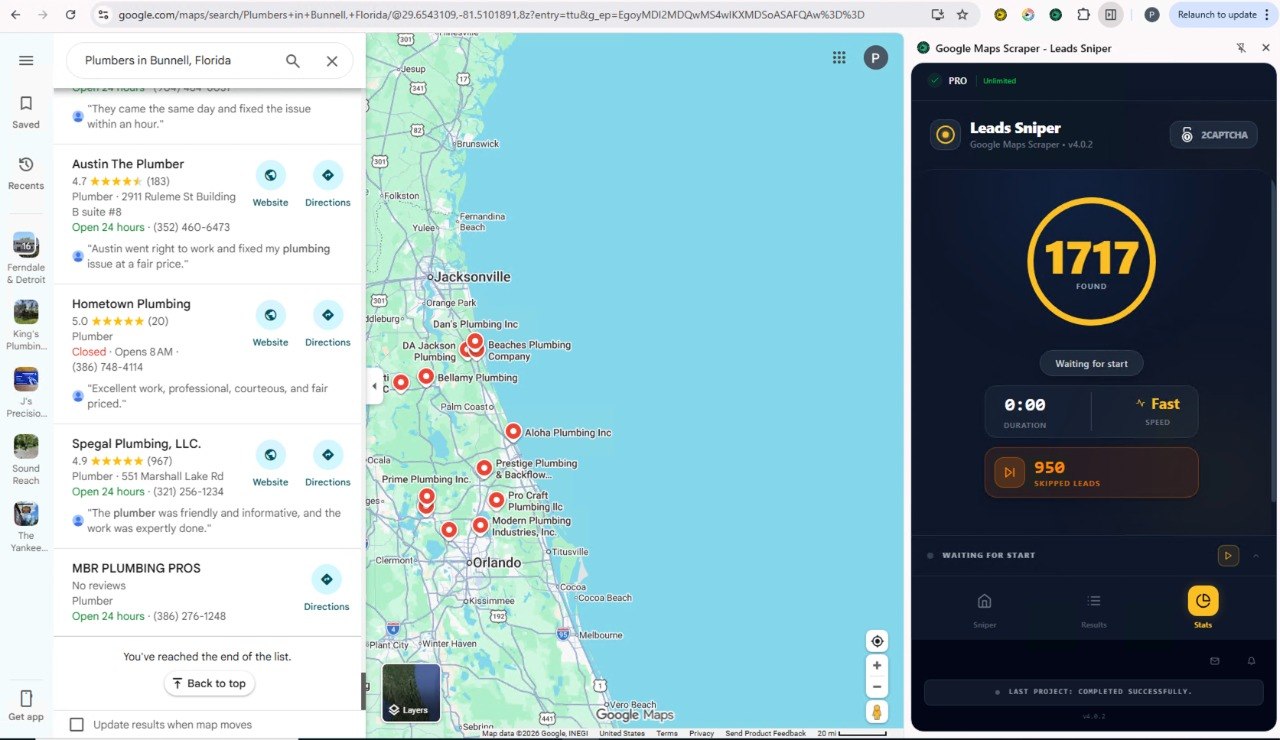
Leads Sniper's Google Maps Scraper is built around the exact workflow described in this guide. It works as a browser extension for Chrome and Edge, with no coding, no proxies, and no VPS required.
Here's what makes it practical for agencies:
- One-click extraction – Search Google Maps, run the scraper, export to CSV or Excel in seconds
- 60+ data fields per listing – Including emails, social profiles, review counts, ratings, GMB claim status, and operating hours
- Email extraction – Leads Sniper goes beyond what's listed on Google Maps and pulls email addresses from the business's own website, a feature most scrapers don't offer
- Unlimited lead extraction – No per-lead pricing. Extract as many as you need
- Unclaimed GMB detection – Instantly identify businesses without a claimed Google Business Profile, a direct signal of need for local SEO services
- Agency-scale pricing – Lifetime access plans with multi-installation options, meaning multiple team members or browsers can run extractions simultaneously
- 2-hour free trial – No credit card required. You can test the tool against a real niche before committing
Leads Sniper has been used by over 12,000 agencies and professionals to extract more than 17 million business listings and 2 million email addresses. It's not a research tool. It's a prospecting engine.
The Future of Agency Prospecting in 2026 and Beyond
The tools are getting smarter. Here's where agency prospecting is heading:
AI-powered lead scoring – Tools will increasingly analyze scraped data to score leads by likelihood to convert, based on factors like review velocity, website quality, and GMB completeness.
Intent-based prospecting – Combining Google Maps data with search intent signals (businesses running ads, recently updated listings, new business opens) will allow agencies to prioritize "warm" businesses over cold ones.
Hyper-local segmentation – Prospecting by neighborhood rather than city. A dental practice in a high-income zip code has a different budget profile than one in a lower-income area, and agencies are starting to exploit that.
Automated enrichment pipelines – Scraped data will flow directly into enrichment tools, email verification services, and CRMs with minimal manual handling, collapsing the gap between extraction and outreach.
Personalization at scale – AI writing tools will use scraped data fields to generate personalized first lines for every prospect automatically, making high-volume outreach feel one-to-one.
The agencies that are learning to build these systems now will have a structural advantage that compounds over time.
Key Takeaways
- Google Maps is the largest active database of local businesses and the highest-quality free prospecting source available to agencies
- A Google Maps scraper extracts 60+ data fields per listing, including contact info, social profiles, reviews, ratings, and GMB claim status
- Scraped data outperforms purchased lead lists on every meaningful metric: freshness, accuracy, cost, and customization
- The best agency prospecting workflows combine scraping, lead qualification, audit-based outreach, and consistent follow-up
- Leads Sniper's Google Maps Scraper enables agencies to extract unlimited leads, detect unclaimed GMB listings, and export clean CSV files in one click, without technical setup
- Prospecting mistakes such as generic outreach, missing an ICP, and poor follow-up are more responsible for low conversion rates than the quality of the data itself
- The future of agency client acquisition runs on real-time local data, AI enrichment, and hyper-personalized outreach
Build a Predictable Client Pipeline with Better Data
The agencies winning in 2026 aren't necessarily working harder. They're working from better information. Google Maps gives them a real-time view of exactly which local businesses need help, and exactly how to frame the conversation.
That advantage starts with the data you collect. If you're still buying outdated lead lists or doing manual research one business at a time, you're leaving pipeline on the table.
Leads Sniper's Google Maps Scraper is designed specifically for this workflow: extract fresh business data, identify qualified prospects, and move to outreach faster than any manual process allows. Start your free 2-hour trial at leads-sniper.com/products/google-maps-scraper and build your first list today.
Frequently Asked Questions
What is a Google Maps scraper and how does it work for agencies?
A Google Maps scraper is a tool that automatically extracts business data from Google Maps listings based on a keyword and location. For agencies, it works by searching a specific niche and city, then pulling structured data, including business names, phone numbers, emails, ratings, social profiles, and more, into a spreadsheet for prospecting and outreach.
Is scraping Google Maps data legal?
Scraping publicly available data from Google Maps is a widely practiced method of data collection. However, users should review Google's Terms of Service and consult legal counsel for their specific jurisdiction and use case. Most agency prospecting use cases involve publicly listed business contact information, which is generally considered acceptable for outreach.
How do agencies qualify leads from Google Maps data?
After extraction, agencies typically filter by review count (low volume signals low visibility), average rating (under 4.0 signals reputation issues), GMB claim status (unclaimed = opportunity), and whether a website exists. These filters help agencies prioritize prospects most likely to need, and pay for, their services.
How does Google Maps lead generation compare to buying lead lists?
Google Maps scraping produces fresher, more accurate, and more customizable data than most purchased lists, at a fraction of the cost. Scraped data reflects real-time business information, while purchased lists are often months old and lack fields like review count, GMB claim status, and social profile links.
What types of agencies benefit most from Google Maps scraping?
SEO agencies, web design agencies, digital marketing agencies, reputation management agencies, and lead generation agencies all benefit significantly. Any agency selling services to local businesses can use Google Maps data to identify niche-specific, geographically targeted prospects at scale.
How many leads can you extract with a Google Maps scraper?
With a tool like Leads Sniper's Google Maps Scraper, there is no limit to the number of leads you can extract. Agencies can run multiple searches across different cities and niches, exporting unlimited listings to CSV or Excel without per-lead costs.
Can a Google Maps scraper find email addresses?
Most Google Maps listings don't include an email address directly. However, Leads Sniper's Google Maps Scraper extracts email addresses from the business's own website when one is available, making it possible to collect emails for a significant portion of scraped listings.
How long does it take to build a qualified prospect list using a Google Maps scraper?
An experienced agency can build a list of 500 qualified, niche-specific prospects in under two hours using a Google Maps scraper. This includes running the extraction, filtering for qualifying signals (review count, rating, GMB status), and preparing the list for outreach.


