


Quick answer: In the Google Maps Scraper vs Google Places API debate, a Google Maps scraper is usually the better choice for lead generation because it extracts richer prospecting data including emails and social profiles—at a predictable cost. The Google Places API is better suited to developers building structured, official integrations into apps and software.
Local business data drives modern sales and marketing. Phone numbers, websites, reviews, and contact details fuel cold outreach, local SEO pitches, and B2B campaigns. The question most teams face isn't whether to collect this data it's how. That's where the Google Maps Scraper vs Google Places API comparison comes in.
Both tools pull information from Google's massive local business ecosystem. But they work in completely different ways, serve different users, and carry very different price tags. One is built for developers who want clean, official data feeds. The other is built for marketers and agencies who want leads they can act on today.
This guide breaks down how each option works, what data you get, what you'll pay under the 2026 Google Maps Platform pricing model, and which tool wins for lead generation. By the end, you'll know exactly which solution fits your workflow.
What Is a Google Maps Scraper?
A Google Maps scraper is a software tool that automatically extracts publicly visible business data from Google Maps listings. Instead of copying details by hand, you enter a search term and location say, "dentists in Austin" and the tool collects every matching listing in minutes.
A typical Google Maps scraping tool pulls data points such as:
- Business name
- Phone number
- Website URL
- Physical address
- Reviews and star ratings
- Business categories
- Email addresses (often via website crawling)
- Social media profiles
- Claimed or unclaimed Google Business Profile status
That last point matters more than people realize. Knowing whether a Google Business Profile is claimed helps agencies spot businesses that need help managing their online presence an instant sales angle.
Google Maps scrapers are popular with sales teams, marketing agencies, local SEO providers, and B2B companies. The reason is simple: Google Maps data extraction at scale turns a public directory into a targeted prospect list, ready for outreach.
What Is the Google Places API?
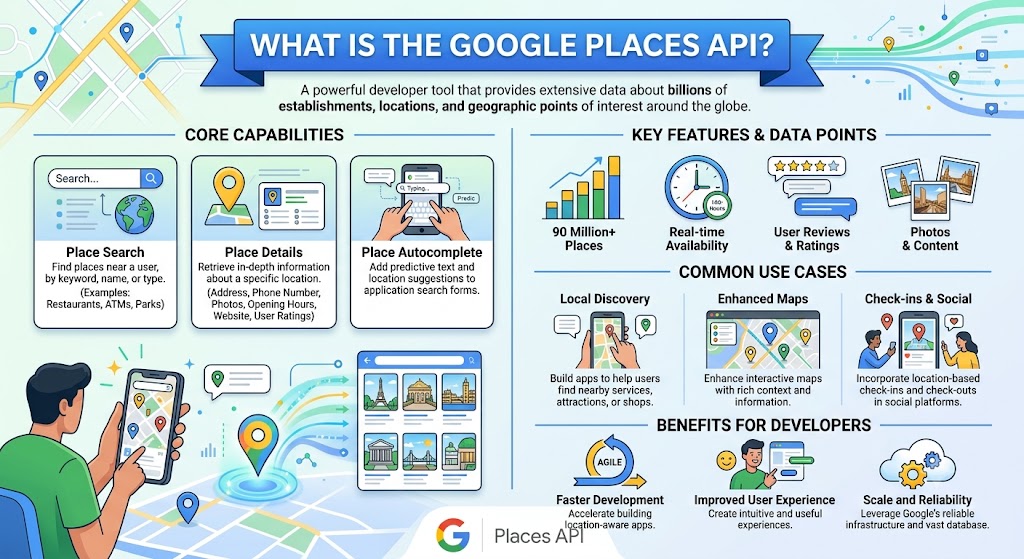
The Google Places API is Google's official method for accessing place data programmatically. Rather than scraping a page, your application sends a structured request to Google's servers and receives clean, formatted data in return.
It works through an API request model. You authenticate with an API key, send a query (like a Text Search or Place Details request), and Google returns standardized fields name, address, coordinates, ratings, opening hours, and more.
This approach has clear strengths. The data is reliable, consistent, and sanctioned by Google. But it comes with limits. The Google Places API does not return email addresses, and it offers little in the way of lead enrichment. It's designed to power features inside apps think a store locator or a "find nearby restaurants" function—not to build outreach lists.
Using the Places API also requires development skills. Someone needs to write code, manage authentication, handle quotas, and parse responses. For non-technical teams, that's a real barrier.
Google Maps Scraper vs Google Places API: Side-by-Side Comparison
Here's how the two stack up across the factors that matter most.
The pattern is clear. Scrapers win on accessibility and lead-readiness. The API wins on official reliability and deep technical control.
Data Availability Comparison
Lead generation lives or dies by data depth. This table shows what each tool reliably delivers.
Notice the bottom half of the table. Emails, social profiles, and contact-page details are exactly what outreach teams need—and they're exactly what the Google Places API leaves out.
Pricing Comparison: Google Maps Scraper vs Google Places API
Cost is often the deciding factor, so let's get specific about 2026 pricing.
Google Places API pricing
Google overhauled its billing on March 1, 2025. The old $200 monthly credit is gone. In its place, each Core Services SKU gets a free monthly usage threshold based on three tiers:
- Essentials: 10,000 free billable events per month
- Pro: 5,000 free billable events per month
- Enterprise: 1,000 free billable events per month
After you cross the free threshold, you pay per request. Geocoding (an Essentials SKU), for example, runs $5.00 per 1,000 requests from 10,001–100,000, dropping to $4.00, then $3.00, then $1.50 as volume climbs. Expanded volume discounts now scale all the way to 5,000,000+ monthly events.
Google also offers subscription plans for predictable budgeting:
- Starter: $100/month for roughly 50,000 calls
- Essentials: $275/month for roughly 100,000 calls
- Pro: $1,200/month for roughly 250,000 calls
There's one more catch. The original Places API is now a Legacy service, alongside Directions API and Distance Matrix API. Google recommends migrating to Places API (New) for new features and better volume discounts.
The takeaway: Places API pricing is request-based and scales with usage. Pull large datasets every month, and costs add up fast.
Google Maps scraper pricing
Google Maps scraper software usually follows a different logic. Many tools charge a fixed subscription or even a one-time fee, regardless of how many listings you extract. That makes the cost per lead drop dramatically as your volume grows.
Leads Sniper, for instance, uses a one-time payment model with unlimited leads a structure that contrasts sharply with per-request API billing.
Pricing at a glance
Which Is Better for Lead Generation?
For lead generation specifically, the Google Maps Scraper vs Google Places API contest isn't close. Scrapers pull the data that turns a name into a sales conversation.
Consider what outreach actually requires:
- Email collection for cold campaigns
- Website scraping to qualify prospects
- Contact discovery beyond a generic phone line
- Social media discovery for multi-channel outreach
- Prospect qualification using reviews and GBP status
The Google Places API delivers none of the contact-enrichment data and stops at structured listing fields. A Google Maps scraper for lead generation goes further, crawling business websites to surface emails and social links the API simply won't provide.
Advantages of a Google Maps Scraper
- Faster prospecting build a list in minutes, not days
- More data points, including emails and social profiles
- Better lead enrichment through website crawling
- Easier workflow with no coding required
- Higher scalability at a predictable cost
- Purpose-built for agencies and sales teams
Advantages of the Google Places API
- Official Google solution with sanctioned access
- Structured, consistent responses that are easy to parse
- Reliable integrations for production software
- Ideal for in-app features like store locators
- Developer-friendly with strong documentation and customization
Limitations of Google Maps Scrapers
No tool is perfect. Google Maps scrapers operate in a legal grey zone, depend on Google's page structure (which can change), and may require proxies for very high volume. Data quality also varies between providers, so choosing a reputable Google Maps scraping tool matters.
Limitations of the Google Places API
The Places API has real drawbacks for marketers:
- High cost at scale under pay-as-you-go billing
- No email addresses a dealbreaker for outreach
- Limited lead enrichment beyond core fields
- Developer requirements that block non-technical teams
- API quotas that cap throughput
Real-World Use Cases
Use Case 1: Lead Generation Agency. An agency needs 5,000 contacts a week across niches. A Google Maps scraper delivers names, emails, and websites at a flat cost pure margin on every campaign.
Use Case 2: Local SEO Agency. This team targets businesses with unclaimed Google Business Profiles. Scraped GBP status flags ideal prospects instantly. The Places API can't surface that signal.
Use Case 3: SaaS Company. A SaaS product needs a reliable in-app store locator. Here the Google Places API wins structured, official data integrates cleanly into the application.
Use Case 4: Sales Prospecting Team. Reps want enriched leads with phone, email, and LinkedIn. Google Maps data extraction via a scraper fills the CRM with action-ready records.
Use Case 5: Market Research Firm. Analysts study local market density and review sentiment. Both tools help, but a scraper's broader data capture speeds up the analysis.
Why Many Businesses Choose Leads Sniper
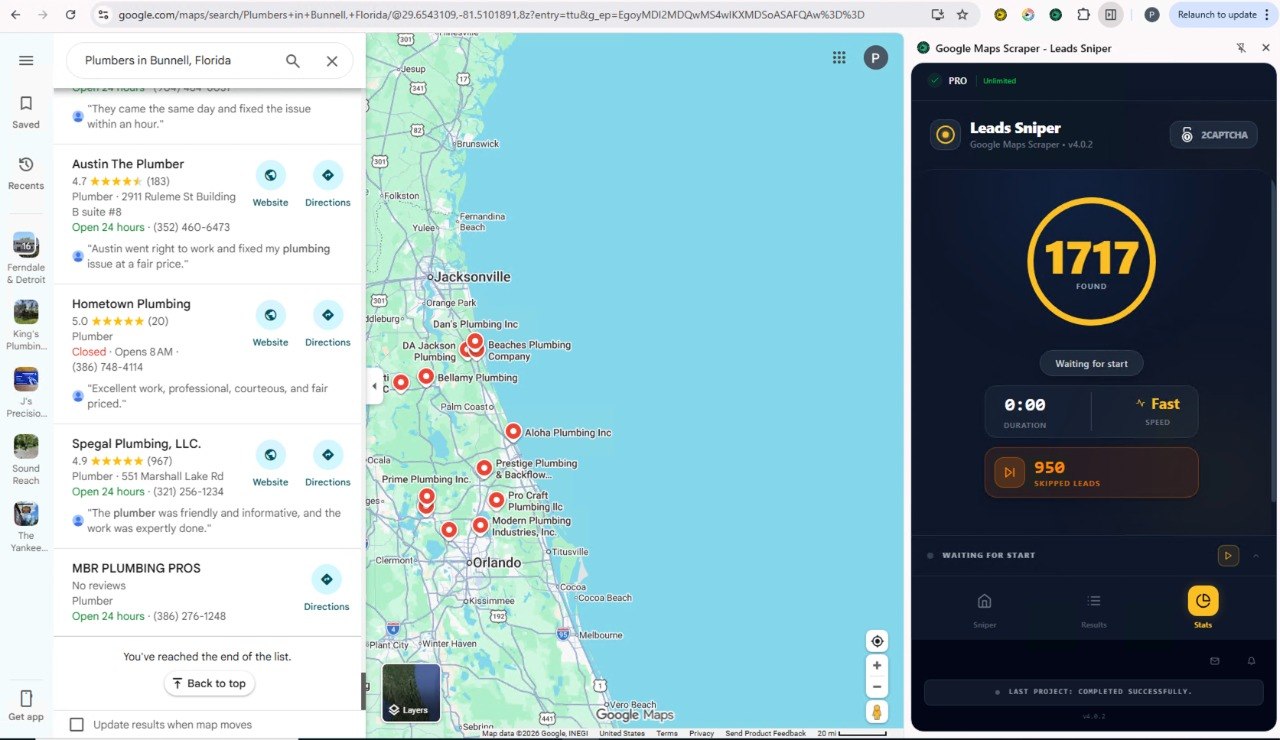
Among local business prospecting tools, Leads Sniper has earned a following 12,000+ companies and professionals use it. It's worth understanding why, purely from a capability standpoint.
Leads Sniper offers a Google Maps scraper designed for non-technical users. You search by location and keyword, then export results to CSV. No code, no API keys.
Its strength is data enrichment. Beyond the standard listing fields, Leads Sniper includes a domain email extractor that crawls business websites for contact emails closing the exact gap the Google Places API leaves open. The platform also covers Google Search and Yellow Pages, supporting end-to-end lead generation workflows.
The one-time payment model with unlimited leads appeals to agencies running high-volume campaigns, since the cost per lead keeps falling as usage grows. For teams whose entire goal is Google Maps lead generation, that economic model lines up neatly with the work.
Frequently Asked Questions
Is Google Maps scraping legal?
Scraping publicly available business data is generally considered legal under US law, supported by rulings like hiQ v. LinkedIn. That said, it conflicts with Google's Terms of Service, so it sits in a legal grey zone. Stick to public data and consult legal counsel for high-stakes use.
Does the Google Places API provide email addresses?
No. The Google Places API does not return email addresses. To collect emails, you need a Google Maps scraper that crawls business websites or a dedicated email extraction tool.
Which is cheaper: a Google Maps Scraper or the Google Places API?
For ongoing, high-volume lead generation, a Google Maps scraper is usually cheaper. Scrapers often use fixed or one-time pricing, while the Google Places API charges per request after your free tiercosts that climb with volume.
Can Google Maps scrapers extract social media profiles?
Yes. Many Google Maps scrapers crawl linked business websites to capture social media profiles, something the Google Places API doesn't offer.
What is the best solution for B2B lead generation?
For B2B lead generation, a Google Maps scraper is the stronger choice. It delivers emails, websites, and social profiles the contact data B2B outreach depends on. The Places API lacks this enrichment.
Can I automate local business prospecting?
Yes. Google Maps scraper software typically includes built-in automation, letting you run searches and export leads with minimal effort. Automating the same workflow with the Google Places API requires custom development.
Is the Google Places API suitable for large-scale lead generation?
Not ideally. While the Google Places API scales technically, its per-request pricing and missing contact data make large-scale lead generation expensive and incomplete compared with a dedicated scraper.
Final Verdict: Google Maps Scraper vs Google Places API
The right tool depends entirely on your goal.
Choose the Google Places API if you're a developer building official, structured features into an app or software product and you don't need emails or contact enrichment.
Choose a Google Maps Scraper if you're a marketer, agency, or sales team focused on lead generation, large-scale prospecting, and rich contact data at a predictable cost.
For most businesses chasing leads, the verdict in the Google Maps Scraper vs Google Places API matchup is clear: the scraper delivers more usable data, faster, and cheaper per lead. The Places API remains excellent just for a different job. Match the tool to the task, and you'll get the results you're after.


