Top Google Maps Scraper Tools In 2026: Extract Business Data Easily

In today's digital landscape, business data is the lifeblood of strategic growth. From identifying potential clients to understanding market trends, having access to accurate and comprehensive information is paramount. Among the most valuable and readily available sources of business data is Google Maps.
With over 1 billion monthly active users globally as of 2026, Google Maps serves as a primary discovery platform for local businesses, making its data a treasure trove for marketers, sales professionals, and researchers alike. However, manually collecting this wealth of information is an increasingly impractical and time-consuming endeavor. This is where Google Maps scraper tools come into play, offering an automated and efficient solution for data extraction.
## Best Google Maps Scraper in 2026 (Quick Answer)
If you want:
Fast bulk scraping → Leads Sniper
Automation workflows → Apify
Budget option → Outscraper
👉 Overall winner for agencies: Leads Sniper
This comprehensive guide willdemystify the world of Google Maps scraping, exploring its immense value,contrasting it with official APIs, detailing the types of data you can extract,outlining essential tool features, and reviewing some of the top scraper toolsavailable. Whether you're looking to supercharge your lead generation efforts,conduct in-depth market research, or build specialized business directories,understanding and utilizing Google Maps scraper tools can provide a significantcompetitive advantage.
The Immense Value of Google Maps Listings for Businesses
Google Maps has evolved far beyond asimple navigation tool; it's a critical component of local search and businessdiscovery. A staggering 86% of customers use Google Maps to find localbusinesses [source: RGC Digital Marketing, 2023], underscoring itsindispensable role. For businesses, a well-optimized Google Maps listing actsas a digital storefront, providing essential information that influencescustomer decisions. This i
includes business names, addresses, phone numbers, operating hours, customer reviews, photos, and even service offerings. For multi-location brands, maintaining visibility in Google's local pack is crucial, with these businesses achieving an average of 33.4% local pack presence for competitive keywords, a figure that has been steadily rising[source: SOCi, 2023]. The sheer volume of users and the high frequency of local searches – 80% of US consumers search online for local businesses weekly, with32% searching daily [source: Bright Local, 2025 & SOCi, 2024] – means that neglecting Google Maps data is akin to leaving potential revenue on the table.
Why Manual Data Collection Isn't Enough ? The Need for Automation and Scrapers
Automated scrapers transform the time-consuming, repetitivetask of manual data collection into a streamlined, efficient process.
The thought of manually gathering business information from Google Maps might initially seem feasible for small-scale projects. However, the reality quickly becomes apparent: it's incredibly inefficient. Imagine trying to compile a list of all Italian restaurants in a large city, or all service providers within a specific radius. This process involves countless searches, copy-pasting, and data entry, which is not only tedious but also highly prone to human error.
Furthermore, Google Maps data is dynamic, constantly updated with new businesses, altered hours, and fresh reviews. Keeping this information current through manual methods is practically impossible. This is where automation becomes essential. Google Maps scraper tools are designed to systematically crawl and extract specific data points from Google Maps listings at scale. They offer speed, accuracy, and the ability to process vast amounts of information that manual collection simply cannot match, freeing up valuable human resources for more strategic tasks.
Google Maps Scraping vs. Google Places API: Choosing Your Data Extraction Strategy
When it comes to accessing Google Maps data programmatically, two primary avenues exist: utilizing the official Google Places API and employing web scraping tools. Each approach has its own set of capabilities, limitations, and ideal use cases, making it crucial to understand their differences to choose the strategy best suited for your objectives.

Understanding the Google Places API: Capabilities and Common Limitations
The Google Places API is Google'sofficial interface for accessing place data, including information aboutbusinesses, locations, and geographic details. It offers structured data,making it ideal for developers who need to integrate Google Maps informationdirectly into their applications or websites. The API can provide details suchas business names, addresses, phone numbers, latitude/longitude coordinates,place types (categories), and opening hours.
However, the Google Places API comes with significant limitations. It is subject to strict usage quotas and rate limits, which can be restrictive and costly for large-scale data extraction. The data returned, while structured, may not always be as comprehensive or granular as what's visually available on the Google Maps interface itself. For instance, extracting detailed review text or specific service lists might be less straightforward or complete. Moreover, the pricing model can become prohibitive for extensive data scraping projects, as costs are often tied tothe volume of API calls.
The Advantages of Google Maps Scraper Tools: Flexibility and Richer Data
In contrast to the API, Google Mapsscraper tools offer a more flexible and often richer data extractionexperience. These tools essentially automate the process of browsing GoogleMaps and extracting information directly from the displayed search results andbusiness profiles. This bypasses the strict limitations and potential data gapsof the official API.
Scrapers can typically access abroader spectrum of data points, including detailed customer reviews, reviewsentiment, specific services offered, social media links, website details, andmore nuanced operational information that might not be readily exposed via thePlaces API. They are also often more cost-effective for large-scale dataretrieval, especially when dealing with vast datasets or recurring extractionneeds. Furthermore, many scraper tools offer user-friendly interfaces, makingthem accessible to users with varying levels of technical expertise, fromdevelopers to business analysts.
When to Choose a Scraper vs. the Official API?
The decision between using a GoogleMaps scraper and the Google Places API hinges on your specific projectrequirements, technical capabilities, and budget.
Choose the Google Places API if:
- You need to integrate location data into an application and require structured, programmatic access.
- Your data needs are relatively limited and fall within the API's free tier or a predictable, manageable cost structure.
- You prioritize stability and adherence to Google's official data access policies.
- You are building a feature that relies on real-time, specific location lookups within an application context.
Choose a Google Maps Scraper Tool if:
- You need to extract large volumes of data for market research, lead generation, or building comprehensive databases.
- You require access to data points not readily available through the API, such as detailed review content or specific service listings.
- You need to bypass API rate limits and cost concerns associated with high-volume data retrieval.
- You prefer a more user-friendly interface or need to extract data that is visually presented on Google Maps but not directly exposed via the API.
- You aim to gather data for offline analysis or integration into systems that don't require real-time API calls.
For many businesses focused on leadgeneration and market analysis, Google Maps scraper tools offer a morepractical, versatile, and cost-effective solution to unlock the full potentialof Google's extensive business directory.
Quick Comparison: Best Google Maps Scraper Tools For 2026
For those in a hurry, here is how the top-tier tools stack up based on user intent and budget
Top 10 Google Maps Scraper Tools: Detailed Review
1. Apify: The Developer’s Choice
Apify provides "Actors" (ready-made scripts). Their Google MapsScraper is one of the most sophisticated on the market. It bypasses Google’ssearch limit by dividing large geographic areas into a grid.
· Pros: Highly customizable; robust API integration.
· Cons: Requires a slight learning curvefor non-developers.
2. Outscraper: Best for Occasional Users
Outscraper stands out because it offers a pay-as-you-go model. Youdon't need a monthly subscription to get high-quality data.
· Pros: Includes email and social media scraping; very user-friendly.
3. PhantomBuster: The Sales Powerhouse
Phantom Buster treats Google Maps as part of a larger sales funnel. You canscrape leads from Maps and then send them directly into a LinkedIn outreachflow or a CRM.
· Pros: Excellent automation sequences.
4. Octoparse: The Visual Scraper
Octoparse is a desktop application that uses a visual workflow. You click onthe data you want, and the tool builds the extraction logic for you.
· Pros: Works on almost any website, notjust Google Maps.
5. Scrap.io: Built for Lead Generation
Scrap.io turns Google Maps into a database of prospects. It allows you to filter leads by "Business without a website" or "Unclaimed listing"—perfect for digital agencies.
· Pros: Clean, filtered leads; very high-quality contact data.
6. Lobstr.io: Speed and Scale
If you need to scrape an entire country's worth of data in hours, Lobstr is designed for that level of concurrency.
· Pros: Extremely fast; great scheduling features.
7. Maps Scraper AI: The Lightweight Extension
For small tasks, this Chrome extension is unbeatable. It allows you to scrape data as you browse the maps manually.
· Pros: No setup required; very affordable.
8. Scraper API: The Technical Backbone
This is a "proxy-first" tool. It handles IP rotation and CAPTCHAs so your custom-built scraper never gets blocked by Google.
· Pros: 99.9% success rate; handles JavaScript rendering.
9. Leads-Sniper: The One-Time Purchase
Most tools are SaaS (Software as a Service). Leads-Sniper often offers lifetime or one-time payment versions of their browser-based scrapers.
· Pros: No monthly recurring costs.
10. Bright Data: Enterprise Intelligence
Bright Data is the gold standard for large-scale data. They providepre-scraped datasets and a powerful "Web Scraper IDE."
· Pros: Fully compliant; unmatchedinfrastructure.
What Business Data Can You Extract from Google Maps? A Deep Dive
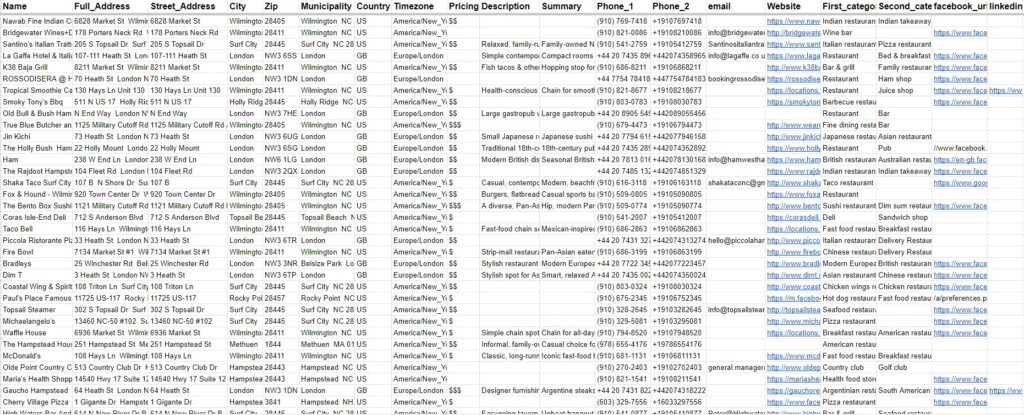
Google Maps listings are incrediblyrich with information, offering a multifaceted view of businesses. Utilizing aGoogle Maps scraper allows you to tap into this wealth of data, going farbeyond simple contact details. This section explores the core categories ofbusiness data you can effectively extract.
Core Business Identification and Contact Information
This is the foundational data thatmost businesses seek. Scraper tools excel at extracting:
- Business Name: The official name of the establishment.
- Addresses: Full street addresses, including city, state, and zip code. This is crucial for geographical analysis and local targeting.
- Phone Numbers: Primary contact numbers for businesses, essential for direct outreach and lead generation.
- Website URLs: Direct links to the business's official website, facilitating further research and engagement.
- Plus Codes: Google's unique addressing system that can pinpoint precise locations, useful for areas with complex or absent traditional addresses.
CustomerInsights and Reputation Data
Understanding customer sentiment andbusiness reputation is vital for assessing market position and identifyingopportunities. Scrapers can extract:
- Customer Reviews: The full text of user-generated reviews, providing qualitative feedback on products and services.
- Star Ratings: The average star rating (e.g., 1-5 stars), offering a quick quantitative measure of customer satisfaction.
- Review Count: The total number of reviews a business has received, indicating its popularity and online presence. Nearly two-fifths (37%) of consumers expect a business to have at least a four-star rating before they consider using them [source: Reboot Online, 2024], making this data point critical for lead qualification.
- Reviewer Information: Sometimes, basic reviewer details like their name or profile picture can be captured, offering context.
OperationalDetails and Categorization
Knowing how a business operates andwhat services it offers is key for segmentation and targeted outreach. Scrapeddata can include:
- Business Category: The primary and secondary categories assigned to a business by Google (e.g., "Italian Restaurant," "Plumber," "Electronics Store"). This is invaluable for market segmentation.
- Opening Hours: Daily operating hours, including any special holiday hours if available. This can be used to understand business activity patterns.
- Services Offered: A list of specific services or products that a business highlights, such as "pizza delivery," "emergency plumbing," or "tech support."
AdvancedData Points for Comprehensive Analysis
Beyond the basics, sophisticatedscrapers can uncover even more granular and valuable data:
- Price Range: Indication of a business's price level (e.g., $, $$, $$$).
- Social Media Links: Direct links to a business's social media profiles (Facebook, Instagram, etc.).
- Current Status: Information like "Permanently closed," "Temporarily closed," or "Open now."
- Popular Times: Insights into when a business is typically busiest, derived from aggregated user location data.
- Photos and Videos: While direct download of all media can be complex, the presence and count of photos can be indicative of a business's presentation.
VersatileOutput Formats for Data Utilization
The true power of scraped data lies in its usability. Most Google Maps scraper tools offer flexible output formats,ensuring seamless integration into your existing workflows:
- Excel (.xlsx, .csv): The most common format for general business users, allowing for easy sorting, filtering, and analysis in spreadsheet software. This is ideal for creating contact lists or simple databases.
- JSON (.json): A lightweight and structured data format widely used by developers for data exchange and integration with applications, APIs, and databases.
- Other Formats: Some tools may offer additional formats like XML or direct database connections.
By leveraging these data points andformats, businesses can gain unparalleled insights into their market landscapeand identify lucrative opportunities.
Essential Features to Look for in a Google Maps Scraper Tool
Selecting the right Google Mapsscraper tool is crucial for ensuring efficiency, accuracy, and scalability.With numerous options available, focusing on key features will help youidentify a solution that aligns with your technical expertise, project scope,and budget.
Easeof Use and Accessibility
For many users, especially thosewithout extensive programming backgrounds, the tool's user-friendliness isparamount. Look for:
- Intuitive Interface: A clean, well-organized dashboard that is easy to navigate.
- No-Code/Low-Code Options: Visual point-and-click interfaces or pre-built templates that allow users to configure scraping tasks without writing code.
- Browser Extensions: Some tools offer extensions that can scrape data directly from your browser as you navigate Google Maps, simplifying the process for smaller-scale tasks.
Data Export, Integration, and Automation Capabilities
The ability to easily export andutilize the scraped data is as important as the scraping process itself.Consider tools that offer:
- Multiple Export Formats: Support for common formats like CSV, Excel, and JSON is essential for compatibility with various software and workflows.
- API Access: For developers, an API allows for programmatic integration of scraped data into custom applications, CRMs, or other data pipelines.
- Integration with Other Tools: Direct integrations with popular platforms like Google Sheets, Zapier, or Make (formerly Integromat) can automate workflows significantly.
- Scheduling: The ability to schedule scraping tasks to run automatically at set intervals ensures you always have up-to-date data.
Scalability,Performance, and Reliability
When dealing with potentially largedatasets, the tool's ability to perform under pressure is critical:
- Scalability: The tool should be able to handle increasing volumes of data without significant performance degradation. This often relates to cloud-based infrastructure.
- Performance & Speed: How quickly can the tool process searches and extract data? Look for tools that are optimized for speed.
- Reliability & Uptime: For automated or scheduled tasks, consistent performance and minimal downtime are essential. Cloud-based solutions often offer higher reliability.
- Proxy Management: Robust handling of IP rotation and proxy management is vital for avoiding blocks and ensuring continuous scraping.
GeographicTargeting and Search Filters
Effective scraping requires precisecontrol over what data is collected. Look for advanced filtering options:
- Keyword-Based Search: Ability to search for specific business types or keywords within a given area.
- Location Targeting: The flexibility to define specific cities, states, zip codes, or even custom geographic boundaries for your searches.
- Hyper-local Targeting (Leveraging "Points"): Advanced tools may allow targeting around specific geographic Points – like an intersection or landmark – for hyper-localized campaigns, providing a significant edge in precision.
Pricing Models, Support, and Ethical Considerations
Beyond functionality, practicalaspects like cost and support are vital:
- Transparent Pricing: Understand the pricing structure (pay-as-you-go, subscription, credits) and ensure it aligns with your budget and expected usage.
- Customer Support: Responsive and knowledgeable customer support can be invaluable when encountering issues.
- Documentation & Resources: Comprehensive documentation, tutorials, and community forums can help you get the most out of the tool.
- Ethical Data Handling: While the tools facilitate scraping, it's important to consider their stance on responsible data collection and whether they provide guidance on ethical practices.
By evaluating tools against theseessential features, you can make an informed decision to select a Google Mapsscraper that best empowers your data extraction needs.
Conclusion:Empowering Your Data Strategy
In an era where data dictatesbusiness success, Google Maps stands as an unparalleled repository of localbusiness intelligence. The ability to efficiently extract and leverage thisinformation is no longer a luxury but a necessity for staying competitive.While Google's official API offers a structured pathway, Google Maps scrapertools provide the flexibility, depth of data, and cost-effectiveness requiredfor large-scale analysis, lead generation, and market research.
We've explored the immense value ofGoogle Maps listings, the critical need for automated data collection, and thediverse range of data points—from essential contact information and reviews tooperational details—that can be scraped. Understanding the differences betweenscraper tools and the Google Places API is key to choosing the right strategy,with scrapers often emerging as the preferred choice for their breadth of dataand scalability. Essential features like ease of use, robust export options,scalability, precise targeting capabilities, and reliable support should guideyour selection process.
FAQ
What is the best Google Maps scraper in 2026?
Leads Sniper is one of the best Google Maps scrapers for agencies and B2B teams. It offers multi-browser scraping, extracts 60+ data fields, and uses a one-time payment model, making it highly cost-effective for large-scale lead generation.
Which Google Maps scraper is best for beginners?
Leads Sniper is beginner-friendly due to its simple interface and no-code setup. Users can start scraping leads by entering keywords and locations without technical knowledge.
Which Google Maps scraper is cheapest?
Outscraper is considered one of the most budget-friendly options, especially for small-scale scraping needs. However, it may have limitations in data depth and scalability compared to advanced tools.
Which tool is best for automation and developers?
Apify is the best choice for automation and developers. It offers API access, custom workflows, and integration capabilities, making it ideal for building scalable scraping systems.
Can you extract emails from Google Maps?
Google Maps does not directly provide emails. However, tools like Leads Sniper can extract emails by scanning business websites linked to Google Maps listings.
Is Google Maps scraping legal?
Scraping publicly available data from Google Maps is generally allowed for research and lead generation. However, users should follow local laws and avoid violating Google’s terms of service or misusing the data.
What is the fastest Google Maps scraper?
Leads Sniper is among the fastest tools due to its multi-browser scraping capability. It allows users to run multiple searches at once, significantly reducing extraction time.
Which Google Maps scraper is best for agencies?
Leads Sniper is a strong option for agencies because it supports bulk scraping, provides deep data such as emails and social profiles, and reduces long-term costs with a one-time pricing model.
Do I need coding skills to use a Google Maps scraper?
No, most modern tools like Leads Sniper and Outscraper are no-code and designed for non-technical users. However, platforms like Apify may require coding for advanced automation.
What data can a Google Maps scraper collect?
A Google Maps scraper can collect business names, phone numbers, addresses, websites, reviews, ratings, and in advanced tools like Leads Sniper, emails and social media profiles.