Quick Answer: A Google Maps scraper automates the extraction of business data (names, emails, phone numbers, addresses, social profiles, and more) directly from Google Maps listings. Instead of spending hours searching manually, sales teams and agencies use scraping tools to build targeted prospect lists in minutes, then export them to CSV or CRM for outreach. Leads Sniper is a no-code browser extension that does exactly this, without proxies or technical setup.
Cold outreach only works when you're talking to the right people. The problem most sales teams face isn't effort; it's data. They spend hours manually searching Google Maps, copying business names into spreadsheets, hunting for phone numbers, and guessing at email addresses. By the time the list is ready, half the data is already stale.
Google Maps holds over 200 million business listings across 195 countries. That's a database most companies would pay thousands to access. But with the right tools, it's free and accessible to anyone willing to use it strategically.
This guide covers everything you need to know about using a Google Maps scraper for lead generation: how it works, what data you can extract, which industries benefit most, how it compares to manual prospecting and the Google Places API, and how to turn raw data into a high-converting prospect list. We'll also cover the legal landscape so you can operate with confidence.
And at the end, we'll walk through exactly how Leads Sniper, a dedicated Google Maps lead scraper built for agencies, sales teams, and freelancers, fits into the process.
What Is Google Maps Lead Generation?
Google Maps lead generation is the practice of identifying potential business customers using data found in Google Maps listings. Every business that appears on Google Maps has publicly submitted information: their name, phone number, address, website, hours, category, and in many cases, review history and ratings.
Sales teams use this data to build targeted outreach lists filtered by location, business type, or category and reach out via cold email, phone, or LinkedIn. Because the data comes directly from business owners who added their listings, it's generally accurate, current, and relevant.
Why businesses rely on it:
- Targeted prospecting: You can search by niche, city, suburb, or zip code, so every lead is geographically and categorically relevant.
- Fresh data: Google Maps updates constantly. Listings reflect real-time business activity, not a database compiled years ago.
- Decision-maker access: Most small and medium business (SMB) listings are owned and managed by the business owner directly, giving you a direct line to the decision maker.
- Volume at scale: A single keyword search in a major city can return hundreds or thousands of results.
Real-world use cases:
- A web design agency searches "restaurants without a website" in their city and reaches out with a pitch.
- A recruitment firm scrapes HR managers at accounting firms across a metro area.
- A SaaS company targets plumbers and electricians who haven't claimed their Google Business Profile.
- A local SEO agency builds a prospecting list of businesses with low ratings that need reputation management.
Key Takeaway: Google Maps is one of the most underutilized lead databases in B2B sales. It's publicly available, constantly updated, and organized by category and location, which makes it ideal for hyper-targeted prospecting.
What Is a Google Maps Scraper?
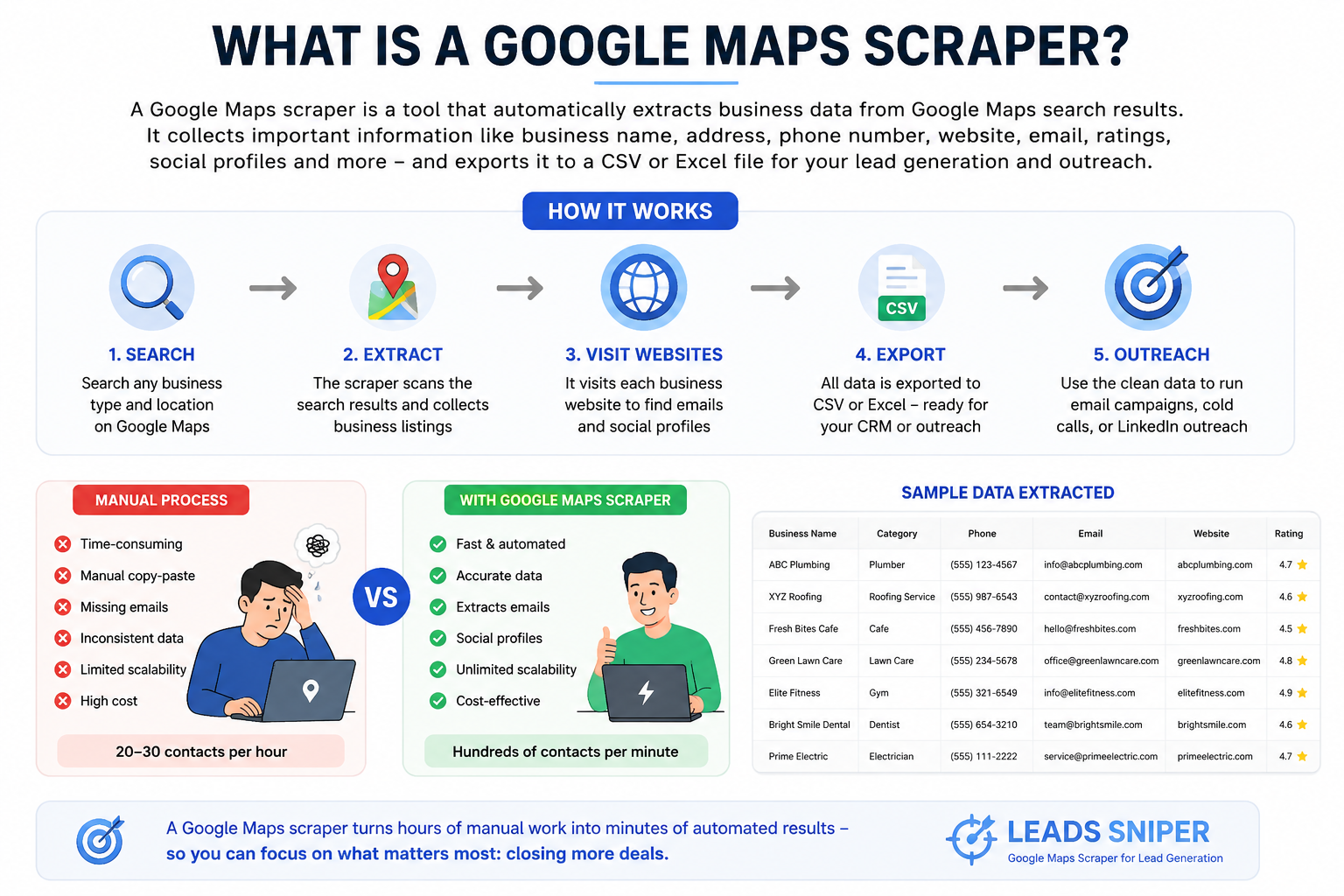
A Google Maps scraper is a tool that automatically extracts business data from Google Maps search results. Instead of opening listing after listing and copying information by hand, a scraper reads the page, pulls the relevant fields, and stores everything in a structured format, usually a CSV or Excel file.
How it works:
- You search for a business type and location on Google Maps (e.g., "HVAC contractors in Dallas").
- The scraper reads the search results and visits each listing.
- It extracts the data fields you need: name, phone, address, rating, website, and more.
- For tools like Leads Sniper, it also visits the business website to find email addresses and social media profiles.
- Everything gets exported to a spreadsheet, ready for your CRM or outreach tool.
The key difference between scraping and manual searching is scale and speed. A human researcher might document 20 to 30 listings per hour. A scraper can process hundreds in minutes.
Browser extension vs. standalone software:
Some scrapers are standalone desktop applications. Others, like Leads Sniper, work as browser extensions for Chrome or Edge. Browser extensions are simpler to set up, require no coding, and run directly on your machine without needing a VPS or proxy server. They're ideal for agencies and sales teams that want results fast without a technical learning curve.
Key Takeaway: A Google Maps scraper automates what used to take hours of manual work. It's not just faster; it's more consistent and more scalable. The right tool extracts contact details, emails, and social profiles that manual searching often misses.
What Data Can You Extract from Google Maps?
The quality of your lead generation depends on the depth of data you can access. A basic scraper might pull a business name and phone number. A more powerful tool like Leads Sniper extracts 60+ data fields per listing.
Core business data:
The email and social profile extraction is a critical distinction. Google Maps does not publish email addresses, but many businesses include them on their websites. Leads Sniper visits each business website and pulls this data automatically, turning a basic listing into a complete outreach record.
Other extractable fields include image URLs, review URLs, accessibility info, atmosphere, crowd data, payment methods, service highlights, recycling info, and more, all useful for deeper segmentation and personalization.
Key Takeaway: The most valuable data, email addresses and social media profiles, isn't visible on Google Maps itself. A quality scraper visits each business website to extract this information, dramatically increasing the value of every lead it generates.
How Google Maps Scraping Works: Step by Step
Understanding the full workflow of how google maps scraper work helps you integrate scraping into your existing sales process. Here's how the process runs from first search to first email:
Step 1: Search Google Maps
Open Google Maps and type your target keyword and location (e.g., "accounting firms Chicago"). The map populates with relevant listings.
Step 2: Activate the scraper
With the Leads Sniper extension installed and active, click the scrape button. The tool begins reading through the visible listings automatically.
Step 3: Extract Google Maps data
The scraper collects all publicly listed information: business name, address, phone, rating, hours, category, and more.
Step 4: Visit business websites
For each listing with a website, the tool navigates to that URL and scans for email addresses and social media profile links.
Step 5: Compile and structure the data
All extracted information is organized into rows and columns, one business per row, one data point per column.
Step 6: Export to CSV or Excel
With one click, download the full dataset in your preferred format.
Step 7: Import to your CRM
Upload the file to Salesforce, HubSpot, Pipedrive, or whichever CRM your team uses.
Step 8: Launch your outreach
Personalize your messaging using the data you've extracted. Reference the business category, location, or review count to make your outreach feel relevant.
No proxies, no coding, no cloud servers. The entire process runs from your browser.
Why Google Maps Is One of the Best B2B Lead Sources
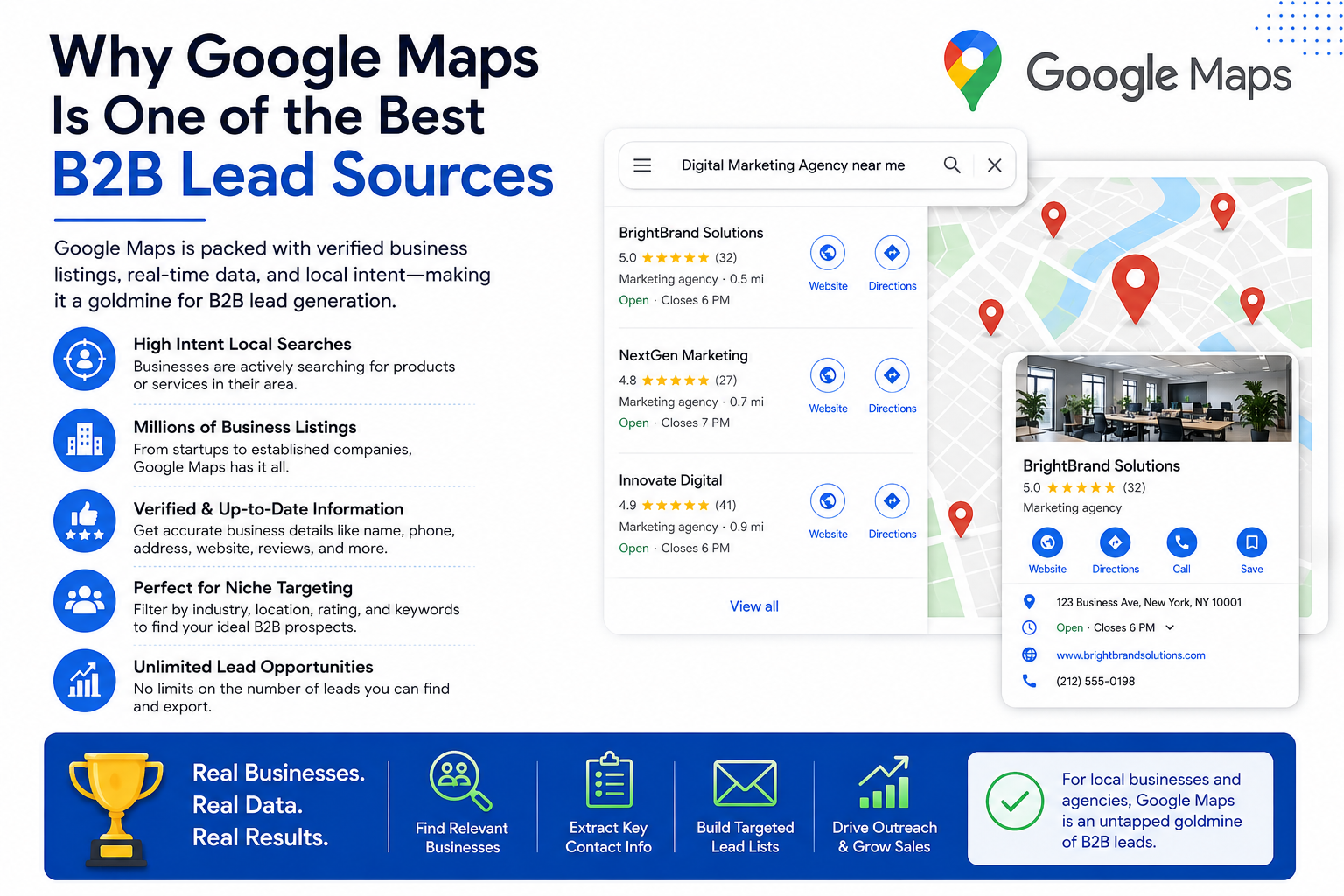
Not all lead databases are created equal. Here's why Google Maps outperforms most alternatives for local and SMB prospecting:
Local intent: Every business on Google Maps has tied their listing to a specific location. That makes geographic targeting highly precise. You can prospect down to a neighborhood, zip code, or city block.
Continuously updated data: Unlike static databases that are refreshed quarterly or annually, Google Maps updates in near real-time. When a business adds a new phone number or changes their website, that update appears quickly.
Direct access to decision makers: Most SMBs manage their own Google Business Profile. The contact details you find often lead directly to the owner or a senior manager, not a gatekeeper.
Unverified vs. verified listings: Leads Sniper can identify unclaimed GMBs, listings that exist but haven't been claimed by the business owner. For agencies selling reputation management or local SEO services, unclaimed listings are one of the most qualified leads you can find.
Volume without cost: Unlike paid lead lists or data providers that charge per contact, Google Maps data is publicly available. You pay for the scraping tool, not the data itself.
Review data as a qualifier: A business with 12 reviews and a 3.1 rating is a different prospect than one with 400 reviews and a 4.8. This information is right there in every listing, allowing you to segment and prioritize before you ever make contact.
Key Takeaway: Google Maps is a live, location-tagged, publicly available business directory that covers 200+ million listings globally. For B2B sales teams targeting local businesses or SMBs, it's one of the richest prospecting sources available and it costs nothing to search.
Industries That Benefit Most from Google Maps Lead Generation
Almost any B2B business that sells to local companies or SMBs can use Google Maps scraping effectively. These are the industries where it delivers the clearest value:
- Marketing and advertising agencies: find businesses with outdated websites or no social presence
- Local SEO agencies: target businesses with low ratings or unclaimed Google profiles
- Web design and development: identify service businesses without a website
- HVAC, roofing, and contractors: find commercial properties or property managers in target areas
- Real estate professionals: locate investors, property managers, and brokers by region
- Cleaning and janitorial services: prospect office buildings, restaurants, and retail
- Accounting and bookkeeping: reach small businesses by category and location
- Legal services: find sole practitioners or small firms in specific practice areas
- Recruiters and HR consultants: identify hiring companies in target sectors
- SaaS founders: find businesses in a target vertical that fit their ICP
- Healthcare providers: locate clinics, specialists, or allied health professionals in a region
- Construction companies: identify commercial contractors, developers, or project managers
- Consultants: prospect niche industries by city or region
The common thread: all of these rely on knowing who's operating in a specific area and being able to reach them with a relevant offer.
Benefits of Using a Google Maps Scraper for Lead Generation
Here's a direct comparison of what scraping benefits add versus not using it:
Time savings: Manual prospecting averages 20 to 30 contacts per hour, while automated scraping handles hundreds per minute. For a sales team that needs 500 contacts a week, that difference is measured in days.
Automation: Once you configure your search, the tool runs without supervision. You can set it up and step away.
Scalability: Need 10,000 leads this month? 50,000? Manual processes can't scale. Scraping tools handle virtually unlimited volume.
More complete data: Most lead lists include name and phone at best. A scraper with website extraction adds email and social profiles, giving your outreach team more channels to work with.
Better personalization: With rating data, review counts, category info, and opening hours, your team can craft more relevant messages. "We noticed your business has over 300 reviews but your website isn't mobile-friendly" is a more effective opener than a generic pitch.
Higher ROI on outreach: More accurate data means fewer bounced emails and fewer wasted calls. Your cost per qualified lead drops significantly.
Accuracy: Google Maps data comes directly from business owners. It's not compiled from third-party sources that may be months out of date.
Manual Prospecting vs. Google Maps Scraper: A Detailed Comparison
The numbers tell the story. A researcher spending 40 hours per week on manual prospecting might produce 800 to 1,200 contacts. A scraper running a few hours a day can produce that same volume, with email addresses included, in a fraction of the time.
Key Takeaway: Manual prospecting doesn't just cost more time; it caps your pipeline. A Google Maps business scraper removes that ceiling, letting your team spend time on outreach rather than data collection.
Google Maps Scraper vs. Google Places API: Which Is Better for Lead Generation?
The Google Places API is Google's official product for accessing business data programmatically. It's used by developers building apps and platforms. For sales prospecting, though, it has real limitations and significant costs.
Pricing reality: Since Google updated its Places API pricing in March 2025, the cost structure has become tiered and complex. A Pro subscription, needed for full feature access, runs $1,200/month for 250,000 calls. For comparison, web scraping tools offer flat-rate or lifetime pricing that works out to a fraction of that cost per record.
The key limitation for sales teams: The Google Places API does not provide email addresses or social media profiles under any plan. Those two fields are what convert a basic business record into an actionable outreach contact. Any sales team relying solely on the API will still need to manually find emails, which defeats the purpose.
Choose the API if: You're a developer building an application that needs structured, real-time location data integrated into a product.
Choose a scraper if: You're a sales team, agency, or freelancer who needs high-volume lead lists with emails, phone numbers, and social profiles, without a developer or a five-figure annual software budget.
Best Practices for Google Maps Lead Generation
How you search is just as important as what tool you use. These practices will improve the quality and relevance of every list you build.
Use specific keyword combinations: "Pediatric dentist" will return more relevant results than "dentist." The more specific your search, the better the lead quality.
Layer location targeting: Search by city, then by neighborhood or zip code. This lets you prioritize areas that match your service territory or ideal geographic profile.
Filter by review count and rating: High-review businesses are often more established and may have larger budgets. Low-rated businesses may need help with reputation management or customer experience. Use this data intentionally.
Target unclaimed listings: Businesses that haven't claimed their Google Business Profile are a strong signal of poor digital presence, which makes them highly qualified for web design, SEO, or marketing outreach.
Verify email addresses before sending: Run extracted emails through a verification tool (like NeverBounce or ZeroBounce) to reduce bounce rates and protect your sender reputation.
Segment before outreach: Don't send the same message to a 500-location chain and a sole trader. Use the data to create segments, then personalize at the segment level.
Enrich with additional research: Use the website URL or LinkedIn profile from your extracted data to learn more about the business before reaching out.
Comply with outreach regulations: In the US, follow CAN-SPAM requirements. In the EU, GDPR applies to cold email outreach. More on this in the legal section below.
How to Build a High-Converting Prospect List from Google Maps Data
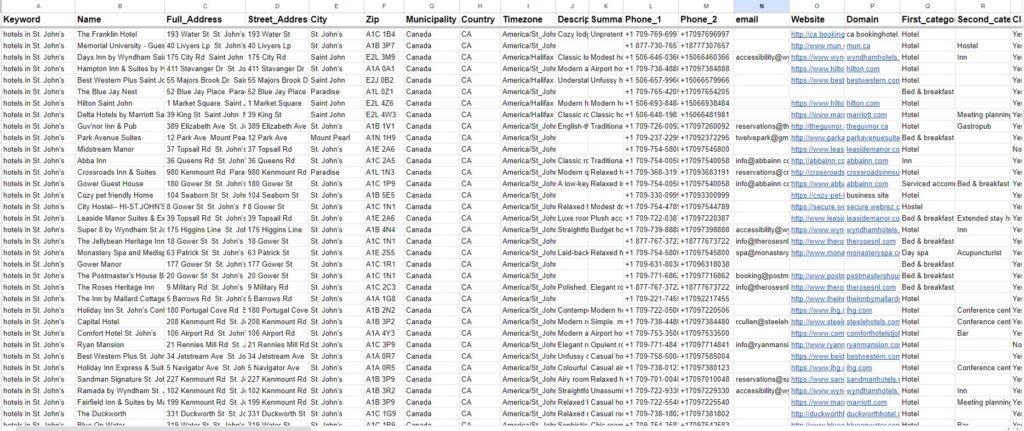
Raw data isn't a prospect list. It becomes one after you've applied structure and qualification criteria.
Step 1: Define your Ideal Customer Profile (ICP)
Before you search, know exactly who you're targeting: industry, location, company size (use review count as a proxy), and business stage.
Step 2: Run targeted searches
Use specific keywords and locations. Run multiple searches to cover variations ("electrician," "electrical contractor," "electrical services") and geographic areas.
Step 3: Filter your results
Remove duplicate entries. Exclude businesses that don't have a website (if email outreach is your primary channel). Filter out chains or franchises if you're targeting independent owners.
Step 4: Qualify leads by data signals
Prioritize based on rating, review count, whether the listing is claimed, and whether a website exists. A business with 15 reviews and an unclaimed listing is a different opportunity than one with 400 reviews and a 4.9 rating.
Step 5: Segment by outreach strategy
Group leads by type: email outreach, phone outreach, LinkedIn connection, or direct mail. Different channels require different resources and messaging.
Step 6: Upload to CRM and assign
Import your CSV, map columns to your CRM fields, and assign leads to sales reps by territory or industry.
Step 7: Build personalized sequences
Use the data you've extracted to write outreach that references something specific: their location, category, rating, or web presence (or lack of it).
Key Takeaway: A list is only as valuable as the targeting and qualification behind it. The data Google Maps scraping provides, including category, rating, location, and web presence, gives you everything you need to build a genuinely high-quality prospect list.
Common Mistakes to Avoid
Even with the best tool, these mistakes will undermine your results:
Using generic keywords: Searching "business" or "company" will return an unfocused mix of listings. Always search by specific category and location.
Ignoring duplicates: Multiple searches in the same area can return overlapping results. Deduplicate before importing to your CRM.
Skipping website email extraction: Phone-only outreach limits your channels. Extracting emails from business websites, as Leads Sniper does automatically, opens up email sequences and LinkedIn connections.
Mass emailing without personalization: Blasting 5,000 contacts with the same generic message will tank your reply rates and damage your domain reputation. Use data to personalize at minimum the business type, location, or pain point.
Not verifying emails: Unverified email lists generate bounces. High bounce rates signal to email providers that you're sending spam. Verify before sending.
Treating all leads equally: A business with 200 reviews and a strong website is a very different prospect from one with 3 reviews and no digital presence. Score and prioritize accordingly.
Ignoring follow-up: Most replies don't come from the first message. Plan a sequence with at least 3 to 5 touchpoints before removing a lead from your pipeline.
Is Google Maps Scraping Legal?
This is the question most people have before they start, and it deserves a clear, balanced answer.
The legal status of scraping publicly available business data:
Scraping publicly available information from Google Maps is generally considered legal under US law. Several federal court rulings support this position. The most significant is hiQ Labs v. LinkedIn (Ninth Circuit, 2017 to 2022), which ruled that scraping publicly accessible data does not constitute unauthorized access under the Computer Fraud and Abuse Act (CFAA). The Supreme Court's Van Buren v. United States decision (2021) narrowed the CFAA further, establishing that it applies to insiders who exceed authorized access, not to people accessing pages that are open to the public without a login.
Two more recent cases reinforce this: X Corp v. Bright Data (2023) was dismissed, and Meta v. Bright Data (2024) was dropped by Meta. Both involved scraping publicly visible content without logging in. The courts consistently distinguished between scraping public data and hacking private systems.
What about Google's Terms of Service?
Google's ToS prohibit scraping. That's a fact. But violating a terms of service agreement is a breach of contract, not a criminal offense. The realistic consequence of scraping publicly listed business data is a temporary IP block, not legal action. Google's legal resources are focused on large-scale commercial repackaging of their full database, not on marketing agencies building prospect lists.
GDPR and CAN-SPAM compliance:
If you're using scraped data for cold outreach, you need to follow applicable regulations:
- CAN-SPAM (US): You don't need prior consent to cold email businesses in the US. You do need a valid physical address, an accurate subject line, and a working unsubscribe mechanism.
- GDPR (EU): B2B prospecting is permitted under Article 6(1)(f) (legitimate interest), but personal data, such as an individual's named email address, requires a documented legitimate interest basis and an opt-out option. Generic business emails (info@company.com) are not considered personal data under GDPR.
- Best practice everywhere: Maintain an opt-out list, honor removal requests immediately, and document your data handling process.
This section is provided for informational purposes only and does not constitute legal advice. Consult a qualified attorney for guidance specific to your situation and jurisdiction.
Key Takeaway: Scraping publicly available business data is generally legal under US law, supported by multiple federal court rulings. The key obligations come not from scraping itself, but from how you use the data in outreach. Follow CAN-SPAM in the US and GDPR in the EU, and always honor opt-out requests.
Why Leads Sniper Is the Best Google Maps Scraper for Lead Generation
Leads Sniper is a Google Maps scraper built specifically for sales prospecting, not general data collection or developer use. It works as a browser extension (Chrome and Edge), installs in seconds, and requires no coding, no proxies, and no VPS.
Here's what sets it apart from alternatives:
Unlimited scraping: Every Leads Sniper plan supports unlimited GMB extraction. No per-lead fees, no daily caps.
Email extraction from business websites: This is the standout feature. Since Google Maps doesn't publish email addresses, Leads Sniper visits each business website and extracts emails automatically. The result is a contact record that includes a phone number and an email, giving you two outreach channels from a single tool.
Social profile extraction: Using the same website-visit process, Leads Sniper identifies and records Facebook, LinkedIn, Instagram, Twitter, and YouTube profile URLs. For social selling or LinkedIn outreach campaigns, this data is invaluable.
60+ data fields per listing: From business hours to review count to GPS coordinates to pricing information, Leads Sniper extracts far more than basic contact info.
One-click CSV and Excel export: No formatting required. The exported file is structured and ready to upload to any CRM.
Find unclaimed GMB listings: Identify businesses that haven't claimed their Google Business Profile, a highly qualified signal for agencies selling digital marketing, local SEO, or web design services.
Target by keyword and location: Search by business category, keyword, city, neighborhood, or region, in any language.
No technical setup: Install the extension, open Google Maps, and start scraping. No API keys, no scripts, no proxies.
Lifetime access with one-time payment: Unlike subscription tools with monthly fees, Leads Sniper offers lifetime plans with enterprise discounts up to 70% for teams needing multiple activations.
12,000+ customers and 17 million+ listings extracted: The platform has processed over 17 million business listings, 17 million phone numbers, 2 million emails, and 4 million social profiles for customers in agencies, sales teams, and freelance practices worldwide. It's rated Excellent on Trustpilot based on 100+ reviews.
Free trial, no credit card required: New users get a full 2-hour free trial with unlimited lead extraction to test the tool before committing.
[Try Leads Sniper free at https://www.leads-sniper.com/products/google-maps-scraper]
Step-by-Step Guide: How to Generate Leads Using Leads Sniper
Here's exactly how to go from zero to a populated prospect list:
Step 1: Install the extension
Visit the Leads Sniper product page and add the extension to Chrome or Edge. No account setup required to start the free trial.
Step 2: Open Google Maps
Go to maps.google.com and type your target keyword and location (e.g., "accounting firms Seattle" or "roofing contractors Miami").
Step 3: Activate Leads Sniper
Click the extension icon in your browser toolbar. The scraper will begin extracting data from all visible listings automatically.
Step 4: Let it run
Leads Sniper works through the results, visiting each business website to collect email addresses and social profiles alongside the Google Maps data.
Step 5: Filter and review
Once extraction is complete, review the results. Remove any listings that don't match your ideal customer profile, such as chains, franchises, or businesses outside your target geography.
Step 6: Export to CSV or Excel
One click downloads your full dataset in your preferred format, with all 60+ fields populated for each business.
Step 7: Import to your CRM
Upload the file to HubSpot, Salesforce, Pipedrive, or your outreach platform. Map columns to your CRM fields during import.
Step 8: Launch your outreach sequence
Use the data to personalize your first touchpoint. Reference the business type, location, or a specific detail from their listing. Then follow up systematically over 3 to 5 steps.
Case Study: How a Local Marketing Agency Used Google Maps Scraping to Fill Their Pipeline
Note: The following is a hypothetical example based on typical use cases reported by Leads Sniper customers.
A small marketing agency in Phoenix, Arizona, specialized in digital services for home service businesses: plumbers, electricians, HVAC contractors, and roofers.
Their prospecting problem: a two-person team spending roughly 15 hours per week searching Google Maps manually, copying data into spreadsheets, and then separately hunting for email addresses using tools like Hunter.io. They were generating about 80 to 100 new contacts per week, not enough to sustain a meaningful outreach sequence.
After implementing Leads Sniper, they ran targeted searches by business category across Maricopa County. In three hours, they extracted 1,400 listings, complete with phone numbers, emails scraped from business websites, and social profile links. They filtered out national chains and businesses without websites, leaving 890 qualified SMB contacts.
Of those, they identified 340 with unclaimed Google Business Profiles, their primary service offering for this segment.
Within six weeks:
- Emails sent: 890 (three-step sequence)
- Reply rate: 11%
- Meetings booked: 38
- Proposals sent: 22
- New clients acquired: 9
- Estimated new ARR: $108,000
The agency's prospecting time dropped from 15 hours per week to approximately 3 hours. The other 12 hours went back into delivery and account management.
The difference wasn't the outreach strategy. It was the data quality and the volume of qualified contacts they could reach consistently.
Frequently Asked Questions
What is a Google Maps Scraper for Lead Generation?
A Google Maps scraper for lead generation is a tool that automatically extracts business data, including names, phone numbers, addresses, websites, emails, and social profiles, from Google Maps listings. Sales teams and marketing agencies use it to build targeted prospect lists quickly, without manual searching.
Is Google Maps scraping legal?
Scraping publicly available business data from Google Maps is generally legal under US law, based on multiple federal court rulings including hiQ v. LinkedIn and Meta v. Bright Data. Google's Terms of Service prohibit scraping, but violating a ToS is a contract matter, not a criminal offense. Always consult a lawyer for advice specific to your situation.
What data can you extract from Google Maps?
With a tool like Leads Sniper, you can extract 60+ fields per listing: business name, address, phone numbers, website, email (from business website), category, rating, review count, opening hours, coordinates, social media profiles (Facebook, LinkedIn, Instagram, Twitter, YouTube), claimed/unclaimed GMB status, and more.
Can you extract emails from Google Maps?
Google Maps does not publish email addresses directly. However, tools like Leads Sniper visit each business's website during the scraping process to find and extract email addresses automatically.
How is a Google Maps scraper different from the Google Places API?
The Google Places API is Google's official data product, designed for developers. It doesn't provide email addresses or social media profiles, has strict usage limits, and costs up to $1,200/month at scale. A Google Maps scraper like Leads Sniper is a no-code tool designed for sales teams, offers unlimited scraping, includes email and social extraction, and is available for a one-time lifetime payment.
Do I need coding skills to use a Google Maps scraper?
No. Leads Sniper is a browser extension that requires no coding, no proxies, and no technical setup. Install it, open Google Maps, and start scraping.
What industries benefit most from Google Maps lead generation?
Marketing agencies, local SEO firms, web design studios, HVAC companies, real estate professionals, cleaning services, accountants, recruiters, legal consultants, SaaS companies, and construction businesses all see strong results from Google Maps scraping. Any B2B business targeting local companies or SMBs can benefit.
How do I comply with GDPR when using scraped Google Maps data?
Under GDPR Article 6(1)(f), B2B prospecting using publicly available data is permitted under a "legitimate interest" basis. You still need to provide an opt-out mechanism, document your data handling, and immediately honor removal requests. For EU outreach, prior consent or a clear legitimate interest basis is required. Always verify compliance with a legal professional.
Can Leads Sniper identify unclaimed Google Business Profiles?
Yes. Leads Sniper can identify businesses that have a Google Maps listing but haven't claimed their Google Business Profile, a strong signal for agencies selling digital marketing or local SEO services.
What export formats does Leads Sniper support?
Leads Sniper exports to CSV and Excel (.xlsx), both of which are compatible with all major CRM platforms including HubSpot, Salesforce, Pipedrive, and Monday CRM.
Is there a free trial for Leads Sniper?
Yes. Leads Sniper offers a 2-hour free trial with unlimited lead extraction and no credit card required.
How many leads can I extract with Leads Sniper?
All Leads Sniper plans support unlimited GMB scraping. There are no per-lead fees or monthly caps.
Does Leads Sniper work in multiple languages and countries?
Yes. The tool works in any language and supports scraping in any country where Google Maps is available.
Start Generating Leads from Google Maps Today
Google Maps is one of the most underused prospecting tools in B2B sales. The data is there, updated continuously, publicly available, and organized exactly the way sales teams need it. The only question is how fast you can access it and how intelligently you can use it.
A Google Maps scraper for lead generation removes the bottleneck. Instead of spending hours on manual data collection, your team spends time on what actually drives revenue: personalized outreach, relationship building, and closing.
Leads Sniper is built for exactly that. It's fast, no-code, and extracts everything you need for a complete outreach campaign, including business name, phone, email, social profiles, and rating, all in one click. Over 12,000 customers have used it to extract more than 17 million listings. The free 2-hour trial lets you test it with your actual target market before committing to anything.