In a world driven by data, the ability to easily extract actionable business information from Google Maps has become a competitive advantage for marketers, sales teams, researchers, and local businesses. Google Maps hosts millions of business profiles complete with contact details, reviews, ratings, locations, and website links all ripe for collection when done responsibly and intelligently.
This guide pulls together the most effective methods for scraping Google Maps fast and easy, blending educational insight with practical step b step strategies and tool recommendations so that both beginners and advanced users can benefit.

Why Google Maps Data Matters?
Google Maps isn’t just a navigation tool it’s a dynamic and searchable business directory, used by billions to find services and make purchasing decisions. Extracting data from this platform gives you:
- Accurate lead lists with phone numbers, emails, and websites
- Market intelligence for competitor and geographic analysis
- Customer sentiment data via reviews and ratings
- SEO insights for local optimization
Manual data collection is painstaking and inefficient. Automated extraction popularly called Google Maps scraping turns hours of labor into minutes. But with that power comes responsibility: always respect Google’s Terms of Service and applicable data privacy laws.
What is “Google Maps Easy Scrape”?
“Google Maps Easy Scrape” refers to approaches that allow anyone even with minimal technical skills to extract structured business data from Google Maps with simplicity and speed:
- No coding required
- Minimal setup
- Intuitive interface
- Quick export to formats like CSV / Excel
Unlike developer focused approaches (like Python scripts or official APIs), this easy approach focuses on user friendly tools and methods that deliver results without the deep learning curve.
This type of scraping is ideal for:
- Small business owners
- Sales/marketing reps
- Local SEO specialists
- Researchers and analysts
Core Data You Can Extract Using Scraper
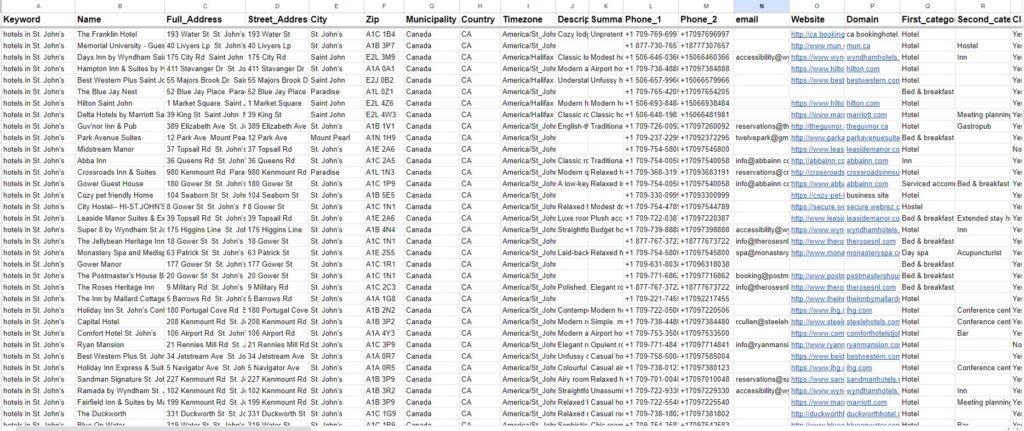
Modern scraping tools and methods can retrieve a wide variety of business details, including:
1) Basic Business Data
- Business name
- Address
- Category
- Operating hours
2) Contact Information
- Phone numbers
- Websites
- Email addresses (when publicly available)
3) Ratings & Reviews
- Average rating
- Number of reviews
- Full review text (if supported)
4) Geolocation
- Latitude & longitude
- Map coordinates for plotting or segmentation
These datasets power lead generation, competitive analysis, customer sentiment research, and location based marketing.
Easy Methods to Scrape Google Maps
Below are the most effective approaches ranked from easiest (no code) to advanced (technical).
Method 1: One-Click Tools and Extensions (Best for Most Users)
The easiest way to scrape Google Maps is with browser extensions or standalone tools that automate data extraction without code.
These tools typically work like this:
- Install the extension or tool
- Open Google Maps and search your target (e.g., “restaurants London”)
- Click a “Scrape” button
- Export your results to CSV or Excel
Some tools even let you filter by:
- Location
- Keyword
- Business category
- Rating thresholds
Benefits
- Fast setup
- No technical skills required
- Instant exports
Common examples
- Chrome/Edge scraper extensions
- Dedicated Google Maps scraping software like Leads Sniper
This method offers a true “easy scrape” experience ideal for quick lead lists or small scale campaigns.
Method 2: APIs (Moderate Technical)

If you want structured, compliant access to Google Maps data, the Google Maps API suite is the official route. It includes services like:
- Places API – Search businesses by location and keyword
- Geocoding API – Convert addresses to coordinates and vice versa
Pros
- Official and structured data
- JSON output for developers
Cons
- Requires API key and account
- Costs can escalate for large extractions
- Still requires some programming skills
For many use cases, APIs are better for developers or systems that need repeated automated access.
Method 3: Custom Scripts (Advanced)
Developers often use tools like Python with Selenium or BeautifulSoup libraries to build custom scrapers. This approach can:
- Mimic browser behavior
- Handle JavaScript-loaded content
- Navigate CAPTCHA and anti-scraping defenses
While powerful, this method requires:
- Programming expertise
- Proxy management
- CAPTCHA strategies
For most users who want fast and easy scraping, browser tools or APIs are typically preferable.
Smart Scraping Strategies For Google Maps Easy Scraper
Even when using easy tools, you should follow best practices to avoid blocks and ensure quality:
1) Rotate IPs and Use Proxies
Google may block frequent automated requests. Using proxy services especially residential or rotating IPs helps mimic human access.
2) Throttle Request Rates
Don’t run hundreds of requests per second. Random short delays emulate natural browsing and reduce block risk.
3) Avoid CAPTCHA
Too many rapid requests often trigger CAPTCHA challenges. Spread requests over time and use proxy rotation to minimize this.
Tools to Make “Easy” Real Extraction Data
Here are some tools and platforms that help make Google Maps scraping fast and accessible:
Google Maps Scraper Extensions
Browser add-ons designed for non-technical users
(One-click export to CSV/Excel)
No-Code Platforms
Platforms that let you scrape without writing code (even via drag-and-drop dashboards).
Cloud Scraper Suites
Cloud-based scraping tools that handle proxies, anti-bot defenses, and scheduling for you.
Developer Options
Octoparse, Leads Sniper, API tools like “SERP API” — ideal for advanced, repeatable workflows.
When to Use Which Method: A Decision Guide
- Choose the Google Maps API if: You are a developer, require programmatic access to
data, need highly structuredJSONoutput, have a budget for API usage, and prioritize strict adherence toGoogle’s terms for large-scale, ongoing projects. - Choose a Google Maps Scraper Extension if: You are a marketer, sales professional, researcher, or small business owner with limited technical expertise, need to
scrapedataquickly and affordably, and are looking for a user-friendly solution to gather lists of businesses,contactdetails,reviews, andratingsfor specific searches. For most users seeking an "effortless" experience, anextensionis the way to go.
Your Step-by-Step Guide to Effortless Google Maps Data Scraping
.jpg)
Embarking on data extraction from Google Maps using a scraper extension is straightforward. By following these steps, you can efficiently gather the data you need without technical hurdles. This process emphasizes speed and simplicity, making it accessible to everyone.
Step 1: Choosing and Installing Your Google Maps Scraper Extension
The first step is to select a reputable Google Maps Scraper extension from your browser’s web store (e.g., Chrome Web Store). Look for extensions with good reviews, clear feature descriptions, and active updates. Once you’ve chosen one, install it with a single click. Some popular extensions offer features to scrape reviews, contact information, and general business data.
Step 2: Defining Your Search Parameters and Area
Navigate to Google Maps and perform your desired search query. This could be a specific business type (e.g., "restaurants"), a keyword (e.g., "Italian pizza"), or a combination of terms. Select the geographic area you want to target. The extension will then analyze the search results page displayed on Google Maps. Some extensions allow you to specify the type of data you wish to scrape, such as addresses, phone numbers, emails, reviews, or ratings.
Step 3: Initiating the Scrape and Monitoring Progress
With your search parameters set and your extension ready, initiate the scrape process. Typically, this involves clicking a button within the extension’s interface. The scraper will then begin automatically navigating through the Google Maps search results, extracting the relevant data for each listing. You can usually monitor the progress of the scrape within the extension’s window, seeing how many URLs have been processed and how much data has been collected.
Step 4: Reviewing and Exporting Your Valuable Dataset
Once the scrape is complete, the extension will present your collected data in a user-friendly format. Most extensions allow you to review the extracted dataset directly within the tool. The crucial final step is exporting this data. Common export formats include CSV (Comma Separated Values) and Excel (.xlsx), which are widely compatible with spreadsheet software. For more advanced users, some extensions might offer JSON export, which is ideal for programmatic integration into databases or analytics platforms. This organized dataset is now ready for analysis and action.
Conclusion: Best Way to “Easy Scrape” Google Maps in 2026
For most users, the sweet spot is:
✨ Use a dedicated scraper tool or browser extension — fast, no code, exportable results.
🧠 Augment with smart scraping strategies like IP rotation and throttling.
🛠 Use APIs for scalable, compliant, developer-centric workflows.
By combining user-friendly tools, thoughtful planning, and ethical practices, you can unlock Google Maps data easily and power your lead generation, research, or competitive insights with confidence.
FAQs
Is web scraping Google Maps legal?
Web scraping can be a legal gray area, and Google’s terms of service prohibit unauthorized data extraction. Ensure you understand the legal implications before engaging in web scraping activities.
Can Google Maps block my IP address if I scrape data?
Yes, Google may block your IP address if it detects suspicious or automated activity. Using proxies and following the strategies mentioned in this article can help minimize the risk of getting blocked.
How can I store the data scraped from Google Maps?
You can store the extracted data in various formats, such as CSV, JSON, or XML. Leads-Sniper supports multiple output formats to suit your needs.
Do I need programming skills to scrape Google Maps?
While having programming skills can be advantageous, tools like Leads-Sniper make it possible to scrape Google Maps data without coding knowledge.
What are some common use cases for scraping Google Maps data?
Businesses use Google Maps data for various purposes, including lead generation, market research, competitor analysis, and location-based marketing campaigns.